
The Tool Desk
Outbyte Driver Updater FREEScan for outdated or missing drivers - takes under a minuteDriver Scan →Outbyte PC Repair FREEClear out junk files and repair common Windows errorsFree Scan →iTechGuides is reader-supported. When you buy through links on our site, we may earn an affiliate commission. As an Amazon Associate I earn from qualifying purchases. Learn more
Check the film-type sticker inside your camera’s film door before buying. Most current Polaroid cameras take one of four formats: 600, i-Type, SX-70, or Go. The camera family determines the right starting choice: 600 cameras use 600 film, i-Type cameras use i-Type or 600, SX-70 cameras use SX-70, and Polaroid Go cameras use Go film. Older or unusual models need an exact model check.
Start by identifying your camera
Open the film door and look for the film-type sticker. If it is missing or unreadable, find the camera’s exact model name and verify its film system before ordering. “Polaroid film” is not one universal format: Polaroid lists five current formats—Go, i-Type, 600, SX-70, and 8×10—but they are not interchangeable across all cameras. Polaroid’s camera-to-film guide explains the common matches.
Choose film by camera family
| Camera | Starting film choice | What to know |
|---|---|---|
| 600-series camera | 600 | 600 packs include a battery that powers vintage 600 cameras. |
| Rechargeable i-Type camera | i-Type | i-Type packs have no battery because the camera has its own rechargeable power source. Polaroid also lists 600 film as compatible with i-Type cameras. |
| SX-70 | SX-70 | This is the direct format match. SX-70 film is less sensitive to light than 600 film. |
| Polaroid Go | Go | Go cameras use Go film exclusively. The photographs are smaller than the common i-Type, 600, and SX-70 formats. |
| Polaroid I-2 | i-Type or 600; SX-70 is also supported with a setting | Choose the film type in the camera for each pack; the I-2 does not detect the inserted film automatically. |
| Historical, unusual, or modified camera | Verify the exact model and film system | A Polaroid brand name alone does not establish compatibility with a current pack. |
These matches describe compatibility, not a ranking of image quality. Polaroid’s general guide covers 600, i-Type, and SX-70, while its I-2 compatibility guidance specifies the extra film-setting step.
What is different about each format?
600 film: for 600 cameras, also usable in i-Type cameras
A 600 pack contains a cartridge battery, which is needed by classic 600-series cameras. That battery is the key practical difference from i-Type film. Polaroid says 600 film also works in i-Type cameras, so it is an option when you have an i-Type model, though i-Type film is the format designed for those rechargeable cameras.
#1 Best Overall

- 24 INSTANT PHOTOS IN THE ICONIC WHITE FRAME: triple pack Polaroid Color i-Type Film with Polaroid's signature white border. Capture and create the beautifully imperfect in dreamlike color, nostalgic texture and one-of-a-kind Polaroid style.
- COLOR INSTANT FILM FOR POLAROID I-TYPE CAMERAS: compatible with Polaroid Now, Now+, Flip and I-2 cameras, plus the Polaroid Lab printer. Polaroid i-Type film is made in the last Polaroid film factory in the world.
- 100% POLAROID CHEMISTRY: every photo develops with rich color, unique texture and the iconic Polaroid aesthetic. This Polaroid camera film creates results that are unpredictable, imperfect and impossible to reproduce.
- POLAROID CAMERA FILM LOVES LIGHT: the more light in your shot, the better your photo. Always shoot in bright light or use your camera's flash, your film will thank you for it.
- DEVELOP IN 10-15 MINUTES: photos appear blank at first - that's part of the magic. Shield them from light and place them face down while they develop to reveal the iconic Polaroid image.
i-Type film: for rechargeable i-Type cameras
i-Type film does not include a battery. It is intended for cameras with their own rechargeable battery, such as compatible i-Type models. Do not assume that an older camera can run i-Type film just because the photographs look like the same general format; check the camera’s film requirement.
SX-70 film: the direct match for SX-70 cameras
SX-70 film has lower light sensitivity than 600 film. Use SX-70 film as the straightforward choice for an SX-70 camera. If you specifically want to use 600 film instead, Polaroid documents a neutral-density filter as a workaround; that requires the appropriate filter and setup, rather than simply inserting a 600 pack. Polaroid explains the neutral-density filter option.
Rank #2
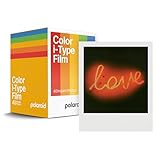
- Updated Classic- The classic Polaroid film is back with a new formula exclusively for I-Type cameras with 40 classic iconic white framed photos.
- New Classic- I-Type film uses Polaroid's latest chemistry to provide richer colors, tones, and contrast. I-Type film is not compatible with vintage Polaroid cameras.
- Light it up- Polaroid instant film loves light. The more light in your shot, the better your photo will turn out. Always shoot in bright light or use the camera flash.
- Develop- Photos will appear blank at first. Photos develop within 15 minutes. Shield photos from the light and place them face down as they develop.
- Create- Every photo you create is rich, textured, and unique. Unpredictable, imperfect, and impossible to reproduce, just like you.
Go film: a separate, smaller format
Go film is designed for Polaroid Go cameras and is not an alternative cartridge for 600, i-Type, or SX-70 cameras. Polaroid lists Go cameras as exclusively compatible with Go film. The smaller format is also visible in the image dimensions below.
Free tools Windows power users keep installed
One-click scans. No signup required.
Check film size if print dimensions matter
Polaroid gives the following dimensions for its film formats. “Photo area” or “image area” is the picture itself; “total area” includes the surrounding film border.
Rank #3

- For Instax mini instant cameras
- 2.13 x 3.4 inches image size
- High speed ISO 800
- Excellent sharpness and vibrant color reproduction
- 20 exposures
| Film format | Image/photo area | Total area |
|---|---|---|
| SX-70, 600, and i-Type | 3.108 × 3.024 inches | 4.233 × 3.483 inches |
| Go | 1.851 × 1.811 inches (47 × 46 mm) | 2.623 × 2.122 inches (66.6 × 53.9 mm) |
These figures are published by Polaroid’s photo-dimensions guide. They show why Go film cannot substitute for the larger integral-film formats.
Check carefully before buying for an older camera
Some older Polaroid cameras use film systems that are no longer supported. Polaroid’s unsupported categories include Spectra/Image, 500, 35mm, roll film, and peel-apart film. If your camera belongs to one of these families—or its model is unclear—verify its exact film system and current support status rather than buying a modern pack based only on the Polaroid name. See Polaroid’s list of unsupported cameras and formats.
Rank #4
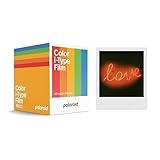
- 48 Photo Bulk Pack- Our classic Polaroid film is back with a new formula exclusively for I-Type cameras with 48 classic iconic white framed photos.
- New Classic- I-Type film uses Polaroid's latest chemistry to provide richer colors, tones, and contrast. I-Type film is not compatible with vintage Polaroid cameras.
- Light it up- Polaroid instant film loves light. The more light in your shot, the better your photo will turn out. Always shoot in bright light or use the camera flash.
- Develop- Photos will appear blank at first. Photos develop within 15 minutes. Shield photos from the light and place them face down as they develop.
- Create- Every photo you create is rich, textured, and unique. Unpredictable, imperfect, and impossible to reproduce, just like you.
Store film and handle it as Polaroid recommends
The date printed on a pack is its production date, not an expiration date. Polaroid recommends using film within 12 months of that date and storing packs flat in a cool, dry refrigerator. Let a pack warm to room temperature before using it, and avoid direct sunlight while handling film. These are manufacturer recommendations, not a guarantee of a particular result. See Polaroid’s camera-and-film care guidance.
Polaroid also recommends checking the camera rollers and cleaning them with a soft cloth dampened with clean water; dirty rollers can distribute film chemistry unevenly. For current-generation SX-70 film, Polaroid notes slightly higher sensitivity than traditional SX-70 film and recommends moving the exposure control one-third toward darken in bright, well-lit conditions. This is an exposure adjustment, not a reason to choose another film format. Further handling tips appear in Polaroid’s guide to getting the most out of film.
Quick Recap
Best Value
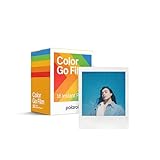
- MINI FILM ONLY COMPATIBLE WITH POLAROID GO: The Polaroid Go only uses Polaroid Go format films. The same Polaroid you know and love, only smaller. Go Film is not compatible with full size Polaroid I-Type Now Cameras
- POLAROID GO FILM DOUBLE PACK: Each double pack includes 16 color instant photos framed in glossy white and ready to take on the world. For use exclusively with the Polaroid Go camera.
- STORE CHILLED, SHOOT WARM: Temperature affects how the film works. Keep it stored cold in the fridge, but never freeze it. Ideally you should let it adjust to room temperature before you use it.
- SHOOT WITH LIGHT: The more light in your shot, the better your photo will turn out. Instant film loves light, especially natural light. Use the flash for all your indoor photos.
- DEVELOP IN THE DARK: All photos appear blank at first. They’re most sensitive during this time, so don’t bend or shake them. Shield them from the light and place them face down for 6 minutes as they develop.
Product prices and availability are accurate as of the date/time indicated and are subject to change. Any price and availability information displayed on Amazon at the time of purchase will apply.

