
Outdated Drivers Are Slowing You Down
One free scan finds every outdated or missing driver and matches the right update for your exact hardware.Free scan · exact hardware matchPC Slower Than It Used to Be?
A free scan shows the junk files, broken settings and background clutter dragging Windows down - then fixes them in one click.Free scan · Windows 10 & 11iTechGuides is reader-supported. When you buy through links on our site, we may earn an affiliate commission. As an Amazon Associate I earn from qualifying purchases. Learn more
To calculate payroll hours, record the actual start and stop time of each work period, subtract only the breaks that are genuinely unpaid, total the hours for each workweek, and then pay overtime on any hours over 40 in that workweek. The workweek, not the pay period, is the unit that matters for federal overtime. The method below uses federal rules as a baseline. State and local rules, and the classification of each worker, can change the result, and those limits are covered at the end.
Start with the time that counts as work
A clock interval is a starting point, not the final payroll number. The U.S. Department of Labor’s Fact Sheet #22 treats time an employee is required to be on duty, or on the employer’s premises or at a prescribed workplace, as hours worked, and it describes certain work travel as work time. Read the full guidance at https://www.dol.gov/agencies/whd/fact-sheets/22-flsa-hours-worked.
Before you do any arithmetic, check three things:
- Work outside the punch. Work performed before clocking in or after clocking out, such as booting up a system or closing out a register, is generally counted as hours worked when the employer knows of it or requires it.
- Breaks that are not really breaks. A meal period during which the employee is fully relieved of duty can be unpaid. A meal period spent answering calls or working is not.
- Travel and training. Whether travel or training time is work time depends on the facts. Confirm the treatment before subtracting any of that time.
The calculation, step by step
- Collect the actual start and stop times for each work period. A return from an unpaid meal break starts a new work period.
- Subtract the start time from the stop time for each period. For an overnight shift, carry the end time into the next day before subtracting. The worked example below shows how.
- Subtract an unpaid break only when it is genuinely unpaid under the rules that apply.
- Add the work periods to get the hours for each day.
- Convert minutes to decimal hours if your payroll software needs them. Divide the minutes by 60, then add to the whole hours. For example, 8 hours 30 minutes becomes 8 + (30 ÷ 60) = 8.5 hours. These are arithmetic conversions, not additional legal rules.
- Total each workweek using the workweek your business has defined. Do not average hours across a two-week pay period.
- Apply overtime to any covered, nonexempt employee’s hours over 40 in each workweek, using that employee’s regular rate. The mechanics are described in the overtime and regular-rate sections below.
Common minute-to-decimal conversions
Most payroll systems that use decimals expect hundredths of an hour. The table shows the conversions you will meet most often. Where the decimal does not divide evenly, it is rounded to four places.
Quick wins for a faster PC:
Clear out junk files and repair common Windows errorsFree Scan →Scan for outdated or missing drivers - takes under a minuteDriver Scan →Repair Windows errors before they cause bigger problemsFix Now →| Minutes | Decimal hours | Example entry |
|---|---|---|
| 6 | 0.10 | 6 minutes of work |
| 7 | 0.1167 | 7 minutes of work |
| 12 | 0.20 | 12 minutes of work |
| 15 | 0.25 | 15 minutes of work |
| 18 | 0.30 | 18 minutes of work |
| 24 | 0.40 | 24 minutes of work |
| 30 | 0.50 | 30 minutes of work |
| 36 | 0.60 | 36 minutes of work |
| 42 | 0.70 | 42 minutes of work |
| 45 | 0.75 | 45 minutes of work |
| 48 | 0.80 | 48 minutes of work |
| 54 | 0.90 | 54 minutes of work |
Keying 8 hours 42 minutes as 8.42 is a common error. It should be entered as 8.70, because 42 minutes equals 0.70 hour.
#1 Best Overall

- Complete Solution - Includes HN3000 AutoAlign time clock, 100 time cards, rack, ribbon, and keys for instant tracking.
- Precise Punching - AutoAlign technology ensures accurate alignment for error-free payroll records.
- Robust Warranty - Two-year warranty with unlimited customer support (Monday–Friday) guarantees reliable performance.
- Simple Setup - Plug-and-play design with clear instructions enables tracking in minutes.
- Clear Printing - High-quality uPunch ribbons deliver legible, consistent punch punches.
Worked examples
Overnight shift
An employee clocks in at 10:00 p.m. Monday and clocks out at 6:30 a.m. Tuesday. Count the hours from 10:00 p.m. to midnight, which is 2 hours, and then from midnight to 6:30 a.m., which is 6.5 hours. The total is 8.5 hours. Subtracting the clock times as if they fell on the same day produces a negative number, which is the error the carry-over step prevents.
Unpaid meal break
An employee clocks in at 8:00 a.m. and out at 4:30 p.m., which is 8.5 hours elapsed. If a 30-minute meal period is genuinely unpaid, the paid time is 8.0 hours. If the same employee works through that meal period, nothing is subtracted, and the total is 8.5 hours.
Two-week pay period with overtime in one week
Suppose a pay period covers two workweeks. The first workweek totals 45 hours and the second totals 35 hours. The pay period total is 80 hours, but the first workweek still has 5 hours over 40. Those 5 hours are overtime even though the 80-hour total does not exceed the period’s standard hours. A payroll that only looks at the combined total will miss the premium.
Rank #2

- VERSATILE 2-IN-1 SOLUTION: Includes uPunch CR1000 Digital Time Clock and Date Stamp, 50 time cards, one ribbon & 2 keys - perfect for small business time and document management.
- ACCURATE DIGITAL TIMEKEEPING: Eliminate manual errors in employee time tracking with this precise digital clock in machine for employees, easily monitoring arrival, break, lunch, and departure times.
- ADVANCED DATE STAMPING: Simplify document organization with built-in date stamp functionality, featuring preset messages and 3-way printing for efficient proof of receipt and processing.
- USER-FRIENDLY DESIGN: Strategically placed window in the cover allows for easy loading of time cards and documents, enhancing efficiency in daily operations.
- RELIABLE SUPPORT: Enjoy peace of mind with uPunch's commitment to quality, including warranty protection and dedicated customer support for all your time clock needs.
Overtime is measured by workweek
The Department of Labor’s Overtime Pay guidance defines the period this way: “An employee’s workweek is a fixed and regularly recurring period of 168 hours — seven consecutive 24-hour periods.” The workweek can begin on any day and at any hour, and it does not have to match a calendar week. Once the employer sets it, the same 168-hour cycle repeats each week. The guidance is at https://www.dol.gov/agencies/whd/overtime.
For covered, nonexempt employees, the general federal rule is that hours over 40 in a workweek are paid at no less than 1.5 times the regular rate. Averaging across weeks is not allowed, so a light week cannot offset overtime in a heavy week.
Example: an employee paid $18.00 an hour works 45 hours in one workweek. The first 40 hours are $720.00. The 5 overtime hours are paid at 1.5 × $18.00 = $27.00 each, or $135.00. The workweek total is $855.00.
Rank #3
![Pyramid Time Systems 2500 Auto-Aligning Time Clock Bundle [2500K1]](https://m.media-amazon.com/images/I/411v7QKnZiL._SL160_.jpg)
- AUTO-ALIGNING PUNCH CLOCK: Top-loading card feed automatically aligns each punch for clean, accurate time entries; no manual adjustments needed; reduces errors that slow down payroll
- RELIABLE TIME CARD MACHINE PERFORMANCE: Consistent printing keeps employee time records accurate pay period after pay period; automatic resets for Daylight Saving Time and short months mean less maintenance for busy managers
- VERSATILE TIMEKEEPING FOR ANY WORKPLACE: Records arrival, break, lunch, and departure times across 3 in/out punch cycles per day; double-sided time cards cover up to 31 days; choose 12-hour or 24-hour military time format
- COMPACT DESIGN, FLEXIBLE PLACEMENT: Small footprint fits on a desk or mounts on a wall to suit offices, retail, warehouses, and other workplaces; backlit LCDs show time, date, and day at a glance; tamper-proof security lock guards against time theft
- COMPLETE BUNDLE, READY TO USE: Includes 100 pyramid time cards, 2 ink ribbon cartridges, 2 security keys, and a 10-slot time card rack; everything a small business needs to start accurate employee time tracking without additional purchases
When pay is not a simple hourly rate: the regular rate
If an employee earns bonuses, commissions, or other pay beyond a flat hourly wage, the overtime rate may not be a simple multiple of the base rate. The Department of Labor’s Fact Sheet #56A states the method this way: “Total compensation in the workweek (except for statutory exclusions) ÷ Total hours worked in the workweek = Regular Rate for the workweek.” The fact sheet is at https://www.dol.gov/agencies/whd/fact-sheets/56a-regular-rate.
Use the following sequence:
- Add the qualifying pay for the workweek. Check the fact sheet first, because the formula excludes payments that the statute excludes.
- Divide by total hours worked in that workweek to get the regular rate.
- For each overtime hour, the employee has already received straight-time pay for it within the total. Add a premium of one-half the regular rate for each overtime hour.
Example: an employee works 45 hours in a workweek at $15.00 an hour and also receives a $90.00 production bonus that the regular rate must include. Qualifying pay is 15 × 45 + 90 = $765.00. The regular rate is $765.00 ÷ 45 = $17.00. The overtime premium is 0.5 × $17.00 × 5 = $42.50. The workweek total is $807.50.
Rounding time clock punches
Many payroll systems round punches to the nearest 5, 6, 10, or 15 minutes. Rounding is allowed only within limits. A Department of Labor Wage and Hour Division opinion letter, FLSA2026-8, addresses rounding, and the core point is that rounding is conditional: it must not fail over time to compensate employees properly for all the work they actually perform. The letter is at https://www.dol.gov/sites/dolgov/files/WHD/opinion-letters/FLSA/FLSA2026-8.pdf.
Rank #4
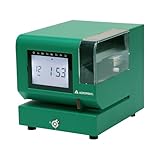
- Tough Enough for Any Job: Built with heavy-duty industrial-grade steel, this time clock withstands dirt, debris, and rugged environments—delivering dependable tracking for small businesses in the harshest conditions.
- Clear Timekeeping, Anytime: Featuring an easy-to-read backlit LCD display, this digital clock ensures visibility in any lighting—streamlining time tracking and stamp tasks without strain.
- Handles High Volume with Ease: With an advanced print head that punches through up to 5 sheets of carbonless paper cards this clock powers through daily use, perfect for businesses with heavy tracking demands.
- Adapts to Your Workflow: Offering 12 or 24-hour formats and 4 customizable print options (e.g., month/date/hour/minutes), this clock fits your needs—setup made simple with the included quick start guide.
- Built Tough, Stays Precise: With a battery backup to maintain accurate time during outages and password-protected settings to prevent tampering, this rugged time clock ensures consistent performance in demanding work environments.
The risk is a one-directional rule. Suppose an employee starts at 7:53 a.m. and the system rounds to 8:00 a.m., then ends at 4:07 p.m. and the system rounds to 4:00 p.m. Each rounding looks harmless on its own, but both cut pay: 14 minutes lost in one shift. If the same pattern repeats and always runs against the employee, the rule is not neutral. Review rounding reports regularly and compare rounded totals with unrounded punches, so that any systematic loss is caught.
Independent reader supportYour contribution helps us test, update, and keep practical guides available for everyone.Choosing a way to record time
The Department of Labor does not require one timekeeping device. Its Fact Sheet #21 says, “Employers may use any timekeeping method they choose,” and adds, “Any timekeeping plan is acceptable as long as it is complete and accurate.” Fact Sheet #21 is dated 2008, so check the current guidance before relying on its exact wording. It is at https://www.dol.gov/agencies/whd/fact-sheets/21-flsa-recordkeeping.
What’s actually slowing this PC down?
Pick the symptom - the matching free tool is one click away.
Compare methods on four points: whether they record actual work, whether they capture schedule deviations and workweek totals, how easily corrections are audited, and whether the records you keep meet the retention rules that apply.
Best Value

- 𝗣𝗥𝗘𝗖𝗜𝗦𝗘 𝗔𝗧𝗧𝗘𝗡𝗗𝗔𝗡𝗖𝗘 𝗧𝗥𝗔𝗖𝗞𝗜𝗡𝗚: Our Punch Card Attendance Machine comes with a large 4" LED screen for clear visibility. Track your employees' start times, break times, lunch periods, and weekly work hours with precision, up to 6 entries per day. Each card holds 15 days of records per side, just flip for continuous tracking. Supports Dual-color printing, black for normal attendance, red for late or early departure, and a built-in speaker provide clear alerts, ensuring seamless and efficient workforce track & time management.
- 𝗙𝗨𝗟𝗟 𝗨.𝗦. 𝗧𝗜𝗠𝗘 𝗭𝗢𝗡𝗘 𝗖𝗢𝗩𝗘𝗥𝗔𝗚𝗘: This attendance machine supports 6 major U.S. time zones: Eastern, Central, Mountain, Pacific, Alaska, and Hawaii. Employees across different regions can be tracked accurately without confusion. Perfect for offices with multi-location teams.
- 𝗔𝗨𝗧𝗢𝗠𝗔𝗧𝗜𝗖 𝗗𝗔𝗬𝗟𝗜𝗚𝗛𝗧 𝗦𝗔𝗩𝗜𝗡𝗚 𝗔𝗗𝗝𝗨𝗦𝗧𝗠𝗘𝗡𝗧: The employee time clock automatically switches between Daylight Saving Time and Standard Time. It handles spring forward and fall back changes seamlessly. This ensures precise timekeeping year-round without manual adjustments.
- 𝗔𝗣𝗣 𝗦𝗨𝗣𝗣𝗢𝗥𝗧𝗘𝗗: This attendance machine comes with an easy-to-operate app for smarter management. The app also allows you to change between 6 major U.S. time zones, set Working Time, set Password, Print Format, Setup Paper, DST Setting, Music Time Setting, and other necessary attributes. NOTE: To calculate total workdays, late entries, leaves, and salary summaries, you need to do it manually from the punch card.
- 𝗛𝗜𝗚𝗛-𝗤𝗨𝗔𝗟𝗜𝗧𝗬 𝗕𝗨𝗜𝗟𝗗 & 𝗟𝗢𝗡𝗚𝗘𝗩𝗜𝗧𝗬: Made of durable ABS material, this compact punch card time recorder withstands daily use. Equipped with a premium-grade print head rated for millions of strikes, it ensures long-lasting, reliable printing with a smooth, fade-resistant surface. Ideal for offices, shops, and small businesses.
| Method | Records actual work | Captures deviations and workweek totals | Audit trail and corrections |
|---|---|---|---|
| Electronic or mechanical time clock | Records each punch as it happens, so it works only if employees punch at the real start and stop times | Shows each day’s punches; you still total the workweek and any extra work outside the punch | Paper cards keep the original punch. Electronic systems vary in whether edits are logged, so confirm the system keeps the original entry |
| Paper timesheet or work-hours record book | Accurate only if employees write real start and stop times, including off-schedule work | Captures deviations if the employee records them; totals are added by hand or in a spreadsheet | Corrections are handwritten. Keep the original entry visible, and have the change initialed and dated |
| Schedule plus documented exceptions | Records scheduled hours; actual hours depend on the exception log | Misstates hours whenever someone works late or leaves early unless every deviation is logged | The exception log is the audit trail. Its completeness determines whether the totals are right |
Records to keep
Under the cited federal fact sheet, payroll records generally must be kept for three years, and records used to compute wages, such as time cards, generally for two years. These periods come from the 2008 fact sheet. The Department’s recordkeeping topic page is at https://www.dol.gov/general/topic/wages/wagesrecordkeeping. State requirements may be longer, so keep records for whichever period is longer.
| Record | Federal retention period | Source |
|---|---|---|
| Payroll records | 3 years | Fact Sheet #21, 2008 |
| Time cards and wage-computation records | 2 years | Fact Sheet #21, 2008 |
Where the federal method stops
The steps above follow federal rules for covered employers. Several factors can change the result, and the federal baseline does not settle them:
- State and local rules on daily overtime, meal and rest periods, rounding, and record retention. Some jurisdictions set overtime thresholds that apply per day as well as per week.
- Employee classification. Whether an employee is exempt or nonexempt is not decided by a salary alone. Job duties and pay structure matter.
- Pay arrangements. Tipped work, piece-rate work, commissions, multiple pay rates, and special industries can each change the calculation.
For a decision about a specific worker, check the Wage and Hour Division’s guidance and your state labor agency’s rules for that jurisdiction. A question about a particular worker or dispute calls for individualized advice from a qualified employment lawyer.
Quick Recap
Product prices and availability are accurate as of the date/time indicated and are subject to change. Any price and availability information displayed on Amazon at the time of purchase will apply.

