
PC Slower Than It Used to Be?
A free scan shows the junk files, broken settings and background clutter dragging Windows down - then fixes them in one click.Free scan · Windows 10 & 11Crashes, No Sound, or Screen Glitches?
Random freezes, missing sound and display glitches usually trace back to one bad driver. Find and replace yours safely.Free scan · under a minuteiTechGuides is reader-supported. When you buy through links on our site, we may earn an affiliate commission. As an Amazon Associate I earn from qualifying purchases. Learn more
This beginner maker project uses a Seeed Studio XIAO RP2040, a compatible XIAO Expansion Board Base, and a Grove DHT11 sensor to show live temperature and humidity, rolling statistics, and recent graphs on the expansion board’s OLED. It runs MicroPython, samples about once per second, and retains only the latest 100 readings for its minimum, maximum, and average calculations.
What the monitor does—and what you need
The project is a build-it-yourself monitor, not a ready-made consumer device. Its program cycles between current temperature and humidity, minimums, maximums, averages, and plots of recent readings. The expansion board provides the 128×64 OLED display, buzzer, and user button used by the program.
Build parts
- Seeed Studio XIAO RP2040.
- XIAO Expansion Board Base compatible with the XIAO RP2040.
- Grove DHT11 temperature and humidity sensor.
- A USB Type-C cable that supports data transfer for firmware installation and connection to your computer.
Seeed’s XIAO RP2040 guide documents compatibility with its expansion board. The board itself is compact (21 × 17.8 mm) and has an RP2040 dual-core Cortex-M0+ processor rated up to 133 MHz, 264 KB SRAM, and 2 MB flash. These specifications describe the board; they do not mean this build has wireless connectivity or built-in long-term data storage.
What’s actually slowing this PC down?
Pick the symptom - the matching free tool is one click away.
Check the DHT11’s limits before choosing where to use it
Seeed’s official Grove DHT11 documentation specifies a temperature range of 0–50 °C and a humidity range of 20–90% RH. Its stated accuracy is ±2 °C for temperature and ±5% RH for humidity. Seeed also notes that the sensor will not work below 0 °C.
#1 Best Overall
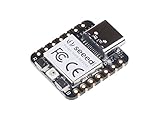
- 📌【Powerful MCU】 XIAO RP2040 is a microcontroller using the Raspberry RP2040 chip with 264KB of SRAM, and 2MB of onboard Flash memory. This microcontroller has dual-core ARM Cortex M0+ processor, and it can runs at up to 133MHz.
- 📌【Multiple Interfaces】 This version of XIAO have 11 digital pins, 4 analog pins, 11 PWM Pins,1 I2C interface, 1 UART interface, 1 SPI interface, 1 SWD Bonding pad interface.
- 📌【Flexible Compatibility】Support Micropython/Arduino/CircuitPython. Easy project operation: Breadboard-friendly & SMD design, no components on the back.
- 📌【Small Size】 As small as a thumb(20x17.5mm) for wearable devices and small projects.
- 📌【Broad Compatibility】 Pins compatible with Seeeduino XIAO and supports Seeeduino XIAO's Expansion board.
Treat it as a basic hobby sensor, not a precision instrument. Its stated accuracy means a displayed number should not be read as an exact measurement, and the specified ranges do not support operation outside those bounds. The documentation does not establish calibration traceability or suitability for safety-critical monitoring or control.
Match the wiring to the program’s pin assignments
The tutorial’s wiring and software are designed together. It uses D4 (GPIO6) and D5 (GPIO7) for software I2C to the OLED, D7 (GPIO1) for the DHT11, D3 (GPIO29) for the buzzer, and D1 (GPIO27) for the button. The XIAO RP2040 pin mapping is shown in Seeed’s official board guide.
Rank #2

- High Performance: Powered by Raspberry Pi 2040 chip, dual-core operating up to 133 MHz, equipped 264KB of SRAM, and 2MB of onboard flash memory
- Ultra-small Design: 21 x 17.5mm, Seeed Studio XIAO series classic form-factor, suitable for wearable devices
- Multiple Development Interfaces: 2x buttons, 11x digital / 4x analog pins, 1x I2C interface, 1x UART port, 1x SPI port, and 1x SWD Bonding pad interface
- Multiple Develop Platform: Support Arduino / Micropython / CircuitPython development, friendly for beginners, satisfied for electronics enthusiasts
- Perfect for Production: Breadboard-friendly & SMD design, no components on the back
Use the project’s wiring diagram to select the Grove connector: connectors on the expansion board can be connected to different pins, so a sensor plugged into an arbitrary Grove port may not match the code. If you change the connector or wiring, update the program’s pin assignments accordingly rather than assuming the original setup still applies.
Install MicroPython and the display assets
The project tutorial uses MicroPython and Thonny. It names Thonny 4.1.6 and MicroPython 1.24.1 in its setup flow; these are the versions stated in that tutorial, not a claim that they are the latest releases. Follow the tutorial’s firmware-installation flow with a data-capable USB Type-C cable.
Rank #3

- 📌【Powerful MCU】 XIAO RP2040 is a microcontroller using the Raspberry RP2040 chip with 264KB of SRAM, and 2MB of onboard Flash memory. This microcontroller has dual-core ARM Cortex M0+ processor, and it can runs at up to 133MHz.
- 📌【Multiple Interfaces】 This version of XIAO have 11 digital pins, 4 analog pins, 11 PWM Pins,1 I2C interface, 1 UART interface, 1 SPI interface, 1 SWD Bonding pad interface.
- 📌【Flexible Compatibility】 Support Micropython/Arduino/CircuitPython. Easy project operation: Breadboard-friendly & SMD design, no components on the back.
- 📌【Small Size】 As small as a thumb(20x17.5mm) for wearable devices and small projects.
- 📌【Broad Compatibility】 Pins compatible with Seeeduino XIAO and supports Seeeduino XIAO's Expansion board.
The OLED is SSD1306-based. The tutorial’s richer graphics setup requires files beyond the default MicroPython installation: ssd1306.py, xglcd_font.py, font files, and monochrome bitmap assets converted for the display. Copy the required files to the board as described by the tutorial before running the main program. Use the tutorial’s own assets and code together; changing a font or bitmap format may require corresponding code changes.
Understand the readings and rolling statistics
The supplied program reads the sensor about once per second and keeps up to 100 recent temperature-and-humidity tuples in a deque. Its minimums, maximums, and averages therefore summarize the retained sample window, not the device’s lifetime history. At the stated sampling interval, 100 readings represent roughly the latest 100 seconds while sampling continues normally.
Rank #4

- RP2040-Zero RP2040 USB-C Connector icrocontroller PICO Development Board Support C/C++, MicroPython, complete SDK, open source materials tutorial, easy to use, can be quickly embedded in applications
- RP2040-Zero RP2040 Microcontroller PICO Development Board Dual-core
- RP2040-Zero RP2040 USB-C Connector icrocontroller PICO Development Board 264KB of SRAM, and 2MB of on-board Flash memory
- RP2040-Zero RP2040 USB-C Connector icrocontroller PICO Development Board Dual-core Arm Cortex M0+ processor, flexible clock running up to 133 MHz
- 8 × Programmable I/O (PIO) state machines for custom peripheral support
The display cycles among live values, the rolling statistics, a temperature plot, and a humidity plot. The tutorial identifies lifetime statistics and threshold alarms as possible future extensions; they are not part of the described baseline behavior.
Troubleshoot sensor and display problems
- The sensor error screen appears: Check that the DHT11 is connected to the Grove port wired for D7 (GPIO1), and that the selected connector matches the project diagram and code. The tutorial describes an error screen and continued operation after read errors, so a temporary failure does not necessarily mean the program has stopped.
- The OLED is blank or graphics are missing: Verify the D4/D5 software-I2C wiring and that the required SSD1306, font, and bitmap files have been copied to the board.
- The button or buzzer does not behave as expected: Check the expansion-board connections and the D1 (GPIO27) button and D3 (GPIO29) buzzer assignments against the tutorial’s wiring.
- Values seem implausible for the environment: Check whether the conditions fall inside the DHT11’s specified temperature and humidity ranges; the device is not specified for below-freezing use.
When to consider a different sensor
If the DHT11’s specified ranges or accuracy are not adequate, compare candidate sensors by measurement range, stated accuracy, interface, wiring, available code and library support, and the additional setup they require. Seeed’s XIAO RP2040 Zephyr example documents an SHT31 connection through an I2C Grove port, offering one possible alternate design path: Seeed’s XIAO RP2040 Zephyr guide.
Best Value

- Seeed Seeeduino XIAO RP2040 Raspberry Pi RP2040 Chip Development Board Module For Arduino/MicroPython/CircuitPython
An SHT31-based version is not a guaranteed drop-in replacement for the DHT11 build. It uses a different sensor interface and requires appropriate software handling; the cited guide establishes an I2C example, not comparative accuracy figures for this project.
Quick Recap
Product prices and availability are accurate as of the date/time indicated and are subject to change. Any price and availability information displayed on Amazon at the time of purchase will apply.

