
The Tool Desk
Outbyte Driver Updater FREEScan for outdated or missing drivers - takes under a minuteDriver Scan →Outbyte PC Repair FREEClear out junk files and repair common Windows errorsFree Scan →iTechGuides is reader-supported. When you buy through links on our site, we may earn an affiliate commission. As an Amazon Associate I earn from qualifying purchases. Learn more
To build a basic Arduino thermometer with a GY-906, connect the module’s power, ground, SDA and SCL pins to a compatible Arduino, install an MLX90614 library, and begin by printing object-temperature readings to the Serial Monitor. The GY-906 name describes a family of breakout boards for the MLX90614 sensor, so check your specific board’s voltage range and pin labels before wiring.
What the GY-906 measures
The GY-906 is a common breakout-board label for the Melexis MLX90614 infrared thermometer. It measures an object’s temperature without touching it and also reports ambient temperature. The module communicates with a microcontroller over I2C/SMBus, a two-wire interface; Joy-IT’s 2024 manual describes the MLX90614 module as an I2C-controlled non-contact temperature sensor (Joy-IT manual). SparkFun likewise describes its Arduino library as using a two-wire, I2C-like SMBus connection (SparkFun MLX90614 Arduino library).
Inside the MLX90614, an infrared-sensitive thermopile detector works with signal-conditioning electronics, a low-noise amplifier, a 17-bit ADC and a digital signal processor. Those components produce a digital temperature reading, but they do not make every GY-906 board or measurement setup identical. The precise MLX90614 variant and the target’s surface properties, distance, field of view and surroundings all matter.
Outdated Drivers Are Slowing You Down
One free scan finds every outdated or missing driver and matches the right update for your exact hardware.Free scan · exact hardware matchPC Slower Than It Used to Be?
A free scan shows the junk files, broken settings and background clutter dragging Windows down - then fixes them in one click.Free scan · Windows 10 & 11Parts for a basic build
- An Arduino Uno or compatible board, such as the Arduino Uno Rev3.
- One GY-906 MLX90614 infrared temperature sensor module.
- A breadboard and jumper wires.
- USB power for the Arduino and a computer with the Arduino IDE and Serial Monitor.
For a retailer search, use the specific phrase “GY-906 MLX90614 infrared temperature sensor module.” Confirm the listing’s sensor variant, supply-voltage range, regulator or level-shifting details, SDA/SCL labels and connector order. “GY-906” alone does not establish those board-level details. The Adafruit repository, for example, documents distinct 3 V and 5 V MLX90614 products, underscoring why the module’s own specifications matter (Adafruit MLX90614 library and documentation).
#1 Best Overall

- ◇Introduction: The MLX90614 is an infrared thermometer sensor for non-contact temperature measurement. Both the IR sensitive thermopile detector chip and the signal conditioning ASIC are integrated in the same TO-39 can package. The MLX90614 integrates a low noise amplifier, a 17-bit ADC and a powerful DSP unit, so the thermometer has both high precision and high resolution. Measured temperature over the entire temperature range (0.02°C resolution) is available via the digital SMBus output.
- ◇Advantages: ①Small size and low cost ②Easy to integrate ③Temperature measurement range: -70 to 380°C ④Accuracy up to 0.5°C in a wide temperature range (temperature measurement error: ±0.5°C (at room temperature)) ⑤ Sensor temperature: -40 to 125°C (use ambient temperature) ⑥Measurement resolution is 0.02°C ⑦With M3 fixing screw holes, easy to install and fix. ⑧Size: 16.8mm(L)*11.46mm(W)*6.2mm(H), probe diameter 8.2mm ⑨ Digital interface type: IIC (slave mode) or PWM ⑩Working voltage: 3.3V~5V
- ◇Product Features: The MLX90614 is a low cost, non-contact thermometer. The output data is linearly proportional to the object temperature, with high accuracy and high resolution. The TO-39 metal package integrates the infrared induction thermopile detector chip MLX81101 (the temperature is measured by PTC or PTAT element) and the signal processing dedicated integrated chip MLX90302, which is specially used to process the infrared sensor output signal.
- ◇The MLX90614 non-contact infrared sensor module can be output through a two-wire SMBus (system management bus) compatible protocol interface (IIC compatible) (0.02°C resolution) or a 10-bit PWM (pulse width modulation) output mode. The temperature range of the MLX90614 is calibrated at the factory, and the temperature measured by the sensor is the average temperature of all objects in the field of view. The PWM pins can also be configured in thermal relay mode.
- ◇Application : ♥High precision non-contact measurement ♥Temperature comfort sensor for car air conditioning control system ♥ Air conditioner temperature sensing element for commercial and industrial buildings ♥ Windshield Anti-Fog Application ♥Industrial moving element temperature control ♥ Printer temperature control ♥Home appliance temperature control ♥Multi-zone temperature control - two-wire communication can support up to 100 sensors ♥ Thermal relay/alarm ♥ Body temperature measurement
Wire the module to the Arduino
- Identify the pins. Read the labels on your module or its documentation and locate VIN or VCC, GND, SDA and SCL. Do not infer pin order from a product photo; board layouts vary.
- Connect power and ground. Connect the module’s VIN/VCC to a voltage supported by that exact board, and connect its GND to Arduino GND. Do not assume a board accepts 5 V just because it is sold for Arduino.
- Connect I2C. Connect SDA to the chosen Arduino board’s SDA pin and SCL to its SCL pin. Use the board’s documented I2C pins; their physical location depends on the Arduino model.
- Check the connections. Make sure power and ground are not reversed and that SDA and SCL are not swapped. Then connect the Arduino to the computer by USB.
Before powering up, check whether the module includes a regulator and I2C pull-up resistors, and whether their electrical levels are compatible with your Arduino. The GY-906 label does not specify these circuit details.
Install a library and read temperatures
- In Arduino IDE, choose Sketch → Include Library → Manage Libraries.
- Search for Adafruit-MLX90614-Library and install it. The Adafruit repository provides installation guidance and example code (Adafruit MLX90614 library).
- Open the library’s File → Examples → Adafruit MLX90614 Library → mlxtest example. Joy-IT recommends this example in its 2024 manual.
- Select the correct board and port in the IDE, upload the sketch, then open the Serial Monitor at the baud rate specified in the example.
The key object-reading call used in an Arduino Project Hub example is readObjectTempC(). That example was published on March 27, 2025 (Arduino Project Hub). Start with the library example’s serial output before adding other components. SparkFun also maintains a separate MLX90614 Arduino library with examples (SparkFun library); use one library’s setup and API consistently rather than mixing example code from different libraries.
Rank #2
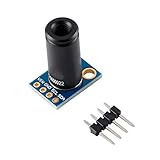
- ✔Product Features: The MLX90614ESF-DCI is a low-cost, non-contact thermometer. The output data is linearly proportional to the object temperature, with high accuracy and high resolution. The TO-39 metal package integrates the infrared induction thermopile detector chip MLX81101 (the temperature is measured by PTC or PTAT element) and the signal processing dedicated integrated chip MLX90302, which is specially used to process the infrared sensor output signal.
- ✔Product parameters: ∗Size: 16.5mm(L)*11.5mm(W) ∗Digital interface type: 1C (slave mode) or PWM ∗Temperature measurement range: -70℃~382.2℃ ∗Temperature measurement error: ±0.5°C (at room temperature) Resolution 0.02°C ∗Operating voltage: 3.3V~5V ∗Ambient temperature: -40~125℃ ∗With M3 fixing screw holes, it is easy to install and fix.
- ✔GY-906-DCI Non-Contact Infrared Thermometry Sensor Module Optical filter to block visible and near-infrared radiation (long wave propagation) is integrated into the package to provide immunity to the environment and sunlight. The wavelength passband of the filter is 5.5 to 14 μm. Due to the integration of a low noise amplifier, a 17-bit analog-to-digital converter, and a powerful digital signal processing chip MLX90302, a high-precision and high-resolution thermometer can be realized.
- ✔The calculated object temperature and ambient temperature are stored in the RAM unit of the MLX90302, with a temperature resolution of 0.01°C, and are compatible with a two-wire SMBus (system management bus) compatible protocol interface (IIC compatible) (0.02°C resolution) or 10 Bit PWM (Pulse Width Modulation) output mode output. The temperature range of MLX90614 is calibrated at the factory, and temperature measured by sensor is the average temperature of all objects in the field of view.
- ✔Application : ♥High precision non-contact measurement ♥Temperature comfort sensor for car air conditioning control system ♥ Air conditioner temperature sensing element for commercial and industrial buildings ♥ Windshield Anti-Fog Application ♥Industrial moving the element temperature control ♥ Printer temperature control ♥Home appliance temperature control ♥Multi-zone temperature control - two-wire communication can support up to 100 sensors ♥ Thermal relay/alarm ♥ Body temperature measurement
Understand range, accuracy and limitations
Temperature range is not the same as accuracy. DFRobot’s current library documentation gives the following output ranges for the sensor variants it documents:
Free tools Windows power users keep installed
One-click scans. No signup required.
| Reading or variant | Documented range |
|---|---|
| Ambient temperature | -40.01 °C to 85 °C |
| Object temperature, MLX90614ESF-DCI | -70.01 °C to 270 °C |
| Object temperature, MLX90614ESF-DCC | -70.01 °C to 380 °C |
These are output ranges documented by DFRobot, not a promise that a given reading is accurate to a particular tolerance in every setup. The available material does not establish clinical-grade body-temperature accuracy or medical validation, so this DIY build should not be treated as a medical thermometer.
Rank #3
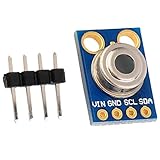
- MLX90614 is an infrared thermometer for non-contact temperature measurements.
- Both the IR sensitive thermopile detector chip and the signal conditioning ASIC are integrated in the same TO-39 can.
- Integrated into the MLX90614 are a low noise amplifier, 17-bit ADC and powerful DSP unit thus achieving high accuracy and resolution of the thermometer.
- The thermometer comes factory calibrated with a digital SMBus output giving full access to the measured temperature in the complete temperature range(s) with a resolution of 0.02°C.
- The user can configure the digital output to be pulse width modulation (PWM). As a standard, the 10-bit PWM is configured to continuously transmit the measured temperature in range of -20 to 120°C, with an output resolution of 0.14°C.
Surface emissivity is another important factor: shiny or low-emissivity materials can produce readings that differ from expectations. DFRobot documents programmable emissivity correction from 0.1 to 1.0 and filtering controls; those settings may help with an application, but they do not remove the need to calibrate against a suitable reference and measurement method. The same documentation notes that MLX90614 variants can differ in temperature range, supply and refresh-rate customization, so identify the exact part used by your module (DFRobot MLX90614 documentation).
Distance and field of view determine how much of the sensor’s view is occupied by the target. A small or distant object may not fill that view, allowing surrounding surfaces to affect the reading. Ambient conditions and the target’s surface also influence results. For repeatable comparisons, hold distance and aim steady, measure the same type of surface, and compare against a reference thermometer appropriate to the task.
Rank #4

- The information below is per-pack only
- MLX90614 is an infrared thermometer for non-contact temperature measurements.
- Both the IR sensitive thermopile detector chip and the signal conditioning ASIC are integrated in the same TO-39 can.
- Integrated into the MLX90614 are a low noise amplifier, 17-bit ADC and powerful DSP unit thus achieving high accuracy and resolution of the thermometer.
- The thermometer comes factory calibrated with a digital SMBus output giving full access to the measured temperature in the complete temperature range(s) with a resolution of 0.02°C.
Add a display, buzzer or distance trigger
Once serial readings are stable, you can add an optional 16×2 LCD or OLED for a standalone display, or a buzzer for an alert. Add one feature at a time and keep the sensor’s voltage and I2C wiring intact. An I2C display may share the I2C bus if its address and electrical requirements are compatible; follow the display’s own documentation.
A March 27, 2025 Arduino Project Hub build includes an HC-SR04 ultrasonic sensor to trigger a reading at a target distance, along with a 16×2 LCD and passive buzzer (Arduino Project Hub project). The ultrasonic sensor is not required for the basic thermometer. In that example’s logic, a target within 10 cm triggers a two-second wait before the reading is printed; its 30 °C buzzer threshold is a project choice, not a specification or accuracy limit of the MLX90614.
Best Value
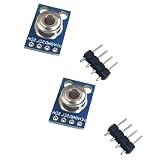
- 2PCS GY-906-BAA MLX90614 MLX90614ESF infrared temperature sensor module
Troubleshoot missing or unstable readings
- No readings or an I2C error: Recheck power, ground, SDA and SCL; confirm the voltage matches the module; and make sure the correct board and port are selected.
- Code does not compile: Confirm that the library used by the example is installed and that the sketch calls methods supported by that library. Avoid combining Adafruit and SparkFun APIs.
- Readings jump or seem implausible: Keep the sensor aimed steadily, ensure the target fills the sensor’s field of view, and avoid changing distance or target surface during comparisons. Consider emissivity and ambient influences before changing code.
- Display or buzzer causes problems: Disconnect optional hardware and confirm the sensor works over serial first, then reconnect one component at a time and check for pin conflicts and power requirements.
Choose a GY-906 module for the actual project
Compare modules by the exact MLX90614 variant and its object-temperature range, board voltage and regulator/pull-up arrangement, I2C pinout and connector, library support, and whether the build needs a display or alert. For measurements beyond a basic demonstration, also consider how you will hold target distance and field of view consistent and account for emissivity and filtering. The GY-906 name by itself is not enough to select a module or predict measurement performance.
Quick Recap
Product prices and availability are accurate as of the date/time indicated and are subject to change. Any price and availability information displayed on Amazon at the time of purchase will apply.

