
Recommended Free Tools
iTechGuides is reader-supported. When you buy through links on our site, we may earn an affiliate commission. As an Amazon Associate I earn from qualifying purchases. Learn more
To use a bank card on a compatible Samsung phone, add it in Samsung Wallet (called Samsung Pay on some devices or screens), complete the verification requested by your card issuer, then select the card and tap the phone at a contactless reader. You can also pay with a compatible Galaxy Watch after setting up Wallet through the paired phone. Availability depends on your country, device, software and the exact card.
Before you add a card
Samsung Wallet works only with supported Samsung devices and compatible cards from participating banks. A bank’s participation does not guarantee that every card it issues is eligible. Check Samsung’s local eligibility information and ask your issuer about the specific debit or credit card you plan to add. Samsung’s US FAQ says ATM-only cards cannot be added; that US-specific rule should not be treated as a global card-eligibility list. Samsung’s US FAQ and Samsung’s card compatibility guidance provide further details.
- Make sure the phone or watch is supported in your region and has current software.
- Have an active internet connection while enrolling the card. Samsung notes that adding a card while abroad may be difficult without an installed SIM and active mobile connection.
- Keep access to the phone number, email address or bank app the issuer may use to verify you.
Samsung’s US support pages are useful for the steps below, but eligibility and menus can differ outside the United States. Samsung notes that screens and settings may also vary by model, software version and wireless provider. Samsung Wallet availability and setup guidance.
Add a bank card to Samsung Wallet on your phone
- Open Samsung Wallet or Samsung Pay. Find the app on your Galaxy phone. On supported devices with Quick Access enabled, Samsung says a swipe-up gesture can open the wallet. Samsung notes that Android 9 or later devices may use Samsung Wallet; available app names and screens depend on device and software. See Samsung’s phone setup guidance.
- Start adding a payment card. Choose the option to add a payment card and follow the prompts. You can enter the card details manually or scan the card, then review the terms. The exact screens may differ. Samsung’s enrollment instructions.
- Complete issuer verification. Choose one of the methods offered in the app, such as your bank’s app, a code by text or email, or a call to the bank. Enrollment is not finished until the issuer’s required verification succeeds. Samsung Support estimates card verification takes approximately 5 to 10 minutes, but this is not a guaranteed completion time. If it does not complete, contact the issuer to check eligibility or resolve a verification hold. Samsung’s verification guidance.
Pay in a store with your phone
- Open Samsung Wallet and select the card you want to use.
- Authenticate as prompted, using the method configured on your device.
- Hold the back of the phone near the store’s contactless payment reader until the payment registers.
If the reader does not register the tap, try repositioning the phone. Samsung says a thick case may need to be removed because it can block the NFC signal. A merchant’s contactless terminal must also be available for this tap-to-pay method. Samsung’s in-store payment guidance.
#1 Best Overall

- Compatibility: This magnetic wallet is carefully designed to be used with magnetic cases on the Samsung Galaxy S26, S25, and S24 series; A17, A16, and A54 series; and the Fold 8 Ultra and Fold 7 series (excluding the Flip series and Fold 8), without obstructing the camera; It is also compatible with the iPhone 18/17/16/15/14/13/12 series (excluding Mini models)
- Detachable Magnetic Design: The wallet attaches to the phone case via magnets, featuring a dual-row N52 magnet design that provides stronger holding power than standard single-row magnets. It attaches securely to MagSafe-compatible phone cases or phones and won’t fall off easily. When you don’t need the wallet, you can easily detach it without affecting your phone’s ability to use other magnetic accessories
- Easily Access 3 Cards: This minimalist wallet can hold three cards without adding bulk. The thumb slot enables you to quickly eject your cards. The built-in card clip keeps your cards securely in place, even when there is only one inside
- Magnetism & RFID Blocking:Built-in electromagnetic shielding layer offers RFID/NFC blocking to prevent unauthorized scanning of credit cards.Additionally, it protects cards from magnetic field interference and demagnetisation
- Exceptional Craftsmanship: Crafted from premium synthetic leather with hand-sealed edges, it offers a comfortable touch and durability. The arc design perfectly aligns with the camera of Samsung phones and provides greater card access space
Set up and pay with a Galaxy Watch
Watch setup uses the paired phone as well as the watch, and the menu names can differ by model. Follow the current prompts in Galaxy Wearable rather than assuming every watch has identical labels.
- Open Samsung Pay or Wallet on the watch and continue setup on the paired phone through the prompts shown there.
- Set a screen lock or PIN on the watch if prompted.
- Add or import a card, then complete the verification requested by the issuer.
- At checkout, press and hold the watch’s Back button, select the card, and hold the watch near the contactless terminal.
Samsung says a compatible smartphone and a compatible card from a participating bank are required for Galaxy Watch payments, and availability varies by device and region. Samsung’s Wallet setup support; Samsung Newsroom’s Galaxy Watch guide, published July 13, 2026.
Rank #2

- Fits Every Smartphones: Compatible with iPhone, Samsung, Google Pixel, LG, and more (even with Otterbox or Spigen cases!). Use it as a phone wallet, mini storage pouch, or a grip helper—perfect for gym, travel, or daily errands
- Large Capacity & Slim: Replace your bulky wallet or purse with a slim phone pocket comfortably holds up to 4 cards (credit cards, ID, drivers license and some cash)
- Strong Adhesion & No Residue: If you didn’t stick it perfectly at the first time, peel off, adjust, and re-stick. No sticky residue will be left after removing it
- Premium Material: Are you still worried about losing your cards? Our mobile wallet is made of high-quality, elastic, and non-slip silicone, which can be tightly attached to cards
- Widely-used: Stick it for computer back, glass, car window, car dash, refrigerator door or home front door
Fix common card setup and payment problems
The card will not add
First confirm that both the device and the exact card are supported where you live. A participating bank may issue some cards that Wallet does not accept. Enrollment also requires an active internet connection; if you are abroad, Samsung notes that the process may be difficult without an installed SIM and an active mobile connection. Ask your issuer whether the card is eligible if the app will not accept it. Samsung’s card compatibility guidance.
Verification does not finish
Use another verification option if the app offers one, or contact the card issuer. The bank can confirm whether the card is eligible and address its own verification holds. Samsung’s approximate 5-to-10-minute estimate is not a deadline or guarantee. Samsung’s verification guidance.
Rank #3

- Premium Durable Leather:This phone card holder is made of quality PU leather, which offers a soft touch, luxurious appearance and last longer. Double pocket design allows you to classify your items easily.
- Strong Stickiness: Each phone wallet pocket uses a high-quality 3M adhesive tape backing for a strong, firm, long-lasting hold. It won't lose strength due to pocket heat, light moisture or sweat, and it won't leave a sticky residue if you choose to remove.
- Universal Size: Perfectly fit iPhone wallet and Samsung Galaxy, Android which size 4 inch or above, such as iPhone12 / iPhone11 / 11pro / iPhone XS Max XR/X / 8 / 8 Plus / 7 / 7 Plus / 6 / 6 Plus/ 6s / 6s Plus, Samsung Galaxy S2 /S3 / S4 / S5 / S6 / S7 /S8 /S9 PLUS, Samsung Galaxy Note, Sony Xperia and more cell phones.
- Easy Convenience Use: Easy stick on every smooth face such as phone or phone case. Peel off the cover of the sticker and stick to the back of your phones and finish by softly pressing.
- Leave Your Wallet at Home - No need your bulky wallet or purse anymore. Just slip your credit cards, ID and some cash into the card holder for back of phone and you're ready to go!
A replacement card needs to be added
If your bank has replaced the card, remove the old wallet entry and add the replacement card, then complete any verification requested for it. Samsung’s card management guidance.
The phone or watch tap does not register
On a phone, try moving the back of the device closer to the reader and remove a thick case if it may be interfering with NFC. On a watch, check that the selected card is active and hold the watch near the contactless terminal as directed. Samsung’s watch setup path and button labels can vary by model, so use the prompts shown on your device. Samsung’s phone payment guidance; Samsung Newsroom’s Galaxy Watch guide.
Rank #4
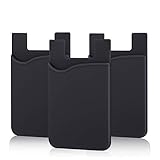
- SILICONE MATERIAL: The phone card holder stick on is made of high quality, anti-slip silicone material, smooth on the outside with a corrugated-looking texture on the inside. This strong and durable material will keep its shape and cards will not fall out.
- MINI SIZE & MULTI COLORS: Dimensions: 3.42 x 2.24 x 0.12 inch (87 x 57 x 3 mm); The extra-slim adhesive credit card holder for back of phone is just 3mm thick, adds no bulk to your smartphone, carry only what you need but leave your bulky wallet behind when going out. A range of colors makes it suitable for men, women and even kids. Also, multiple colors enables you to choose the best color to match your device, changing colors as often as you like become reality.
- CONVENIENT CARD HOLDER CASE: This stick on card holder for phone case can securely hold cards (we suggest fit 3 cards) and cash, as well as small items that can be easy to lose such as SD cards, junkdrives, earphones, keys, etc. In addition, the phone wallet stick on can also be used on walls and refrigerators to organize daily essentials. No more need for a bulky wallet or purse. Just slip your credit cards, ID and some cash into the card holder and you're ready to go!
- SUPER ADHENSIVE, EASY TO INSTAL AND REMOVE: Each Pofesun stick on phone wallet uses a 3M adhesive tape backing for a strong, firm, long-lasting hold. It won't lose strength due to pocket heat, light moisture or sweat. When you want to remove the card holder, it can be peeled off without leaving any residue. ( Notes: Make up remover can help you if residue leaves).
- BROAD COMPATIBLE FOR SMARTPHONE & TABLETS: The sticky phone card holder is compatible with all smartphones with a minimum size of 4-inch LCDs or larger such as the iPhone 4 / 4s / 5 / 5s / 6 / 6 plus / 6s / 6s / 7 plus/ 7, Galaxy S2 / S3 / S4 / S5 / S6 / S7 edge/s8 plus, Galaxy Note 1 / 2 / 3 / 4 / 5 / 6 / 7, LG G2 / G3 / G4 / G5, HTC M8, iPod Touch , Sony Xperia, tablets including iPad Air, Galaxy, Surface Pro, and so much more!
Phone or watch: which should you use?
| Payment method | Setup path | At checkout | What must be supported |
|---|---|---|---|
| Galaxy phone | Enroll the card in Samsung Wallet or Samsung Pay on the phone. | Select the card, authenticate, and hold the back of the phone near the reader. | The phone and the specific card must be supported in your region. |
| Galaxy Watch | Set up Wallet on the watch and continue through the paired phone; add or import and verify the card. | Press and hold the watch’s Back button, select the card, and hold the watch near the terminal. | The watch, paired smartphone and specific card must be supported in your region. |
Samsung documents both payment methods, but neither device form bypasses the need for a compatible card and successful issuer verification. Samsung Wallet support; Samsung Newsroom’s Galaxy Watch guide.
The Tool Desk
Outbyte Driver Updater FREEScan for outdated or missing drivers - takes under a minuteDriver Scan →Outbyte PC Repair FREERepair Windows errors before they cause bigger problemsFix Now →Quick Recap
Best Value

- Highly elastic&Put more-This cell phone card holder is made of stretchy fabric with self adhesive sticker,which holds the content of the pocket from falling,even when the phone pocket is upside down.Touch much soft than silicone and leather card holder.Suitable for back of phone or phone case.The pocket is suitable for credit cards or ID cards.Small but very handy&functional for mobile phone.
- Strong adhesive-This stick on wallet is applied with self adhesive tape backing for a strong,firm,long-lasting sticky effect,provides a strong attachment to the surface of your phone.No worry that the card or money may loose.
- Tight and protective-This phone wallet can firmly hold up to 8 cards & earphones & cash and never let go. The special hat design helps to protect your cards and money from missing or being stolen.Over 8 cards or more the holder need one night to restore.
- Fashion and convenient-The design is unique brings you fashion feeling.You may put some money,earphone,key,even gum in this card holder.And no more wallet needed when you out.Just take a phone with this card holder.Especially during exercise,go travelling,in the gym,running,doing sport.Indeed a handy&practical small phone wallet for your beloved phone. The color black,navy blue also meet all requirement of whole family.
- Compatible with-iPhone 7/7 Plus/8/8 Plus/X/6/6 Plus/5/5s/5c/4/4s,Google Pixel,Samsung Galaxy S9/S8/S8+/S9+/S7/S6/S5/S4/ S3/S2,Galaxy Note 9/8/5/4/3/2/1,Galaxy A8/A6,LG G6/G5/G6/G5/G4/G3/G2/X/Optimus series,Nexus 6/5/4,HTC M8/EVO/Desire/Sense,iPod Touch, Sony Xperia,HUAWEI P9 Lite,ZET,coolpad and much more! Works with nearly ANY phone case including: Spigen,Ringke,Otterbox,Lifeproof, CaseMate,Belkin,Speck,Apple and more.(PS:for anti-fingerprint glass back phone please apply on a phone case)
Product prices and availability are accurate as of the date/time indicated and are subject to change. Any price and availability information displayed on Amazon at the time of purchase will apply.

