
Quick wins for a faster PC:
Clear out junk files and repair common Windows errorsFree Scan →Scan for outdated or missing drivers - takes under a minuteDriver Scan →iTechGuides is reader-supported. When you buy through links on our site, we may earn an affiliate commission. As an Amazon Associate I earn from qualifying purchases. Learn more
Retailers use mobile phones and tablets to bring checkout, inventory lookup, fulfillment, and product guidance to the sales floor. Customer-facing apps can support shopping and loyalty, too. The benefits depend less on putting a device in someone’s hand than on connecting it reliably to the retailer’s point-of-sale (POS), inventory, customer, and fulfillment systems.
What can store associates do with mobile devices?
A managed phone or tablet can give associates access to tools that were once tied to a fixed counter or back office. The right setup depends on the job: a quick stock check calls for a different screen and accessory than a payment or a detailed customer consultation.
Take payments away from a fixed counter
Mobile POS lets associates help customers check out at the point of decision, assist people waiting in line, or complete a transaction elsewhere on the sales floor. Apple describes iPhone, iPad, and Apple Pay as components of its retail POS example; the actual payment flow still depends on the retailer’s POS software, payment processor, hardware, and configuration. A mobile device does not automatically replace fixed registers, and retailers need a fallback for outages or tasks that still require a counter.
Do these 3 things before closing this tab:
1Repair Windows errors before they cause bigger problems2Fix the driver behind crashes, sound loss and screen glitches3Clear out junk files and repair common Windows errorsToshiba Global Commerce Solutions reports that a Toshiba and Industry Dive survey found 67% of surveyed stores had implemented mobile POS alongside other checkout formats, with an average of 3.04 checkout options. The retrieved article passage does not establish the report year or sample size, so these are attributed survey findings—not current industry-wide adoption benchmarks. In that article, Toshiba product marketing manager Michael Connors described associates helping customers through line-busting, clienteling, and personalized recommendations; that is a vendor representative’s description of the use case, not independent evidence of business impact. Toshiba Global Commerce Solutions’ mobile POS article
#1 Best Overall

- Highly flexible - The 360° rotatable base and tablet bracket holder combined with a folding arm offer unparalleled adjustment for typing or showcasing without missing any viewing angles. Turn display in a second between cashier and shopper or switch landscape/portrait mode instantly.
- Business-oriented - Two size rubber padded bracket holders collectively fit 6" - 13" tablets or any gadgets with width or height measurement in the range of 6.6"-9.6" (Please noticed that both two clips fit cases less than 0.5" thickness), An ideal docking station stand for perfect match of large or small tablet pcs typically used at restaurant shop point of sale, office home desk, etc.
- Ergonomic design - Quick attach/detach of holder with simple push of the button creates no hassle for easy storage and carrying. A true universal ipad kiosk stand with easy pull handlebar and dedicated space for power cord charging.
- Broad application - Not only does it make your ipads/android/windows surface tablets a desktop display computer, it allows you to type, press, view, swivel with great stability. Confidently interact with customers at restaurant, check out at register, collaborate in group meeting at office, present products or services at showroom, and many more.
- Steady support - Light and smooth turning of bracket holder/arm provides high efficiency in busy settings. The weighted base plus hard folding arm offer sturdy structure to withstand weights of large tablets and heavy operation on the device, a professional grade tablet stand.
Check stock and support fulfillment
An associate can use a camera or scanner to look up an item, check recorded availability, and help find an alternative or another fulfillment option. Apple describes iPhone use for scanning, item lookup, and access to systems of record, as well as inventory work on iPhone and iPad. It also identifies pick-and-pack tasks as a mobile use case. Apple describes camera-based scanning and augmented reality for counting parts and products; those are platform capabilities, not guaranteed features of every device or retail app. Apple’s retail examples
Give informed, personalized assistance
When associates can see detailed product information and current inventory, they can answer questions and suggest available alternatives without leaving the customer to search alone. Clienteling extends this with customer profiles and prior interactions, so an associate can continue a conversation in a relevant way. Samsung’s August 20, 2026 article describes associates accessing profiles, past purchases, inventory, and product information; Apple also describes access to product details, inventory data, and customer preferences. These capabilities do not guarantee higher sales. Retailers are responsible for deciding what customer information staff may access and how it is handled under their own policies and applicable requirements. Samsung Business Insights’ discussion of mobile retail
Rank #2

- Highly flexible - The 360° rotatable base and tablet bracket holder combined with a folding arm offer unparalleled adjustment for typing or showcasing without missing any viewing angles. Turn display in a second between cashier and shopper or switch landscape/portrait mode instantly.
- Business-oriented - Two size rubber padded bracket holders collectively fit 6" - 13" tablets or any gadgets with width or height measurement in the range of 6.6"-9.6" (Please noticed that both two clips fit cases less than 0.5" thickness), An ideal docking station stand for perfect match of large or small tablet pcs typically used at restaurant shop point of sale, office home desk, etc.
- Ergonomic design - Quick attach/detach of holder with simple push of the button creates no hassle for easy storage and carrying. A true universal ipad kiosk stand with easy pull handlebar and dedicated space for power cord charging.
- Broad application - Not only does it make your ipads/android/windows surface tablets a desktop display computer, it allows you to type, press, view, swivel with great stability. Confidently interact with customers at restaurant, check out at register, collaborate in group meeting at office, present products or services at showroom, and many more.
- Steady support - Light and smooth turning of bracket holder/arm provides high efficiency in busy settings. The weighted base plus hard folding arm offer sturdy structure to withstand weights of large tablets and heavy operation on the device, a professional grade tablet stand.
Support tasks across the shift
A device assigned to store work can help staff move between lookup, inventory checks, fulfillment, and customer assistance. Whether one device can handle several jobs smoothly depends on the applications and integrations: switching among disconnected tools can slow a workflow rather than simplify it.
What can customers do with their own phones?
A retailer’s mobile app or mobile-friendly website can support product discovery, shopping, loyalty perks, and in-store assistance. Those are customer-facing experiences, distinct from staff devices used for store operations. The retailer must decide what the phone experience should accomplish and how it connects to product information, inventory, and customer accounts; the sources here do not establish current adoption rates for each function.
Rank #3

- ANTI-THEFT TABLET KIOSK FOR PUBLIC SETTINGS: Built for retail managers, hospitality staff, and IT teams. An anti-theft TORX bolt secures the tablet inside the clamp, and a second TORX-secured connection locks the case to the pole, helping prevent unwanted removal in retail stores, hotels, restaurants, schools, offices, trade shows, and other high-traffic environments.
- UNIVERSAL CLAMP FIT FOR 7.9"–11" TABLETS, UP TO 2.2 LBS: Adjustable clamps fit tablet widths from 5" to 7.125" and heights from 7.87" to 9.68". Three included silicone pad thicknesses (2mm, 3mm, 4mm) let you match the clamp to your tablet's exact thickness for a secure, no-wobble hold. Tablet ports and buttons remain fully accessible once mounted. Bare tablet only; cases are not compatible. Please measure your tablet to ensure compatibility before purchase.
- FULL TILT & 360° ROTATION: Adjustable head tilts +20°/-110° (130° total range) and rotates 360° for portrait or landscape orientation, allowing flexible viewing angles for POS transactions, check-in stations, and interactive displays.
- STABLE COUNTERTOP DESIGN WITH BOLT-DOWN OPTION: 11.2" stand height with base dimensions of 6.29" W x 9.05" D provides stable placement. Base can be bolted down for added security and stability.
- INTEGRATED CABLE ROUTING: Tablet charging cord can be routed through the pole to maintain an organized and professional countertop setup.
A CDW summary of its 2015 survey said 91% of the “Retail Innovators” subset used mobile apps in some capacity. The survey covered 314 line-of-business managers in March and April 2015, with 102 respondents in that subset. Among Retail Innovators, 61% cited browsing inventory and 53% cited customer perks as mobile-app benefits. These are historical findings about a defined respondent group, not current retailer usage rates. CDW’s 2015 Retail Innovators Report summary
How do retailers choose the right mobile setup?
Start with the work that needs to happen, then verify that the device, applications, payment components, and systems support it. A device named in a vendor article is an example, not a universal recommendation.
Rank #4

- All-in-One POS Solution – Includes register base, thermal receipt printer, secure cash drawer, and stand – built for retail stores and quick-serve restaurants.
- Compatible with 10″ Amazon Fire Tablets; pairs with the Datio POS App – try free before subscribing.
- Monthly Subscription – $64/month includes Software, Updates, Support, and Warranty. No long-term contract, cancel anytime.
- Flexible Payments – Datio Credit Card Payments via Worldpay (free terminal on approval), or use your own terminal for cash-only tracking.
- Amazon Fire Tablet Not Included – POS hardware only; customer supplies a compatible 10″ Fire Tablet separately.
- Staff device or customer phone: Staff devices can be managed and configured for store workflows. Customer-phone experiences depend on shoppers’ own devices and the retailer’s app or web service.
- Phone or tablet: Phones are easier to carry and handle; tablets provide more screen space. Match the form factor to the task and how associates work on the floor. The cited sources do not provide a controlled comparison of the two.
- Mobile POS or fixed checkout: Check where transactions should happen, whether payment hardware and software are compatible, how queues will be managed, and what associates should do if mobile checkout is unavailable.
- General-purpose or retail-specific hardware: Assess durability, scanning and payment peripherals, device management, security support, and compatibility. The cited sources do not establish a single best device category.
- One integrated platform or separate apps: Check how well tools connect to POS, inventory, customer records, and fulfillment—and how easily staff can move among tasks.
For example, Samsung names the Galaxy XCover7 Pro as a device retail associates may use. That mention does not establish current availability, suitability for a particular store, or compatibility with its POS. Verify those requirements with the retailer’s own software and payment providers before selecting a device.
Recommended Free Tools
Why do integration and connectivity determine whether mobile helps?
A device is useful only when its app can reach accurate, relevant retailer data. A stock lookup that cannot access the inventory system, or a payment flow that does not work with the POS, may leave staff unable to complete the task. Before rollout, map each workflow to its systems, confirm that the required data and permissions are available, and decide how staff will proceed when a connection or application fails.
Best Value
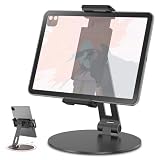
- 【360° Rotatable Base】The swivel stand will let you get easier to show the scree. Flexible for business use: turns your tablets to retail kiosk,desktop,countertop,showcase,register,cashier. Flexible for home use: playing game, watching videos, viewing photos, reading, typing, video recording,working ETC. Supporting both vertical and horizontal viewing.
- 【 Compatibility 】 Applies to 7 - 13 inches tablets,pads and cellphones, such as iPad Pro 11'' / 12.9 ''/ 13'', iPad 10.9, iPad Air 5 / 6, iPad mini 1-6, iPad Pro 9.7'' / 10.5'', Kindle, Microsoft Surface Pro 10 9 8 7+ X 7 6 5 4 3, Surface Go,Galaxy Tabs, iPhones and more.
- 【Adjustable-tightness joints】Use the ‘4 mm Allen Wrench’ comes with the apckage to adjust the degree of tightness. Once you set up a degree of tightness, It would be as sturdy as you want. And the angles are adjustable.
- 【Sturdy construction】Made of premium aluminum-higher strength, lighter weight.
- 【Please Note】The clamp is made of plastic, the rest of them are aluminum.
Connectivity is part of that readiness, but it is not the only factor: application reliability and system integration also matter. Verizon’s announcement of the 2026 Connected Retail Experience Study says 61% of surveyed retailers reported revenue loss from slow digital experiences and 55% from in-store mobile app crashes. These are figures from Verizon’s summary of the study, not proof that network problems alone caused the reported losses. The announcement also discusses mobile inventory-tracking apps. Verizon’s 2026 Connected Retail Experience Study announcement Verizon’s separate overview discusses mobile retail technology and network readiness, drawing on its 2024 Connected Retail Experience Study. Verizon Business on mobile retail technology and inventory management
What should a rollout include?
- Choose a specific workflow. Identify the task—such as stock lookup, mobile payment, or order picking—and who performs it.
- Trace its system dependencies. Confirm which POS, inventory, customer, and fulfillment records or services the workflow needs.
- Verify the complete setup. Check device and software compatibility, required scanning or payment peripherals, device management, security support, and connectivity in the store.
- Plan the exception path. Define what associates should do when a device, app, system, or connection is unavailable, especially during checkout.
- Check the workflow in practice. Confirm that staff can complete the task using the intended devices and systems, and that handling customer data matches retailer policy.
Vendor-authored examples and case studies can illustrate possible workflows, but they are not independent proof of general business results. For instance, Tulip reports gains in customer outreach, conversion, average order value, and influenced sales in a May 22, 2024 case study about an unnamed luxury retailer adopting its POS and clienteling tools. Treat those figures as that vendor’s account of one retailer’s experience, not a forecast for another business. Tulip’s luxury-retailer case study
Quick Recap
Product prices and availability are accurate as of the date/time indicated and are subject to change. Any price and availability information displayed on Amazon at the time of purchase will apply.
The Tool Desk
Outbyte PC Repair FREERepair Windows errors before they cause bigger problemsFix Now →Outbyte Driver Updater FREEFix the driver behind crashes, sound loss and screen glitchesFind Drivers →
