
iTechGuides is reader-supported. When you buy through links on our site, we may earn an affiliate commission. As an Amazon Associate I earn from qualifying purchases. Learn more
ProductivityPulse is described by its author as a local-first Chrome time tracker that estimates active browser use, offers a focus timer for distracting sites, and stores records on the device by default. Its design depends on combining user-activity signals with Chrome’s idle API—not simply counting how long a tab stays open. The important platform caveat is that a Manifest V3 service worker can go dormant, so tracking state cannot safely live only in memory.
Why build a local-first browser time tracker?
In the DEV Community article, author Taranaz says the goal was automatic time tracking without constant start-and-stop actions, while keeping browsing data local by default. The author characterizes other approaches as too invasive or too manual; that is the author’s rationale, not a measured comparison of time-tracking products. The app described in the article is ProductivityPulse.

The idea is to make browser activity easier to review without treating an open browser window as proof of productive work. The article describes session records, domain-level breakdowns, Pomodoro logs, and a dashboard. These are product descriptions from the author, not independently tested findings about the extension’s accuracy or effects.
PC Slower Than It Used to Be?
A free scan shows the junk files, broken settings and background clutter dragging Windows down - then fixes them in one click.Free scan · Windows 10 & 11Crashes, No Sound, or Screen Glitches?
Random freezes, missing sound and display glitches usually trace back to one bad driver. Find and replace yours safely.Free scan · under a minuteHow does it distinguish active use from an open tab?
According to the article, the tracker combines Chrome’s idle API with a content script that observes keypresses, mouse movement, and scrolling. It also says writes are debounced to avoid saving on every detected action. In principle, this lets the design distinguish a person interacting with a page from a tab left open while the user is away.
#1 Best Overall

- UNDATED WEEKLY PLANNER - This weekly planner start any time with 54 weeks, Weekly planner notebook has plenty of space to write your goal plan, work plan, student plan or personal schedule, keep track of priorities, and write notes on the back. This versatile planner allows you to stay organized in 2026, 2027, or even as far ahead as 2028!
- FEATURES - Use our weekly to-do list layout system to systematically handle your tasks. Establish a weekly intention, set daily priorities, practice daily gratitude, organize your work and tracker habit. This planner empowers you to take charge of your to-do list and turn your goals into achievements.
- HIGH QUALITY - This weekly dashboard planner size of 8" x 11", it offers ample space for writing and planning your tasks, just the perfectly size to fit in your backpack. Is used to high quality 100gsm pure white paper, a back pocket for extra space.
- BOOST YOUR PRODUCTIVITY - This spiral weekly productivity planner focus on the important work and get organized. Weekly to do list notepad allowing you to categorize and prioritize your tasks effectively. This planner features a dedicated habit tracker section, allowing you to monitor activities like workouts, diet, deep work and work tasks.
- PERFECT TIME MANAGEMENT - Whether you're a small business owner, project manager, freelancer, academicians or master multitasker, the weekly to do list pad will be your new favorite daily office productivity tool. This weekly deskpad planner is a perfect choice to send to your friends or families as well.
That distinction is an implementation goal, not a validated accuracy result. The article provides no source code, measurement protocol, or test results establishing how reliably the extension identifies active work. Interaction signals also show activity, not whether the activity is useful or work-related.
What does the focus control do?
The author says users can identify distracting domains and that the extension intercepts them at document_start, replacing the page with a dark-mode focus timer. Chrome’s content-script documentation explains how extension scripts run in web pages and how those contexts interact with the browser.
Rank #2

- Helps Boost Your Productivity - Nothing beats the satisfaction of staying on top of your daily tasks and goals. Use our chic focus planner to prevent procrastination whether at work or in school. It contains daily and monthly sheets to keep you organized.
- Make Your To-Do List Accessible - Remember all important deliverables when you list them on your minimalist project management planner. Each time journal is designed with different planning and task categories, which help cultivate focus and good habits.
- Promotes Mindfulness - Aside from encouraging productivity, our daily planners with quotes support mindful living and self-awareness. These inspirational planners have ample space for note-taking, scribbling, and habit and water tracking.
- Fully Customizable, Minimalist Planner - Our planner and goal tracker are ideal for planning daily to-dos and even major . They also feature inspirational quotes to constantly motivate you as you tackle your day-to-day responsibilities.
- Ideal Gift for Loved Ones - Help a loved one stay organized and motivated daily. Gift them a time schedule planner. This minimalist weekly planner is the perfect companion, so they never lose sight of their goals. From the creators of The Five Minute Journal.
The article’s timing description should not be read as a guarantee that distracting content is never visible: no code or reproducible timing comparison is provided. The feature is presented as an early page-load intervention, not as proof that every navigation is blocked before any content appears.
Where are records kept, and what does local-first mean?
The article says session data, domain breakdowns, and Pomodoro logs are stored in chrome.storage.local. It describes Firebase backup as optional for users who want cross-device syncing. The author also claims “zero tracking telemetry,” but the article does not establish that through an independent privacy audit, source-code review, or network test. Treat it as the author’s product assertion rather than an audited guarantee.
Rank #3

- 1️⃣ A DAILY PLANNER DESIGNED FOR FOCUS: This undated daily planner gives you space to think. Prioritize your most important tasks, define your goal focus, track habits, and manage distractions—all within a structured yet open layout. A full brain dump and reflection page ensures nothing feels constrained. Designed to bring calm structure to your productivity.
- 2️⃣ TIME BLOCK YOUR SCHEDULE WITH INTENTION: The integrated hourly planner layout allows you to practice deliberate time blocking. Move beyond reactive task lists and create a focused schedule that supports deep work and better time management. Ideal for structured thinkers and ADHD minds seeking clarity without overwhelm.
- 3️⃣ FROM LONG-TERM VISION TO DAILY EXECUTION: This is more than a daily planner. It is an integrated planning system—complete with weekly planner spreads, monthly calendars, and yearly reference planning. Align your long-term goals with weekly priorities and daily action. Reflect, adjust, and move forward with intention.
- 4️⃣ THE PRODUCTIVITY TOOLKIT — YOUR ANTI-PROCRASTINATION SYSTEM: When motivation fades or distractions take over, the Productivity Toolkit provides structured, science-backed exercises to reset your focus. Practical frameworks support you in overcoming procrastination, regaining clarity, and building sustainable productivity habits. This is where planning becomes personal growth.
- 5️⃣ ADHD-FRIENDLY STRUCTURE WITHOUT OVERWHELM: Designed for adults who need help staying focused, prioritizing tasks, and following through. The open yet guided layout gives you structure without feeling boxed in, making it useful for work, home, school, or personal goals.
Chrome’s storage API documentation describes extension storage as asynchronous and available to extension contexts, including service workers and content scripts; use requires the storage permission. Chrome documents a default 10 MB limit for storage.local (5 MB in Chrome 113 and earlier). Local data is tied to the machine, remains when browser cache is cleared, and is removed when the extension is uninstalled. The API’s access level can be changed; local storage is exposed to content scripts by default.
For comparison, Chrome documents approximately 100 KB total and 8 KB per item for storage.sync. Dense time logs may therefore need a deliberate data model if synchronized. The article describes Firebase as the optional cloud route, but does not explain its implementation, what fields it transmits, or its retention and deletion behavior.
Why does Manifest V3 service-worker behavior matter?
Manifest V3 extensions use service workers rather than a permanently running background page. Chrome’s service-worker lifecycle documentation says a worker normally terminates after 30 seconds of inactivity; a request that takes longer than five minutes or a fetch that takes longer than 30 seconds can also end it. Events and extension API calls reset timers, and events can wake a dormant worker.
Do these 3 things before closing this tab:
1Fix the driver behind crashes, sound loss and screen glitches2Clear out junk files and repair common Windows errors3Scan for outdated or missing drivers - takes under a minuteChrome’s guidance is explicit: “Any global variables you set will be lost if the service worker shuts down.” A tracker therefore needs to persist necessary state and reconstruct or resume it when a later event wakes the worker. An implementation that assumes a background process will continuously accumulate time in memory is not resilient to MV3’s lifecycle.
Best Value
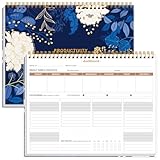
- BOOST YOUR PRODUCTIVITY - This undated weekly productivity planner notepad focus on the important work and get organized. Weekly to do list notepad allowing you to categorize and prioritize your tasks effectively. Whether you're a small business owner, project manager, freelancer, academicians or master multitasker, the weekly to do list pad will be your new favorite daily office productivity tool.
- UNDATED WEEKLY PLANNER - This weekly planner start any time with 54 weeks, Weekly planner notebook has plenty of space to write your goal plan, work plan, student plan or personal schedule, keep track of priorities, and write notes on the back. This versatile planner allows you to stay organized in 2026, 2027, or even as far ahead as 2028!
- FEATURES - Weekly Theme and Highlights for at-a-glance planning Top 3 Priorities for the week 6 Focus Areas to segment and list tasks for goals, projects, or clients Daily Tracker for healthy habit-tracking and routine-tracking.
- HIGH QUALITY - This weekly desk planner size of 8.5" x 11", it offers ample space for writing and planning your tasks, just the perfectly size to fit in your backpack. Is used to high quality 100gsm pure white paper, elastic band and a back pocket for extra space.
- FUNDTIONAL DESIGN - This weekly deskpad planner will completely change how you structure your work: by segmenting your tasks by area and tracking the most important details, you'll feel less scattered and more organized.We believe in helping you be fulfilled with your life and productive at the same time by using a weekly to do list notepad.
The lifecycle page cited here was last updated May 2, 2023. Check current Chrome documentation for the browser versions an extension supports, since platform behavior and limits can change.
What does the dashboard show?
The article describes a dashboard with a 30-day, GitHub-style intensity heatmap intended to reveal patterns and streaks across daily sessions. It also frames the visualization as a way to notice “peak cognitive hours.” That phrasing is an interpretation of patterns, not a scientifically validated conclusion established by the article. A heatmap can summarize recorded activity; it cannot by itself determine attention, productivity, or cognitive performance.
What is established—and what is not
- Described design: activity signals paired with Chrome’s idle API, a domain focus intervention, local session records, an activity dashboard, and optional cloud backup.
- Platform behavior: MV3 service workers may stop and restart, while Chrome storage has defined quotas and persistence characteristics documented by Chrome for Developers.
- Not independently established: tracking accuracy, performance impact, privacy beyond the author’s telemetry claim, Firebase data handling, or the extension’s current availability and store status.
That boundary matters: Chrome’s documentation explains what the platform permits and how it behaves, but it does not verify that ProductivityPulse implements those mechanisms correctly or that its privacy claims have been independently audited.
What’s actually slowing this PC down?
Pick the symptom - the matching free tool is one click away.
Quick Recap
Product prices and availability are accurate as of the date/time indicated and are subject to change. Any price and availability information displayed on Amazon at the time of purchase will apply.

