
iTechGuides is reader-supported. When you buy through links on our site, we may earn an affiliate commission. As an Amazon Associate I earn from qualifying purchases. Learn more
Google Photos can connect to Gemini Apps so you can search photos, videos, and albums with natural-language questions. I decided to disconnect that feature, export my library, and move it to storage I manage. I saved money in my own case, but that result depends on the costs I actually faced; a NAS or self-hosted library is not automatically cheaper for every household.
What does “Gemini and Google Photos” mean?
There are two distinct feature paths, and their privacy explanations should not be conflated. One is a connection between Google Photos and Gemini Apps that lets eligible users search a Photos library from Gemini. The other is Gemini features inside Google Photos, such as Ask Photos, covered by a separate Photos-specific privacy notice.
For the Gemini Apps connection, Google says you can ask questions about information in your library or use prompts such as “Find my photos from my most recent trip” and “Show me recent selfies.” The help page also gives “what’s my driver’s license number?” as an example. That illustrates why people may consider the contents sensitive; it does not mean search results are necessarily complete or correct. Google’s feature help lists eligibility requirements including a personal Google Account, Keep Activity enabled, age 18 or older, supported geography, and certain Google Photos settings. Availability can vary by region and account type.
What privacy controls does Google describe?
Google Photos features
In its Photos-specific notice, updated February 18, 2026, Google says: “Your personal data in Google Photos is never used for ads.” It also says: “We don’t train any generative AI models outside of Google Photos with your personal data in Google Photos.” The same notice explains that Photos features can process photos and videos and make inferences. These statements apply to Gemini features in Google Photos; they are not a blanket description of every way content might be handled when shared with Gemini Apps. Read Google’s Gemini features in Photos privacy hub.
#1 Best Overall

- Entry-level NAS Personal Storage:UGREEN NAS DH2300 is your first and best NAS made easy. It is designed for beginners who want a simple, private way to store videos, photos and personal files, which is intuitive for users moving from cloud storage or external drives and move away from scattered date across devices. This entry-level NAS 2-bay perfect for personal entertainment, photo storage, and easy data backup (doesn't support Docker or virtual machines).
- Set Your Devices Free, Expand Your Digital World: This unified storage hub supports massive capacity up to 64TB.*Storage drives not included. Stop Deleting, Start Storing. You can store 22 million 3MB images, or 2 million 30MB songs, or 43K 1.5GB movies or 67 million 1MB documents! UGREEN NAS is a better way to free up storage across all your devices such as phones, computers, tablets and also does automatic backups across devices regardless of the operating system—Window, iOS, Android or macOS.
- The Smarter Long-term Way to Store: Unlike cloud storage with recurring monthly fees, a UGREEN NAS enclosure requires only a one-time purchase for long-term use. For example, you only need to pay $459.98 for a NAS, while for cloud storage, you need to pay $719.88 per year, $2,159.64 for 3 years, $3,599.40 for 5 years. You will save $6,738.82 over 10 years with UGREEN NAS! *NAS cost based on DH2300 + 12TB HDD; cloud cost based on 12TB plan (e.g. $59.99/month).
- Blazing Speed, Minimal Power: Equipped with a high-performance processor, 1GbE port, and 4GB LPDDR4X RAM, this NAS handles multiple tasks with ease. File transfers reach up to 125MB/s—a 1GB file takes only 8 seconds. Don't let slow clouds hold you back; they often need over 100 seconds for the same task. The difference is clear.
- Let AI Better Organize Your Memories: UGREEN NAS uses AI to tag faces, locations, texts, and objects—so you can effortlessly find any photo by searching for who or what's in it in seconds. It also automatically finds and deletes similar or duplicate photo, backs up live photos and allows you to share them with your friends or family with just one tap. Everything stays effortlessly organized, powered by intelligent tagging and recognition.
Content shared with Gemini Apps
Google’s separate Gemini Apps Privacy Hub says that when a user shares a photo or video from a connected media gallery with Gemini Apps through screen actions or the upload feature, the content, with Keep Activity on, “is used to improve Google services with the help of human reviewers.” This disclosure concerns content shared with Gemini Apps, rather than the Photos-native features described above. Google’s Gemini Apps Privacy Hub reports an update on September 24, 2026, and a notice date of June 29, 2026.
How do you disconnect Google Photos from Gemini?
Google documents a disconnect control in Gemini Apps’ Connected Apps settings. Use that control if you want to stop the Google Photos connection without moving your library. Disconnecting the integration is separate from exporting or deleting your Google Photos files. For the current eligibility and connection details, follow Google’s Google Photos and Gemini Apps help.
Rank #2

- Your Personal Streaming Server - Build your own Netflix-style media library and stream 4K movies, shows and photos to any device without monthly fees
- Create Your Own Cloud - Store your entire photo, video and music collection; access from anywhere with fast 282 MB/s transfer speeds
- Creator-Grade Backup Solution - Protect your irreplaceable content with automated backups to cloud services, external drives and remote NAS
- Multi-Layered Data Protection - Combine RAID redundancy, automated backups and snapshot technology to prevent data loss from any cause
- Smart Home Surveillance - Support up to 30 IP cameras with AI detection, instant alerts and secure remote monitoring
How do you move Google Photos to a NAS or self-hosted library?
Export first, import second, verify before removing the cloud copy. Google Takeout is the account-data download path documented by Google. A Takeout archive can include files and metadata sidecars, so importing the archive is not the same as proving every date, album, and edit landed as expected.
Outdated Drivers Are Slowing You Down
One free scan finds every outdated or missing driver and matches the right update for your exact hardware.Free scan · exact hardware matchPC Slower Than It Used to Be?
A free scan shows the junk files, broken settings and background clutter dragging Windows down - then fixes them in one click.Free scan · Windows 10 & 11- Request a Google Photos export with Google Takeout. Follow Google’s instructions for downloading your Google data and keep the downloaded archive intact while you prepare the destination.
- Choose the destination and import path. Synology documents a Takeout-based migration into Synology Photos in its migration guide. Its instructions warn that files exported from a library using Storage saver, or photos whose information was edited in Google Photos, may need a helper to write metadata back into the files. Immich also points to Google Takeout for bringing the rest of a Google Photos archive into its self-hosted application; see its quick start.
- Check the import before deleting anything. Open a sample across different years and devices, check dates and representative albums, and compare item counts between the export and destination. These checks are prudent safeguards, not a guarantee from either migration guide.
- Keep a separate backup and test that you can restore it. A working photo server is not, by itself, a second copy.
Takeout downloads can also create a date trap: Google warns that an operating system may assign new filesystem timestamps when files are downloaded. A file’s download time may therefore differ from when the photo was captured. Preserve the archive’s metadata and verify dates after import rather than trusting filesystem timestamps alone. Google’s download help explains the timestamp issue.
Rank #3

- Unmatched Performance with Intel Alder Lake-N N100: Experience fast, efficient data handling with a modern 4-core, 4-thread Intel processor (up to 3.4GHz) and onboard 16GB LPDDR5 memory, enabling smooth 4K media streaming, rapid backups, and seamless multitasking for demanding applications.
- Ultra-Fast 10 Gigabit Ethernet (10GbE): Quadruple the speed of standard 2.5GbE connections. The built-in 10GbE port facilitates lightning-fast file transfers, lag-free high-resolution video editing, and robust support for multiple users in collaborative environments.
- Flexible & High-Speed 6-Bay Storage Configuration: This versatile NAS features 2 dedicated SATA bays for 2.5" HDDs and 4 M.2 NVMe slots for 2280 SSDs. Mix and match drives for the perfect balance of high-capacity storage and blazing-fast NVMe performance in one compact system.
- Included Unraid OS Starter License: Unlock ultimate storage flexibility right out of the box. Unraid OS allows you to use drives of different sizes and types together in one array, maximize usable capacity with its efficient parity system, and enjoy a vast library of community applications for media serving, virtualization, and more.
- Compact, Cool, and Connectivity-Rich Design: Its space-saving metal shell design fits anywhere. Strategically placed cooling vents ensure optimal thermal performance for 24/7 operation. Connect effortlessly via USB-C (10G), USB 3.2 Gen2, HDMI 2.0 for direct 4K display output, and a 3.5mm audio port.
What changes when you manage the library yourself?
A self-managed library can put files on hardware you control, but it also makes you responsible for keeping the service accessible, securing remote access, maintaining software, and recovering from failures. Immich is a self-hosted application, not a cloud account that manages those tasks for you.
Immich recommends a 3-2-1 backup strategy and says a comprehensive backup should include both uploaded photos and videos and the database. Its backup and restore documentation describes the backup requirements. In practical terms, plan for multiple copies on separate media, including a copy away from the primary device, and know how to restore both media and database data.
Rank #4
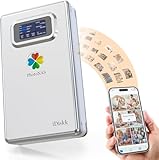
- 【Familly or Personal Automatic Backup Photos & Videos and Free Up Space with No Subscription Fee (Anytime Anywhere】:Over Internet,the PhotoNAS can speedily and instantly back up your photos and videos from your cellphones (iPhone & Android phones) and tablets but also back up all files or documents from your Windows PC and Macbooks
- 【Global Remote Access (enjoy entertainment Content or Office files/docs】:With PhotoNAS, you can share,back up or enjoy your photos, videos, music around the world corner,and you can also retrieve files or docs that are stored in the hard drive.No matter where you are, your digital memories can be reached easily and quickly
- 【Dual Data encryption transmission (SSL + Private encryption)】:With PhotoNAS,you never worry about data security, equipped with powerful processing chipset, which makes it simple to protect your data,your own private account ensures all data under control
- 【Real-time Data Synchronization across Moible Phones and PC/Mac】:The PhotoNAS can work with all devices with different systems, including iPhones, iPads, Android phones, as well as Windows and Mac computers.Over internet,makes it simple for data synchronization across above-mentioned devices
- 【Dual Data encryption transmission (SSL + Private encryption)】:With PhotoNAS,you never worry about data security, equipped with powerful processing chipset, which makes it simple to protect your data,your own private account ensures all data under control
Synology says Synology Photos supports automatic background backup from a device and describes its software as free without premium tiers. That describes the software, not the total cost of ownership: hardware, drives, electricity, off-site backup, and your time still count. Synology Photos’ product page describes its features.
Recommended Free Tools
Did moving save money?
It did for me, based on my own costs and use; that is a personal result, not evidence that self-hosting is cheaper for a typical household. The sources here do not establish a head-to-head total-cost comparison. To decide for yourself, compare the cloud plan fees you would otherwise pay with the costs of a NAS or server, drives, electricity, replacement drives, off-site backup, and the time required to maintain and troubleshoot the system over the same period.
Best Value

- Get enhanced features, cloud capabilities, MacOS 26 compatibility, and up to 7x faster performance than LS 200.
- Connect the LinkStation to your router and enjoy shared network storage for all your devices. The NAS is compatible with Windows and MacOS 26, and Buffalo's US-based support is on-hand 24/7 for installation walkthroughs.
- Subscription-Free Personal Cloud – Store, back up, and manage all your videos, music, and photos and access them anytime without paying any monthly fees.
- Storage Purpose-Built for Data Security – A NAS designed to keep your data safe, the LS700 features a closed system to reduce vulnerabilities from 3rd party apps and SSL encryption for secure file transfers.
- Back Up Multiple Computers & Devices – NAS Navigator management utility and PC backup software included. You can set up automated backups of data on your computers.
Also weigh what “under my control” means to you. Google provides a way to disconnect the connection and an export path; running your own library gives you more direct control over where files are stored, while making access security, updates, and resilient backups your responsibility. The cited documentation establishes those controls and operational requirements, not a measured reduction in privacy risk.
Quick Recap
Product prices and availability are accurate as of the date/time indicated and are subject to change. Any price and availability information displayed on Amazon at the time of purchase will apply.

