
Crashes, No Sound, or Screen Glitches?
Random freezes, missing sound and display glitches usually trace back to one bad driver. Find and replace yours safely.Free scan · under a minuteWindows Errors? Fix Them Before They Spread
Repair common Windows errors and clear accumulated junk for a smoother, more stable PC - no reinstall needed.Free scan · no reinstalliTechGuides is reader-supported. When you buy through links on our site, we may earn an affiliate commission. As an Amazon Associate I earn from qualifying purchases. Learn more
For a small business already using Google Workspace, the right Marketplace app is the one that improves a recurring workflow without adding unnecessary cost, access, or administration. These 10 options cover email campaigns, project work, signatures, design, reporting, and custom apps; they are a use-case shortlist, not a universal ranking.
How to choose a Workspace Marketplace app
The Marketplace is a directory of apps that extend Workspace or connect it with other products. Its categories and filters—including integration, price, and rating—can help narrow a search, but they do not establish that an app is suitable for a particular business. Google says Marketplace featuring cannot be purchased: “As an app developer, you can’t pay to get an app featured in a Marketplace category.” Google Workspace Developer Documentation, “Get your app featured in the Google Workspace Marketplace,” was last updated September 3, 2026. Read Google’s featuring criteria.
Before installing, compare the job the app does, its exact Workspace integrations, current price or trial terms, requested permissions, security information, and the effort required for setup and administrator approval. Also ask whether your team will use the workflow often enough to justify another tool. Google’s “Works with” labels reflect add-on integrations; web apps do not appear in those integration categories, so a missing label is not proof that a vendor has no web app.
The Tool Desk
Outbyte PC Repair FREERepair Windows errors before they cause bigger problemsFix Now →Outbyte Driver Updater FREEFix the driver behind crashes, sound loss and screen glitchesFind Drivers →A Marketplace security-assessment badge is a useful signal, not a replacement for reviewing the app’s requested access, vendor data terms, and your organization’s administrator policies. Listings and their details can change. Check the app’s live listing and your Workspace administrator’s requirements before installation.
#1 Best Overall

- Income And Expense Log Book: This Income and Expense Record Book(8.5" x 10.5") is a necessary item for any small business owner or entrepreneur. It is an essential part of any business - helping you understand your overall earnings to determine if you are profitable.
- Daily Tracking and Weekly Overview: let our log tell you if you are profitable today! There are two pages per week to help you you track your income and expenses. At the end of each day or week, you can note whether you made a profit or a loss for the day.
- Clear P&L Statement For Your Business: This income and expense book makes it easy to see your expenses and how they fluctuate from time to time. This makes it easy for you to decide where you can cut back on expenses and assess your total annual net profit.
- Main Features: Expense Review + Income Review + Weekly Pages + Summary of The Year + Twin-Wire Binding + Waterproof Cover + Rounded corner design + Thicker paper
- Effective Organization: This budget book has a twin-wire binding and you can easily lay it flat at 180°. This effective design can help you work better and bring you great convenience in the process of using.
10 Marketplace apps matched to small-business tasks
The descriptions below reflect the vendors’ Marketplace listings. Ratings and install counts are not evidence of productivity gains, revenue, or time saved. Where included, figures are listing snapshots from the Marketplace page accessed October 7, 2026, and may change.
| App | Useful for | Workspace workflow described in the listing | Marketplace snapshot (October 7, 2026) |
|---|---|---|---|
| Mailmeteor | Mail merge and follow-ups | Personalized email from Sheets, with tracking, scheduling, follow-ups, and automation. | 4.9 rating; 7M+ installs; independent security-assessment badge displayed. |
| Yet Another Mail Merge (YAMM) | Personalized Gmail campaigns | Send personalized bulk email from Gmail and track results in Sheets in real time. | 4.7 rating; 6M+ installs; security badge displayed. |
| Asana | Task and project management | Manage tasks and projects and streamline workflows; its Workspace presence is shown in the Marketplace integrations area. | Rating and install count not stated in the cited Marketplace snapshot. |
| Trello for Google Workspace | Turning messages into tasks | Create Trello cards from Gmail and Google Chat messages. | 3.7 rating; 9M+ installs. |
| DocuSign eSignature for Google Workspace | Document signatures | An e-signature integration listed in Marketplace business essentials. | 3.6 rating; 4M+ installs; security-assessment badge displayed. |
| Canva | Connected design workflows | Integrates with Gmail, Drive, and Calendar. | 4.6 rating; 1M+ installs; security badge displayed. |
| Lucidchart | Diagrams and visual planning | Create flowcharts, wireframes, entity-relationship diagrams, and other visuals. | 4.1 rating; 47M+ installs; independent security-assessment badge displayed. |
| Supermetrics | Marketing reporting in Sheets | Bring marketing data from Facebook, Google, LinkedIn, and other sources into Sheets. | 4.4 rating; 1M+ installs. |
| AppSheet | No-code business apps | Google’s no-code app development platform for building and deploying mobile apps. | 4.4 rating; 28M+ installs. |
| HubSpot connector for Gemini | Connecting an existing HubSpot workflow with Gemini | A connector for accessing a HubSpot workflow from Gemini; the listing does not establish that HubSpot’s full CRM is included. | 14K+ installs; rating not stated in the cited Marketplace snapshot. |
All app figures and listing descriptions in the table are from the Google Workspace Marketplace page accessed October 7, 2026. Counts and ratings are directory signals, not comparable business outcomes or proof that one app is better than another.
Rank #2

- Easy To Track Your Finances: HAUTOCO accounting ledger book keeps you on top of your expenses and income! Help you keep your money organized, spend well, and set and achieve financial goals
- Premium Material: The accounting ledger book has a total of 120 pages and 3,000 lines of entries. It is made of 100gsm thick paper to reduce ink leakage; it is equipped with a waterproof and sturdy PP cover to protect the inner pages
- Practicality: The expense tracker notebook measures 10.1 x 7.8'', and the large size gives you enough space to record each of your transactions; there are 2 PE large pockets at the back of the account book to store important tickets and loose items
- Manage Your Finances Effectively: Undated accounting books with number, date, description, account, payment or deposit amount, and total balance. You will be able to easily analyze your financial activities and quickly prepare accurate financial statements
- Ideal For Small Business or Personal Use: An accounting log journal can track your business or personal financial status. With a clear record of transactions, you can find unnecessary expenses or fraudulent charges
Which option fits your workflow?
Email outreach and follow-up
Mailmeteor and YAMM both address personalized email workflows involving Gmail and Sheets. Compare their live listings for current pricing, limits, permissions, and the specific tracking or automation features your process needs. If you send occasional one-off messages rather than recurring campaigns, a mail-merge tool may add more setup than value.
Tasks, projects, and messages that need action
Asana is the broader task and project-management candidate in this shortlist. Trello for Google Workspace is more directly tied to turning Gmail or Chat messages into Trello cards. Decide whether your need is managing projects and team work or capturing individual tasks from conversations, then confirm the current integration scope in each listing.
Rank #3

- TURN IDEAS INTO REALITY – Feeling stuck with your idea and not sure where to start? This guided journal helps you write a complete business plan so you can gain clarity and move forward with confidence as an entrepreneur.
- SIMPLE DAILY PRACTICE – 13 guided journaling sections with over 100+ business planning prompts. Make this business planner part of your routine to build momentum and work toward your business goals in just 5 minutes a day.
- BUSINESS PLANNER FOR ENTREPRENEURS – Use this guided journal to define your vision, understand your customers, evaluate competitors, plan expenses, and create a clear roadmap for launching your business.
- PERSONAL GROWTH – Designed as a personal growth workbook to help you reconnect with your purpose, prioritize well-being, and build a business plan centered around meaningful impact.
- PREMIUM ECO-FRIENDLY JOURNAL – Crafted with 100% FSC-certified recycled paper, a recycled cardboard cover, and wrapped in luxurious linen. This entrepreneur planner blends sustainability with thoughtful design.
Signatures, design, and diagrams
DocuSign eSignature is the candidate for an e-signature workflow. Canva connects design work with Gmail, Drive, and Calendar, while Lucidchart is aimed at diagrams such as flowcharts and wireframes. These solve different jobs; choose based on the documents or visuals your team actually produces, not on install counts.
Reporting and custom internal tools
Supermetrics is aimed at bringing marketing-source data into Sheets. AppSheet is for building and deploying mobile apps without code. They are not substitutes: one focuses on reporting data in a spreadsheet, the other on creating an app for a business workflow. Check the current data sources, access requirements, and deployment terms before committing.
Rank #4

- Thoughtfully Designed: 120 durable pages with a large 8.5 x 11" size, perfect for tracking finances and planning expenses
- Stylish & Functional: Soft, durable matte cover in a vibrant pink color, appealing to women entrepreneurs
- Versatile Use: Ideal for personal, small business, or home-based businesses, with features like tax deduction tracker and marketing planner
- Made in the USA: Lightweight and easy to carry, ensuring quality and reliability
- Yearly & Monthly Planning: Organize your business goals, income, expenses, and more with yearly and monthly planning sections
Using a HubSpot workflow with Gemini
The HubSpot connector for Gemini is specifically a connector. Its Marketplace listing is not evidence that a complete CRM is bundled with it. Confirm what the connector can access, which accounts or plans are required, and whether your team’s administrator permits that connection.
Do these 3 things before closing this tab:
1Repair Windows errors before they cause bigger problems2Fix the driver behind crashes, sound loss and screen glitches3Clear out junk files and repair common Windows errorsQuick Recap
Best Value
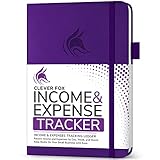
- PERFECT LEDGER BOOK FOR SMALL BUSINESSES: This accounting ledger book for small businesses will help you organize finances, sort and summarize transactions, create balance summaries and set you up for financial success.
- SWITCH TO EFFICIENT & STRESS-FREE ACCOUNTING: This accounting book is undated and lasts a whole year and has 113 pages, including 53 weekly views, an annual summary, empty note pages, and, at the back, a spacious pocket for receipts.
- TAKE CONTROL OF YOUR FINANCES & SUCCEED: With this detailed record of all transactions and totals, you will be able to easily analyze your finances and quickly prepare accurate financial statements.
- COMPACT A5 FORMAT & DURABLE DESIGN: This bookkeeping record book comes in A5 format (5.8 by 8.3 inches) and has an eco-leather hardcover, 120gsm no-bleed paper, elastic, pen loop, bookmark, pocket for notes, and a user guide.
- 60-DAY MONEY-BACK GUARANTEE: We will exchange or refund your receipt book for small business if you aren’t satisfied with your expense tracker notebook for any reason. Reach out to us via message to refund your small business supplies.
Installation and approval checks
- Open the app’s live listing in the Google Workspace Marketplace and verify the publisher, supported Workspace products, current price or trial terms, and feature description.
- Read the permissions and data-access details. Check whether the app needs access to Gmail, Drive, Sheets, Calendar, Chat, or other services, and whether that access is proportionate to its task.
- Review the vendor’s current privacy and data-handling terms, along with any visible independent security assessment. A badge does not replace this review.
- Ask your Workspace administrator whether users can install the app or whether administrator approval, allowlisting, or a policy change is required.
- Test the intended workflow with a limited, low-risk use case before rolling it out broadly. Confirm that the integration does what the listing says and that the team can manage or revoke access if it no longer needs the app.
Product prices and availability are accurate as of the date/time indicated and are subject to change. Any price and availability information displayed on Amazon at the time of purchase will apply.

