
iTechGuides is reader-supported. When you buy through links on our site, we may earn an affiliate commission. As an Amazon Associate I earn from qualifying purchases. Learn more
Which video doorbells work with Google Home? It depends on what you mean by “support.” Google’s Home app live view is limited to Nest cameras and doorbells controlled with that app, while some third-party doorbells offer narrower Google Assistant or smart-display integrations. Before buying, match the exact model to the task you need: app live view, a stream on a Google display, or a ring announcement on a speaker.
What Google Home support do you need?
A “Works with Google” listing or account link does not guarantee that a doorbell can show video in the Google Home app or reproduce every Nest notification. Check the specific destination and action you care about:
- Live video in the Google Home app: Google says this is available only for Nest cameras and doorbells controlled with the Home app. Google’s live-video help page sets that boundary.
- Video on a Google smart display or other supported video device: Some third-party integrations document this separately from Home app viewing. Confirm the exact model and destination.
- Visitor announcements: Check whether a doorbell press can announce on your speakers or displays, and whether the devices must be in the same Home.
- Motion alerts and other notifications: Do not assume these behave like doorbell-press announcements; verify them for the model and integration.
Skip a model when its documented integration leaves out the function you actually want—not merely because it is made by a third party.
Which video doorbells work with Google Home?
Nest Doorbell: the direct route for Home app live view
Google’s connected-home inventory includes Nest Doorbell (battery), Nest Doorbell (wired), Nest Doorbell (wired, 2nd gen), and Nest Doorbell (wired, 3rd gen). See Google’s connected-home device list. Google’s stated Home app live-view limitation makes Nest the clearest documented choice if viewing the feed in that app is essential.
#1 Best Overall

- Meet the wired Nest Doorbell; with 2K HDR video and Gemini, it knows what’s at your door and and what to do next (Gemini features require a Google Home premium subscription; try it for 1 month at no cost to you)[4]
- No need to recharge or replace batteries; the Nest Doorbell keeps you plugged into home, day and night
- The Nest Doorbell keeps your data safe with encrypted video, two-step verification, and enhanced security through your Google Account; and a green LED light lets you know when it’s processing or streaming video
- With an Advanced subscription to Google Home Premium, know more about what’s happening with notifications like “Person with flowers”[3]; get even more detailed descriptions and tap to see a summary of what happened[3]
- Video is crisp and clear in 2K HDR, the Nest Doorbell’s highest resolution yet[1,2]; see rich color and details, see in the dark with night vision, and see the bigger picture with an expanded 166° field of view[1]
For visitor announcements, Google requires the Nest doorbell and the Google speaker or display to be assigned to the same Home. Do Not Disturb prevents announcements. See Google’s visitor-announcement guidance. Check those settings if a compatible Nest doorbell does not announce a press.
Arlo: documented support for selected models and video devices
Arlo’s compatibility information names selected doorbells, including Video Doorbell (2nd Generation), Essential Video Doorbell Wire-Free, and Essential Video Doorbell Wired. Its Google compatibility page is the place to confirm whether a particular model remains listed.
Rank #2

- Meet the wired Nest Doorbell; with 2K HDR video and Gemini, it knows what’s at your door and and what to do next (Gemini features require a Google Home premium subscription; try it for 1 month at no cost to you)[4]
- No need to recharge or replace batteries; the Nest Doorbell keeps you plugged into home, day and night
- The Nest Doorbell keeps your data safe with encrypted video, two-step verification, and enhanced security through your Google Account; and a green LED light lets you know when it’s processing or streaming video
- With an Advanced subscription to Google Home Premium, know more about what’s happening with notifications like “Person with flowers”[3]; get even more detailed descriptions and tap to see a summary of what happened[3]
- Video is crisp and clear in 2K HDR, the Nest Doorbell’s highest resolution yet[1,2]; see rich color and details, see in the dark with night vision, and see the bigger picture with an expanded 166° field of view[1]
Arlo describes linking a compatible device through Google Home’s “Works with Google” flow and viewing a live feed on supported Google video devices and displays. Its setup instructions explain the linking process. This is not evidence that every Arlo doorbell supports live view in the Google Home app or all Nest-style notifications. If app-based live view is your must-have, do not treat a display-streaming feature as a substitute.
Free tools Windows power users keep installed
One-click scans. No signup required.
eufy: check the doorbell and its base station together
eufy’s compatibility table varies by doorbell and HomeBase or chime model; consult its device compatibility table for the exact combination. Its Google Assistant guidance lists selected wired and battery doorbells, but says the integration does not support camera streaming into the Google Home app.
Rank #3

- The Nest Doorbell has built-in intelligence and can tell the difference between a person, package, animal, and vehicles and send you an alert in the Google Home app[1], no subscription required
- Easily check in from anywhere 24/7 with live HD video with HDR and night vision[1]; see what you missed with 3 hours of free event video history[2]; or add a Nest Aware subscription (sold separately) for up to 60 days of event video history[3]
- If your Wi-Fi goes down or there’s a power outage, the Nest Doorbell will store up to 1 hour of recorded events so you can see what you missed[4]
- The Nest Doorbell is easy to install wired or wire-free; the built-in battery means it works with any door, or connect it to your existing doorbell wires with the included wire connector
- Whether you choose battery or wired installation, the battery-powered Nest Doorbell cannot continuously record 24/7 video history, even with a Nest Aware subscription
That means a listed eufy model may offer Google Assistant compatibility without providing the Home app video experience. If you need a feed on a particular display, confirm that destination separately; do not infer it from account linking or Assistant compatibility.
Will my doorbell show live video in the Google Home app and announce rings on my Nest speakers?
Those are separate capabilities. Google’s Home app help says: “Live video is available only for Nest cameras and doorbells that you control with the Google Home app.” For Nest doorbell announcements, the doorbell and speaker or display must be in the same Home, and Do Not Disturb must be off. Third-party compatibility pages may describe display streaming or Assistant controls without promising either of those Nest-specific behaviors.
Rank #4

- Meet the wired Nest Doorbell; with 2K HDR video and Gemini, it knows what’s at your door and and what to do next (Gemini features require a Google Home premium subscription; try it for 1 month at no cost to you)[4]
- No need to recharge or replace batteries; the Nest Doorbell keeps you plugged into home, day and night
- The Nest Doorbell keeps your data safe with encrypted video, two-step verification, and enhanced security through your Google Account; and a green LED light lets you know when it’s processing or streaming video
- With an Advanced subscription to Google Home Premium, know more about what’s happening with notifications like “Person with flowers”[3]; get even more detailed descriptions and tap to see a summary of what happened[3]
- Video is crisp and clear in 2K HDR, the Nest Doorbell’s highest resolution yet[1,2]; see rich color and details, see in the dark with night vision, and see the bigger picture with an expanded 166° field of view[1]
Before purchase, use this short check:
- Write down the exact model and generation, not just the brand or product family.
- Find the manufacturer’s current compatibility entry for that model.
- Match the listed feature to the destination you use: Home app, Google display, or speaker announcement.
- Check whether a HomeBase, chime, linked account, or other device is required.
- If you rely on ring announcements, verify whether the vendor documents that event specifically; motion alerts are not the same thing.
Choose battery or wired power only after checking installation fit
Battery Nest Doorbell
Google says the battery Nest Doorbell can be installed without connecting it to the home’s doorbell system wires. Its battery installation instructions cover setup. This is useful when system wiring is unavailable or you do not want to connect to it.
Windows Errors? Fix Them Before They Spread
Repair common Windows errors and clear accumulated junk for a smoother, more stable PC - no reinstall needed.Free scan · no reinstallOutdated Drivers Are Slowing You Down
One free scan finds every outdated or missing driver and matches the right update for your exact hardware.Free scan · exact hardware matchWired Nest Doorbell
Wired models are not automatically drop-in replacements. Requirements vary by model and region, so check Google’s compatibility and voltage guidance against your existing doorbell system. Google identifies a multimeter as the most accurate way to measure voltage and advises caution around wiring; use a professional if you are unsure how to locate or test the transformer.
Best Value
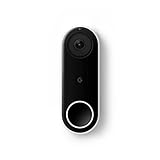
- Always know who’s at the door with the wired Nest Doorbell; get an alert when someone approaches and talk to visitors at your door from anywhere[1]
- With person alerts, this video doorbell can tell the difference between a person and a thing and alert you even if they don’t ring the bell[1]
- Nest Hello is now the Nest Doorbell (wired); no matter which name is on the box, you’ll find the same great product inside
- The wired Nest Doorbell requires the Nest app; it’s not compatible with the Google Home app
- Easily check in from anywhere with 24/7 streaming and continuous video recording; go back and view a 3-hour snapshot history to see what you missed[1,2]
Use this decision rule before you buy
| Your priority | What the documentation supports | What to avoid assuming |
|---|---|---|
| Live video in the Google Home app | Google limits Home app live video to Nest cameras and doorbells controlled with that app. | A third-party “Works with Google” label does not establish Home app live view. |
| A feed on a Google smart display or video device | Arlo documents this for supported devices and compatible models. | Display streaming does not establish Home app live view or every notification feature. |
| Google Assistant integration for an eufy doorbell | eufy lists selected doorbells, with compatibility depending on model and base station. | Assistant compatibility does not mean camera streaming in the Google Home app. |
| Visitor announcements on Google speakers or displays | Google documents announcements for Nest doorbells when devices are in the same Home and Do Not Disturb is off. | Do not assume every third-party integration announces presses in the same way. |
Compatibility pages can change, and the documented examples above do not establish support for every manufacturer or SKU. Recheck the exact model’s current feature list before ordering, especially if you need a particular video destination or announcement behavior.
Quick Recap
Product prices and availability are accurate as of the date/time indicated and are subject to change. Any price and availability information displayed on Amazon at the time of purchase will apply.

