
iTechGuides is reader-supported. When you buy through links on our site, we may earn an affiliate commission. As an Amazon Associate I earn from qualifying purchases. Learn more
To hear about a doorbell ring on your PC, have Home Assistant send a notification to a desktop browser or installed web app registered for HTML5 Push Notifications. Create an automation that triggers when your doorbell reports a ring, then sends that notification to the PC. You do not need a dedicated PC accessory, but your doorbell integration must expose a usable ring event.
How the PC alert works
The setup has three parts: your doorbell integration reports a ring to Home Assistant, an automation reacts to that event, and a registered browser or web app on your PC receives the push notification. Home Assistant’s HTML5 Push Notifications documentation includes a desktop doorbell example.
This is a browser or web-app notification, not the same destination as a Home Assistant Companion App notification on a phone. Home Assistant documents actionable Companion App notifications for iOS and Android; for a PC, use the HTML5 browser or web-app route instead.
Check that Home Assistant can detect a ring
Before building the automation, check the entities provided by your doorbell integration. Home Assistant’s Doorbell integration documentation describes the doorbell.rang trigger for event entities with the doorbell device class. The trigger documentation explains how to choose triggers in the automation UI; YAML is not required for that workflow.
#1 Best Overall

- Works with HomeKit Secure Video and All Major Ecosystems: Fully compatible with Apple HomeKit Secure Video (HSV) for encrypted recording, iCloud storage, and relevant notifications directly on Apple devices. Also compatible with Matter, Alexa, Google Assistant, SmartThings, and Home Assistant, integrating into your existing smart home setup.
- Built-In Aqara Zigbee & Matter Hub for Simple Device Control: No extra hub needed. This doorbell includes a built-in Zigbee and Matter hub, letting you connect and manage other smart devices—such as sensors, lights, and locks—directly through your doorbell camera. Simplify your setup while expanding your smart home possibilities.
- More Accurate Motion Detection with mmWave Radar: The advanced mmWave radar detects human presence with greater accuracy than traditional PIR sensors. Get smarter alerts without false triggers from pets, wind, or moving shadows, for a more secure and efficient video doorbell. (NOTE: Detection setting is adjustable in the app to increase sensitivity for quicker response.)
- Secure Cloud & Local Storage: Protect your footage with encrypted cloud storage hosted securely, keeping your data close and compliant. Prefer local storage? Insert a microSD card (up to 512GB, not included) for easy backup. The SD card slot is safely located in the Chime inside your home, preventing theft or unauthorized access.
- 2K Ultra HD Video, 95dB Built-in Chime, and Dual-Band Wi-Fi: Features a 2K wide-angle lens for crisp, detailed video. The built-in 95dB chime delivers loud and clear alerts. Supports 2.4GHz and 5GHz Wi-Fi and meets WPA3 security standards for reliable and secure connections. *Note: When connected to Apple HomeKit, the resolution is limited to 1600×1200. This limitation also applies to Aqara Home when both platforms are used simultaneously.
Support depends on the doorbell and its integration. Home Assistant documents examples for Reolink, Ring, and UniFi Access, but those examples do not establish compatibility for every model. Confirm that your exact device is supported and that its integration exposes a ring event you can use in an automation.
Register the PC and create the automation
-
Open Home Assistant in the browser you use on the PC, or in its installed web app, and register that destination for HTML5 Push Notifications. The notification action can target a browser or installed web app registered for push. Allow notifications in both the browser or web app and the operating system; the exact permission controls vary by platform.
Rank #2
Sale Aqara Doorbell Camera G400 with Chime, Wired/PoE, HomeKit Secure Video,IP65
- Works with HomeKit Secure Video and All Major Ecosystems: Fully compatible with Apple HomeKit Secure Video (HSV) for encrypted recording, iCloud storage, and real-time notifications directly on Apple devices. Also compatible with Alexa, Google Assistant, and SmartThings. Pro-level compatibility provides more options via RTSP/ONVIF support, NVR integration, and other advanced setups. *Note: To use this device with HomeKit Secure Video, an iCloud+ plan and an Apple home hub are required.
- 2K HD 165° Head-to-Toe Vision: See everything from packages at your feet to faces at the door. Featuring 2K HD resolution and a 165° ultra-wide field of view with a 3:4 aspect ratio, the G400 doorbell camera provides a vertical perspective that traditional 16:9 cameras miss. Equipped with nearly invisible 940nm infrared LEDs, this doorbell captures bright, high-definition video in total darkness, monitoring discreetly without alerting intruders or disturbing neighbors. *Note: When connected to Apple HomeKit, the resolution is limited to 1200p. This limitation also applies to Aqara Home when both platforms are used simultaneously.
- Reliable Hardwired Power & Stable Wi-Fi 6: You can utilize the high-efficiency PoE connection or reuse your existing 8–24V AC/DC wiring, simplifying the upgrade path while maintaining stability. Additionally, the Wi-Fi video doorbell supports both 2.4GHz and 5GHz Wi-Fi 6 and meets WPA3 security standards for reliable and secure connections.
- Local AI Detections & Custom Replies: Reduce false alarms with local person recognition and zone intrusion, ensuring you're instantly notified when it matters, with no cloud processing required. When someone rings, use custom quick replies or the voice-changing intercom to answer the door safely. Our wired doorbell camera also features visitor face recognition and cloud package identification for total peace of mind.
- IP65 Weatherproof & Easy Setup: Built to withstand the elements with an IP65 rating for dust and water resistance, it works flawlessly in wind and rain. The package includes a wedge kit for optimal positioning and a plug-in chime for indoor alerts. The smart doorbell supports 24/7 continuous recording directly to a microSD card (up to 512GB, not included). For added peace of mind, all local footage is automatically backed up to your SMB-compatible NAS server, keeping your video safe and secure.
-
In Home Assistant, create an automation and select the doorbell-rang trigger for the event entity your integration provides. If the trigger is not available, check the integration’s entities and confirm that a ring event is exposed before proceeding.
Crashes, No Sound, or Screen Glitches?
Random freezes, missing sound and display glitches usually trace back to one bad driver. Find and replace yours safely.Free scan · under a minuteWindows Errors? Fix Them Before They Spread
Repair common Windows errors and clear accumulated junk for a smoother, more stable PC - no reinstall needed.Free scan · no reinstallSpecial offer. See more information about Outbyte and uninstall instructions. Please review EULA and Privacy policy. -
Add the HTML5 Push Notifications send-message action and select the registered PC notification target. Set a concise title and message so the alert makes sense at a glance. Home Assistant’s example also demonstrates optional icon, action-button, interaction, time-to-live, and urgency fields; add only the behavior you need.
Rank #3
Sale Door Chime, Smart WiFi Door Sensor Chime Window Sensor Alarm
- Real-Time App Alerts for Safety - WiFi Door Chimes when Door Opens monitors your home from anywhere via the Tuya/Smart Life App. Perfect for child safety and dementia care—receive instant push notifications the moment a door or window is opened
- Loud Chime for Business & Home - WiFi door chime helps you never miss a customer with 5 volume levels (up to 110dB). Assign unique ringtones to different sensors so you know exactly which door triggered the alert without checking your phone
- 100% Wire-Free DIY Installation Plug and Play in Minutes - Simply plug the receiver into an outlet and stick the sensor using the included adhesive. Fully expandable to support up to 20 sensors for complete coverage
- Family Sharing & Auto-Memory - Share device access via the App so multiple family members receive alerts simultaneously. The smart memory function of this door chime for business when entering retains your melody and volume settings even after a power outage
- Free Notifications From APP! No Monthly Fees - Enjoy Free App Push Notifications without subscription costs for this door opening chime. Optional PAID SMS or phone call alerts are available for users who need offline security reminders.
-
Save the automation and test it with a real ring. If no alert appears, check that the automation ran, the selected target is the PC browser or web app you registered, and notification permissions are enabled. A successful phone notification does not by itself confirm that the PC target is registered or permitted.
What to expect from the notification
A desktop push alert can tell you that someone rang, but do not assume it will include a live video feed. Home Assistant’s HTML5 doorbell example shows an icon URL and an action button; it does not establish that the notification displays live video. Reolink’s rich-notification guidance discusses a mobile notification path, which should not be treated as proof of desktop image or video support.
Rank #4

- Meet the wired Nest Doorbell; with 2K HDR video and Gemini, it knows what’s at your door and and what to do next (Gemini features require a Google Home premium subscription; try it for 1 month at no cost to you)[4]
- No need to recharge or replace batteries; the Nest Doorbell keeps you plugged into home, day and night
- The Nest Doorbell keeps your data safe with encrypted video, two-step verification, and enhanced security through your Google Account; and a green LED light lets you know when it’s processing or streaming video
- With an Advanced subscription to Google Home Premium, know more about what’s happening with notifications like “Person with flowers”[3]; get even more detailed descriptions and tap to see a summary of what happened[3]
- Video is crisp and clear in 2K HDR, the Nest Doorbell’s highest resolution yet[1,2]; see rich color and details, see in the dark with night vision, and see the bigger picture with an expanded 166° field of view[1]
If you add an action button, make its consequence clear. An action that unlocks a door is security-sensitive: do not expose it casually in a notification, and ensure the automation and access controls match the risk.
Do these 3 things before closing this tab:
1Scan for outdated or missing drivers - takes under a minute2Clear out junk files and repair common Windows errors3Fix the driver behind crashes, sound loss and screen glitchesWhen the standard desktop notification is not enough
If you specifically need a camera feed in a Windows toast rather than a simple alert, a Home Assistant Community post describes HA Video Toast, a third-party utility for desktop notifications tied to Home Assistant events. It is not an official Home Assistant feature. Check its current project status, operating-system support, and installation instructions before relying on it.
Best Value
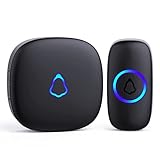
- [Work Out of Box] This wireless doorbells for home has been paired before delivery. There is no need for wiring or electrician installation when using it since its installation can be completed within 1 minutes: plug the receiver into the socket, ready to go.
- [Long Range] This high-frequency electronic technology wireless remote control doorbell adopts the FM signal scheme, which has strong anti-interference features and one-to-one signal pairing. No need to worry about signal connecting wrongly with the next door. And the sensing distance can reach up to 1000Ft in obstacle-free environment.
- [Lead A Convenient Life]The doorbell has been updated with 58 songs (including merry christmas ringtone) and 5 levels of volume that can be adjusted. You can be add as required, choose 2 button with 1 receiver or 1 button with 2 receivers or 2 buttons with 3 receiver sets, etc.
- [Weather Resistance & Energy-saying] The door bell is made of high-quality ABS material, showing high performance in fire and flame resistance. working temperature:-4 °F -140 °F. IP55 dust proof and waterproof protection. The receiver adopts an optimized circuit design. The transmitter does not consume power without being pressed. Battery life:3 years.
- [Exquisite Appearance & High Quality] The door bell ringer demonstrates subtle and novel industrial aesthetics and fashionable design. We have industry-leading automation equipment, high-precision placement. We strictly control the product quality. In case of malfunctions, please contact us as soon as possible for resolutions.
For readers choosing a doorbell, compare the exact model’s Home Assistant support, whether the integration supplies a ring event, whether the desired image or video works with the chosen notification target, and whether operation depends on cloud or local access. The cited integration examples are not a comprehensive compatibility list.
Quick Recap
Product prices and availability are accurate as of the date/time indicated and are subject to change. Any price and availability information displayed on Amazon at the time of purchase will apply.

