
Quick wins for a faster PC:
Scan for outdated or missing drivers - takes under a minuteDriver Scan →Clear out junk files and repair common Windows errorsFree Scan →iTechGuides is reader-supported. When you buy through links on our site, we may earn an affiliate commission. As an Amazon Associate I earn from qualifying purchases. Learn more
You can explore this open-source J1939 CAN bus emulator without buying CAN hardware: its repository documents a virtual-bus setup that pairs a traffic simulator with a separate monitor. When you need to test a physical receiver, you can add a compatible USB-to-CAN interface and a properly wired, terminated bus. The project is a focused traffic-generation and monitoring setup, not a demonstrated replacement for a full commercial analysis suite.
What the J1939 emulator does
The project repository describes two applications with distinct jobs:
- PC-side simulator: steps a simple vehicle-dynamics model and generates J1939 frames using 29-bit extended CAN identifiers.
- Linux-side monitor: listens through SocketCAN, extracts parameter group numbers (PGNs), decodes signals into physical values, and presents them in a live dashboard.
The repository describes J1939-21 extended identifier composition, PDU1 and PDU2 handling, signal encoding, and a hardware-agnostic transport layer built on python-can. It says the applications can exchange traffic through real CAN hardware or a virtual CAN bus.
Recommended Free Tools
Coverage is defined, not comprehensive
The repository states that the simulator covers 20 PGNs and 30 signals, including standard J1939-71 parameters and proprietary EV battery and charging groups. The monitor is listed as covering 17 PGNs. These are the project’s stated inventories; they do not establish complete J1939 support.
#1 Best Overall
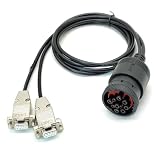
- CAN Cable, J1939 DEUTSCH Connector to Dual DB9, One Two Expansion of Diagnostic Interface, CAN to J1939 Cable with DEUTSCH Connector;CAN SAE J1939;Truck Diagnostic Tool; 1Meter
- Supports Dual CAN channels, capable of simultaneously recording data from both the main J1939 network and the auxiliary J1939 network; Equipped with multi-layer shielding technology to effectively resist electromagnetic interference; Adapt to mainstream data loggers such as CANedge, achieve a one to two expansion of heavy-duty vehicle diagnostic interfaces, and provide access to multiple J1939 networks through a single Deutsch 9-pin connector
- Suitable for heavy-duty truck maintenance technicians and vehicle networking R&D engineers, used for CAN data reading and monitoring of heavy-duty vehicles (trucks, buses, tractors, etc.) and industrial equipment.
- The interface adopts gold plating technology, which is resistant to oxidation and has stable conductivity; The DB9 joint is reinforced with injection molding, which is resistant to tension, tearing, and wear; The shell is equipped with CAN1/CAN2 laser engraved markings for easy identification of channels; Select high specification flame-retardant wire
- [Usage]: 1 Insert the Deutsch 9-pin male connector into the vehicle diagnostic interface (usually located below the dashboard in the driver's cabin); 2. Connect the DB9 female head labeled CAN1 to the main channel of the data logger; 3. Connect the DB9 female head labeled CAN2 to the secondary channel or the second monitoring device; 4. Tighten the hand screws on both sides of DB9 to ensure a stable physical connection; 5. Start the vehicle power supply and read J1939 protocol data through the recorder
Start on a virtual CAN bus
The documented virtual-bus route lets you explore generated traffic before choosing or connecting an adapter. Follow the repository’s setup instructions for creating the virtual CAN interface and configuring the two applications to use it; the specific commands and configuration can depend on the operating system and installed python-can backend.
- Set up the virtual CAN interface using the repository’s instructions for your Linux environment.
- Configure the simulator and monitor to use that interface and start both applications.
- Confirm that the monitor receives frames and displays decoded PGNs and signal values.
This path is useful for learning how the sample generator and decoder work. It does not, by itself, verify that a physical ECU or receiver will accept the traffic.
Rank #2

- 80M frequency of high-performance 32-bit processor with 512K flash, 128K SRAM memory space to cache information CAN 6000's.
- support advanced online programming (online writing FLASH) CAN configuration information stored in real time and status.
- 10K ~ 1M baud rate range of any configuration, with baud rate calculation configuration tools, one-click configuration.
- 10K ~ 1M baud any frame measuring range, one key-frame test and configure the baud rate.
- Typical applications: PC or laptop's USB interface to send and receive CAN bus network; the fast CAN network data collection, data analysis; CAN bus-USB gateway; USB interface to CAN network interface; extend the length of the CAN bus network communications; Industrial CAN network data monitoring; CAN-bus network debugging and testing; CAN2.0A/2.0B packet analysis; iCAN protocol analysis; DeviceNet protocol analysis; CANopen protocol analysis; SAE J1939 protocol analysis.
Connect a physical CAN bench when needed
The repository’s example physical setup uses an IXXAT USB-to-CAN II adapter at 250 kbit/s with 29-bit extended J1939 frames. Its documentation describes CAN_H and CAN_L wiring, a DB9 breakout, and a terminated bus. It also says Vector, Kvaser, or PEAK adapters supported by python-can can be substituted, subject to the installed backend and setup.
The Tool Desk
Outbyte Driver Updater FREEFix the driver behind crashes, sound loss and screen glitchesFind Drivers →Outbyte PC Repair FREERepair Windows errors before they cause bigger problemsFix Now →Before connecting, check that the adapter, driver, python-can backend, connector, and operating system are compatible; set the bus bitrate to match the receiver; and confirm correct CAN_H/CAN_L wiring and termination. The repository’s documented example is a setup description, not evidence that every listed adapter or configuration will work in every environment.
Rank #3

- USB CAN interface
- Powered by USB connector
- Supports CAN FD up to 8 Mbit/s (when implementing correct physical layer)
- Supports both 11-bit (CAN 2.0A) and 29-bit (CAN 2.0B active) identifiers
- Lightweight fiberglass reinforced polyamide housing overmolded with TPE
A USB-to-CAN interface is only one part of a physical bench. For example, the CANdo manufacturer’s interface description lists adjustable CAN bitrate and J1939 compatibility, but says the interface has no internal bus termination. Any physical network must therefore have termination handled separately, with connector and driver compatibility checked for the specific bench.
How this differs from broader commercial tools
Vector describes CANalyzer as a tool for analyzing and stimulating network communications, with functions including replay, logging, diagnostics, and stimulation; J1939 is listed among its higher-layer protocol options. The open-source repository, by contrast, describes a sample traffic simulator and a monitor with bounded PGN inventories. The available documentation does not establish feature parity or a like-for-like cost comparison.
Rank #4

- CAN J1939 Deutsch Adapter Cable;DB9 To J1939 Connector Cable;J1939 to DB9 Adapter Cable ; Expansion of Diagnostic Interface,CAN SAE J1939;Truck Diagnostic Tool; 1Meter
- Suitable for heavy-duty truck maintenance technicians and vehicle networking R&D engineers, used for CAN data acquisition and ECU diagnosis of trucks, buses, and construction machinery
- Supports standard J1939 protocol, designed specifically for CANedge data loggers; Built in multi-layer shielding layer to resist electromagnetic interference, ensuring zero loss in signal transmission; High compatibility interface suitable for mainstream heavy equipment such as Caterpillar and Cummins
- The interface adopts gold plating technology, which is resistant to pulling, inserting, and oxidation; The Deutsch connector housing is made of high-temperature resistant engineering nylon, which is sturdy and slip resistant; DB9 end is equipped with double-sided metal hand screws, and the wire is made of flame-retardant PVC outer coating
- [Usage]: 1 Align the Deutsch 9-pin male head with the vehicle OBD diagnostic port (usually green or black interface) and rotate it to lock it; 2. Connect the DB9 female head on the other end to the D-Sub 9 interface of the CAN recorder or OBD scanner; 3. Rotate the long screws on both sides of DB9 clockwise until they are completely fixed; 4. Turn on the vehicle ignition switch and read the SAE J1939 data stream in real-time through the terminal connection
MathWorks’ Vehicle Network Toolbox documentation describes CAN and J1939 send/receive, encoding and decoding, virtual-bus traffic simulation, logging and replay, and support for Vector, Kvaser, PEAK-System, and NI hardware. This is another broader software ecosystem reference, not evidence that the toolbox and this repository are interchangeable.
| Question | Open-source repository | Commercial tool documentation |
|---|---|---|
| Primary stated scope | Sample J1939 traffic generation plus monitoring and decoding; coverage is listed as 20 simulator PGNs/30 signals and 17 monitor PGNs (project repository, accessed 2026). | CANalyzer is described by Vector as a broader analysis and stimulation tool with replay, logging, diagnostics, stimulation, and J1939 as an option. |
| Virtual bus | Repository says its applications can communicate over a virtual CAN bus. | MathWorks documents virtual-bus traffic simulation in Vehicle Network Toolbox. |
| Physical hardware | Repository documents an IXXAT USB-to-CAN II bench at 250 kbit/s and says supported Vector, Kvaser, or PEAK adapters may be substituted, depending on backend and setup. | MathWorks lists support for Vector, Kvaser, PEAK-System, and NI hardware. The cited CANalyzer page describes the product’s functions; it does not establish a hardware compatibility list here. |
| Cost or feature parity | No like-for-like cost or parity result is established by the cited project documentation. | No current license price or directly comparable benchmark is established by the cited vendor documentation. |
Where the project fits—and where evidence stops
This repository is a practical starting point when the goal is to generate sample J1939 traffic, observe a limited set of PGNs, or begin on a virtual bus before building a hardware bench. Its stated inventories make it important to check whether the PGNs and signals you need are actually included.
Best Value

- Supports CAN FD, up to 8 Mbit/s
- Powered through the standard USB type “A” connector
- Quick and easy plug-and-play installation
- Supports silent mode for analysis tools – listen to the bus without interfering
- Galvanic isolation comes as standard on the Leaf v3, enhancing protection from power surges or electrical shocks
A separate Python J1939 library’s 2018 documentation, for release 0.1.0.dev1, described its own status as alpha and marked some features as under construction. That is a statement about that historical documentation, not a reliable claim about the library’s current status.
The available project and vendor materials do not establish independent test results, complete protocol coverage, a current commercial license price, or parity with a broad commercial analysis workflow. Treat the repository as a focused emulator and monitor whose suitability depends on the frames, signals, hardware, and test workflow you need.
Quick Recap
Product prices and availability are accurate as of the date/time indicated and are subject to change. Any price and availability information displayed on Amazon at the time of purchase will apply.
Do these 3 things before closing this tab:
1Repair Windows errors before they cause bigger problems2Scan for outdated or missing drivers - takes under a minute3Clear out junk files and repair common Windows errors
