
iTechGuides is reader-supported. When you buy through links on our site, we may earn an affiliate commission. As an Amazon Associate I earn from qualifying purchases. Learn more
The Flutter upgrade passed CI, but plugins failed on device. A green CI run confirms only what that job actually built or tested; it does not establish that CI exercised the same platform integration or runtime path as the failing device. Start by recording the exact SDK and package versions, identify where the failure occurs, and change one likely cause at a time.
Record the failing setup before changing it
Capture the environment used by both CI and your local reproduction. Flutter’s guidance treats upgrading the SDK and upgrading packages as separate operations; changing both together makes it harder to identify which change introduced the failure. See Flutter’s SDK upgrade guidance for upgrade commands and ways to select a specific SDK version.
- Flutter channel and exact version or revision, from
flutter --version. - Dependency versions and the project lockfile.
- Target platform, device or emulator, and operating-system version.
- The complete error output and the stage where it occurs: build, install, launch, or runtime.
- CI build and test targets, so you can compare them with the failing scenario.
Do not assume CI and the device followed the same path. Compare the actual job steps and platform matrix with what fails locally; the title alone does not establish what CI covered.
Recommended Free Tools
Use the failure stage to narrow the investigation
First identify whether the plugin fails during compilation, installation or launch, or after the app is running. Then focus on evidence from that stage: build output and tool configuration for a build failure; platform integration and launch logs for an install or launch failure; and runtime logs, plugin behavior, and rendering paths for a runtime failure. This is a way to organize diagnosis, not a claim about the cause of this unspecified incident.
#1 Best Overall

- k + dcan k+can cable, k + dcan cars obd cable allow diagnostic for E CHASSIS from 1998 - 2019. Works with D-CAN, PT-CAN, K-CAN and etc. Please check if the store name is Tao Tao before purchasing.
- Original chip, 100% Original Brand New FTDI 232RL.It is imported from the Original factory.Board and raw materials are made of high quality Plastic materials.
- Switched for inpa k+Dcan, You can use the switch to do more cars .Some cars need disconnect to use for inpa k+dcan,but others need connect. It can support more cars after adding the switch. Not every model need switch.
- Install Note, The software cannot work with antivirus. The virus protector may notify it as“virus” by mistake. Please disable or uninstall the anti-virus software on your PC to make sure the diagnose software works normally.
- Compatible system, It is perfect for Windows 7 32bit system. Sometimes, it is compatible with Window 8/10, it is up for your system. Don't fit the mac OSX.
Check the Flutter release transition
Find the Flutter release transition in your project history, then consult Flutter’s breaking-change index and the guidance for the relevant release. Flutter notes that migration guides reflect the release under which they were published and may not remain current indefinitely, so verify that a guide applies to your target version and current project configuration.
If the upgrade produces Dart compile errors, Flutter suggests trying dart fix where applicable. It does not address every breaking change, so use the specific migration guidance rather than treating it as a universal repair.
Rank #2

- 16 in1 power cable with FPC interface, it supports 80% of Android models, for motherboard testing and repair.
- Stable & Durable ,Original factory-grade connectors ensure reliable power transfer.
- Tangle-Free Silicone Cable ,Soft, flexible, and easy to store.
- 5000+ Insertion Tested ,Withstands repeated plugging/unplugging.
- Hanging Hole Design ,Convenient for workshop organization.
If the failing target is Android, check plugin and build migrations
Legacy plugin embedding APIs
Inspect the failing plugin’s Android implementation for legacy use of PluginRegistry.Registrar. Flutter documents the newer FlutterPlugin API and warns that older APIs can lead to undefined behavior in embedding scenarios. That makes legacy embedding a candidate to investigate—not a diagnosis without the plugin name and error. Start with Flutter’s plugin API migration guide.
Quick wins for a faster PC:
Fix the driver behind crashes, sound loss and screen glitchesFind Drivers →Repair Windows errors before they cause bigger problemsFix Now →Gradle and Kotlin configuration
Compare the app’s Android Gradle Plugin and Kotlin configuration with the requirements and migration steps for the Flutter release and Android build-tool versions in this project. Flutter’s Android Gradle Plugin migration guidance covers version-dependent changes. Do not copy a tool version from an older migration page without confirming it matches the project’s current toolchain.
Rank #3
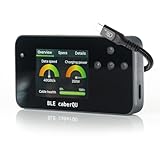
- Expert Kit contents: Includes the fully assembled BLE caberQU tester, a durable hard shell protective case, screen protector, high-speed USB4 cable, and a printed manual for immediate professional use.
- Wireless app integration: Connects via Bluetooth to the official mobile app on iOS and Android; enables the free X-RAY firmware update to unlock advanced diagnostic views for professional-grade cable maintenance.
- Comprehensive technical readouts: Displays eMarker data and internal Vbus resistance; supports testing for various standards including USB 1.1 through USB4 with voltage ranges from 5 V to 48 V.
- Real-time digital display: Features three intuitive dials showing maximum transmission speed and power capacity at a glance; includes a detailed pinout map for all 24 pins plus the connector shield.
- Advanced cable diagnostics with X-RAY: Analyzes USB-C to USB-C cables for data transfer speeds and charging power; provides a precise health percentage and deep protocol insights including Thunderbolt and DisplayPort support.
Scripts that read Flutter plugin metadata
Search custom build scripts and other automation for .flutter-plugins. Flutter documents its replacement with .flutter-plugins-dependencies; the older file stopped being generated after stable Flutter 3.32. Treat that release detail as migration context, and check the current release and project scripts before changing them. See Flutter’s plugin configuration migration guide.
Plugins that render to an Android surface
If the affected plugin renders to an Android surface, check whether its implementation needs the release-specific SurfaceProducer migration. Flutter recommends the newer API for Impeller, but the right action depends on the plugin and Flutter version. Consult the Android surface plugin migration guide rather than applying the migration by default.
Rank #4
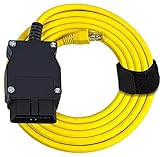
- ⚙️【Program or Hide Modules】- The 6.6 ft. Ethernet to OBD cable gives you control over the modules available in your BMW. Modules are the separate computer programs that run various aspects of your vehicle, from the physical function to the accessories and tools of your vehicle. With this cable and a diagnostic tool, you can choose to program a single module or hide multiple modules. This all works through the ENET data line.
- ⚙️【High Quality Cable】- The CAT5e Ethernet Cable is durable and suitable for professional use. It is abrasion-resistant with gold plating and a grounded and shielded RJ45 connector. The 16-pin OBD connector is flexible so that shifting around with your computer won't damage the car's connector. Pure copper, metal film resistors, and lead-free solder all mean that this cable will work for years to come. Once you start tinkering with the modules on your car, you'll be keeping it.
- ⚙️【Supported BMW models include】- BMW F-series, the new 1 Series (F20), 3 Series (F30), 5 Series (F07, F10, F11, F18), 6 Series (F12, F13), 7 Series (F01, F02, F04), GT, XSeries and the latest BMW G-Series.
- ⚙️【Compatible Car Models】- This OBD Interface Cable is specifically for BMW vehicles. It works with many different BMW models. BMW owners purchase their vehicles because they want a top-of-the-line car that looks great, has plenty of power, and perhaps more than anything else is entirely under their control. By modifying various E-SYS modules, you'll have more control than you can imagine. TIPS: Software not included.
- ⚙️【Software Compatibility】- Some cables limit you to just one type of software for your module exploration. Our OBD Interface cable works with many different software options, letting you take the approach to your vehicle that makes the most sense to you. You can try out ECOM, ICOM, INPA, ISIS, and ISTA Rheingold to find the software that feels most intuitive and functional for your needs. This cable will work with any of them, giving you full access to your vehicle's modules.
Apply one targeted change, then verify on the failing target
- Match the error to a specific release migration, incompatible dependency, or project configuration issue.
- Change only the variable supported by that evidence. Avoid upgrading the SDK, packages, and Android build tools together while isolating a regression.
- Rebuild and run on the affected platform and device or emulator. A passing test on a different target does not verify the failing path.
- Compare the result with the original error and the recorded versions. If the failure remains, keep the environment record and investigate the next clue rather than layering on unrelated fixes.
Flutter’s Android build migration guidance uses a device or emulator run as a validation step. No test result for this particular failure is established here.
The Tool Desk
Outbyte Driver Updater FREEScan for outdated or missing drivers - takes under a minuteDriver Scan →Outbyte PC Repair FREERepair Windows errors before they cause bigger problemsFix Now →What information is needed for a specific fix?
The root cause cannot be identified from “plugins failed on device” alone. The next useful details are the affected platform, plugin name and version, complete error text, flutter --version, relevant dependency versions, Android Gradle Plugin and Kotlin versions if applicable, and whether CI built and ran the same target. With those details, you can distinguish a plugin implementation issue from an app build configuration or platform-specific runtime problem.
Quick Recap
Best Value
- Digital Interface & Metrics: View critical health percentages and transmission speeds on a clear digital screen with three diagnostic modes; verify voltages up to 48V and currents up to 5A
- Advanced Technical Analysis: Assess all 24 pins plus shield to monitor internal resistance and continuity; detect damaged wiring or subpar manufacturing before it impacts your expensive hardware
- Wireless App Integration: Connect via Bluetooth to the official iOS or Android app to install the X-Ray update and view six new diagnostic categories, including manufacturer IDs and certificate checks
- Comprehensive Safety Kit: Includes the fully assembled BLE caberQU tester, a protective hard shell travel case, a custom-fit screen protector, and a detailed printed manual for immediate professional use
- Active Cable Insights: Use the X-Ray feature to detect retimers, SBU types, and lane counts; distinguish between USB4 v2 and legacy standards with real-time data pulled from the eMarker
Product prices and availability are accurate as of the date/time indicated and are subject to change. Any price and availability information displayed on Amazon at the time of purchase will apply.

