
iTechGuides is reader-supported. When you buy through links on our site, we may earn an affiliate commission. As an Amazon Associate I earn from qualifying purchases. Learn more
To pair a Fitbit Sense with your phone, connect the watch to its charging cable, install the Google Health app, sign in with a Google Account, and follow the app’s on-screen setup flow. Pairing happens inside the Google Health app, not on the phone’s Bluetooth settings screen. Once the two devices are paired, they can communicate and sync data.
What you need before you start
- A Fitbit Sense and its charging cable. Connect the watch to the cable before you begin setup.
- A compatible iPhone or Android phone. The minimum operating systems are listed in the table below.
- Bluetooth turned on for the phone.
- A Google Account. New Fitbit users need one, and the app will ask you to sign in with it.
Phone and account requirements
Google publishes minimum operating-system versions on its Fitbit setup requirements page. The table summarises those minimums and the phone settings Google’s guidance mentions.
| Requirement | iPhone | Android phone |
|---|---|---|
| Minimum operating system (Google’s published minimum) | iOS 16.4 or higher | Android 11 or higher |
| Where to get Google Health | Apple App Store | Google Play Store |
| Google Account | Required for new Fitbit users | Required for new Fitbit users |
| Bluetooth | Must be on | Must be on |
| Additional settings | Not stated beyond Bluetooth in Google’s troubleshooting guidance | Power Saving Mode off, location services on, and location permission for Google Health (see the Android checks below) |
The same setup requirements page mentions February 2, 2026 as the date until which existing users could use their Fitbit account. That date has now passed, so expect the app to ask you to sign in with a Google Account. Google may change minimum versions and app policies, so confirm the current requirements on the setup requirements page before you start.
Do these 3 things before closing this tab:
1Repair Windows errors before they cause bigger problems2Scan for outdated or missing drivers - takes under a minute3Clear out junk files and repair common Windows errorsStep-by-step pairing
- Charge the Sense. Connect the Fitbit Sense to its charging cable before you start setup.
- Install Google Health. Download the Google Health app from the Apple App Store or Google Play Store.
- Sign in. Open the app, choose Sign in with Google, then select an existing Google Account or create one.
- Pair the watch. Follow the prompts in the app to pair the Fitbit Sense with your phone. Google’s Fitbit Sense getting-started page states: “Follow the on-screen instructions to create an account and pair your Fitbit device with your phone. This allows your devices to communicate and sync data.” (Google Health Help Center, Fitbit Sense setup instructions.)
- Keep Bluetooth on. Leave phone Bluetooth enabled while setup runs, and run setup from the app rather than the phone’s Bluetooth settings screen.
If setup fails
Work through these steps in order, and retry setup in the Google Health app after each one. Google’s troubleshooting guidance follows this sequence.
#1 Best Overall

- 1.59in l x 1.59in w x 0.49in h. ECG, stress sensing and a skin temperature sensor. Get notifications for calls, texts, calendar events and apps like Gmail and Facebook plus send quick replies and voice replies right from your wrist.
- Compatibility: Apple iOS 12.2 or higher, Android OS 7.0 or higher, Syncing range: Up to 30ft, Music control via Bluetooth Classic on Android and Bluetooth LE on iOS devices.
- Built-in GPS + GLONASS, Speaker, Microphone, Multi-path optical heart rate sensor, IR sensors for oxygen saturation (SpO2) monitoring
- Water-resistant to 50 meters. Battery life up to 6+ days. Heart rate tracking technology. Saves 7 days of detailed motion data minute by minute.
- International Model - No warranty in the US. In Box: Fitbit Versa 3, Classic wristband (both small & large), Charging cable
- Turn phone Bluetooth off, wait 10 seconds, turn it back on, and retry setup.
- Restart the Sense, then retry setup.
- Restart the phone, then retry setup.
- If Google’s account and device rules call for it, remove other Fitbit devices from your Google Account, then retry.
- In the phone’s Bluetooth settings, forget the Sense connection, then retry from the app. This is the only step where you use Bluetooth settings, and it clears the old connection. Setup itself still runs in the app.
- Uninstall and reinstall Google Health only if the earlier steps fail. Before you uninstall, confirm that your phone still meets the app’s supported operating-system requirements shown in the table above.
Extra checks for Android phones
Google also recommends the following on Android before you retry:
- Confirm that the phone is on Google’s supported list.
- Turn Power Saving Mode off, because it can interrupt the Bluetooth connection.
- Turn location services on, and allow Google Health to access location.
- Keep the phone’s software up to date.
If it paired but will not reconnect or sync
When the watch was paired earlier but has stopped connecting or syncing, Google’s guidance suggests this order:
Rank #2
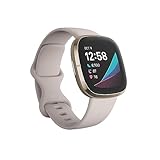
- Assess your heart for atrial fibrillation -a heart rhythm irregularity- and easily share results with your doctor (The Fitbit ECG app is only available in select countries. Not intended for use by people under 22 years old.Operating temperature: 14° to 113°F
- An on-wrist skin temperature sensor tracks yours each night so you can see how it varies. You can also see your nightly blood oxygen levels at a glance with our collection of clock faces.Radio transceiver: Bluetooth 5.0.Operating temperature: -10° to 45° C
- High & low heart rate notifications alert you if yours seems above or below your average.Battery lasts 6 plus days plus, fast charging gives you a full day's charge in just 12 minutes (Varies with use and other factors; up to 12 hours with continuous GPS).Use built-in GPS during runs, hikes, rides and more to see pace & distance without your phone and use the built-in mic and speaker to take Bluetooth calls hands-free when your phone is nearby (Requires more frequent charging).
- Force-quit Google Health and reopen it.
- Reset phone Bluetooth by turning it off for at least 10 seconds, using the same reset described in the setup section.
- Restart both the Sense and the phone.
- Keep the watch close to the phone while it reconnects.
- If interference or multiple connections may be the cause, temporarily turn off Bluetooth on other nearby devices.
- If the problem persists, remove the device from your Google Health account, forget it in the phone’s Bluetooth list, and set it up again in the app.
Removing and re-pairing is a last resort. Use it only after the restarts and Bluetooth resets have failed, because it resets the connection and you will need to complete setup again.
Free tools Windows power users keep installed
One-click scans. No signup required.
Quick Recap
Rank #3

- Optimize your workouts with a Daily Readiness Score that reveals if you’re ready to exercise or should focus on recover (requires Fitbit Premium membership. Premium content recommendations are not available in all locales and may be in English only)
- EDA Scan app detects electrodermal activity which may indicate your body's response to stress and a built-in skin temperature sensor logs yours each night so you can see when it varies
- With a compatible ECG app right on your wrist, assess your heart for atrial fibrillation--a heart rhythm irregularity--and share the results with your doctor (Only available in select countries. Not intended for use by people under 22 years old)
- An on-wrist skin temperature sensor tracks yours each night so you can see how it varies
- Includes a 6-month Premium membership complete with personalized insights, advanced analytics, guided programs and more (New & returning Premium users only. Must activate trial within 60-days of device activation. Content and features may change)
Product prices and availability are accurate as of the date/time indicated and are subject to change. Any price and availability information displayed on Amazon at the time of purchase will apply.

