
iTechGuides is reader-supported. When you buy through links on our site, we may earn an affiliate commission. As an Amazon Associate I earn from qualifying purchases. Learn more
A FireWire connection can damage a computer’s FireWire port circuitry in a particular electrical fault, but a dead port does not by itself mean the motherboard is fried. The 1394 Trade Association’s design guide describes a failure mode that can damage the FireWire PHY—the chip handling the port—while other ports on the same chip may continue to work. Your computer’s condition and the cause of any failure need model-specific diagnosis.
What FireWire can damage
The 1394 Trade Association’s FireWire Design Guide, FWDG 1.0TA describes a hot-connection failure called “Late Vg.” If cable power and one or more data contacts connect before ground, power can reach a PHY’s data inputs. The guide says the resulting voltage and current can damage those inputs; ordinary PHY electrostatic-discharge protection is not designed to protect against this longer, higher-current condition.
The guide reports that IEEE 1394a-2000 cable power is specified at 8–30 VDC, maximum 1.5 A, and legacy IEEE 1394-1995 cable power at 8–40 VDC, maximum 1.5 A. These are standard-related ranges cited by the guide, published in 2010—not measurements of your equipment or proof that those voltages reached your computer.
The Tool Desk
Outbyte Driver Updater FREEFix the driver behind crashes, sound loss and screen glitchesFind Drivers →Outbyte PC Repair FREEClear out junk files and repair common Windows errorsFree Scan →Does a failed FireWire port mean the whole motherboard is ruined?
No. The guide says a damaged port may simply stop operating while other ports on the same PHY continue to work. A failed FireWire port is therefore not enough to conclude that the entire motherboard is dead. The guide describes PHY replacement as a way to resolve this kind of localized failure, but whether that repair is possible or worthwhile depends on the computer’s design and service options.
#1 Best Overall

- 【Easy to install】PCI-E 1X to 1394a card is plug-and-play, no need to install drivers, the card can be used immediately after installation, very easy to install.
- 【Widely compatible】PCIe IEEE 1394 firewire adapter is compatible with CD-ROM, DVD-ROM Drive, DV camcorders,disk recorders, digital cameras, camcorders, audio capture cards and audio devices, printers, scanners, digital video recorders, video editing cards, and devices with 1394A/B interfaces (such as data acquisition cards).
- 【Supported systems】Win Me,Win 2000,Windows 7 8 10 11,XP,Windows 98se,server 2003,xp 64-bit, Vista
- 【High-speed transmission】PCIE-1394A supports 100/200/400/800mbps data transfer rate & PCI Express systems,Compatible with IEEE 1394 OpenHCI specification version 1.0 and v1.1.
- 【NOTE】Product Includes: 1x VT6308P 1394a PCIe capture card, 1x Low Profile Bracket, 1x FireWire 400 cable.PCIe Firewire 400 Card just provides a channel from the camera to the computer only, the image captured by the camera does not make any modification, if the captured video is not satisfactory, please check the pixel settings of your camera.This model is VIA chip, so it does not support the firewire sound card.Please contact us if you have any questions!
In repair analysis, the guide reports continuity failures such as an open or short on a TPA line, with other TPA/TPB or bias-circuit damage also possible. These are technician-level checks, not a reason to probe live equipment yourself. Its plain-language description of the symptom is: “To the end user, a 1394 port damaged by a Late Vg event will simply fail to operate.”
What can cause the failure
A Late Vg event depends on a fault in the powered connection: for example, the contacts engaging out of sequence because a connector is angled, distressed, or has poor ground contact. Faulty cable or connector conditions can also contribute to fault current. This mechanism makes damage plausible; it does not establish what happened in a particular incident.
Rank #2
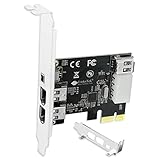
- 1. PCIE-1394A will allow users add 4X 1394A (3X 6Pin and 1X 4Pin) interface on Windows desktop PCs and industrial devices for 1394A devices data transfer. Help users light up old type 1394A devices on new PCs and import data from old device such and DV camcorders.
- 2. Supports IEEE 1394A FireWire 400 datalink protocol, each 1394A interface will get 400Mbps (50MB/S) max data transfer rate. Auto detect 1394A firewire devices and negotiates the connection speed to 100Mbps, 200Mbps, 400Mbps.
- 3. Compatible with IEEE 1394-1995, 1394a-2000, 1394A OHCI (Open Host Controller Interface) 1.1 standard interface devices, such as Digital Cameras, CD-ROM, DVD-ROM Drive, DV Camcorders, Hard Drives, Media Equipment, 1394A Video Devices, 1394A Audio Devices and Printers.
- 4. Plug and Play on Windows 98, 2000, 2003, XP, Vista, 7, 8, 8.1, 10, 11 (32/64bit) and Windows Server 2022, 2019, 2016, 2012R2, 2012, 2008R2, 2008, 2003R2, 2003 (32/64bit). Please NOTE: Due to setting issue, some PCs need to install Windows Legacy Driver.
- 5. PCIE 1.1 standard, PCIE X1 interface, will provide 2.5Gbps bandwidth for all 4-Ports 1394A card. PCIE 1.1 standard, will work on PCIE 1.0, 1.1, 2.0, 3.0, 4.0 standard. PCIE X1 interface, will works on PCIE X1, X2, X4, X8, X16 slot.
Focusrite’s Saffire guidance lists hot-plugging with a host port that may not comply with IEEE 1394, angled or reversed insertion, and low-quality or damaged cables among possible causes of FireWire chip failure. These are possible risk factors, not a diagnosis of your computer or cable.
Recommended Free Tools
What to do if the port stopped working
- Stop reconnecting suspect hardware. Do not keep trying a cable or device that may be damaged or shorting. Set aside any cable with a bent, loose, or visibly damaged connector.
- Check the scope of the symptoms. Note whether only one FireWire port stopped working or whether the computer also has other failures or instability. A single dead port is consistent with a localized PHY problem; broader symptoms need broader diagnosis.
- Record the setup. Identify the computer and peripheral models, the cable’s connector types, whether the peripheral is bus-powered or self-powered, and which devices were on when the connection was made. That information helps a technician assess the incident without repeatedly exposing hardware to a suspect connection.
- Arrange model-specific diagnosis if needed. If the port remains inoperative or the computer has other faults, ask a qualified repair provider to assess the port circuitry and the rest of the system. A port failure alone does not establish that the whole motherboard needs replacement.
How to reduce risk when connecting FireWire equipment
FireWire was designed to support hot-plugging, but that capability does not guarantee that every real-world port, cable, and connection is fault-free. Manufacturers give more conservative advice because implementation, contact angle, cable condition, and bus power can affect the risk.
Rank #3

- 1. PCIE-TSB43AB23 is a PCIE X1 interface to 3X 6Pin and 1X 4Pin IEEE 1394A ports expansion card. It is based on Texas Instrument TI TSB43AB23 PCIE to Firewire 400 host controller. Will provide better compatible experience on Windows OS PCs, Working Stations, Industrial Devices and MAC OS Desktop PCs for 1394A devices data transfer.
- 2. Supports FireWire 400 datalink protocol on each 1394A interface will be make sure users get 400Mbps (50MB/S) max data transfer rate. Auto detect 1394A firewire devices and negotiates the connection speed on 100Mbps, 200Mbps, 400Mbps.
- 3. Compatible with IEEE 1394-1995, 1394a-2000 and OHCI (Open Host Controller Interface) 1.1 standard interface devices such as Digital Cameras, CD-ROM, DVD-ROM Drive, DV Camcorders, Hard Drives, Media Equipment, 1394A Video Devices, 1394A Audio Devices and Printers.
- 4. 1. Plug and play on MAC OS 4.6 and later. 2.Plug and Play on Windows 98, 2000, 2003, XP, Vista, 7, 8, 8.1, 10, 11 (32/64bit) and Windows Server 2022, 2019, 2016, 2012R2, 2012, 2008R2, 2008, 2003R2, 2003 (32/64bit). NOTE: Due to setting issue, some PCs may need to install Windows Legacy Driver.
- 5. PCIE 1.1 standard, PCIE X1 interface, will provide 2.5Gbps bandwidth for all 4X 1394A ports. PCIE 1.1 standard, will work on PCIE 1.0, 1.1, 2.0, 3.0, 4.0 standard. PCIE X1 interface, will works on PCIE X1, X2, X4, X8, X16 slot. Full height bracket and low-profile bracket in the package, will works on almost all desktop PCs.
For its Saffire interfaces, Focusrite recommends turning off the computer and device before connecting, then turning on the device before the computer. For disconnecting, it advises shutting down control software and turning off the device first. Sound Devices likewise recommends connecting while both host and device are off, powering the FireWire device first, and starting the computer last. For bus-powered six-pin systems, it says to connect the cable before switching on the device and computer. Follow the instructions for the specific equipment you own where they differ.
Independent reader supportYour contribution helps us test, update, and keep practical guides available for everyone.Check the connector before replacing a cable
FireWire cables are not interchangeable just because both ends are FireWire. Apple’s legacy Logic Pro cable documentation describes 4-pin and 6-pin FireWire 400 connectors and a 9-pin FireWire 800 connector, including mixed-end cables. Check both devices’ ports and manuals before choosing a replacement. A new cable may address a damaged or mismatched cable, but it cannot be assumed to repair a PHY that has already been electrically damaged.
Rank #4

- 1. FS-FW400 is a PCIE X1 to 4 Ports firewire 1394A expansion card. Allow users add 3X 6Pin and 1X 4Pin 400Mbps max 1394A firewire ports on Windows and MAC OS desktop PCs, Light up 4X 1394A firewire devices which including 1394A industrial cameras, 1394A HDD storage enclosures, 1394A sound card and 1394A DV camcorders.
- 2. Based on Texas Instruments TI TSB43AB23 400Mbps 1394A firewire ports host controller and ASMedia AS1083 PCIE bridge controller will compatible with AMD, ARM, MAC and Intel hardware platform. Compatible with Sony, Panasonic, Cannon, Sharp, JVC and many other DV camcorders for digital video creating or editing.
- 3. PCI Express 1.1 standard, will provide 2.5Gbps total bandwidth. Fully compliant with IEEE 1394-1995, 1394A-2000 and OHCI (Open Host Controller Interface) 1.1 standards. Supports serial bus data transfer rates of 100Mbps, 200Mbps and 400Mbs. Supports up to 63 1394A devices connection.
- 4. Compatible System: 1. Plug and Play on Windows 11, 10, 8.x,7, Vista, XP, 2003, 2000, 98(32/64bit) and Windows Server 2003, 2003R2, 2008, 2008R2, 2012, 2012R2, 2016, 2019, 2022 systems. 2. Plug and Play on MAC OS X 8.6 and later versions systems. 3. Plug and Play on Linux kernels 2.4+ systems.
- 5. PCIE X1 interface, will works on PCIE X1, X2, X4, X8, X16 slot, do not work on PCI slot. The full height bracket mounted on this PCIE 1394A firewire expansion card, will works on standard size PCs. Low profile bracket in the package, will works on slim PCs.
For Mac owners, Apple’s port-identification support page, published September 22, 2026, identifies FireWire 400 and FireWire 800 and states that Mac support for FireWire connections requires macOS Sequoia 15 or earlier. Confirm the exact Mac, operating-system version, adapter chain, and peripheral before relying on a legacy FireWire setup.
Do these 3 things before closing this tab:
1Clear out junk files and repair common Windows errors2Fix the driver behind crashes, sound loss and screen glitches3Repair Windows errors before they cause bigger problemsQuick Recap
Product prices and availability are accurate as of the date/time indicated and are subject to change. Any price and availability information displayed on Amazon at the time of purchase will apply.

