
iTechGuides is reader-supported. When you buy through links on our site, we may earn an affiliate commission. As an Amazon Associate I earn from qualifying purchases. Learn more
A field management app helps coordinate work and information for people working away from an office, but the term covers several different jobs. Construction teams may need drawings, tasks and punch lists; service teams may need dispatch and work orders; asset operators may need inspections, GIS data and maintenance records. Start by identifying your workflow, then check offline access, field records, device support and connections to office systems.
What is a field management app?
A field management app is mobile software for coordinating tasks and capturing work information outside the office. Depending on the product, that can mean construction project coordination, technician dispatch and service work, or asset inspection and maintenance. These are related categories, not interchangeable workflows.
For example, Fieldwire describes its product as “the construction project management software that connects field and office and makes site coordination easier.” Its construction features include task management, plan viewing and markup, punch lists, forms, reports and offline mode. Fieldwire’s construction field management page also lists iPhone, iPad and Android platforms.
Choose an app by the work your team does
Construction coordination
Look for tools organized around projects, drawings and jobsite tasks. Useful capabilities can include plan viewing and annotation, task assignment, punch lists, forms, photos and reports. Fieldwire lists these kinds of functions for construction teams; that vendor description is evidence of its stated features, not independent proof of product performance.
#1 Best Overall

- Unrivaled Durability & Ultimate Protection: Built for tough work environments with rubber corner bumpers and high-strength plastic, this clipboard is built to endure the toughest environments, preventing accidental drops and impacts. With a real hinge and tight snap closure, it ensures unparalleled durability
- Internal Pen Pouch Organizer: Our storage clipboard features an extra nylon pouch inside, equipped with three compartments – two mesh pockets for smaller items and one larger pocket for bulkier essentials. Provide a place for your pens, calculator, sticky notes, ruler, or business cards
- Spacious yet Portable: Our letter-size clipboard stands out with ample storage for 8.5x11”/ a4 papers, maintaining its compact and portable design for enhanced convenience compared to legal size options
- Weather-resistant: Drawing on valuable voice from our users, we've removed the back hole to ensure water resistance. Say goodbye to worries about spills or unexpected weather - keep important internal documents safe and dry wherever your busy schedule takes you
- Versatile Performance: More than just a clipboard – it's a multi-functional work companion! Whether you're jotting down notes, signing contracts, or presenting proposals, this clipboard rises to every occasion with unmatched efficiency. Ideal for office, school, and home use
Technician dispatch and service work
Service teams generally need a workflow that follows a job from scheduling and dispatch through the technician visit, documentation and billing. Depending on the operation, check for work orders or service tickets, equipment and material tracking, time entry, purchase orders, customer information, signatures and invoice handling.
- FIELDBOSS describes mobile service tickets, equipment and material tracking, time tracking, purchase orders and offline mode. See its mobile field service management page.
- Trimble Viewpoint Vista describes mobile work orders, electronic signatures, invoice routing, custom forms, a dispatch board and a connection to its back-office accounting system. See Trimble’s field service and work order page.
- Acumatica describes a broader service workflow spanning scheduling, dispatch, service orders, technician activity, inventory, billing and customer information. See Acumatica’s field service management page.
Asset inspections and maintenance
For infrastructure, utilities or other asset operations, prioritize inspections, service requests, work orders, location data and compliance reporting. Trimble Unity Field describes these workflows, including GIS data, offline access and synchronization when connectivity is available. Its Unity Field mobile app page explains the vendor’s stated capabilities.
Rank #2

- Enhanced Durability with Reinforced Design – This clipboard features reinforced over-molded corners and real hinges, providing superior strength and long-lasting durability that can withstand tough environments and heavy daily use—an upgrade over standard clipboards
- Built-In Plastic Filing Pockets – In addition to providing a main compartment with ample space, it comes with a plastic folder with several slots to hold letter-size loose papers (8.5 x 11 inches), business cards, pamphlets, certificates, and important paperwork, keeping everything you need organized and secure in one place
- Triple-Hinge Pen Holder for Extra Stability – The pen holder features an innovative triple-hinge design, one more hinge than typical models, making the connection more secure and preventing breakage. This multi-hinge design ensures that the pen holder will stay intact and durable over time, even with frequent use
- Portable & Lightweight for On-the-Go Professionals – Even with its heavy-duty construction, this clipboard is lightweight and easy to carry, offering a level of portability that’s perfect for professionals on the go. Whether you're a teacher, contractor, nurse, or coach, this clipboard provides the perfect balance of strength and convenience—ideal for transporting between job sites, classrooms, or meetings
- Versatile Performance: More than just a clipboard – it's a multi-functional work companion! Whether you're jotting down notes, signing contracts, or presenting proposals, this clipboard rises to every occasion with unmatched efficiency. Ideal for office, school, and home use.
Compare the capabilities that affect field work
| What to compare | Questions to ask |
|---|---|
| Workflow fit | Does the app handle your actual work: construction coordination, technician service dispatch, or asset inspection and maintenance? |
| Mobile and offline behavior | Which devices and operating systems are supported? Which drawings, maps, work orders, forms and documents remain available offline? How are edits synchronized after reconnecting? |
| Field records | Can workers capture the records your jobs require, such as photos, forms, signatures, labor, materials, time and cost details? |
| Office connections | Does it connect to the accounting, ERP, inventory, customer, GIS or asset systems your organization already uses? |
| Operational visibility | Can dispatchers and managers see assignments, field updates and completion status in the systems they rely on? |
Verify offline access before relying on it
“Offline mode” does not by itself establish that every part of an app works without a connection. Before selecting a product, walk through a representative job with the vendor or in an evaluation environment: open the relevant records, capture changes, and reconnect to check how synchronization behaves.
- Identify exactly which records and documents must be available without service.
- Check whether maps, drawings, forms, photos and attachments are included in offline access, rather than assuming they are.
- Ask how the app handles conflicting edits or failed synchronization, and how workers can tell whether an update has reached the office.
- Confirm whether the offline workflow differs by device, product configuration or type of record.
Trimble Unity Field specifically describes offline access with synchronization when connectivity is available. FIELDBOSS and Fieldwire list offline mode, but the cited product descriptions do not establish the precise offline coverage or synchronization behavior for every record. Verify those details for the workflow you intend to use.
Rank #3

- Durable material: The clipboard shell is made of high quality aluminum. Makes stationery products wear-resistant, while high-quality aluminum has a good service life Our splint box has a waterproof surface, so don't worry the rain will invade the box.
- Easy to carry and store clipboard: stylish design, occupy a small space, you can easily put a backpack, large wallet, briefcase or other small space.
- Adequate internal storage: You can put learning stationery, work reports, books, mobile phones, etc. into box. Sufficient storage space makes it easier for you.
- External glossy WordPad: smooth, unobstructed surface, smooth writing, and large clasps to prevent file loss.
- Widely Use: The clipboard for classroom is suitable for offices, schools, hospitals, restaurants, workshop and any other settings. The A4 size clipboard can greatly help you improve work efficiency
Check device compatibility and documentation needs
Confirm the app’s current device and operating-system requirements before purchasing phones or tablets for a team. Fieldwire lists iPhone, iPad and Android support on its product page; that listing should not be treated as a guarantee for every device or operating-system version.
Then map the app’s field records to your reporting obligations. Construction crews may rely on drawings, task updates, forms and punch lists; service technicians may need work orders, time, parts and signatures; asset teams may need inspection results, GIS information and compliance reports. A feature list is useful only if it covers the records workers must actually complete and managers must review.
Rank #4
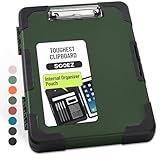
- Unrivaled Durability & Ultimate Protection: Reinforced with rubber corner bumpers and crafted from high-strength plastic, this clipboard is built to endure the toughest environments, preventing accidental drops and impacts. With a real hinge and tight snap closure, it ensures unparalleled durability
- Internal Pen Pouch Organizer: Our storage clipboard features an extra nylon pouch inside, equipped with three compartments – two mesh pockets for smaller items and one larger pocket for bulkier essentials. Provide a place for your pens, calculator, sticky notes, ruler, or business cards
- Spacious yet Portable: Our letter-size clipboard stands out with ample storage for 8.5x11”/ a4 papers, maintaining its compact and portable design for enhanced convenience compared to legal size options
- Water-resistant: Drawing on valuable voice from our users, we've removed the back hole to ensure water resistance. Say goodbye to worries about spills or unexpected weather - keep important internal documents safe and dry wherever your busy schedule takes you
- Versatile Performance: More than just a clipboard – it's a multi-functional work companion! Whether you're jotting down notes, signing contracts, or presenting proposals, this clipboard rises to every occasion with unmatched efficiency. Ideal for office, school, and home use
Evaluate integrations and the office handoff
List the systems that field data must reach, such as accounting, ERP, inventory, customer management, GIS or an asset register. Ask whether the connection is built in, requires configuration or depends on another service, and verify which information moves in each direction. A product’s connection to one back-office system does not establish compatibility with every system your organization uses.
What’s actually slowing this PC down?
Pick the symptom - the matching free tool is one click away.
Also trace a real job from assignment to completion: who assigns it, what the worker records, where updates appear, and how work completion supports follow-up such as billing or maintenance planning. This exposes handoff gaps that a mobile feature checklist alone can miss.
Best Value

- CLIPBOARD WITH INTERNAL STORAGE: This Contractor Clipboard provides a durable, portable working and writing surface with storage space below The internal storage compartment is secured by a convenient one-touch spring latch
- CONVENIENT DESIGN: The Flambeau Contractor Clipboard is designed to provide a portable workspace The board has a lightweight, ergonomic design so that you can easily carry it wherever your work takes you
- INTERNAL PEN POUCH: This heavy-duty clipboard features an internal organizational pouch for storage of pens and business cards so that you can keep all of your supplies with you on-the-go
- DURABLE CONSTRUCTION: This heavy-duty clipboard storage case is molded from a durable, high-impact plastic with protective over molded corners to withstand a long life of wear-and-tear
- PRODUCT SPECIFICATIONS: The Flambeau Contractor Clipboard measures 16 x 115 in Comes in a grey color with black protective over molded corners
A practical selection checklist
- Name the primary workflow. Decide whether the app is for construction project coordination, technician service work, or asset inspection and maintenance.
- Write down required field records. Include the drawings, work orders, forms, photos, signatures, time, labor, materials or compliance records the team must capture.
- Test a typical offline scenario. Check which content remains accessible and how updates synchronize after connectivity returns.
- Confirm devices and operating systems. Match current vendor requirements to the phones or tablets your team will use.
- Map office integrations. Verify that the app can exchange the necessary data with your accounting, ERP, inventory, customer, GIS or asset systems.
- Trace status visibility. Confirm that dispatchers and managers can see assignments, progress and completion where they need to work.
- Check current terms directly with vendors. Pricing, plan packaging, platform support and feature availability can change, so confirm them for your region and intended configuration.
What a field management app will not tell you by itself
Vendor feature pages can help identify whether a product claims to support a workflow, but they do not establish comparative savings, reliability or ease of use. No independently contextualized statistic is established here for the category. Treat performance claims as claims to validate against your own requirements rather than as a basis for choosing one app over another.
Quick Recap
Product prices and availability are accurate as of the date/time indicated and are subject to change. Any price and availability information displayed on Amazon at the time of purchase will apply.

