
What’s actually slowing this PC down?
Pick the symptom - the matching free tool is one click away.
iTechGuides is reader-supported. When you buy through links on our site, we may earn an affiliate commission. As an Amazon Associate I earn from qualifying purchases. Learn more
Fax-over-IP (FoIP) servers can reduce the cost and complexity of faxing by consolidating fax applications and endpoints onto an IP network, but they do not guarantee a fixed saving. Whether a deployment costs less depends on the fax traffic, existing lines and hardware, SIP service, licensing, migration, support, and reliability requirements. The key technical distinction is that T.38 relays fax data over IP, while G.711 can carry fax as audio; either approach works only when the endpoints and the entire network path interoperate.
How does fax over IP work?
Traditional fax uses T.30 procedures designed for analog telephone lines. FoIP carries fax communications across an IP network instead. A fax machine may connect through an analog telephone adapter (ATA) or gateway, while fax-server software or a multifunction printer may connect to an IP-PBX or SIP service. SIP signaling helps negotiate call capabilities; it does not by itself ensure that a fax will complete successfully.
Two common ways to carry the fax are T.38 relay and G.711 pass-through. T.38 is designed to relay fax information in real time over IP. G.711 transports the fax as audio, which can work in some configurations but has different network and endpoint requirements. Cisco documents both pass-through and T.38 relay call flows, and Dialogic’s comparison discusses how latency, packet loss, and jitter affect the choices. Support for fax parameters such as V.34 and ECM also varies among gateways.
Think of compatibility as an end-to-end path: fax endpoint, ATA or gateway if present, PBX or session border controller (SBC), SIP signaling, and trunk provider. A standard or a device’s certification with one provider establishes neither universal compatibility nor reliable delivery over every route.
#1 Best Overall

- Right Click or print with CimFAX virtual printer to send fax on Windows computer. Receives fax 24/7. Easy-to-use software.
- Drag and Drop to send fax on Mac computer. Pop-up notification for incoming fax.
- One Tap to send fax on your smart phone. Remote access. Fax anytime anywhere.
- Automatically save fax on local/network shared folder as PDF. Automatically send incoming fax to your email as PDF file.
- Schedule to send fax; Auto resend when sending fails; Faxing status synchronized on all workstations; Fax in high quality high speed; DHCP enabled, easy to set up.200 users licensed; 1 CimFAX > 200 fax machines; 16GB memory stores up to 320,000 pages
T.38 versus G.711 fax over SIP
| Approach | What it does | What to verify |
|---|---|---|
| T.38 relay | Relays fax information over IP rather than carrying it as ordinary voice audio. | Confirm T.38 support and configuration at the fax endpoint or gateway, PBX/SBC, and SIP provider; check the fax features your devices need. |
| G.711 pass-through | Carries fax as audio over an IP voice path. | Confirm that all equipment and the provider support the intended pass-through configuration and that network conditions are suitable. |
Neither method is universally best. Avaya’s IP Office Manager 12.2 documentation, updated September 23, 2026, describes T.38 Fax over SIP support on IP500 V2 in standalone or expansion-gateway configurations and G.711 support on Linux servers. For that product, it says T.38 transport and Direct Media are mutually exclusive on a SIP line. It also notes that a Super G3 environment may call for G.711 because T.38 cannot encode Super G3, while T.38 may offer redundancy benefits on a network that supports it. These are product- and version-specific details, not general rules for every PBX.
The standards layer describes capabilities; actual results depend on implementations and the full call path. RFC 6913 defines a SIP media feature tag for fax capability, but signaling a capability is not a substitute for confirming the provider’s behavior and testing the complete configuration.
Three ways to deploy FoIP
| Deployment | Best fit | Key checks |
|---|---|---|
| IP-PBX with ATAs and other endpoints | An office with multiple fax devices or a PBX already serving analog equipment, fax servers, or multifunction printers. | Check which analog devices need ATAs, supported fax modes across the PBX and trunk, port capacity, administration, and redundancy. |
| Fax server registered directly to a SIP service | A dedicated fax deployment that can connect without an intermediary PBX. | Verify that the server’s T.38 implementation and registration method are supported by the SIP provider, and confirm channels, failover, and operational support. |
| Analog fax machine connected through an ATA | A one-for-one replacement path for an existing analog machine where the provider supports the exact ATA and service configuration. | Confirm the machine, ATA model and firmware, T.38 or G.711 behavior, provider settings, ECM and speed needs, and the number of simultaneous calls supported. |
A multi-port FXS gateway can connect several analog devices, while an ATA is typically used for one or a small number of analog endpoints. A fax server is software or a server-side system, not a physical adapter; it may centralize fax workflows but is not automatically a replacement for every analog fax machine or line.
Rank #2

- Right Click or print with CimFAX virtual printer to send fax on Windows computer. Receives fax 24/7. Easy-to-use software.
- Drag and Drop to send fax on Mac computer. Pop-up notification for incoming fax.
- One Tap to send fax on your smart phone. Remote access. Fax anytime anywhere.
- Automatically save fax on local/network shared folder as PDF. Automatically send incoming fax to your email as PDF file.
- Schedule to send fax; Auto resend when sending fails; Faxing status synchronized on all workstations; Fax in high quality; 1GB memory stores up to 20,000 pages; DHCP enabled, easy to set up.
Will my fax machine work on a SIP trunk?
Possibly, but the answer depends on the exact fax machine, ATA or gateway, PBX/SBC (if used), SIP trunk, and configuration. Ask the carrier which fax transport it supports, whether it offers T.38 and/or G.711 pass-through, how it handles fallback, and which device variants it has tested. Then validate representative inbound and outbound faxes—including the largest documents and modes your organization actually uses—before retiring analog lines.
Provider-specific compatibility lists are useful leads, not universal endorsements. T38Fax’s device page, for example, names Grandstream HT801 V2/HT802 V2 and HT812, Cisco ATA 191/192 MPP variants, Poly ATAs, AudioCodes MediaPack MP11X, and Grandstream GXW4004/GXW4008 among devices for its service. The page specifically limits its Cisco certification to MPP variants, illustrating why exact suffixes matter. A different SIP carrier may support a different set of models or settings.
The same provider lists fax-server products including OpenText RightFax, HylaFAX Enterprise, GFI FaxMaker, XM Fax, Biscom FAXCOM, Esker Fax, Zetafax, and FaxFinder IP, plus Dialogic SR140 and XCAPI components. Its separate server article, updated June 5, 2025, names additional implementations and says its service supports standard SIP/T.38. Treat these as vendor-reported compatibility information, not independent rankings or confirmation of current licensing; check with the product vendor and carrier before committing.
Rank #3
- Right Click or print with CimFAX virtual printer to send fax on Windows computer. Receives fax 24/7. Easy-to-use software.
- Drag and Drop to send fax on Mac computer. Pop-up notification for incoming fax.
- One Tap to send fax on your smart phone. Remote access. Fax anytime anywhere.
- Automatically save fax on local/network shared folder as PDF. Automatically send incoming fax to your email as PDF file.
- Schedule to send fax; Auto resend when sending fails; Faxing status synchronized on all workstations; Fax in high quality; 2GB memory stores up to 40,000 pages; DHCP enabled, easy to set up.
Can a fax server replace analog fax lines?
A fax server can centralize fax handling and connect through an IP-PBX or directly to a compatible SIP service, potentially reducing the number of separate analog connections. Whether it can replace the lines in a particular office depends on how users send and receive faxes, whether existing machines must remain, how many concurrent channels are needed, and the organization’s continuity requirements.
Free tools Windows power users keep installed
One-click scans. No signup required.
- Keep analog devices: Use an ATA or multi-port gateway where appropriate, after confirming each device and path.
- Centralize faxing: Use server software and a supported SIP connection if the organization can move fax workflows to managed applications or connected multifunction printers.
- Retain a fallback where needed: Decide how critical fax delivery is and whether redundancy or an alternate route is required before removing existing service.
Consolidation can shift costs rather than eliminate them: a lower line count may come with SIP charges, server or gateway expense, software licensing, support work, and migration effort. Do not cancel existing service until end-to-end tests and the recovery plan are complete.
Where the savings can come from—and how to estimate them
Dialogic identifies several possible cost mechanisms: centralizing fax servers and applications, running server workloads on virtual machines, reducing administration across sites, and toll bypass when distant offices use centralized fax resources over a corporate IP network. These are categories to investigate, not a guarantee of lower total cost.
Rank #4
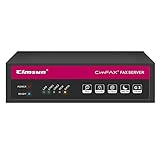
- Right Click or print with CimFAX virtual printer to send fax on Windows computer. Receives fax 24/7. Easy-to-use software.
- Drag and Drop to send fax on Mac computer. Pop-up notification for incoming fax.
- One Tap to send fax on your smart phone. Remote access. Fax anytime anywhere.
- Automatically save fax on local/network shared folder as PDF. Automatically send incoming fax to your email as PDF file.
- Schedule to send fax; Auto resend when sending fails; Faxing status synchronized on all workstations; Fax in high quality; 8GB memory stores up to 160,000 pages; DHCP enabled, easy to set up.
Dialogic also reports a vendor-conducted test between two locations over a SIP trunk: a 15-page document took ten minutes using T.38 V.17 and six seconds using T.38 IAF. The source does not state a publication year. This comparison is between two transmission modes in that test; it is not a general FoIP-versus-PSTN speed study or evidence of a particular cost saving.
Build a local, like-for-like estimate using the costs that would actually change:
Recommended Free Tools
- Current analog line rental, usage, and long-distance charges.
- Fax traffic volume and the number of simultaneous channels required.
- ATA, gateway, server, or virtual-machine costs, including replacement and redundancy.
- Fax-server software and support licensing, plus SIP trunk and per-channel charges.
- Implementation, testing, staff time, and ongoing administration.
- Resilience requirements, including backup connectivity and the cost of any retained analog service.
Compare the total over the same period and state the geography and assumptions, since telecom pricing and service availability vary. No current, comparable cost study in the cited sources establishes an ROI across analog fax, cloud fax, and self-managed FoIP.
Best Value

- Supports 2 SIP profiles through 2 FXS ports and a single 10/100Mbps port
- TLS and SRTP security encryption technology to protect calls and accounts
- Automated provisioning options include TR-069 and XML config files
- LED indicators - POWER, NET, PHONE1, PHONE2 Supports 3-way voice conferencing Failover SIP server automatically switches to secondary server if main server loses connection
- Supports T.38 Fax for creating Fax-over-IP
Choosing the right equipment and service
Start with the architecture, not a product list. A single analog machine points toward an ATA; several analog machines may require a multi-port FXS gateway; a centralized workflow may need fax-server software or a supported server-side T.38 component. Then confirm the exact hardware variant, channel count, server requirements, current licensing, and provider configuration. A device described as compatible with one carrier should not be assumed to work with another.
Before migration, ask the SIP provider and equipment vendors to confirm the complete call path in writing where possible. Test inbound and outbound faxes, the required fax speeds and error-correction behavior, failover, and the number of concurrent sessions under the intended setup. If a PBX feature such as Direct Media affects fax transport, check the documentation for that exact product and version.
Quick Recap
Product prices and availability are accurate as of the date/time indicated and are subject to change. Any price and availability information displayed on Amazon at the time of purchase will apply.
The Tool Desk
Outbyte PC Repair FREERepair Windows errors before they cause bigger problemsFix Now →Outbyte Driver Updater FREEFix the driver behind crashes, sound loss and screen glitchesFind Drivers →
