
Recommended Free Tools
iTechGuides is reader-supported. When you buy through links on our site, we may earn an affiliate commission. As an Amazon Associate I earn from qualifying purchases. Learn more
To download Toyota’s phone app, install the official Toyota App from the Apple App Store or Google Play, sign in or register, then tap Add Vehicle. That download does not automatically install or unlock navigation in your Toyota: built-in Cloud Navigation is part of Drive Connect and is available only on select vehicles with an active trial or subscription.
Download and set up the Toyota App
- On an iPhone, open the Apple App Store. On an Android phone, open Google Play.
- Search for Toyota App and install Toyota’s official app. Toyota’s app FAQ instructs users to “Download and install the latest version of the Toyota App by visiting the App Store or Google Play.” See Toyota’s app FAQ.
- Open the app and choose Register, or sign in with an eligible existing account. Toyota lists My Toyota, Lexus Drivers, and SmartPath credentials as sign-in options on its app FAQ.
- Choose Add Vehicle and follow the prompts to connect your vehicle to the account.
- To check or activate eligible Connected Services, open the vehicle’s service details in the app and follow the available prompts. Toyota says an eligible Drive Connect trial can be activated during registration and vehicle addition.
Toyota describes the app as a free download and says it supports Toyota models from 2010 onward. That does not mean every connected feature works on every supported model. Device requirements, app availability, and vehicle functions may vary; check the current app-store listing and your vehicle’s Connected Services information.
Which Toyota navigation option do you need?
There are three different routes to consider. The Toyota App is a phone app for managing your account and vehicle-connected features; it is not itself an installation of built-in car navigation.
Free tools Windows power users keep installed
One-click scans. No signup required.
| Option | Where navigation runs | What to know |
|---|---|---|
| Toyota App | On your smartphone | Free download; sign-in and vehicle setup are needed for account and vehicle features. Availability varies by vehicle. [c001] [c003] |
| Drive Connect Cloud Navigation | In the Toyota multimedia system | Requires an active trial or paid subscription and is offered on select 2022-and-newer vehicles. Confirm eligibility for the specific vehicle. [c002] [c004] |
| Apple CarPlay or Android Auto | Compatible phone apps displayed through the vehicle multimedia system | Requires a compatible phone and Toyota system; support depends on the vehicle and phone. [c005] |
How to get Toyota’s built-in Cloud Navigation
Toyota’s in-car Cloud Navigation is part of Drive Connect, which also includes Destination Assist and Intelligent Assistant. It is not a separate map app that you download to your phone. Toyota describes Drive Connect as available on select 2022-and-newer vehicles, with an active trial or paid subscription required. Eligibility and service details are vehicle-specific, so do not assume that a particular model year alone qualifies.
#1 Best Overall

- Latest 2025 Navigation Update SD Card: Keep your drives accurate with the newest 86271 0e077 navigation sd card, with built-in GPS providing updated coverage across the USA and Canada, including highways, POIs, gas stations, restaurants, and speed limit changes
- Compatible with Select Toyota Models 2014-2018: This 2025 Toyota navigation sd card update works only with factory-installed Toyota GPS systems for 4 Runner (2014-2018), Avalon (2015-2018), Camry/Camry Hybrid (2014-2017), Corolla (2014-2018), and Highlander/Highlander Hybrid (2014-2018). Important notes: It is NOT compatible with 11.6 inch vertical screens and does NOT fit any Lexus models
- Extended Toyota Vehicle Compatibility: Fits for Toyota Mirai (2016-2018), Prius (2016-2018), Prius C (2015-2018), Prius V (2015-2017), RAV4 (2014-2018), Sequoia (2014-2018), Sienna (2015-2017), Tacoma (2014-2018), Tundra (2014-2018), and Venza (2015-2016)
- Plug and Play Navigation Map Updates: Insert the micro sd card into the Toyota navigation slot, start the engine and wait for automatic map loading. Do not turn off your vehicle during setup. Your upgraded maps for navigation are ready to guide your trip
- Reliable Navigation Update SD Card Storage: This durable 86271 0e077 micro sd card ensures smooth data transfer, quick map loading, and stable navigation. Note: The 2025 card uses 2024 map data for timely production and release. All GPS cards are usually 6 to 12 months behind
- In the Toyota App, open the vehicle’s Connected Services details and check whether Drive Connect is available.
- Consult the owner’s manual for the exact vehicle’s multimedia and connected-service support.
- If the vehicle is eligible, follow Toyota’s prompts to activate the available trial or subscription. Terms can change, so check the current details shown for your vehicle.
Toyota’s Drive Connect information describes the service, while its Connected Services guidance explains how to check vehicle-specific eligibility.
Send a destination from the Toyota App to the car
Send to Car is a way to pass a destination from the app to an eligible vehicle; it is not an offline map download. Toyota says the vehicle uses Cloud Navigation for this workflow, so Drive Connect is required.
Rank #2

- 【Wireless Apple Carplay & Android Auto】Enjoy seamless wireless carplay and android auto connectivity for your phone's music, map navigation, messages, hands-free Phone Call etc. This portable CarPlay screen for car ensures smooth voice control and effortless integration, making it a versatile car tablet for daily commutes
- 【OTA Updates】Keep your device up to date with over-the-air firmware updates, so you’re always one step ahead. This wireless CarPlay screen automatically pushes new system updates, ensuring long-term compatibility between your phone and Apple CarPlay, Android Auto, and other in-car electronics
- 【Phone Mirroring Link & Four Audio Outputs】This 9-inch CarPlay screen supports mirroring for both iOS and Android phones. The double-DIN car stereo integrates CarPlay functionality while supporting Bluetooth audio, built-in speakers, FM radio, and an AUX port. Enjoy clear, stable music even in noisy environments. Connecting your phone via Bluetooth to the car's Bluetooth system for audio playback through the car speakers is the optimal choice
- 【Real-time GPS Navigation & Backup Camera】The portable Apple carplay screen provides accurate real-time location and GPS navigation without delay when connected to your phone. Allows you to use popular mapping apps such as Google Maps and Waze to provide real-time navigation ( phone connection required). The backup camera accurately and clearly records your entire driving journey, providing you with comprehensive safety protection
- 【Vivid IPS Touchscreen】With a 1280 x 720 resolution, Featuring 550 cd/m² brightness, 1000:1 contrast ratio, and 16.7 million colors, this car tablet reduces glare and offers 18% brighter visuals. Its vibrant, tablet-like display stands out from standard car screens, enhancing visibility for navigation and multimedia
- In the Toyota App, open My Destinations and search for a destination.
- Open the destination’s details and choose Send to Car.
- Use the vehicle’s multimedia system to access the destination through Cloud Navigation.
If the Send to Car option or destination does not work, check the vehicle’s Connected Services details and Drive Connect status. Toyota’s Connected Services guidance covers the feature.
Use phone navigation through the Toyota screen
If Drive Connect is not available for your vehicle, Apple CarPlay or Android Auto may let you use supported phone navigation apps through compatible Toyota multimedia systems. Compatibility varies by Toyota model and phone, so check Toyota’s vehicle-specific support information before relying on it.
Rank #3

- Notice ▶Some car models only support 480P pixel input so the picture will not be as clear as compared to the OEM system.In addition, please check the product details to confirm if your car model is within the acceptable range. If you are unsure, please contact us via Amazon email.(*Not compatible with Lexus )
- Vehicle Compatible ▶Compatible with Toyota 2014-2019 with Touch 2 & Entune2.0(Highlander/RAV4/4Runner/Tundra/Tacoma/Camry/Corolla/Avalon/Prius/CH-R/Sienna 2014-2019 etc.) Not compatible with Corolla 86140-02540 Fujitsu with 7" display and the 4runner with Pioneer host/Prius w/ 11.6" screen equipped models/RAV4 86100-42241.
- Wireless CarPlay/Android Auto ▶The AUTOABC Carplay/Android Auto adapter for TOYOTA can add Carplay/Android functionality to your car,allows you to access map navigation, phone contacts, email, notifications, music and more with the help of an intelligent voice assistant. While keeping your hands free, realize completely safe driving operation.
- Original Car Function Support ▶This Carplay/Android Auto adapter supports your original car knob controls and your original steering wheel button controls, while retaining all the functions of the original console. Such as voice control, real-time navigation, calling function, music function, sending and receiving messages, etc.
- Mirror Projection ▶Support mirror projection for iPhone, synchronize your smartphone to car audio and enjoy more features such as Netflix movies, YouTube videos, maps, etc.
- Android Auto: Toyota’s cited guidance says Android Auto is built in on Android 10; Android 9 and earlier requires downloading Android Auto. Requirements may change, so check the current setup guidance for your phone and vehicle.
- Apple CarPlay: Follow Toyota’s model-specific setup instructions. Toyota warns not to attempt setup while driving.
See Toyota’s Apple CarPlay and Android Auto guidance for compatibility and setup details.
Independent reader supportYour contribution helps us test, update, and keep practical guides available for everyone.Availability and regional limits
This guide reflects Toyota USA information. Availability, app-store requirements, service terms, and supported vehicles may differ outside the United States and can change over time. Toyota’s cited pages do not establish a complete model-and-trim eligibility list or current minimum iOS and Android versions. For the most reliable answer, check the app-store listing for your phone and the Connected Services information tied to your vehicle.
Quick Recap
Best Value

- 🚗 Perfect Fit for Your Toyota RAV4 Designed exclusively for the Toyota RAV4 2013-2018 models(With JBL or not), this stereo seamlessly replaces your factory unit—preserving the original look while unlocking smart features. Confused about fit? Send us a photo of your dash—we’ll help confirm!
- ⚡ Fast & Smooth Like Your Tablet Experience Android 15 with 4GB RAM + 64GB storage. Switch between maps, music, and calls without lag. Connect to Wi-Fi, download apps, stream videos—it’s like having an iPad built into your dash.
- 📱 Wireless CarPlay & Android Auto — Go Cord-Free! Jump in and your phone instantly connects. Access maps, playlists, and messages wirelessly. Use voice commands (”Hey Sir” or ”OK Google”) to keep your hands on the wheel and eyes on the road.
- 🎵 Crystal-Clear Calls & Wheel Controls Bluetooth 5.2 ensures crisp calls through your car speakers. Plus, retain your steering wheel buttons to adjust volume, skip tracks, and answer calls—safety and convenience in one.
- 📍 Built-In GPS with Live Navigation Preloaded offline maps guide you even without signal. Find gas stations, restaurants, and parks easily. Add your favorite apps like Waze or Google Maps via Wi-Fi for real-time traffic updates.
Rank #4
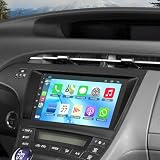
- 【Applicable Models】The car stereo is suitable for Toyota Prius 2010-2015, easy to install and operate. (If your car has original JBL system or amplifier, this radio will not fit it.) Please check the year, dimensions and shape of the center console of your vehicles before purchasing. If you are not sure, you can send messages or picture to us, we will give you advice
- 【Powerful Functions】Our Android 13.0 car audio receivers with 9 inch IPS Touch Screen built-in 4G RAM + 64G ROM, ensures smooth operation and faster response,support CarPlay, Android Auto, GPS navigation, Bluetooth5.2, FM radio, EQ Settings, WiFi Connection, Backup Camera, USB, multi-format music player, 1080p video player, video and audio output, AUX audio and video input, external microphone, steering wheel control.
- 【Wireless Carplay and Android Auto】This Toyota Prius Upgrade Replacement is compatible with wireless/wire apple CarPlay and Android Auto, you can make calls hands-free with the help of Siri or Goo-gle assistance, easy to get phone contacts, emails, notifications, map navigation, music, videos and more. It means that you can focus more on road safety while driving!
- 【Bluetooth Function& Steering Wheel Control】This Bluetooth5.2 radio supports answering/ making Bluetooth phone calls with hands-free. The built-in microphone picks up your voice and your car speaker can help you hear the person on the other side clearly. Use the steering wheel buttons to control the car audio, which is more convenient for operation and safer for driving.
- 【GPS Navigation & WIFI】The GPS Navigation Head Unit built-in GPS module and external GPS antenna for online or offline map navigation. Offline map data preload, ready to use after installation,includes voice and visual turn-by- directions 11 million+ POI library, 2D & 3D routes, fuel tracker. this car radio also supports WIFI Hot-spot connection, you can easily access and download online navigation apps, Instagram, Facebook, TikTok, etc on Play store.
Product prices and availability are accurate as of the date/time indicated and are subject to change. Any price and availability information displayed on Amazon at the time of purchase will apply.

