
iTechGuides is reader-supported. When you buy through links on our site, we may earn an affiliate commission. As an Amazon Associate I earn from qualifying purchases. Learn more
The Dough Spectrum One is a 27-inch 4K, 144Hz IPS monitor built to serve both gaming and desk work. Its versatile ports and three finish choices strengthen that all-purpose pitch, but the right finish depends on your room, and 144Hz is not the highest refresh rate available for competitive play. Dough’s specifications describe what the monitor is designed to deliver; they are not independent test results.
Is the Dough Spectrum One good for gaming and work?
For someone who wants one 27-inch display for detailed desktop work and high-refresh-rate gaming, the Spectrum One’s core combination is appealing: 3840 × 2160 resolution, an IPS panel and a maximum 144Hz refresh rate. Dough lists a 48–144Hz frequency range and support for VESA Adaptive-Sync, NVIDIA G-SYNC Compatible and AMD FreeSync Premium Pro. These are manufacturer specifications and certification claims, not results from independent measurements. Dough’s product page also lists DisplayHDR 600; that label alone does not establish how bright or convincing HDR looks in practice.
Running games at 4K and high frame rates can demand substantial performance from a gaming PC. The monitor can display up to 144 frames per second, but your system must render frames at that pace to make full use of its refresh rate. Consoles and games also vary in their supported resolutions and frame rates, so the monitor’s maximum does not guarantee that every game will run at 4K/144Hz.
Windows Errors? Fix Them Before They Spread
Repair common Windows errors and clear accumulated junk for a smoother, more stable PC - no reinstall needed.Free scan · no reinstallOutdated Drivers Are Slowing You Down
One free scan finds every outdated or missing driver and matches the right update for your exact hardware.Free scan · exact hardware matchDough specifies a 1ms gray-to-gray overdrive response time. The manual describes the IPS panel, adaptive sync and factory calibration, and says a calibration report is included for DCI-P3 color accuracy. Those are Dough’s claims; no independent response-time, color-accuracy, input-lag, brightness or panel-uniformity measurements are established here. The manufacturer’s manual describes IPS as producing “rich on-screen colors and creates better viewing angles”; “rich” is promotional wording, not a measured result. The Spectrum One manual provides the maker’s technical descriptions.
#1 Best Overall

- Stunning Visuals: The 27" IPS panel is factory calibrated for a Delta E 0.6 average accuracy, delivering 1.07 billion colors that cover 98% of the DCI-P3 and 100% of the sRGB gamut. HDR10 support with a 10 million:1 dynamic contrast ratio enhances photos and videos with lifelike highlights and deep shadows. Designed for anything and everything.
- Adaptive Sync Technology: Support for AMD FreeSync Premium Pro technology with NVIDIA G-Sync and VESA Adaptive-Sync compatibility enables the monitor to dynamically adjust its refresh rate to the frame rate being output by the graphics card, thereby greatly reducing screen tearing, stuttering, and other artifacts.
- High-Speed Ports: Two HDMI 2.1 ports are available alongside one DisplayPort 1.4 input for high-bandwidth connections to compatible devices. This display can display video from two separate sources in split screen mode. The integrated USB 3.2 Gen 2 hub includes two side-facing USB-A and one USB-C port, each of which supports up to 10 Gb/s transfers with compatible devices. Plug a pair of headphones into the 3.5mm audio jack for listening privacy.
- Single Cable Connection: Reduce desktop clutter by connecting your compatible laptop to the USB-C 3.2 Gen 2 port, which lets you transfer video, data, and up to 100W of power over a single cable.
- Gaming Features: Pixel-perfect upscaling uses integer-ratio pixel duplication for low-resolution input signals to maintain the look of pixel art and keep retro games looking crisp. A crosshair overlay assists your aim and gives a competitive advantage. A Frame rate counter overlay shows you how well your system is performing. Presets tuned by Blur Busters offer strong performance straight out of the box.
Who should consider it?
- Mixed-use gamers and desk workers: 4K resolution gives you room for detailed work, while 144Hz is a high refresh-rate ceiling for gaming.
- Competitive players focused on maximum speed: iMore notes that super-competitive gamers may prefer a display with a substantially higher refresh rate. iMore’s review also says the monitor’s presentation can be striking in a suitable environment, but may not suit every workspace or gaming setup.
- Buyers prioritizing proven image performance: check for independent measurements of the specific finish and model you are considering; the specifications above do not substitute for them.
Should you choose matte, glossy or Gorilla Glass?
Dough’s Spectrum One line is offered in matte, glossy and Gorilla Glass finishes. The central feature set is shared across versions, according to iMore; the display finish is the main distinction. Neither glossy nor Gorilla Glass is categorically better: the useful choice is the one that suits your room and your tolerance for reflections.
| Finish | Practical consideration |
|---|---|
| Matte | A finish option to consider if reflection control matters in your workspace. The available sources do not provide comparative glare measurements. |
| Glossy | Can suit a controlled-lighting room, but reflections may be distracting if bright windows, lamps or objects sit in the viewing area. |
| Gorilla Glass | A distinct finish option in the current product line. The available sources do not establish that it is categorically sharper, better-looking or more glare-resistant than the alternatives. |
Before choosing, consider window placement, lamps, bright objects behind you and whether you prefer a glossier presentation enough to accept possible reflections. Dough’s manual recommends controlling room lighting and avoiding bright surfaces or direct light sources that interfere with viewing. That guidance is especially relevant if your desk faces a window or a lamp is reflected in the screen. Neither the manual nor the cited review provides an independent, side-by-side measurement of finish glare or image quality.
Rank #2

- Stunning Visuals: The 27" IPS panel is factory calibrated for a Delta E 0.6 average accuracy, delivering 1.07 billion colors that cover 98% of the DCI-P3 and 100% of the sRGB gamut. HDR10 support with a 10 million:1 dynamic contrast ratio enhances photos and videos with lifelike highlights and deep shadows. Designed for anything and everything.
- Adaptive Sync Technology: Support for AMD FreeSync Premium Pro technology with NVIDIA G-Sync and VESA Adaptive-Sync compatibility enables the monitor to dynamically adjust its refresh rate to the frame rate being output by the graphics card, thereby greatly reducing screen tearing, stuttering, and other artifacts.
- High-Speed Ports: Two HDMI 2.1 ports are available alongside one DisplayPort 1.4 input for high-bandwidth connections to compatible devices. This display can display video from two separate sources in split screen mode. The integrated USB 3.2 Gen 2 hub includes two side-facing USB-A and one USB-C port, each of which supports up to 10 Gb/s transfers with compatible devices. Plug a pair of headphones into the 3.5mm audio jack for listening privacy.
- Single Cable Connection: Reduce desktop clutter by connecting your compatible laptop to the USB-C 3.2 Gen 2 port, which lets you transfer video, data, and up to 100W of power over a single cable.
- Gaming Features: Pixel-perfect upscaling uses integer-ratio pixel duplication for low-resolution input signals to maintain the look of pixel art and keep retro games looking crisp. A crosshair overlay assists your aim and gives a competitive advantage. A Frame rate counter overlay shows you how well your system is performing. Presets tuned by Blur Busters offer strong performance straight out of the box.
Can you connect a gaming PC, console and laptop?
Dough lists two HDMI 2.1 inputs, one DisplayPort 1.4 input and one USB-C input. That gives a typical multi-device desk several options for video connections, but the actual resolution and refresh rate available depend on the connected device, cable and supported signal modes. The monitor also has a built-in USB hub.
| Connection | Manufacturer-listed capability | What to check |
|---|---|---|
| 2 × HDMI 2.1 | Video inputs | Confirm the console or PC output and cable support the video mode you intend to use. |
| 1 × DisplayPort 1.4 | Video input | Check the graphics card, cable and selected resolution/refresh combination. |
| 1 × USB-C | DisplayPort 1.4 video, USB data and USB Power Delivery up to 100W | Verify the laptop supports video over USB-C, use a capable cable, and check that up to 100W meets its power needs. |
| USB hub | Downstream USB connections; the manual says the hub can connect to a host via USB Type-B or USB Type-C | For hub access, connect the monitor to the host using one of the supported upstream connections. |
A compatible laptop can use USB-C for display, audio, hub access and power, according to the manual; Best Buy’s matte-model listing also describes USB-C display and hub use while charging a laptop. The one-cable experience is not universal: host-device video support, cable capability and laptop power demand all matter. A laptop that needs more than 100W may not receive its full required charging power from the monitor.
Rank #3

- Adjustable Backlight strobing reduces eye-tracking motion blur and increases the clarity of objects that move quickly across the screen
- Adjustable Overdrive lets you balance high-speed performance and image quality to best suit your needs. The Pre-sets have been tuned by Blur Busters for great performance straight out of the box.
- Pixel-perfect upscaling, using integer-ratio pixel duplication for low-resolution input signals, maintains the iconic look of pixel art and keeps retro games looking crisp.
- The USB Type-C port lets you connect the monitor and its built-in USB hub to your mobile device with a single cable while also charging it at up to 100W. Required cable types (HDMI 2.1 / DisplayPort 1.4 or certified USB-C alt-mode cable). Supported resolutions and refresh rates per input port.
- User-upgradable firmware allows development to tweak existing features and unlock new ones
What should you check before buying?
Price, stock and bundled items can vary by seller, model and finish. Dough’s Spectrum One collection page displayed “from $349” and marked the collection in stock when accessed on September 30, 2026. Treat that as a time-specific store-page snapshot, not a guaranteed current price or an offer from another retailer. Check Dough’s live Spectrum One collection page for current availability and configuration.
The product family includes models ES07D03, ES07DC9 and ES07E30 in Dough’s support documentation; Best Buy identifies its matte listing as ES07D03. Check the model and finish in the listing rather than assuming every Spectrum One page refers to the same configuration. The Best Buy matte listing is a retailer-specific listing, not evidence of terms across other sellers.
Rank #4
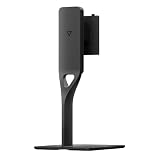
- Ergonomic Vertical Adjustment: Features a versatile vertical tilt mechanism that allows you to angle your monitor 7 degrees downward or 23 degrees upward, enabling you to find the perfect viewing angle that reduces neck strain and enhances comfort during extended work sessions or gaming marathons
- Full Rotation Capability: Equipped with comprehensive landscape rotation functionality that supports 90 degrees left and 90 degrees right movement, providing complete flexibility to switch between landscape and portrait orientations for optimal viewing of different content types and multitasking scenarios
- Dough Spectrum Compatibility: Specifically designed as the official monitor stand for the Dough Eve Spectrum display, ensuring seamless integration and perfect fit with your premium monitor while maintaining the sleek aesthetic of your desktop setup
- Enhanced Workspace Organization: Elevates your monitor to an optimal viewing height while creating valuable desk space underneath for storing keyboards, documents, or other accessories, helping you maintain a clean and organized workstation
- Stable Desktop Design: Constructed with a robust base that provides reliable support for your monitor while allowing smooth adjustment movements, ensuring your display remains securely positioned at your preferred angle throughout daily use
- Confirm the exact finish and model number.
- Review the seller’s live price, stock, warranty, return policy and included cables.
- Check whether a stand is included or optional for that configuration; Dough’s retailer copy describes an optional stand, and the manual confirms VESA-compatible mounting.
- If you plan to use a monitor arm, verify its fit and the specific monitor’s mounting requirements before ordering.
Dough’s collection page also showed a refurbished option described as repaired returns or warranty units that may have minor cosmetic imperfections and a limited one-year warranty. That description is specific to the page and can change, so read the live terms for the unit you intend to buy.
What does the firmware history tell you?
Dough’s support page lists a scaler firmware Beta 03 entry dated July 31, 2024, for models ES07D03, ES07DC9 and ES07E30. Its changelog says the update addressed occasional black-screen blanking, a standby power issue, color-space retention and intermittent video-signal detection, and reports faster wake and source detection. This is a documented firmware-history entry; it does not show that every unit has these problems, nor does it establish that Beta 03 is the current recommended firmware. If firmware is a concern, check the support information for your exact model and its installed version before attempting an update. Dough’s product and support page lists the documentation.
Quick Recap
Product prices and availability are accurate as of the date/time indicated and are subject to change. Any price and availability information displayed on Amazon at the time of purchase will apply.

