
Do these 3 things before closing this tab:
1Repair Windows errors before they cause bigger problems2Fix the driver behind crashes, sound loss and screen glitches3Clear out junk files and repair common Windows errorsiTechGuides is reader-supported. When you buy through links on our site, we may earn an affiliate commission. As an Amazon Associate I earn from qualifying purchases. Learn more
The Dell UltraSharp UP2718Q is a 27-inch 4K IPS monitor aimed at people who work with color, not gamers chasing high refresh rates. HotHardware’s December 5, 2017 review lists HDR10, local dimming, broad color-gamut coverage and calibration controls among its strengths; it also lists a 60 Hz refresh rate and no adaptive-sync support. Those are historical review-era specifications and observations, not a current-market assessment.
What the UP2718Q offers
HotHardware describes the UP2718Q as a content-creation display. Its review lists a 27-inch, 16:9 IPS panel with 3840 × 2160 resolution, 1.07 billion colors and 178-degree horizontal and vertical viewing angles. The listed refresh rate is 60 Hz, with a 6 ms gray-to-gray response time.
The review reports coverage of 100% sRGB, 100% Adobe RGB, 100% Rec. 709, 97.7% DCI-P3 and 76.9% Rec. 2020. These are figures reported in the 2017 review; they are not a standardized, current comparison against newer monitors. HotHardware called the display “an excellent tool for graphic designers and content creation professionals.” (HotHardware review, December 5, 2017)
HDR and brightness: what the review establishes
HotHardware lists HDR10 support and local dimming, with 400 nits typical brightness, 1000 nits peak brightness, 1000:1 typical contrast and 20,000:1 contrast in HDR. These are review-listed specifications from 2017, not fresh measurements or evidence that the monitor meets the expectations of a modern HDR reference display. The figures alone do not establish how its HDR performance compares with current displays.
#1 Best Overall
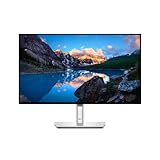
- Ambient Light Sensor: A built-in Ambient Light Sensor intelligently optimizes brightness and color temperature based on your surroundings
- A smoother visual experience: 120Hz refresh rate delivers less flicker, more seamless scrolling and smoother motion than 60Hz monitors
- Fit your work style: Tilt, swivel, pivot and adjust the height of your monitor to work your way
- Stay focused on your work: Our InfinityEdge screen provides a virtually borderless experience
- Tailored to you: Create, store and manage ICC profiles on your computer dynamically through the software dashboard
Calibration controls and observed image behavior
The review says Dell UltraSharp Calibration utilities provide access to a lookup table (LUT), allowing custom color settings to be stored. It does not establish that a colorimeter is included or identify a required model; anyone planning a calibration workflow should check the compatibility of their equipment separately.
In its 2017 account, the reviewer says they used Lagom LCD test pages, saw no banding and noticed slight color shift at extreme viewing angles. Those are the reviewer’s observations in that test, not a guarantee of results on every unit or a new independent test.
Rank #2

- 4K UHD IPS Black Display with Factory Calibration: 3840 x 2160 resolution and 99% DCI-P3 color coverage calibrated to Delta E less than 1.5 for professional color accuracy.
- 120Hz Refresh Rate and 5ms Response Time: Smooth, fluid motion with reduced blur for fast-paced workflows and seamless multitasking across multiple applications.
- Thunderbolt 4 Single Cable Solution: Transmits video, data, and up to 140W power simultaneously, with daisy chain support for up to two additional 4K monitors.
- ComfortView Plus and Ambient Light Sensor: Reduces harmful blue light for less eye strain during long sessions; auto brightness adjustment keeps the screen comfortable all day.
- Full Ergonomic Adjustability and Rich Port Selection: Height, tilt, swivel, and pivot adjustments plus HDMI 2.1, USB-C, USB-A, and Ethernet ports for a versatile, personalized setup.
Ports, stand and mounting
HotHardware lists one DisplayPort 1.4 input, one mini DisplayPort, two HDMI 2.0a inputs and USB 3.0 ports. The stand offers height adjustment, tilt, pivot and swivel; the review also reports portrait rotation and VESA compatibility. It notes that the monitor has no built-in speakers. (HotHardware review)
The Tool Desk
Outbyte Driver Updater FREEFix the driver behind crashes, sound loss and screen glitchesFind Drivers →Outbyte PC Repair FREEClear out junk files and repair common Windows errorsFree Scan →Is it suitable for gaming?
The 60 Hz ceiling and 6 ms gray-to-gray response time make the UP2718Q a poor fit for buyers prioritizing high-refresh competitive play. HotHardware also reports that it lacks FreeSync and G-SYNC, and describes tearing or stutter above 60 frames per second in the gaming scenarios discussed in the review. That is a historical account of those scenarios, not a claim about every game or system configuration.
Rank #3

- For Creators: Bring your ideas to life on a screen that shows your work exactly as you intended. With 98% Display P3 coverage and factory-calibrated color accuracy, your photos, videos, and designs look true to life, straight out of the box.
- For Developers: Spread out your code, terminal, and browser across a crisp QHD canvas, and switch between two machines, like a personal laptop and a work device, using a single keyboard and mouse with built-in KVM.
- For Designers: Deep blacks, rich contrast, and a smooth 120Hz refresh rate make every detail sharper and every transition seamless.
- For Executives: A light ash finish and a virtually borderless screen bring a clean, refined look to any space. It keeps you connected, productive, and ready to lead from anywhere.
- Ideal Mac Companion: Tested with devices on macOS, this Thunderbolt display with Display P3 color works beautifully for Mac users. Install the Dell Display and Peripheral Manager app to fine-tune your settings.*
Historical price and buying a used unit
HotHardware put the launch-era price at nearly $1,500 and judged the monitor expensive at the time. That figure is a historical reference, not a current price or an indication that the model remains available new. If considering a listing now, verify the exact model, seller, condition, warranty and asking price; the 2017 review cannot establish today’s availability or value.
Quick Recap
Rank #4

- For Creators: See your ideas exactly as you imagined. With 99% Display P3 coverage and factory-calibrated color accuracy at Delta E less than 1.5, your photos, videos, and edits look true to life from the very first second.
- For Developers: Spread your code, terminal, and browser across a crisp 4K workspace, and switch between two machines, like a personal laptop and a work device, using a single keyboard and mouse with built-in KVM.
- For Designers: The Enhanced IPS Black panel brings a remarkable 3,000:1 contrast ratio with 47% deeper blacks than conventional IPS, so shadows feel richer and colors pop.
- For Executives: A refined light ash finish and a near-borderless screen bring a clean, premium look to any space. It keeps you connected with fast Ethernet and helps you lead with confidence from anywhere.
- Ideal Mac Companion: Tested with devices on macOS, this Thunderbolt display with Display P3 color works beautifully for Mac users. Install the Dell Display and Peripheral Manager app to fine-tune your settings.*
Product prices and availability are accurate as of the date/time indicated and are subject to change. Any price and availability information displayed on Amazon at the time of purchase will apply.

