
What’s actually slowing this PC down?
Pick the symptom - the matching free tool is one click away.
iTechGuides is reader-supported. When you buy through links on our site, we may earn an affiliate commission. As an Amazon Associate I earn from qualifying purchases. Learn more
Yes—Dell has sold SSDs under its own name, and Dell still documents SSD upgrades and replacements for its computers. That does not mean Dell offers one universal drive or that every Dell computer has a replaceable SSD: availability and compatibility depend on the exact system and region.
Does Dell sell SSDs?
Dell’s SSD FAQ refers to “Dell SSDs,” confirming that the company has sold branded solid-state drives. However, that FAQ is historical and does not establish Dell’s current consumer SSD lineup. Dell’s support documentation continues to cover SSD types, compatible parts, upgrades, and replacement procedures for Dell computers.

In practical terms, Dell may offer a compatible storage part for a particular computer, but you should not assume that a Dell-branded SSD is currently available for every model or in every country. Dell’s parts shop is available only in select regions.
Which SSD fits a Dell computer?
There is no single SSD that fits every Dell computer. Dell lists several drive interfaces and formats, including 2.5-inch SATA, mSATA, M.2 SATA, and M.2 NVMe. The computer’s system board and model specifications determine which type it supports. As Dell puts it, “The type of hard drive (HDD or SSD) that is supported on your Dell computer depends on the hard drive interface … that is available on the system board.” Dell support: hard-drive replacement and compatibility
#1 Best Overall

- Genuine Dell 512GB Class 35 (Gen 4x4) Solid State Drive
Before buying, check both the interface and physical form factor in the technical specifications or service manual for your exact computer. A drive that shares the same general label—such as M.2—may still be unsuitable if the system requires a different interface. Capacity and whether the drive is replaceable also matter.
How to check Dell SSD compatibility and availability
- Identify the computer. Find its exact model or Service Tag.
- Check the model documentation. Use the service manual and technical specifications to confirm supported interfaces, form factors, capacity limits where listed, and whether the storage drive is replaceable.
- Look up compatible parts. Enter the model or Service Tag in Dell’s support and parts lookup, then look under Hard Drives & Storage. Regional shop availability varies. Dell’s parts and upgrades guidance
- Check the specific part’s terms. Review its warranty and return conditions before purchase; an upgrade part does not automatically inherit the warranty of the computer.
If Dell’s store is not available in your region, consult an authorized reseller, but verify the drive against the same model-specific documentation before ordering.
Rank #2

- Genuine Dell 512GB Class 40 Solid State Drive
Can you replace or upgrade a Dell SSD?
Dell publishes instructions for replacing or upgrading storage, but the procedure is specific to the computer. Some systems may have storage integrated into the system board rather than a user-replaceable drive. Follow the service instructions for the exact model instead of relying on a guide for a different Dell system.
Back up important files before replacing a drive. If you are replacing a failed drive, plan how you will reinstall the operating system or restore your data; the hardware replacement instructions do not by themselves guarantee that your files or software will transfer.
Rank #3
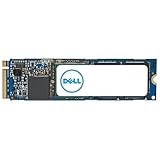
- Genuine Dell 2TB Class 40 Solid State Drive
What warranty applies to a Dell SSD?
Warranty coverage depends on the particular product and purchase. Dell’s older SSD FAQ says, historically, that “Dell SSDs come with a standard three years warranty (extendable up to five years on certain high performance enterprise SSDs).” The FAQ is approximately 14.9 years old according to its search listing, which does not establish its publication year or current policy. Do not treat those durations as the warranty for a drive sold today.
Check the current terms for the exact SSD or replacement part. Dell’s warranty page explains that terms are product-specific: Dell warranty information. Parts purchased as upgrades do not automatically take on the computer’s warranty.
Quick Recap
Best Value
Rank #4
- Genuine Dell 1TB Class 35 (Gen 4x4) Solid State Drive
What Dell’s SSD information does—and does not—establish
- Dell has sold SSDs under its own name, but the historical FAQ does not prove that Dell currently sells a broad consumer lineup.
- Dell documents multiple SSD interfaces and formats; compatibility must be confirmed for the exact computer.
- Dell provides a model-based route to look up parts, but store availability varies by region.
- Replacement options depend on system design, and warranty coverage must be checked for the specific part.
Product prices and availability are accurate as of the date/time indicated and are subject to change. Any price and availability information displayed on Amazon at the time of purchase will apply.
Recommended Free Tools

