
Free tools Windows power users keep installed
One-click scans. No signup required.
iTechGuides is reader-supported. When you buy through links on our site, we may earn an affiliate commission. As an Amazon Associate I earn from qualifying purchases. Learn more
The Dell PowerEdge R730 is a configurable 2U enterprise rack server—not one fixed specification. Dell documents two sockets for Xeon E5-2600 v3 or v4 processors, up to 24 DIMM slots, and multiple storage and expansion options. That makes the platform adaptable, but a used R730’s actual capabilities depend on its installed parts and included accessories. This review explains what the platform supports and what to verify before buying; it does not claim firsthand performance, noise, power, or reliability testing.
What the R730 is—and what the model name does not tell you
The R730 is a 2U rack server built around two processor sockets. Dell specifies support for Intel Xeon E5-2600 v3 and v4 processors. It was positioned for enterprise workloads, including virtualization and high-availability clustering, but the model name alone does not identify a machine’s processor, memory, storage, network hardware, or management entitlements.

Dell’s specification is a menu of supported configurations, not a promise that every used unit includes the maximum parts. Consult the Dell PowerEdge R730 technical specification and owner manual alongside the seller’s exact configuration and service-tag details.
Outdated Drivers Are Slowing You Down
One free scan finds every outdated or missing driver and matches the right update for your exact hardware.Free scan · exact hardware matchPC Slower Than It Used to Be?
A free scan shows the junk files, broken settings and background clutter dragging Windows down - then fixes them in one click.Free scan · Windows 10 & 11R730 platform specifications
| Area | Dell-documented capability | What to verify on a used unit |
|---|---|---|
| Form factor and processors | 2U rack server; two sockets for Intel Xeon E5-2600 v3 or v4 processors. | Installed processor generation, count, and exact model. |
| Memory | Up to 24 DIMM slots and up to 3 TB of memory, according to Dell’s 2016 specification. | Installed capacity, DIMM count and layout, and whether modules match the intended configuration. |
| Storage bays | Configurations with up to 16 2.5-inch drives or up to 8 3.5-inch drives; drive technologies vary by configuration. | Chassis and backplane type, included drives and caddies, and supported drive interface. |
| Expansion | Up to seven PCIe 3.0 slots plus a dedicated PERC slot. | Which risers and cards are actually installed and whether slots are available for your use. |
| Storage controller | Dell lists internal PERC and HBA choices. | Exact controller model, mode, and compatibility with the intended disks or operating system. |
| Networking and management | Several network daughter-card choices; iDRAC8 with Lifecycle Controller. | Installed network card and iDRAC license/features. Do not assume advanced management features are licensed. |
| Power supplies | Dell’s specification lists 495 W, 750 W, and 1100 W PSU options. | Installed PSU rating, number of supplies, redundancy, and labels. These ratings are not measured system consumption. |
The capacities and options above are platform maxima or choices in Dell’s 2016 specification, not evidence of what a particular listing contains. Confirm the exact service-tag configuration and consult the manual before relying on a maximum.
#1 Best Overall
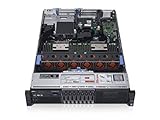
- 2x Intel Xeon E5-2640 V3 - 2.60GHz 8 Core
- 32GB - 2x16GB PC4-1700R DDR4 Registered
- PERC H330 RAID Controller
- 2x 750W R730 PSU
- 2x Enterprise 600GB 10k 2.5" SAS Hard Drive
What workloads can it suit?
Dell presents the R730 for virtualization and high-availability clustering. Red Hat’s hardware catalog also lists the R730 and describes enterprise workload categories such as databases, virtual desktop infrastructure, data warehousing, e-commerce, and HPC data-node use. These references show the platform’s intended range, not guaranteed performance or present-day support for a particular software release.
Before buying for a specific operating system or hypervisor, check that vendor’s current hardware compatibility documentation for the exact release and hardware configuration. Neither the server’s age nor a general catalog entry establishes current support for every release.
Rank #2

- Dell PowerEdge R730xd 24B SFF 2U Server
- 2x Intel Xeon E5-2690 v4 2.6Ghz 14-Core (28-cores Total)
- 128GB DDR4 RAM – 4x 1.2TB 10K SAS 2.5” 12Gb/s
- Dell H730P mini 2GB 12Gb/s RAID
- 2x 750W PSU - 2x 10Gb SFP+ 2x 1Gb (RJ45) NIC
Is a used R730 a good home server or NAS?
It can be a fit if you need a rack server’s processor, memory, drive-bay, or expansion flexibility and have a suitable place to run it. For a home NAS or homelab, the trade-offs that most need checking are power use, fan noise, heat, physical space, and whether the installed controller and backplane suit your storage plan.
The Tool Desk
Outbyte PC Repair FREERepair Windows errors before they cause bigger problemsFix Now →Outbyte Driver Updater FREEFix the driver behind crashes, sound loss and screen glitchesFind Drivers →The available documentation does not establish real-world idle or load power draw, sound level, or temperature for your prospective configuration. PSU wattage is a supply rating, not the amount of electricity the server will use. If consumption or acoustics matter, assess the specific machine under your intended workload with suitable measurement equipment, or find a credible test that identifies its hardware and method.
How to compare two R730 listings
Do not compare listings by model name or processor count alone. Use the same checklist for each machine, and get evidence for details the listing leaves vague.
| Compare | Ask or inspect |
|---|---|
| Processors | Generation, exact model, and number installed. |
| Memory | Total installed capacity, number of DIMMs, and layout. |
| Drive configuration | 2.5-inch or 3.5-inch chassis and backplane; which drives and caddies are included. |
| Controller | Exact PERC or HBA model and its configuration. |
| Expansion and networking | Installed PCIe cards, risers, and network daughter card. |
| Power | PSU wattage and efficiency labels, whether supplies are redundant, and how many are included. |
| Management | iDRAC license and available features. |
| Accessories and condition | Rails, bezel, power cords, seller-tested condition, and diagnostic or boot evidence. |
When a listing does not specify a component or accessory, treat it as unconfirmed rather than assuming it is present.
Rank #4

- Dell PowerEdge 13th Generation 12-Bay 3.5 inch LFF 2U Rack Server
- Enterprise Rack Server For Home Use
- 2x Intel Xeon E5-2670 V3 - 2.30GHz 12 Core CPUs
- 128GB PC4-2133 DDR4 Registered Memory
- 12x Empty Drive Trays for 3.5 inch R-Series
What to verify with the seller before purchase
- Match the identity. Request the service tag and configuration details, then check the configuration against the seller’s description.
- Confirm the physical build. Ask for clear front and rear photos. Verify bay size, backplane, controller, network card, PCIe risers, and the number and labels of power supplies.
- Confirm included parts. Get explicit confirmation about drives, caddies, rails, bezel, and power cords; these are not guaranteed by the chassis model name.
- Check firmware and management access. Ask for BIOS and iDRAC status, the iDRAC license/features, and whether the system reaches a normal boot.
- Request condition evidence. Ask for a hardware diagnostic result or boot report and details of any faults or missing parts.
- Validate your intended software. Check the current OS or hypervisor vendor documentation for the release you plan to run and the relevant hardware.
Dell’s R730 support resources provide model documentation, including the owner manual and firmware resources. The listed owner-manual update date of December 30, 2020, and setup-documentation update date of March 23, 2021, do not establish the server’s current support lifecycle; check Dell’s live support information for that.
Recommended Free Tools
Quick Recap
Best Value
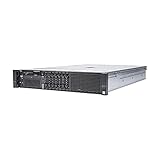
- Dell 13th Generation Rack Mount 2U 8-Bay 2.5" SFF Server
- Enterprise Server For Home Use
- 2x Intel Xeon E5-2670 V3 - 2.30GHz 12 Core CPUs
- 128GB PC4-2133 DDR4 Memory
- 2x Enterprise 2.5" SAS 1.2TB 10k Hard Drives
Product prices and availability are accurate as of the date/time indicated and are subject to change. Any price and availability information displayed on Amazon at the time of purchase will apply.

