
iTechGuides is reader-supported. When you buy through links on our site, we may earn an affiliate commission. As an Amazon Associate I earn from qualifying purchases. Learn more
A pin grid array (PGA) is an electronic package whose electrical pins are arranged in a grid on its underside. In the processor arrangement most readers encounter, those pins slide into matching holes in a socket on a motherboard, so the chip can be removed and replaced without soldering. The label describes the contact layout of the package, not whether any particular chip fits any particular board.
What the term means
The acronym stands for pin grid array. Intel’s package type guide for desktop processors describes PGA packages as having pins inserted into a socket, and Texas Instruments describes PGA packages as having pin connections on the bottom of a rectangular substrate (Intel, Package Type Guide for Intel Desktop Processors; Texas Instruments, Find All TI Packages: Pin Grid Array). Both descriptions point to the same core idea: the pins are the connection points, and they stand out from the bottom face of the package.
How a PGA connection works
In a PGA processor, the pins are the male part of the connection. The socket supplies the female side, a set of holes whose contacts grip each pin when the chip is seated. Intel’s guide notes that in its described examples the pins are staggered, which helps the processor go into the socket in only one orientation. That staggering is a feature of those examples, not a rule that every PGA package follows.
Do these 3 things before closing this tab:
1Fix the driver behind crashes, sound loss and screen glitches2Repair Windows errors before they cause bigger problems3Scan for outdated or missing drivers - takes under a minuteBecause the pins are mechanical and can be pulled out or bent, PGA packages are usually handled with more care than packages that have flat contact pads. Their main practical advantage is serviceability: the chip can be lifted out of its socket for replacement or upgrade.
#1 Best Overall

- Pentium-3 PGA Socket 370 Cooling Fan
PGA compared with LGA and BGA
People often confuse PGA with the other common package types. The difference comes down to where the contacts sit and how the package is attached.
| Format | Where the contacts sit | How the package connects | Serviceability |
|---|---|---|---|
| PGA (pin grid array) | Pins on the package underside | Pins inserted into socket holes | Socketed; the package can be removed |
| LGA (land grid array) | Flat lands on the package underside | Spring contacts in the socket press against the lands | Socketed; the package can be removed |
| BGA (ball grid array) | Solder balls on the package underside | Balls are soldered to board pads | Soldered; Intel notes removal is difficult after attachment |
The table reflects how Intel’s glossary describes the three formats (Intel, CMOS: Lead-Free Glossary). The practical summary is that PGA and LGA are both socketed, but the pins sit on different sides of the connection. A BGA package is a different case entirely, because it is soldered to the board.
Rank #2

- Model Specification: PZ1331A-51ZZ5-1H CPU SOCKET AM4 designed for professional motherboard replacement applications
- Contact Configuration: Features 1331 precision-engineered contacts for reliable processor connectivity and optimal performance
- Premium Plating: 15U gold plating ensures superior electrical conductivity and long-lasting corrosion resistance
- Lead-Free Solder: Lead-free solder construction meets modern manufacturing standards for electronic components
- Durable Body Material: LCP (Liquid Crystal Polymer) construction provides excellent thermal stability and mechanical strength
PGA is a family, not one design
The term covers a range of packages. Texas Instruments lists rectangular, leaded PGA packages with a ceramic body that is hermetically sealed. The company positions these for high-reliability uses such as aerospace, radiation-environment, and military or defense equipment. So a PGA may be a consumer processor socket component, or a sealed component for demanding industrial and defense hardware. Pin count, pitch, and body material all vary by package.
Historical examples with pin counts
Intel’s package guide cites several PGA-family examples. These figures describe specific legacy products and are not a universal pin count for PGA:
Rank #3

- Note: This kits only compatible with INTEL original plastic buckle (the original box fan installed with the CPU). And the same type of screw spring radiator replacement.
- Compatible with Intel 775, lga 115X (1155, 1156, 1150, 1151), 1366, 2011 motherboard use, universal backplane, adjustable. Compatibility is very good.
- Motherboard backplate can adjuste the hole distance. 775 hole pitch is 7.2cm; 1155, 1156, 1150, 1151 hole distance is 7.5cm; 1366, 2011 motherboard hole spacing is 8.0cm (note that not all 2011 motherboards can be used, the main difference is the 4 screw holes for fixing the heat sink.)
- Note: Some HP/DELL motherboards use very special high-instep backplanes. If they cannot be used, you can directly apply for return.
- Material: Plastic+Iron. One Set kits contains an adjustable backplane, 4pcs screw, 4pcs spring and 4pcs gasket.
- 370 pins: FC-PGA examples used for Pentium III and Celeron processors.
- 478 pins: a Pentium 4 FC-PGA2 example.
- 603 pins: a PGA Xeon example.
Intel’s guide states: “The PGA package is used by the Intel® Xeon® processor, which has 603 pins.” That sentence refers to the one example in the guide, not to all Xeon processors. Intel’s package guide was last reviewed on 6 February 2025, and these examples describe older products, so they should be read as historical illustrations rather than current buying advice.
Independent reader supportYour contribution helps us test, update, and keep practical guides available for everyone.Checking whether a PGA chip fits a board
Seeing “PGA” on a specification does not confirm compatibility. Before buying or swapping a processor, confirm the following against the manufacturer’s documentation:
Rank #4

- COMPATIBILITY: Designed for Intel 10th and 11th Generation processors with LGA 1200 socket interface for desktop motherboards
- SOCKET TYPE: LGA (Land Grid Array) 1200 pin configuration provides secure CPU mounting and reliable electrical connections
- INSTALLATION: Direct replacement component that fits standard motherboard mounting points for LGA 1200 platforms
- DESIGN: Precision-engineered contact pins ensure stable connectivity between processor and motherboard for optimal performance
- NOTE: Replacing the CPU socket connector requires professional technical skills and specialized tools.
- The exact socket type the processor requires, since a PGA chip only works in a matching PGA socket.
- The processor’s package designation and pin count, which must match the socket.
- Whether the motherboard’s chipset and BIOS support that processor generation.
Intel’s motherboard buying guide makes the same point: compatibility is set by the specific processor and board documentation, not by the package name alone (Intel, Gaming Motherboard Buying Guide).
Free tools Windows power users keep installed
One-click scans. No signup required.
Quick Recap
Best Value
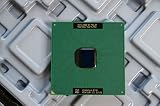
- Intel Pentium III 933 MHz 133 MHz 256 KB Socket 370 CPU General Features: Intel Pentium III CPU
- 933 MHz Speed Socket 370 Flip Chip Plastic Pin Array (FC-PGA) Design 256 KB L2 Cache
- 133 MHz Front End Bus Speed
Common points of confusion
- PGA and LGA are not interchangeable. A PGA processor will not seat in an LGA socket, and the reverse is also true.
- A bent pin is a repair problem. Because the pins are exposed, damage is a common failure mode for PGA chips and sockets.
- A higher pin count does not mean a faster chip. Pin count reflects the electrical interface of a specific package, not performance.
Product prices and availability are accurate as of the date/time indicated and are subject to change. Any price and availability information displayed on Amazon at the time of purchase will apply.

