
iTechGuides is reader-supported. When you buy through links on our site, we may earn an affiliate commission. As an Amazon Associate I earn from qualifying purchases. Learn more
A catchy username is one people can remember after hearing it once, spell correctly without help, and use on every service you need. It also has to be accepted by the platform where you register it, and that acceptance depends on rules that differ from service to service. This guide walks through choosing a name in that order: fit and memorability first, then privacy, then the platform checks that decide whether the name can actually be used.
Start with the audience and the purpose of the account
Before you list any words, decide who should recognize the account. A playful gaming handle, a professional profile, and a private community identity serve different audiences, and a name that works for one can feel wrong for another. A username for a freelance designer’s portfolio should tell clients something about the work; a handle for a multiplayer game can be looser and more personal. Writing one sentence about the account’s job, such as “a name fellow photographers can find and remember,” gives you a filter for every candidate that follows.
Generate candidates from a few deliberate sources
Most people brainstorm by staring at a blank field. A more reliable approach is to start from a small set of material and combine it. Consumer safety guidance from the Hawaii Office of the Attorney General, in its 2016 Internet Safety Manual (Second Edition), recommends drawing on interests, combining words, and keeping a screen name short. That advice is a practical prompt rather than a proven formula, but it produces a workable list quickly.
Crashes, No Sound, or Screen Glitches?
Random freezes, missing sound and display glitches usually trace back to one bad driver. Find and replace yours safely.Free scan · under a minuteWindows Errors? Fix Them Before They Spread
Repair common Windows errors and clear accumulated junk for a smoother, more stable PC - no reinstall needed.Free scan · no reinstallPull words from interests, skills, and tone
List five to ten words connected to what you do or enjoy: a craft, a place you know well, a skill, a running joke, a sound you like. Then pair two of them, or pair one word with a short descriptor. Keep the result short. Shorter names are easier to type, easier to read in a crowded reply thread, and less likely to be truncated in a mobile interface.
#1 Best Overall

- Handy pocket-sized journal
- Organize user names and passwords
- Alphabetically organized with 4 entries per page
- Includes password safety tips
- 6 25 x 3 25 inches
Test each candidate out loud
Read each option aloud to someone, or to yourself, and ask whether a listener could spell it after hearing it once. Names that depend on a specific capital letter, a doubled consonant, a number that could be “2” or “to,” or a deliberate misspelling tend to fail this test. If the spelling needs explaining, people will mistype it, and a mistyped handle sends them to someone else’s account or to nothing at all.
Check whether the name is distinct
A catchy name that many other people already use is hard to find and easy to confuse with an impersonator. Search for the candidate on the platforms you plan to use, and also search the broader web, where an unusual name is easier to assess. Availability itself is handled per service, covered below.
Rank #2

- This 3 pack of Oxford Password Books comes in 3 colors: plum purple, dark green, and dark blue; each 4" x 6" password book has 52 pages with 204 entry spaces
- These password keeper books organize your usernames and passwords in alphabetical order, with plenty of room to add updated passwords
- A discreet way to keep track of all your online data: plain covers in retro-inspired colors make these password journals look just like regular journals; use the label area to customize
- Features all the details of a portable, slim journal: durable coated covers, white 80 gsm paper, and stitched binding to keep pages in place
- Includes tips for choosing and refreshing strong passwords and ways to keep your personal information safe, like using acronyms and hints and writing in pencil so you can update your passwords often
Keep identifying details out of public names
For any public-facing name, leave out details that make the person easier to locate or identify. The Hawaii manual states the principle directly: “A safe screen name should not include your real name, age, location.” Common mistakes include a full name with a year of birth, a school or town name combined with a nickname, or a phone-area code in a handle. Each detail may seem harmless alone, but combined with a profile photo or a bio, they can link an online persona to a real person. If you want a name that is both memorable and private, a made-up word or a nickname with no biographical markers usually does the job better than a clever pun on your hometown.
The Tool Desk
Outbyte Driver Updater FREEFix the driver behind crashes, sound loss and screen glitchesFind Drivers →Outbyte PC Repair FREERepair Windows errors before they cause bigger problemsFix Now →Check each platform’s rules separately
Naming rules are set by each service, not by a single standard. The table below lists the rules from the sources reviewed for this guide. Treat every entry as a snapshot: platform help pages change, and the figures should be checked on the service’s current help page before you register.
Rank #3

- Never Forget Passwords Again: Record 468 passwords, with space for updates; Say goodbye to password woes! Secure Pass Keeper Book keeps you covered
- Secure Your Secrets: Discreet appearance, pocket-sized convenience; The ultimate keeper of privacy in your hands, sized at 4.1''x 5.8''
- Master your passwords with Alphabetical Tabs: 24 sections, each storing up to 18 passwords; Ample writing space to update and secure passwords; Add personal hints and notes for extra security; # Index tabs for frequently used passwords; Plus, lined note pages for convenient note-taking
- Enduring Vegan Leather: Exquisite Texture; 100 GSM Paper Resists Ink Bleed-through, Ensuring Long-lasting Value; Elevate Your Password Management
- Added Functionality: Sturdy Pen Loop, Elastic Band and Inner Pocket; Enjoy 180° Lay Flat for effortless writing, 360° Flipping for comfortable reading from any angle with spiral binding; A practical gift for family, friends, and partners
| Service or standard | Stated rules | What it means for your choice |
|---|---|---|
| Gmail (Google Account email address) | Google’s Gmail Help page on creating a username gives a range of 6 to 30 characters and a specific allowed-character set (letters, numbers, and periods, with additional restrictions). | Your Gmail username is also your email address, so it is effectively permanent and visible to the people you email. Choose it with that in mind. |
| X | X’s Help Center lists a maximum of 15 characters, with letters, numbers, and underscores allowed. | A short handle leaves little room for compound names. Underscores are the only punctuation available, so a name with a hyphen or period will need a different form. |
| Meta’s help guidance says usernames can use letters, numbers, or periods. The length limit is not stated in the source reviewed. | Avoid building a name you may later want to change, since the original may not be reclaimable (see the change section below). | |
| Bungie (Bungie Name) | Bungie’s Bungie Name Guide warns that unsupported Unicode, emoji, and some symbols can cause problems when players search for or display names. Names may be moderated, including for personal identifying information. | Game-specific. Do not assume the same restrictions apply to other games or to non-gaming services. |
| RFC 8265 (IETF standard) | Published October 2017, this standards-track document defines profiles for preparing and comparing internationalized usernames and passwords. It notes that applications may use different notions of what a username is. | Explains why non-English characters can be normalized or compared differently across systems. It does not guarantee that any particular service accepts those characters. |
The practical lesson is that a name is portable only if it satisfies the strictest rule among the services you plan to use. A name that is fine on X may be too long or too punctuated for another platform, and a name that works in one game can display incorrectly in another.
Handle decorative characters with caution
Stylized Unicode lettering, emoji, and decorative symbols can look distinctive in a preview but cause real problems. Bungie’s guidance notes that unsupported characters can make a name harder to search for and can display incorrectly. Some characters that look like standard letters are actually different code points, so a friend typing the name on a standard keyboard may never find the account. If you want a stylized look, use it only for a display name or bio, and keep the username itself in plain letters and numbers that the platform clearly supports.
Rank #4

- Secure Password Storage: 102-page organizer holds 306 logins with fields for website, username, password, and notes, offering an unhackable, offline solution for professionals or seniors managing multiple accounts.
- Dedicated WiFi Section: Back page features a special format for router and WiFi details, ensuring easy access to critical network info, ideal for home, office, or travel use in a compact, reliable notebook.
- Convenient Ring-Bound Design: 8x5-inch book with sturdy ring binding allows pages to flip easily, providing durable, portable organization for passwords, perfect for students, freelancers, or busy households.
- Ample Entry Capacity: Each page fits three entries, totaling 306 site logins, making it a comprehensive tool for tracking online accounts, subscriptions, or services without digital vulnerabilities.
- User-Friendly Layout: Clear fields and compact size ensure quick, organized access to login details, great for gifting to tech users, seniors, or anyone needing a simple, secure password management solution.
Be realistic about changing a username later
Treat your first choice as potentially permanent. Changing a name can cost you the old one. X states that a previous username becomes available for someone else immediately after a change, so you cannot count on reclaiming it later. Meta’s help guidance on Facebook cautions that an original username may not be reclaimable after a change. If you are switching from an older handle, consider whether anyone is likely to claim the old name, and whether you want to keep it reserved with a placeholder account. Email addresses carry a similar weight, since other services often use them for recovery.
Pre-commitment checklist
- The name fits the audience and the purpose you wrote down.
- It contains no real name, age, location, or contact detail if the account is public.
- Someone could spell it correctly after hearing it once.
- It is within the length and character rules of every service you plan to use, checked on each service’s current help page.
- It avoids decorative Unicode, emoji, and symbols in the username itself.
- It is available on each platform you need, and you have checked for impersonation or confusion with an existing account.
- You are comfortable that changing it later may mean losing it permanently.
What the evidence does and does not establish
The guidance above rests on platform rules, safety advice, and standards documents. No study available for this guide shows which naming pattern is most memorable or which style attracts the most followers. The consistent recommendations are practical: be easy to spell, keep personal details out of public names, respect each platform’s character rules, and assume a change may be irreversible. Use those as constraints, then let your own taste choose among the options that pass them.
Best Value
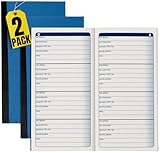
- 1InTheOffice Password Journal, a small and blue 3 1/4 x 6 1/4 book with 192 entries, now available in a convenient (2 Pack) for extended password management.
- Password Keeper Book Small convenient pocket size comes in handy. A password book you can carry anytime and anywhere.
- This password journal is good for keeping all your private information in one place. Such as your username and passwords to your different media accounts.
- The indexes of this blue password book is arranged alphabetically. A great way to find what you are looking for.
- The size of this password journal is 3 ¼ x 6 ¼. Composes 192 entries, with 4 entries on every page.
Among the names that pass every check on this list, pick the one that sounds right to you when you say it aloud and that you would still be happy to give out in five years.
Name choices also carry a practical risk that generic advice often misses. A name you can use everywhere is worth more than a name that is slightly more clever but only available on one service. If a name is taken on your preferred platform, the best alternative is usually a small, unambiguous variation, not a longer or more punctuated name that will fail elsewhere.
Quick Recap
“
Product prices and availability are accurate as of the date/time indicated and are subject to change. Any price and availability information displayed on Amazon at the time of purchase will apply.
Quick wins for a faster PC:
Fix the driver behind crashes, sound loss and screen glitchesFind Drivers →Clear out junk files and repair common Windows errorsFree Scan →Scan for outdated or missing drivers - takes under a minuteDriver Scan →
