
iTechGuides is reader-supported. When you buy through links on our site, we may earn an affiliate commission. As an Amazon Associate I earn from qualifying purchases. Learn more
The Clevetura S for Mac puts pointer control and gestures on the keyboard’s keys, making it handy for quick actions without reaching for a mouse. In Cult of Mac’s October 5, 2026 review, Rajesh Pandey found that idea useful—but still preferred a Logitech MX Master 3S for longer stretches of pointer work. The keyboard’s touch surface is a reason to consider it, not proof that it can replace a mouse for everyone.
How the Clevetura S turns keys into a pointer surface
The Clevetura S is a compact 78-key Mac keyboard whose keys also register touch input. With its TouchOnKeys app, the keyboard can handle pointer movement and macOS gestures while your hands remain near the keys. Pandey particularly liked using gestures to switch Spaces and invoke Mission Control, along with quick pointer movements. He summarized the appeal this way: “This is the reason to consider the Clevetura S, and it delivers on its promise.”
The review describes several ways to click: a two-finger tap for a right-click, a double-tap for a left-click, and physical left- and right-click buttons below the spacebar. The TouchOnKeys app is required for the keyboard’s touchpad features; the review says it also manages gestures, backlighting, sensitivity and per-app profiles. These are details reported in the review, not independently verified specifications.
Quick wins for a faster PC:
Repair Windows errors before they cause bigger problemsFix Now →Scan for outdated or missing drivers - takes under a minuteDriver Scan →What it is like to type on a touch-sensitive keyboard
The touch surface changes what happens when your hands are idle. Pandey initially triggered touch input by resting his fingers on the keys, and says it took a few weeks to feel comfortable with the keyboard. Sensitivity adjustment and a keyboard-only mode are described as ways to reduce unwanted touch input. If you normally leave your fingers resting on the keys between sentences, expect to adjust that habit: “If you tend to leave your fingers resting on the keys between sentences, expect a similar change in habit.”
#1 Best Overall
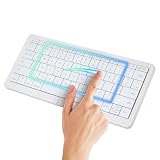
- WIRELESS KEYBOARD WITH TRACKPAD BUILT INTO THE KEYS: Scroll, swipe and zoom without moving your hand to a mouse. Compact 78-key layout for tighter desks and travel
- COMPACT MAC KEYBOARD, 78 KEYS, QUIET TYPING. Low-profile scissor switches at a standard 19 mm key pitch, so the layout feels familiar in a smaller footprint.
- NATIVE MAC TRACKPAD GESTURES: Compatible with Mac, iPad, Apple TV and Vision Pro. Three Bluetooth channels plus USB-C connect one keyboard to four devices. Mac needs the TouchOnKeys app
- BACKLIT RGB KEYBOARD: Per-key backlight responds to touch and gestures, with 16.5 million colors in the TouchOnKeys app
- ADAPTIVE TOUCH RECOGNITION: Separates typing from touch, so resting hands do not trigger the cursor. Battery runs up to 44 hours with the backlight off. Slim and easy to carry
That learning curve matters more than the feature list. The design asks you to keep your fingers poised rather than casually resting them on the keycaps. Someone who frequently switches from typing to a quick gesture may appreciate the proximity; someone who wants a conventional typing feel with no behavioral adjustment may find it distracting.
Does it replace a mouse?
Not for the reviewer’s longer pointer sessions. Pandey found the keyboard useful for brief movements and gestures but continued using a Logitech MX Master 3S for extended work. That distinction sets a realistic expectation: the Clevetura S can reduce some trips from keyboard to mouse, while the review does not establish that its key-based surface matches a dedicated mouse for sustained or precise pointer control.
Rank #2
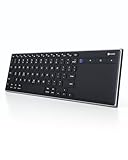
- Dual Connection Modes: The CZUR K5S keyboard supports both stable Bluetooth wireless connection and reliable wired USB connection, allowing you to easily switch between modes for flexible use with PC, laptop, tablet, and phone
- Multi-OS Quick Switch: Seamlessly adapt to different systems with simple shortcuts—press FN + A for Mac/iOS, FN + S for Windows, and FN + D for Android—ensuring full key compatibility and smooth typing across your devices
- Rechargeable & Power Saving: Built with a rechargeable battery and included charging cable, the K5S eliminates frequent battery replacements. It automatically enters sleep mode after 10 minutes of inactivity and can be quickly awakened by pressing any key (touchpad cannot wake the keyboard)
- Slim, Lightweight & Portable: Designed for mobility, the CZUR K5S features a thin, compact body that fits easily into bags for office, business trips, or WFH setups. Note: keycaps are slightly smaller than a standard full-size keyboard
- No Backlight Design: This keyboard does not include backlighting, offering a clean, distraction-free typing experience while helping extend battery life
It is most compelling if you regularly invoke macOS gestures or make short pointer adjustments while typing. If your work depends on prolonged pointer movement, treat the integrated surface as a complement unless you already know that a keyboard touchpad suits your workflow.
Do these 3 things before closing this tab:
1Fix the driver behind crashes, sound loss and screen glitches2Clear out junk files and repair common Windows errors3Scan for outdated or missing drivers - takes under a minuteLayout, connections and app requirements
According to Cult of Mac’s review, the Mac model has scissor switches, a full function-key row, Fn at the lower left, customizable backlighting, and touch sliders for controls such as brightness and volume. It can remember three Bluetooth connections and can connect by USB-C. The review compares its appearance with Apple’s Magic Keyboard, while noting the Clevetura’s closely spaced keycaps, thicker body and lack of Touch ID.
Rank #3

- Connect 3 Devices Simultaneously: This Bluetooth keyboard features 3 Bluetooth channels, allowing you to connect up to 3 devices at once. You can easily switch between devices, and control your tablet, computer, TV, and phone with a single keyboard. Bluetooth 5.3 ensures a stable and reliable connection with a range of up to 10 meters
- Ultra Slim and Portable Keyboard: The Inateck Bluetooth keyboard is just 0.2 inches thick and weighs only 228g, making it extremely lightweight and portable. It’s the perfect Bluetooth keyboard for travels and business trips
- Comfortable Typing Experience: The keyboard comes with a larger, more precise touchpad without lags. The first row features dedicated shortcut keys for one-touch access to shortcut functions. The non-slip bottom feet design ensures stable typing without movement, providing you with a typing experience similar to that of a laptop
- Compatible with Windows and iPad OS: Our Bluetooth keyboard is fully compatible with Windows and iPad OS, allowing you to use it with desktops, laptops, iPad, iPad Pro, iPad Air, and iPad Mini
- Built to Last: The keys of our Bluetooth keyboard are rated for over 5 million keystrokes. With a full charge, the standby time can last up to 150 days, reducing battery anxiety while traveling.
TouchOnKeys is central to the distinctive feature: it is required for the touchpad functions and is where the review says users manage gestures, lighting and per-app profiles. Consider that software dependency alongside your need for a multi-device keyboard, wired use or Touch ID; the review does not establish compatibility or feature details beyond the points it reports.
Independent reader supportYour contribution helps us test, update, and keep practical guides available for everyone.Battery life and the backlight
Cult of Mac quotes Clevetura’s claims of up to 44 hours of uninterrupted work and around 1.5 weeks of normal use without the backlight. Those are company figures as reported by the review, not independent test results. Pandey separately says he initially charged the keyboard every two or three days, then got four or five days between charges after a firmware update added Backlight Eco Mode. That is one reviewer’s experience, not a controlled battery test; the review also suggests dimming or turning off the backlight may help.
Who should consider the Clevetura S?
- Consider it if quick pointer adjustments and macOS gestures near the keyboard are valuable enough to justify learning a different way to rest your fingers.
- Think carefully if you want a mouse replacement for long or precision-heavy pointer work; the reviewer kept a dedicated mouse for those sessions.
- Check the fit if Touch ID, wider-spaced keys, avoiding companion software, or long battery intervals are priorities. The review notes no Touch ID, describes closely spaced keys, requires TouchOnKeys for touch features, and reports battery experience that varied with a firmware update and backlight use.
The review reported the white Mac version at $199 and the black version at $189 on preorder on October 5, 2026, with black shipping expected in mid-to-late October. These were time-sensitive prices and availability notes from that date, not confirmation of current stock or offers.
Quick Recap
Product prices and availability are accurate as of the date/time indicated and are subject to change. Any price and availability information displayed on Amazon at the time of purchase will apply.

