
Quick wins for a faster PC:
Scan for outdated or missing drivers - takes under a minuteDriver Scan →Clear out junk files and repair common Windows errorsFree Scan →iTechGuides is reader-supported. When you buy through links on our site, we may earn an affiliate commission. As an Amazon Associate I earn from qualifying purchases. Learn more
If your Chromebook is fully shut down and its power button is broken, there is no universal, officially documented way to turn it on without that control. First check whether it is actually asleep: waking a sleeping Chromebook is different from starting one that is off, and any lid or keyboard wake option depends on the exact model. If the device is off, use the manufacturer’s support or repair route rather than trying recovery shortcuts.
First determine whether the Chromebook is asleep or off
A sleeping Chromebook may be able to wake through a model-supported action, such as opening the lid or using a keyboard. That does not mean the same action can start a Chromebook that has been shut down. The supported wake behavior varies by model, so check the manual or support page for your exact device.

For the Chromebook convertible families covered by ASUS’s guidance, a device that is off requires a press of the power button. That guidance is specific to those families, not a rule for every Chromebook. ASUS Chromebook wake and power guidance
If you are unsure of the state, check for charging indicators and consult your model’s instructions. Do not assume that opening the lid, pressing keys, plugging in a charger, or connecting a USB device will start every Chromebook.
#1 Best Overall

- Compatible With: Dell Chromebook 11 3100 3110 3120 5190 Series Laptop
- MPN: 00D2DT 0G6FD2 0H06WJ
- Replacement Power key:for Dell Chromebook 11 3100 3110 3120 5190 Keyboard US layout with power key
- Condition&Quality :100% Original Brand New. Each One Will Be 100% Tested and Working before Packing and Shipping.
- Warranty:120-Day Warranty Against any Manufacturer Defective. BUT No Man-Made Scratch or Damage when Returning or Exchanging.
If it is fully off and the power button is broken
A no-power symptom does not prove that the button itself has failed; the underlying issue could involve other power hardware. Identify the exact make and model, then contact the manufacturer or an authorized repair provider. Google directs users to their manufacturer for repair when troubleshooting does not resolve the issue, and Lenovo’s support information is product-specific. Google Chromebook Help: Recover your Chromebook · Lenovo Chromebook support
- Look for the model name or number on the device label, packaging, or purchase records.
- Check warranty coverage and the manufacturer’s repair instructions for that model.
- For a school- or work-managed Chromebook, contact the administrator.
Do not open the case or try to short contacts or bridge motherboard pins. Those are not general startup steps and can damage the device.
Rank #2
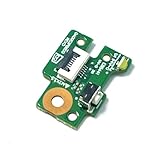
- Power Switch ON-FF Button Board Replacement for HP CHROMEBOOK X360 11-AE, Chromebook 11 G1, CHROMEBOOK 11 x360 G1 EE 928083-001
- This Product Are Tested Before Shipping.
- Easy for you replace your faulty,cracked or broken one ,seller remind that you should replace this in the off state.
- Before purchasing, please confirm that your laptop model matches the product description exactly!
- Installation requires disassembling the laptop. For most users, we recommend having a qualified technician perform the installation to ensure proper setup and avoid accidental damage
Why recovery mode will not bypass a broken power button
Chromebook recovery addresses a missing, damaged, or malfunctioning ChromeOS installation; it is not a general way to start a Chromebook that is fully off. Google’s standard recovery entry sequence is to hold Esc and Refresh, then press Power. Some models use Esc and Maximize, then Power. Because the documented sequences use the power control, they do not solve a broken-button startup problem. Google Chromebook Help: Recover your Chromebook
Do these 3 things before closing this tab:
1Repair Windows errors before they cause bigger problems2Fix the driver behind crashes, sound loss and screen glitches3Clear out junk files and repair common Windows errorsRecovery also removes and reinstalls ChromeOS. Google warns: “Recovery permanently erases everything on your Chromebook’s hard drive, even your downloaded files.” Back up local files first if the device can be started and backed up. If USB recovery is needed, Google specifies a flash drive with at least 8 GB of capacity; the process erases the selected recovery drive as well.
Use recovery only when ChromeOS itself needs repair and you can follow the instructions for your model—not as a workaround for failed power hardware.
Quick Recap
Best Value

- Compatible With: Dell Chromebook 11 3110 3120 Laptop Keyboard
- Keyboard Part Number: 00D2DT 0G6FD2 0H06WJ;10 Pcs Keyboard
- Replacement Power key: for Dell Chromebook 11 3110 and Chromebook 3120 Keyboard
- Condition&Quality: 100% Original Brand New; Each One Will Be 100% Tested and Working before Packing and Shipping
- Warranty: 120-Day Warranty Against any Manufacturer Defective; BUT No Man-Made Scratch or Damage when Returning or Exchanging
Rank #4
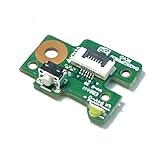
- Compatible with HP CHROMEBOOK X360 11-AE/ Chromebook 11 G1/CHROMEBOOK 11 x360 G1 EE, Part Number:928083-001
- Package includes:1pcs Board Power Button Board
- Please carefully verify that the model and part number are completely consistent before purchasing. If the models are different, they are not compatible
- This Product Are Tested Before Shipping.
- Easy for you replace your faulty,cracked or broken one ,seller remind that you should replace this in the off state.
Product prices and availability are accurate as of the date/time indicated and are subject to change. Any price and availability information displayed on Amazon at the time of purchase will apply.

