
What’s actually slowing this PC down?
Pick the symptom - the matching free tool is one click away.
iTechGuides is reader-supported. When you buy through links on our site, we may earn an affiliate commission. As an Amazon Associate I earn from qualifying purchases. Learn more
Canteen and food court management software connects billing, menus, ordering, payments, kitchen production, inventory, subsidies, vendors, and reporting. A simple cafeteria may need only a restaurant POS, while an institutional canteen or multi-vendor food court usually needs cashless identity, meal entitlements, order routing, commissions, settlements, and outage procedures.
The category is real, but “canteen software” does not describe one standardized product. A school cafeteria, factory dining room, university campus, mall food court, and single-site restaurant-style cafeteria can share a POS while requiring very different controls around identity, subsidies, vendors, inventory, and financial reconciliation.
Key takeaways
- A single cafeteria may need only POS, menu, payment, kitchen, and basic inventory functions, while a multi-vendor food court usually needs centralized ordering, vendor commissions, and settlement reporting.
- Institutional canteen software is distinguished by employee, student, patient, resident, or contractor accounts; meal plans; subsidies; prepaid balances; and eligibility rules.
- Marketplace prices observed on August 18, 2026 ranged from ₹10,300 per year for a listed Marg POS offer to ₹45,000 per quantity for a listed Cafelive offer, but the units and included services were not equivalent.
- Offline operation, refunds, duplicate payments, out-of-stock synchronization, role permissions, audit logs, and data export should be tested before signing a contract.
- Accurate ingredient inventory is not automatic: recipes, portion sizes, receiving, waste, substitutions, transfers, and stock counts must all be recorded correctly.
What is canteen and food court management software?
Canteen and food court management software is a group of connected tools for selling, ordering, producing, accounting for, and analyzing food in a cafeteria or shared dining operation. Common modules include point-of-sale billing, menu management, online or QR ordering, kitchen tickets or displays, cashless payments, inventory, customer accounts, meal subsidies, vendor settlement, multi-outlet administration, and reporting.
Free tools Windows power users keep installed
One-click scans. No signup required.
The category spans general restaurant POS products, institutional cafeteria systems, cashless canteen platforms, kitchen-management tools, and multi-vendor food-court software. A current Techjockey marketplace category listing illustrates that these product types are often grouped together even though their workflows and commercial models differ.
#1 Best Overall

- KEEP YOUR FOOD WARM AND READY - Alpha living’s 4 pack chafing dish allows for users to maintain their foods heat, with top-quality stainless-steel frame and body.
- COVENIENT STRUCTURE - Each chafing dish comes with 2 fuel holders, frame, A full-size pan tray, and lid. The chafing dish also has handles to ensure that the product can be moved with ease.
- STRONG MATERIAL - Alpha living’s chafing dish has a Stainless Steel, frame As well as a heavy duty handle that supports its 8 quart tray.
- EASY MAINTENANCE AND CLEANING - the chafing dish is easy to clean and maintain. Made with high quality material, ALPHA LIVING chafing dish is rust resistant and ensure long durability.
- FOLDABLE FRAME – comes with fold-able legs made with thicker Stainless Steel to ensure that its frame is effective and your food is well supported.
Who needs canteen and food court management software?
Organizations need this software when food service involves more than a straightforward cash sale at one counter. Typical users include:
- Schools, universities, hostels, and campuses managing student accounts, meal plans, prepaid balances, or nutrition information.
- Corporate offices and factories administering subsidized meals, employee eligibility, meal periods, or department charging.
- Hospitals, government facilities, military sites, and residential institutions serving controlled populations.
- Malls, airports, cinemas, stadiums, and shopping complexes coordinating independent food vendors.
- Caterers and enterprise operators managing several outlets, kitchens, locations, or client accounts.
- Single-site cafeterias that need faster counter service, kitchen coordination, cash control, or stock visibility.
A conventional restaurant POS can be sufficient for a cafeteria that sells directly to walk-up customers and has one operator. The case for a dedicated canteen or food-court platform becomes stronger when the operation includes meal entitlements, cashless identity, multiple vendors, centralized settlement, or integrations with HR, payroll, student-information, ERP, or accounting systems.
What is the difference between canteen software and food-court software?
Canteen software usually manages known users and institutional rules, whereas food-court software usually manages independent vendors and shared commercial infrastructure. The boundaries overlap: a university food court may need both a student meal-plan system and multi-vendor settlement.
| Requirement | Institutional canteen | Multi-vendor food court |
|---|---|---|
| Primary customer | Employee, student, patient, resident, contractor, or visitor | Mall, airport, venue, or shopping-complex customer |
| Identity | Employee or student ID, account, card, RFID, QR, or meal pass | Usually anonymous customer, app account, loyalty account, or QR order |
| Payments | Prepaid balance, subsidy, meal entitlement, payroll charge, card, wallet, or cash | Card, QR, wallet, cash, or one central payment method |
| Meal rules | Breakfast, lunch, dinner, daily limits, eligibility, or recurring plans | Promotions, menus, taxes, and commercial prices |
| Vendors | One caterer or several contracted providers | Independent brands or concessionaires with separate reporting |
| Financial control | Subsidy accounting, department charging, payroll, and caterer reconciliation | Commission rules, deductions, refunds, payouts, and vendor settlements |
| Inventory | Often centrally managed by the caterer or institution | Usually vendor-specific, with possible central oversight |
| Ordering | Counter, employee or student portal, app, kiosk, QR, and pre-ordering | Central ordering, vendor routing, tokens, pickup status, and queue management |
| Reporting | Consumption by user, department, meal plan, or subsidy category | Sales, commissions, performance, and settlement by vendor and outlet |
Buying a restaurant POS for an institutional workflow can leave important questions unanswered: who is eligible for a subsidized meal, how is the institution’s share separated from the customer’s payment, and how is a cancelled meal reversed? Buying a food-court platform without proper concessionaire accounting can create the opposite problem: good ordering screens but unreliable vendor payouts.
What features should the software include?
POS and billing
The POS should handle counter sales, item-level prices, discounts, promotions, taxes appropriate to the operating jurisdiction, refunds, cancellations, digital or printed receipts, shift opening and closing, cash-drawer reconciliation, and multiple tills or outlets.
Ask the vendor to show separate ledger lines for the customer-paid amount, employer or institution subsidy, vendor share, tax, discount, refund, and final settlement. A product labelled “POS” may record a sale without modelling these institutional accounting relationships.
Menu, price, and availability management
A capable system should support menus by outlet, day, time slot, customer group, or vendor. Useful controls include scheduled menu changes, price books, bundles, add-ons, modifiers, dietary labels, allergen information, nutrition data, and automatic out-of-stock status.
Recommended Free Tools
GeniusERP’s institutional canteen page lists customized menus, product categories, item prices and quantities, dietary requirements, nutrition information, weekly meal lists, and student or staff ordering. Those are vendor-described capabilities, not independent proof that every deployment delivers them.
Counter, QR, kiosk, and online ordering
Ordering may happen at a counter, through a mobile app, website, QR code, self-service kiosk, employee portal, or student portal. Pre-ordering and scheduled ordering can spread demand away from the busiest meal period; takeaway, dine-in, pickup, delivery, and bulk ordering may require different status and fulfillment rules.
Every ordering channel must share the same menu, price, modifier, availability, refund, order-status, and customer-notification data. More channels improve convenience only when synchronization is reliable. MealPe’s product page lists pre-ordering, scheduled ordering, multi-restaurant orders, multiple payment methods, real-time tracking, dine-in, takeaway, delivery, and Android, iOS, and web ordering.
Kitchen order tickets and kitchen displays
Kitchen workflow is where a polished ordering demo often fails to represent daily operations. Look for Kitchen Order Tickets (KOTs), Kitchen Display Systems (KDS), printer routing by preparation station, item-level status, priority queues, preparation times, pickup notifications, order throttling, and separate dine-in, takeaway, and delivery workflows.
MealPe lists KDS and KOT support among its vendor features. During a demonstration, ask the vendor to process a large order with modifiers, split items between stations, delay one item, mark another ready, cancel part of the order, and issue a partial refund.
Rank #2

- 8 QUART CAPACITY FOR HOT OR COLD FOOD: Designed with an 8-quart capacity, this chafing dish buffet set can easily accommodate large portions of food. Whether you need to keep dishes hot with water and a fuel can or maintain them cool with ice, this versatile buffet chafer set ensures your food is elegantly presented, keeping your guests’ dining experience delightful. Perfect for both warm and chilled food.
- FOOD GRADE STAINLESS STEEL: Crafted from reinforced, thickened stainless steel, this Chafing Dishes for Buffet Set offers exceptional durability and corrosion resistance, ensuring it retains its high-quality performance over time with regular use and storage. The enhanced insulating properties help keep food warm or fresh for extended periods. The elegant mirror finish and rounded edges not only add a touch of sophistication but also prevent scratches and protect your fingers from cuts.
- EASY TO CLEAN AND INSTALL: Made from food-grade stainless steel, the surface of the chafers and buffet warmers is incredibly easy to clean and wipe down. Whether you clean by hand or use a dishwasher, the surface dries quickly, making maintenance a breeze. Perfect for busy events or frequent use, these chafing dishes are ideal for quick turnaround times. Each set comes with all the necessary accessories and installation instructions, so you can have it set up in minutes.
- USER-FRIENDLY LID HOLDER: The set includes a practical lid holder that prevents utensils from touching surfaces such as countertops or tables, keeping food clean and easily accessible. This thoughtful feature allows you to remove the lid effortlessly, place it on the holder, and access the food without any hassle, ensuring a smooth dining experience for both hosts and guests.
- MULTIPURPOSE CHAFING DISH SET: The spacious 8-quart capacity is perfect for a variety of events, from small gatherings to large banquets. Serve entrees, side dishes, soups, stews, or desserts with ease. This versatile chafing dish set is ideal for restaurants, buffets, catering services, schools, corporate events, parties, hotels, and weddings, helping you present food in a professional and elegant manner.
Cashless payments, cards, RFID, and identity
Cashless systems can use bank cards, mobile wallets, QR payments, RFID cards, NFC cards, employee or student IDs, prepaid accounts, meal passes, coupons, payroll deductions, or biometric verification. The right option depends on whether the users are a controlled population, whether smartphones are practical, and how much hardware the organization can support.
ATS positions its system as an RFID-based, offline Windows POS for cashless food-court and canteen billing. GeniusERP describes cashless payments through cards, digital wallets, or other electronic methods. These descriptions do not establish that RFID, offline authorization, or any payment mechanism is universally more secure or reliable.
Before choosing a cashless identity method, ask:
- Can a lost card be blocked immediately, and can its balance or meal entitlement be recovered?
- Are funds stored on the card, in the software wallet, or with a payment processor?
- Can the system prevent duplicate taps and identify a payment approved without an order?
- Can a subsidy be limited by day, meal period, item, department, employee category, or contractor status?
- How are refunds handled when a prepaid balance or subsidy was used?
- Does biometric data remain in the platform, or does an external access-control system perform verification?
Inventory, purchasing, and recipes
Inventory modules may cover ingredients, finished goods, recipes or bills of materials, purchase orders, suppliers, receiving, stock transfers, wastage, spoilage, batch or expiry tracking, low-stock alerts, consumption deduction, and variance reporting by outlet or kitchen.
Quick wins for a faster PC:
Repair Windows errors before they cause bigger problemsFix Now →Fix the driver behind crashes, sound loss and screen glitchesFind Drivers →Clear out junk files and repair common Windows errorsFree Scan →Techjockey identifies stock and raw-material tracking as a category use case, while GeniusERP claims real-time stock monitoring, insufficient-supply alerts, and automated reordering. A POS sale does not by itself prove accurate ingredient usage. Theoretical stock consumption depends on correct recipes, portion sizes, units of measure, substitutions, receiving, waste records, transfers, and physical counts.
Vendor commissions and settlements
Multi-vendor operations should look for vendor onboarding, menu approval, vendor-specific users, commission rules, fixed rent plus percentage commission, separate taxes, shared or separate payment channels, settlement periods, deductions, adjustments, refund allocation, payout reports, and vendor performance reporting.
OZRIT describes centralized billing, vendor management, commission tracking, settlements, token management, analytics, and multi-location administration. Those are capabilities described by a development vendor; request a working demonstration of the exact commission, refund, tax, and payout rules in your contract.
Subsidies, meal plans, and account rules
Subsidy and meal-plan functionality can cover employer-paid meals, student plans, department or cost-center charging, employee tiers, daily or monthly limits, meal-period entitlements, contractor and visitor billing, meal passes, payroll deductions, unused-balance rules, and overage payment.
MealPe lists subsidy management, bulk food ordering, cashless cafeterias, and meal passes. Ask the vendor to demonstrate repeated use within one meal period, a cancelled meal, an over-limit order, a visitor order, a contractor account, and a reversal after settlement.
Staff permissions, audit trails, and reporting
Role-based access should separate what customers, cashiers, vendors, kitchen staff, managers, facilities administrators, finance teams, and IT administrators can see or change. CUBES advertises multiple users with differentiated access allocation for its canteen POS.
Useful reports include sales by item, vendor, outlet, channel, and time; average order value; peak periods; fulfillment time; payment-method mix; subsidy use; meal-plan usage; refunds and voids; discounts; inventory variance; waste; vendor commissions; settlement balances; department consumption; failed transactions; and cashier activity. A dashboard is not a substitute for transaction-level exports and an audit history.
Which integrations matter?
Potential integrations include HR, payroll, ERP, student-information, accounting, access-control, identity, payment-gateway, inventory, procurement, tax, email, SMS, and notification systems. Define the system of record for identity, eligibility, wallet balance, menu, price, order, payment, inventory, settlement, and accounting entry before implementation. Ambiguous data ownership causes many failures that look like missing software features.
Do these 3 things before closing this tab:
1Repair Windows errors before they cause bigger problems2Fix the driver behind crashes, sound loss and screen glitches3Clear out junk files and repair common Windows errorsHow does a complete canteen or food-court workflow operate?
A complete transaction should connect identity, eligibility, menu, payment, production, fulfillment, stock, and finance:
Rank #3
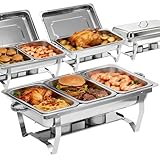
- 【SUPERIOR INSULATION FOR FRESHNESS】 The chafers and buffet warmers sets can keep food warm and keep food cold. If you want to keep the food warm, add hot water to the water tray and light up the fuel in the fuel burners. If you want to keep the food cold, add the ice to the water tray, it maintains food freshness at any event.
- 【HIGH QUALITY STAINLESS STEEL】 Our chafing dish is made of durable stainless steel, so it can maintain temperature better. Compared with other competing products, it has more stable legs and is not easy to deform. And this chafing dish buffet set has a longer service life. With its sturdy construction, you can count on its durability to make your parties a breeze.
- 【AVOID HURTING YOUR FINGERS】 This food warmers for parties have rolled-edge design that will protect your fingers. This safety design can prevent worrying about handling or cleaning the chafing dish with caution.
- 【EASY TO INSTALL】 Our chafer is easy to package, transport, and store with foldable legs. With its integrated stand and minimal use of screws, setting it up is a breeze. You’ll only need screws for the lid, while the rest of the parts require no additional hardware. Simply unfold the stand, stack the pans, and you’re good to go in just 2 minutes! And when it comes to cleaning up, it’s as easy as pie. Thanks to the rolled edges design, you can bid farewell to any worries about accidental cuts.
- 【WIDE APPLICATION】 This stainless steel buffet warmer is perfect for catering, parties, hotels and weddings. Its exquisite design will get a lot of compliments from guests at your party
- The customer authenticates with an account, card, QR code, RFID credential, or guest process.
- The system checks eligibility, wallet balance, meal entitlement, subsidy, or payment method.
- The customer sees the correct menu, price, modifiers, dietary information, and current availability for the selected outlet and time.
- The system creates the order and applies payment, subsidy, discount, tax, or split funding.
- The order routes to the correct vendor, kitchen station, KOT printer, or KDS screen.
- The customer receives a token, pickup number, notification, or status update.
- Kitchen or vendor staff accept, prepare, modify, delay, complete, or cancel the order.
- Inventory and theoretical ingredient consumption update according to the configured recipes and adjustments.
- The system records refunds, voids, payment status, and audit events.
- End-of-day reports reconcile tills, payment processors, subsidies, vendor commissions, and accounting entries.
Ask for this entire lifecycle in a pilot rather than evaluating isolated screens. A successful order submission does not prove that payment, stock, refunds, and vendor settlement will reconcile.
Which operating model fits your organization?
| Requirement | Single cafeteria | Institutional canteen | Multi-vendor food court |
|---|---|---|---|
| Standard POS | Essential | Essential | Essential |
| Online or QR ordering | Useful | Often useful | Usually useful |
| Meal subsidies | Optional | Often essential | Sometimes needed |
| RFID or meal cards | Optional | Common in some environments | Possible |
| Inventory | Important | Important | Vendor-dependent |
| Recipe-level stock | Useful | Often important | Varies by vendor |
| KDS or KOT | Useful | Useful | Important when orders route to vendors |
| Vendor commissions | Not needed | Sometimes needed | Usually essential |
| Central settlement | Not needed | Important for caterers | Essential |
| Multi-location control | Optional | Common for large organizations | Common for chains and operators |
| Customer accounts | Optional | Important | Optional or loyalty-oriented |
| Payroll or ERP integration | Rare | Often important | Finance and accounting integration is more common |
| Queue or token management | Useful | Often useful | Frequently important |
Should you choose cloud, on-premises, or offline-first software?
Cloud, on-premises, and offline-first architectures solve different operational problems; the best choice depends primarily on connectivity, site control, hardware support, and multi-location requirements.
| Architecture | Advantages | Risks and questions | Likely fit |
|---|---|---|---|
| Cloud | Central access, easier multi-site reporting, automatic updates, and simpler web or mobile access | Internet dependence, subscriptions, data-export limits, vendor lock-in, hosting, and privacy | Connected campuses, chains, and operators needing centralized administration |
| On-premises | Local control of hardware and data, and potentially stronger continuity at isolated sites | Local maintenance, hardware lifecycle, backups, remote administration, and synchronization | Sites with internal IT capability or strict local-control requirements |
| Offline-first | Transactions can continue during some network outages, with later synchronization | Duplicate prevention, cached data, delayed payment authorization, stale inventory, and recovery procedures | Factories, campuses, or facilities with unreliable connectivity |
ATS describes an offline Windows-based POS, while OZRIT describes cloud-based, multi-vendor, and multi-location deployments. These are materially different architectures, not merely different interface designs. Ask what exactly works offline: order capture, payment authorization, identity checking, subsidy validation, printing, or only local display.
The Tool Desk
Outbyte PC Repair FREEClear out junk files and repair common Windows errorsFree Scan →Outbyte Driver Updater FREEFix the driver behind crashes, sound loss and screen glitchesFind Drivers →How much does canteen and food court management software cost?
Canteen and food court management software has no single reliable market price. The total cost may include a license or subscription, terminals, scanners, RFID or NFC readers, cards and enrollment, kiosks, kitchen screens, printers, payment-processing fees, integrations, data migration, training, support, customization, and ongoing maintenance.
According to Techjockey’s marketplace listing observed on August 18, 2026, the following starting-price signals were displayed:
| Product listed | Displayed starting price | How to interpret it |
|---|---|---|
| Marg POS | ₹10,300 per year | Confirm edition, terminals, taxes, support, and included modules. |
| ATS Cashless Canteen Management System | ₹24,000 per user | Confirm whether “user” means a named account, terminal, or another licensing unit. |
| Cafelive | ₹45,000 per quantity | “Quantity” is ambiguous and should not be treated as an annual or per-user subscription. |
| Mink Foodiee Canteen Management Software | ₹15,000 | Confirm the period, license scope, hardware, implementation, and support. |
These are Indian-rupee marketplace listings, not comparable total quotations. The listed units differ, and the reviewed material does not establish whether hardware, taxes, implementation, support, integrations, or customization are included. CUBES states that it provides a quotation based on the required POS type and customization, so quote-based pricing is also part of this market.
Request every vendor to price the same scenario: number of outlets, vendors, tills, kiosks, users, daily transactions, payment methods, kitchen devices, integrations, support term, data migration, training, and offline requirements. Ask separately for one-time costs, recurring costs, transaction fees, hardware replacement, customization, and exit or data-export fees.
How should you compare vendors?
1. Document the current operation
Record the number of outlets and vendors, daily transactions, peak transactions per 15-minute interval, tills, kiosks, scanners, printers, meal periods, subsidy rules, payment methods, existing business systems, inventory practices, required reports, network reliability, and data-retention requirements.
2. Separate mandatory controls from attractive extras
Typical must-haves are reliable POS, payment reconciliation, menu availability, order status, role permissions, audit logs, refunds and voids, required integrations, outage procedures, and data export. Loyalty, recommendations, advanced nutrition analytics, white-label apps, delivery, facial recognition, AI forecasting, and engagement features may be later phases unless the operating model genuinely requires them.
3. Use a requirements matrix
| Criterion | Questions for the vendor |
|---|---|
| Operating model | Is the product designed for a cafeteria, institutional canteen, or multi-vendor food court? |
| Pricing | Is billing per user, terminal, outlet, vendor, transaction, device, or organization? |
| Payments | Does it support cards, QR, wallets, RFID, meal cards, subsidies, and payroll deductions? |
| Offline mode | What continues during an outage, and how are transactions synchronized without duplicates? |
| Multi-vendor | Can vendors have separate menus, users, reports, commissions, refunds, and settlements? |
| Kitchen | Are KOT, KDS, printer routing, pickup status, and order throttling included? |
| Inventory | Does the system support recipes, waste, transfers, purchasing, expiry, and variance? |
| Accounts | Can the system distinguish students, employees, visitors, contractors, departments, and eligibility groups? |
| Data | What export formats, APIs, ownership terms, retention controls, and audit history are provided? |
| Hardware | Which readers, printers, kiosks, scanners, and screens are supported, and how are they replaced? |
| Support | What implementation services, training, local support, response times, and spare-device options exist? |
| Security | How are roles, logs, encryption, backups, recovery, and biometric data handled? |
4. Run a realistic pilot
The pilot should include a normal service period, the busiest service period, a network interruption, an out-of-stock item, a price change, a refund, a lost card or failed identity check, a split payment, a vendor settlement, an inventory correction, and end-of-day reconciliation.
5. Reconcile independent records
Compare the platform with payment-processor totals, cash drawers, bank deposits, physical inventory, vendor invoices, payroll or subsidy records, and accounting entries. A platform is not operationally successful if orders work but financial totals cannot be reconciled.
What are the main implementation risks?
Network outages and synchronization
Ask whether transactions continue offline, what data is cached locally, how duplicate transactions are prevented, how quickly synchronization occurs, whether payment authorization works offline, and how inventory behaves while the connection is unavailable.
Rank #4

- Food Grade Stainless Steel: Our round chafing dishes for buffet are made of food-grade stainless steel to ensure the safety and durability of the product; This material not only meets customers' requirements for strength but also ensures food hygiene and safety; In addition, our food warming trays for buffet is resistant to scratches, stains, abrasions, and heat, and can maintain its original condition for a long time chafing dishes
- Long Lasting Heating Cooling: This chafing dish for buffet keeps your food evenly heated throughout the meal, if you like to keep it warm, you can add hot water to the water pan, light the fondue fuel canister and the insulated pan lid will keep the heat in; the food warmers for parties buffet can also be cooled, place ice cubes in the water pan to keep your food fresh
- 6QT Large Capacity: The size of this set of 4 pcs chafing dish buffet set: 18.11" x 12.4", each food tray can hold up to 6 qt of food, you will have plenty of space to enjoy all the delicious food, each meal tray has a full-sized food tray, perfect for storing appetizers, entrees, and other food, serving at least 6 people
- Easy to Carry & Clean: The buffet servers and warmers lid handles and the double handles on each support frame provide a comfortable and reliable grip, allowing you to serve easily and place utensils, the trays, and lids are dishwasher safe, easy to clean and maintain; Not only can chafers and buffet warmers sets be used as a buffet warmer, but it also adds a touch of sophistication to your dining experience
- Package Includes & Widely Used: This buffet warmers for parties includes 4 x support frames, 4 x water pans, 4 x food trays, 4 x dome cover, 4 x fuel canisters (fuel not included), 4 x cover holder, 4 x fuel plates; Ideal for parties, banquets, weddings, and other indoor and outdoor catering events; Great for venues such as restaurants, cafeterias, catering, schools and corporate events
Payment mismatches
Test duplicate card taps, a payment approved without an order, an order created while payment status is delayed, partial refunds, offline transactions uploaded twice, and cashier voids that must appear in settlement reports.
Out-of-stock items
When a vendor sells out, availability should update across the POS, app, kiosk, QR menu, and kitchen screen. Otherwise the operation must handle substitution, cancellation, refund, and customer notification consistently.
Multi-vendor orders
Ask what happens when one vendor accepts an order and another rejects it, preparation times differ, one item is partially fulfilled, taxes differ, pickup is shared, commissions must be allocated, or only one item is refunded.
PC Slower Than It Used to Be?
A free scan shows the junk files, broken settings and background clutter dragging Windows down - then fixes them in one click.Free scan · Windows 10 & 11Crashes, No Sound, or Screen Glitches?
Random freezes, missing sound and display glitches usually trace back to one bad driver. Find and replace yours safely.Free scan · under a minuteSubsidy abuse and privacy
Controls may be needed for repeated use within one meal period, card sharing, proxy ordering, orders above limits, visitor use, contractor eligibility, and cancelled-meal reversals. Sensitive data may include identity, meal history, dietary or allergy information, wallet balances, employment or department status, and biometric identifiers. Confirm data minimization, retention, deletion, access logs, encryption, breach procedures, and the legal requirements in the buyer’s jurisdiction.
Hardware dependency
Readers, receipt printers, kiosks, kitchen screens, barcode scanners, and biometric devices can become the operational bottleneck. Confirm supported operating systems, warranties, replacement lead times, spare-device policies, and remote diagnostics. Hardware and customization can materially change the final price; CUBES’s quote-based approach is one example of why a software-only comparison can be misleading.
Which type of product is the best fit?
| Operating situation | Likely best-fit category | Prioritize |
|---|---|---|
| Basic single-site cafeteria | General restaurant or cafeteria POS | Billing, menu availability, payments, kitchen workflow, cash closeout, and basic inventory |
| Employee or student canteen with controlled access | Cashless institutional canteen platform | Identity, meal limits, prepaid balances, subsidies, offline behavior, and account reconciliation |
| Campus with meal plans and pre-ordering | Campus meal-management platform | Student or employee accounts, scheduled menus, meal passes, nutrition data, pre-ordering, and ERP or student-system integration |
| Mall, airport, or venue food court | Multi-vendor food-court platform | Central or vendor checkout, order routing, tokens, commissions, settlements, and vendor-level reports |
| Several company-owned locations | Cloud multi-location POS or enterprise food-service platform | Central menu control, consolidated reporting, permissions, integrations, and support at scale |
| Unreliable connectivity | Offline-first or hybrid platform | Local transaction continuity, duplicate prevention, synchronization, payment limitations, and recovery drills |
| Unusual subsidy or contract rules | Configurable packaged product or bespoke platform | Rules engine, APIs, auditability, implementation ownership, and long-term maintenance cost |
Do not choose the product with the longest feature list. Choose the system that can accurately connect people, menus, orders, payments, kitchen production, inventory, subsidies, vendors, and financial reconciliation for the actual operating model—especially during peak demand and outages.
Frequently Asked Questions
Can a normal restaurant POS manage a canteen?
A normal restaurant POS can manage a simple single-site cafeteria when the operation mainly needs counter billing, menus, payments, and basic kitchen workflows. A dedicated canteen platform is more appropriate when the operation needs employee or student accounts, meal subsidies, prepaid balances, eligibility rules, payroll charging, or institutional reporting.
Do these 3 things before closing this tab:
1Clear out junk files and repair common Windows errors2Fix the driver behind crashes, sound loss and screen glitches3Repair Windows errors before they cause bigger problemsWhat does canteen and food court management software cost?
Observed Indian marketplace starting prices on August 18, 2026 included ₹10,300 per year for a listed Marg POS offer, ₹24,000 per user for ATS, ₹45,000 per quantity for Cafelive, and ₹15,000 for Mink Foodiee. The units were different, and the figures may exclude hardware, implementation, support, taxes, integrations, and customization, so they are not comparable total costs.
Does cashless canteen software work during an internet outage?
Some products are positioned as offline-first or offline-capable, but offline support must be tested rather than assumed. Ask whether order capture, payment authorization, identity checks, subsidy validation, printing, and inventory updates continue offline, and how the system prevents duplicates during synchronization.
Is RFID better than app or QR ordering for a canteen?
RFID can suit controlled populations and high-volume meal periods, while apps and QR ordering can suit pre-ordering and contactless service. RFID requires cards, readers, enrollment, replacement, and lost-card procedures; app and QR systems require compatible devices, connectivity, account support, accessibility, and customer adoption.
Does canteen software automatically make inventory accurate?
No. Accurate ingredient inventory requires correct recipes, portion sizes, units of measure, purchasing and receiving records, waste and spoilage entries, substitutions, transfers, and regular physical counts. POS sales alone do not prove accurate theoretical stock usage.
Crashes, No Sound, or Screen Glitches?
Random freezes, missing sound and display glitches usually trace back to one bad driver. Find and replace yours safely.Free scan · under a minuteWindows Errors? Fix Them Before They Spread
Repair common Windows errors and clear accumulated junk for a smoother, more stable PC - no reinstall needed.Free scan · no reinstallThe Bottom Line
The right canteen and food court management software is determined by the operating model, not by the number of features in a vendor brochure. Use a general POS for straightforward cafeteria sales; evaluate institutional cashless and meal-plan controls for schools, campuses, factories, and offices; and require vendor commissions, order routing, and settlement reconciliation for multi-vendor food courts. Compare total implementation cost, test peak periods and outages, and make payment, inventory, privacy, and data ownership part of the acceptance criteria.
Quick Recap
Product prices and availability are accurate as of the date/time indicated and are subject to change. Any price and availability information displayed on Amazon at the time of purchase will apply.

