
What’s actually slowing this PC down?
Pick the symptom - the matching free tool is one click away.
iTechGuides is reader-supported. When you buy through links on our site, we may earn an affiliate commission. As an Amazon Associate I earn from qualifying purchases. Learn more
Yes—but not with a normal SSD swap. A modder demonstrated a MacBook Neo with 1TB of internal storage by removing its soldered 256GB NAND package and fitting a K8A5 1TB chip. The result proves the upgrade is technically possible, not that it is a practical DIY project: it requires microsoldering equipment and skill, risks data loss, and can void the warranty.
What the 1TB MacBook Neo mod changed
The Neo’s storage is soldered to its logic board, so the upgrade involved replacing the NAND package rather than installing a removable SSD. The documented mod started with a 256GB model and used a K8A5 1TB NAND package associated with the 1TB iPhone 16 Pro configuration. The modder selected it because that phone and the Neo share the A18 Pro SoC, according to 9to5Mac’s 2026 report.
After the work, macOS showed 994.61GB of capacity. The figure is the reported usable capacity shown by the modified machine, not a separate factory configuration. Apple’s cited MacBook Neo lineup tops out at 512GB; the 1TB option was not offered by Apple in the reporting. Tom’s Hardware’s report covers the completed modification.
Free tools Windows power users keep installed
One-click scans. No signup required.
Why this is not a replaceable SSD
A conventional SSD upgrade involves removing a module and fitting a compatible replacement. The Neo mod instead requires board-level BGA rework: the storage chip is soldered directly to the logic board. AppleInsider describes the operation as involving hot-air rework equipment and microscopes, with the potential to void the warranty. See AppleInsider’s coverage.
#1 Best Overall

- Complete DIY kit for upgrading your 2012-2015 27" iMac's hard drive with a high-performance OWC 6G Solid State Drive; No software hacks required
- Sequential Reads (Compressible Data): up to 532MB/s; Sequential Writes(Compressible Data): up to 467MB/s
- Compatible with 2012, 2013, 2014, and 2015 27-inch iMac
- Includes: OWC Mercury 6G SSD, AdaptaDrive 2.5" to 3.5" Drive Converter Bracket, OWC In-line Digital Thermal Sensor Cable, (2) OWC 2-1/4" Suction Cups, 27" iMac Adhesive tape set for proper display resealing, (4) Installation tools, Microfiber Screen Cleaning Cloth
- Backed by free DIY install videos and expert support; 3 Year OWC Limited Warranty
- Disassemble the laptop and expose the logic board.
- Remove the underfill around the NAND package and desolder the original chip.
- Clean and prepare the board pads, then align and solder the replacement package.
- Restore or reflash macOS so the modified computer can boot and use its storage.
Each stage demands precision. Damage to the board, pads, or replacement chip can leave the computer unusable, and the reports do not establish a long-term failure rate for this modification. A working demonstration is evidence that this particular mod succeeded, not a guarantee that another installation will.
How much faster is the 1TB storage?
The reported benefit is overwhelmingly capacity, not speed. Tom’s Hardware measured about 1,500MB/s for the stock 256GB storage and up to 1,600MB/s after the 1TB replacement using Blackmagic Disk Speed Test. Those reported figures indicate a modest increase in that test, not a broad guarantee of faster performance in every workload.
Rank #2

- This kit comes with everything you need to replace or upgrade your SSD, including the special screwdrivers necessary to remove the bottom case and SSD.
- Compatible with Apple MacBook Air laptops with model A1466 and Mid 2013-2017 release years.
- The Mid 2013 and Early 2014 releases will even see a significant increase in read/write speeds with this drive.
- NOTE: This SSD is NOT compatible with the model A1466 with Mid 2012 release year.
| Configuration | Reported capacity or speed | What the figure means |
|---|---|---|
| Stock 256GB Neo | About 1,500MB/s | Reported Blackmagic Disk Speed Test result, Tom’s Hardware |
| Modified 1TB Neo | 994.61GB; up to 1,600MB/s | Capacity shown in macOS and maximum reported test speed, Tom’s Hardware |
Is the 1TB soldering upgrade worth it?
For most owners, the risk and specialist work make this a poor alternative to choosing more storage when buying or keeping files on an external drive. The cited 2026 prices put the 256GB MacBook Neo at $599 and the 512GB model at $699; the K8A5 chip alone was approximately $210 at retail, according to 9to5Mac. That chip price excludes tools or labor, and component prices may change. The reports do not provide a total installed cost for a professional service.
Do these 3 things before closing this tab:
1Clear out junk files and repair common Windows errors2Fix the driver behind crashes, sound loss and screen glitches3Repair Windows errors before they cause bigger problems- Consider the mod only if you have advanced BGA microsoldering experience, the required equipment, and accept the warranty and data risks.
- Choose a higher-capacity model if you want more internal storage without board rework; the cited lineup includes a 512GB option.
- Use external storage if your goal is simply to keep large files without modifying the logic board.
The mod establishes that 1TB is achievable with a specific NAND replacement, but neither long-term reliability nor a cost advantage over alternatives is established by the reports.
Quick Recap
Best Value
- Includes everything you need to replace or upgrade your SSD.
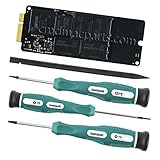
- Comes with: 512GB SSD, Nylon Spudger, Screwdrivers (T5, T6, P5)
- Compatible with MacBookPro10,2 (Late 2012 / Early 2013)
- Connects to an mSATA 3.0 slot with the 7+17 pin connector
Rank #4

- Notice: The card comes with blak film covering pins and Sintech install guide paper-card.【ONLY Sintech Adapter sell Sintech-brand】
- Support Adata NVMe SSD : SX6000, SX7000, SX8200, SX8200 Pro etc,Corsair : MP500, MP510,Crucial : P1,HP: ex920, ex950
- Support Intel NVMe SSD : 600p, 660p, 760p,Toshiba XG3-XG4-XG5-XG5p-XG6 line,Samsung: 960 Evo, 960 Pro, 970 Evo, 970 Pro,WD:v1, v2 and v3,MyDigital: SBX - BPX
- NOT Support: PM981,950 Pro ,WD Blue NvME SN570 /SN770
- Important Notice: It can't support recovering from internet,important to prepare bootable USB disk driver(M.2 PCIe has no OS systerm inside,it must be erased first),if you don't know how to do this, you can ask for help. There is hibernation for all 2013-2014 Macs,you can set it to resolve this problem as guider in attached photo.If you meet unbootable after installing MAC OS,pls reset "NVRAM" by Hold Down "CMD+Option+P+R".
Rank #3

- Jorkar A1466 SSD Hard Drive for Macbook is compatible with MacBook Air (mid 2013-2015,2017), A1466 SSD (EMC 2632 2925 3178), A1465 SSD (EMC 2631 2924); for MacBook Pro Retina 2013-2015, A1398 SSD (EMC 2674 2745 2876 2881, 2909 2910), A1502 SSD (EMC 2678 2875 2835).
- Note: Model & EMC needs both match with our list, or will not work. Before removal, Back up your original data to USB drive; and Updated your old original SSD to mac OS 10.13 High Sierra or Later version. If not, the new SSD will not be recognized after replacement.
- Jorkar SSD for Macbook air/pro has been Pre-installed MacOS High Sierra 10.13, If you want a higher system, you can go to the Appl Store to upgrade it. Note, when you update the MacOS, please change to the regional language, then the installation will begin.
- Jorkar SSD Hard Drive for macbook Increases the capacity and processing speed for your macbook air/pro, read speed is up to 2150 MB/s, write speed 1650 MB/s (1TB). The newer the computer and the larger the SSD capacity, the faster the speed.
- Faster boot times, faster application loading times and better system responsiveness. Encryption protect your data safely.
Product prices and availability are accurate as of the date/time indicated and are subject to change. Any price and availability information displayed on Amazon at the time of purchase will apply.

