
Free tools Windows power users keep installed
One-click scans. No signup required.
iTechGuides is reader-supported. When you buy through links on our site, we may earn an affiliate commission. As an Amazon Associate I earn from qualifying purchases. Learn more
Yes. RPCS3 can launch supported physical PlayStation 3 games on a PC running Windows, Linux, macOS or FreeBSD. The catch is that most Blu-ray drives are not guaranteed to read PS3 discs: RPCS3’s quickstart guidance calls for a drive with a MediaTek chipset and a +6 read offset. Even if the drive reads a disc, the game itself may not run properly.
What you need to play a PS3 disc on PC
- A PC running Windows, Linux, macOS or FreeBSD.
- A Blu-ray drive that can read PS3-format discs. RPCS3’s quickstart guidance specifies a MediaTek chipset and a +6 read offset.
- RPCS3 set up according to its current guidance, plus a game that works well enough to play in the emulator.
RPCS3 announced expanded direct-disc support beyond Windows, and GamesRadar quoted the project as saying: “Owning your games as physical media allows you to play games released as far back as 20 years ago without relying on any servers!” That means a compatible PC and drive can read and launch a physical game disc; it does not mean every PS3 game is supported or that the emulator needs no setup.
Why an ordinary Blu-ray drive may not recognize a PS3 game
PS3 discs use a layout that many ordinary Blu-ray readers cannot fully read. A drive’s Blu-ray branding alone is not enough to establish compatibility. The relevant checks are the exact drive model, its chipset and firmware, and whether it supports the required +6 read offset.
Before buying, compare the exact model and firmware against RPCS3’s current supported-drive hardware list and quickstart guidance. Similar retail names do not guarantee identical internal hardware, so do not assume that a drive will work because another model in the same product family does. The supported-drive list and availability can change.
#1 Best Overall

- 【Wide Compatibility—Disc Formats】 This 8-in-1 all-in-one external Blu-ray drive supports reading and burning BD, DVD, and CD discs. Compatible with BD (read support for BD-ROM, BD-R/RE (25GB/50GB), and BD-XL (100GB, read-only); maximum burning support up to 50GB (BD-R DL)), DVD±R/RW (including DL 9.6GB), CD-R/RW, and M-Disc, and supports writing to SD/TF cards. Performance: BD read speed 6x / DVD 8x / CD 24x; write speed BD-R 6x, DVD±R 8x, CD-R 24x. Supports 3D Blu-ray playback. Third-party software ((such as PowerDVD, Leawo, AnyDVD, etc.)) is required to play Blu-ray discs.️⚠️Note: The maximum Blu-ray recording capacity is 50GB (dual-layer); 4K playback is not supported.
- 【 Widely Compatible】 Fully compatible with Windows 11/10/8.1/7/XP/ME/2000 and macOS 10.6 and later. Works seamlessly with laptops, desktops, all-in-one PCs, mini PCs, MacBook Pro/Air, Dell, Lenovo, HP, and other mainstream laptops and desktops, delivering truly hassle-free cross-platform use. Note: Not compatible with TVs, tablets, smartphones, or in-car devices.
- 【8-in-1 Multi-Function Blu-ray Burner + USB Hub】 This External blueray/dvd drive for pc supports burning and reading BD, CD/DVD discs, features 3D playback, and can be used as a USB hub for laptops. Equipped with 2 USB-C ports, 1 USB 3.0 port, 1 USB 2.0 port, and 1 TF/SD card slot, it is compatible with USB wired/wireless mice, keyboards, computer coolers, and other peripherals. Through this card slot, you can quickly transfer photos and videos from camera or phone memory cards to your computer, meeting the need to connect multiple devices simultaneously. This enhances expandability and makes usage more convenient. Note: TF and SD cards cannot be read simultaneously.
- 【Dual-Port All-in-One, High-Speed Reading]】This Bluray burner external has USB-A & USB-C 3.0 for . Even laptops without USB-A can connect via USB-C. Slim and portable, fits in a laptop bag; ideal for home, office, travel. Supports backup, software, media playback, and CD/DVD/Blu-ray for HD. Built-in cable stores in base. Includes USB power cable: if underpowered, connect to PC or 5V/2A adapter (⚠️no data transfer) to improve reading stability. Enjoy your discs anywhere, including Blu-ray.
- 【Ultra-slim and portable, comes with 1 carrying case + 4 CD sleeves】 This Blu ray drive— Lightweight and reliable, ensuring your data stays safe wherever you go Weighing just 300 grams, this external Blu-ray burner features an ultra-slim design (5.5 x 5.5 x 0.35 inches) that fits easily into a backpack or suitcase, making your travels hassle-free. It comes with a portable carrying case and 4 CD sleeves to effectively prevent scratches, avoid cable tangles, and keep your belongings organized and safe.
Disc readability and game compatibility are separate checks
A compatible drive only answers whether RPCS3 can read the disc. It does not establish whether the game will boot, reach gameplay or run reliably. RPCS3 tracks compatibility by game ID, with disc and digital releases listed separately; check the entry that matches your copy before deciding what to expect.
In RPCS3 compatibility data from January 2026, entries were categorized as follows:
Rank #2

- 【Premium External Blu-ray Drive】 Enjoy seamless playback with this Portable Blu-ray Player, supporting BD reading up to 6X, DVD at 8X, and CD at 24X. Effortlessly burn CDs/DVDs with low noise and energy efficiency. (Note: Can read but cannot burn Blu-ray discs)
- 【Plug & Play CD DVD Burner】 This External Blu-ray Drive works instantly for CD/DVD playback and burning—just connect via USB 3.0 or Type-C. (Blu-ray playback requires third-party software like PowerDVD or Leawo)
- 【Ultra-Fast USB 3.0 & Type-C】 Experience rapid 5Gbps transfers with high-speed USB 3.0 and dual USB-A/C connectors. Perfect for laptops and desktops (Not compatible with Chromebook, TV,Tablet, iPad, Truck and Car)
- 【Sleek & Portable Blu-ray Player】 Featuring a brushed texture shell and embedded data cable, this lightweight drive is ideal for travel, work, or home entertainment
- 【Reliable Support Guaranteed】 Need help with setup or Blu-ray playback? Contact us via your Amazon order for quick assistance!
| Status | Entries | What to take from it |
|---|---|---|
| Playable | 2,558 | Listed in the project’s Playable category in that January 2026 snapshot. |
| Ingame | 899 | Listed separately from Playable; check the game’s notes rather than treating it as a guarantee of a complete playthrough. |
| Intro | 101 | Listed separately from the categories above. |
| Loadable | 3 | Listed separately from the categories above. |
| Nothing | 0 | No entries were in this category in that snapshot. |
A separate Tom’s Hardware report in July 2026, citing RPCS3 data, said 2,681 of 3,559 PS3 titles were compatible. That is a dated count, not a permanent success rate; the project’s data changes, and the overall figure does not tell you how a particular game performs.
Crashes, No Sound, or Screen Glitches?
Random freezes, missing sound and display glitches usually trace back to one bad driver. Find and replace yours safely.Free scan · under a minuteWindows Errors? Fix Them Before They Spread
Repair common Windows errors and clear accumulated junk for a smoother, more stable PC - no reinstall needed.Free scan · no reinstallDirect disc launch or dump the game to storage?
Direct launch keeps the physical disc as the source for loading the game, so you need the compatible drive whenever you use it. Dumping a disc to storage adds a setup step and uses storage space, but gives you a stored copy to load without relying on the disc drive for each session. Neither approach changes the game’s compatibility status in RPCS3.
Rank #3

- 【Powerful function】: This external bluray drive has powerful storage capacity and fast reading speed Turbocharge workflows with USB 3.0’s 5Gbps bandwidth—6X faster than USB 2.0. Effortlessly manage BD(100GB). CDs (700MB), DVDs (4.7GB), and dual-layer DVDs (8.5GB). has strong error correction capability, impact resistance, low noise, and low power consumption.(Note: Incompatible with TVs, Tablets, PS4, iPads, Chromebooks, Projectors, or Vehicles.)
- 【Dual USB Power Design for Stable Operation】:Compared with standard external Blu-ray drives, this drive includes an additional USB power cable, ensuring stable power supply for smooth disc reading and writing. Reduces playback interruption and burning failure caused by insufficient power.
- 【Easy to carry】: external blu ray player combines two different USB cables into one. external blu ray drive for laptop。easy carrying and storage of USB3.0 and Type-C interfaces, and it can be easily connected to Type-C or USB 3.0 interface computer。
- [Strong Compatibility]: blu ray drive external Software Required: This blu ray player for pc a wide range of devices, including laptops, PCs, working seamlessly with Windows, macOS, and Linux. However, Bluray playback and writing require specific software, such as PowerDVD, Leawo Blu-ray Player, AnyDVD,or VLC Media Player. iDeer Blu-ray Player Simply install your preferred Bluray software to get started.(Note: This product does not come with the playback software, please purchase it separately.)
- 【Easy to Use】: The usb blu ray drive external is very easy to use, it can compatible read and write CD, DVD and compatible with BD. Designed for convenience, this Blu-ray drive is compact and lightweight, making it easy to carry during business trips or vacations.
If you already own a supported drive and want to play from the disc, direct launch is the straightforward route. If you prefer not to depend on the drive for repeated loading, consult RPCS3’s current guidance for dumping games and use the same game-ID compatibility check. Do not assume that either route makes an unsupported title playable.
Independent reader supportYour contribution helps us test, update, and keep practical guides available for everyone.Do you need a PS3, and does owning the disc settle everything?
You do not need a PS3 to launch a disc directly through RPCS3 if you have a compatible PC, drive and game. Owning the disc does not remove the need to follow RPCS3’s setup instructions or check the title’s compatibility. Keep to applicable laws and the emulator project’s guidance when using game files or discs.
Quick Recap
Best Value
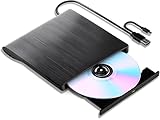
- 【High-Def 3D Playback & Reliable 6X BD Burning】 This versatile BD-RW writer supports high-definition 3D Blu-ray playback and precision burning for BD, DVD, and CD formats. It delivers stable maximum speeds of 6X for BD, 8X for DVD, and 24X for CD, providing a secure solution for high-capacity data backup and long-term media archiving.
- 【High-Speed USB 3.0 & Type-C Dual Interface】 Equipped with a 2-in-1 integrated cable featuring both USB 3.0 and Type-C connectors, this drive ensures rapid 5Gbps data syncing and consistent high-speed performance. It offers seamless connectivity for modern ultra-thin laptops and traditional desktops without needing extra adapters.
- 【Seamless Cable Management & Ultra-Slim Design】 The data cable is ingeniously hidden within the bottom storage slot, preventing cable loss and enhancing portability. Its lightweight, slim profile features anti-slip shockproof pads, ensuring quiet operation and protection during home, office, or travel use.
- 【Wide Compatibility & Multi-Format Support】 Fully compatible with Windows 11/10/8.1/7, Mac OS, and Linux. It supports a wide range of formats including BD-ROM, BD-R/RE, DVD±R/RW, DVD-RAM, and CD-R/RW. (Note: Not compatible with Chromebooks, TVs, Tablets, iPads, or Car systems).
- 【Usage Optimization & Region Code Tips】 For peak performance on low-power devices, please connect the included external power cable. Blu-ray playback requires third-party software (such as VLC, Leawo, or PowerDVD). For 3D Blu-ray playback, a 3D-capable display and compatible software are required.
Rank #4

- 【All-in-One Interface & High-Speed Read/Write】A built-in 2-in-1 USB 3.0 & Type-C cable allows the Blu-ray burner to connect to both USB-A and Type-C ports without any adapter. Maximum read/write speeds reach 6x BD, 8x DVD, and 24x CD, with 5Gbps data transfer – ensuring smooth large-file copying and stutter-free playback.
- 【Supports 50GB Discs】Fully compatible with 50GB Blu-ray discs for both reading and writing, the external Blu-ray drive is ideal for system installation, data backup, movie archiving, gaming, and music burning – one drive covers all high-capacity storage needs in any scenario.
- 【Immersive 3D Cinema Experience】Enjoy near-1080p 3D Blu-ray playback with the external Blu-ray drive, delivering a theater-like visual feast at home. Perfect for action and sci-fi blockbusters in stunning 3D (note: 4K Ultra HD Blu-ray discs are not supported).
- 【Plug and Play & Ultra Portable】No driver installation required – simply connect the external Blu-ray burner via USB, press the eject button, insert your disc, and start playing. The slim, lightweight design makes it perfect for travel and business trips, allowing you to carry your optical drive anywhere with ease.
- 【Broad System Compatibility & Helpful Tips】Unlike some external Blu-ray drives that have limited support, the drive works seamlessly with Windows (11/10/8/7/XP/Vista), macOS, and Linux on laptops, desktops, and all-in-one PCs. As a reliable external Blu-ray/DVD drive for PC, it handles all burning and reading tasks effortlessly. Please note: playback/burning software is not included – we recommend PowerDVD, Leawo, Macgo, or VLC. Not compatible with Chromebooks, smartphones, tablets, TVs, or car players.
Product prices and availability are accurate as of the date/time indicated and are subject to change. Any price and availability information displayed on Amazon at the time of purchase will apply.

