
iTechGuides is reader-supported. When you buy through links on our site, we may earn an affiliate commission. As an Amazon Associate I earn from qualifying purchases. Learn more
Yes. A 2-pin fan can usually be slowed by reducing its DC supply voltage with a compatible fan controller. The exact minimum voltage is specific to the fan: it may need a higher voltage to start than to keep running, and it can stall if set too low. A 2-pin fan has no separate PWM-control or tachometer wire, so ordinary 4-wire PWM control and RPM monitoring do not apply.
What the two wires do
The two conductors carry only power and ground. Unlike a 4-wire PC fan, there is no dedicated control-input wire for a motherboard’s PWM signal. Analog Devices explains the wiring and control distinctions in its fan-control engineering article.
Because the fan electronics normally receive power through those same wires, the practical general-purpose method is to vary the DC voltage supplied to the fan.
What’s actually slowing this PC down?
Pick the symptom - the matching free tool is one click away.
Control methods compared
| Method | How it works | When to use it | Main caution |
|---|---|---|---|
| Variable DC voltage | Continuously lowers or raises the fan’s supply voltage. | Best default for a 2-pin fan when the controller matches the fan’s rated voltage and current. | Start and running thresholds differ by fan; excessive reduction can cause stalling or inadequate cooling. |
| Low-frequency PWM on the power line | Rapidly switches the fan’s supply on and off. | Only when the exact fan manufacturer documents compatibility. | MinebeaMitsumi warns that supply-line PWM can create excessive internal voltage and damage some fan control circuits (manufacturer guidance). |
| Motherboard header control | Depends on the header: it may vary voltage or use a dedicated PWM signal. | When the motherboard manual explicitly supports the fan and its electrical load. | A 2-pin plug cannot use a fourth-pin PWM input. A voltage-controlled header can stop the fan at low settings. |
Analog Devices describes both variable DC and low-frequency supply PWM as possible approaches, but also notes that operating values differ between manufacturers, models and individual fans. Do not treat an example voltage for a particular 12 V fan as a universal setting.
#1 Best Overall

- VERSATILE COMPATIBILITY: 2-pin connector design works with most computer cooling fans, featuring a 4-port splitter for multiple fan connections
- ADJUSTABLE SPEED CONTROL: Variable voltage control from 4V to 12V DC allows precise fan speed adjustment for optimal cooling performance
- POWER SPECIFICATIONS: 36W power supply unit with 3A output, operating on universal 100-240V AC input for worldwide use
- PLUG AND PLAY DESIGN: Simple installation with no additional software required - just connect your fans and adjust the speed dial as needed
- COMPREHENSIVE PACKAGE: Includes power adapter, 4-port fan splitter, and speed controller unit for complete cooling system management
How to slow a 2-pin fan with variable voltage
- Identify the fan’s rating. Read the label or datasheet for nominal voltage and current. Also identify the connector polarity and the power source.
- Select a suitable controller. Use an adjustable DC fan controller whose output range includes the fan’s rated voltage and whose current rating meets or exceeds the fan’s requirement. The controller must be designed for the fan’s DC type and supply voltage.
- Start at the rated voltage. Verify that the fan starts normally before reducing the setting. A fan that continues spinning after being started at full voltage may not start when switched on at the lower setting.
- Reduce the voltage gradually. At each setting, confirm that the blades start without hesitation, continue turning, and do not repeatedly stop and restart.
- Check the real cooling load. Test with the equipment operating as it normally will. Increase the setting if temperatures rise beyond the equipment’s acceptable limit or airflow is insufficient.
There is no responsible universal “minimum voltage.” The start threshold and the lower running threshold can be different, and both vary across fan designs and individual units.
Why supply-line PWM needs extra caution
Some designs can be controlled by switching the two-wire supply with low-frequency PWM, but this is not equivalent to the dedicated PWM input on a 4-wire fan. The switching waveform is applied directly to the fan’s power electronics. MinebeaMitsumi specifically cautions that frequent power-supply switching may generate excessive voltage inside the fan and destroy its electronic circuit. Use this method only if documentation for the exact model approves it; otherwise choose variable DC voltage.
Rank #2

- Compatible with 2Pin (2pcs XH2.54 + 2pcs PH2.0) and 2pcs 3/4Pin (MX2.54 2510) fans. Adopts voltage regulation for speed adjustment. Note: 4-pin fans are supported but only via voltage control (non-PWM speed control). Fans are not included.
- DC5525 12V-26V adapter input (adapter not included), 1.25V-12.5V adjustable output, max 40W power load.
- Built-in KF301 screw terminal, supports multiple DIY wiring and extended device connection.
- Adopts high-quality XLSEMI chip, with all-copper connectors for safety and reliability. It features high output current capability, low ripple, excellent line and load regulation, and built-in output overcurrent protection.
- Package Incude:a PC Fan Speed Controller (fans not include)
Using a motherboard header
Check the motherboard manual for the header’s control mode, connector limits and supported fan type. Some 4-pin headers can regulate a fan by changing supply voltage, while others expect a separate PWM signal. Noctua’s troubleshooting guidance discusses these mode differences and the possibility that reduced voltage can stop a fan: Noctua FAQ.
Free tools Windows power users keep installed
One-click scans. No signup required.
Do not assume that plugging a 2-pin fan into a generic 4-wire PWM controller gives it PWM control. The fan has no control-input lead. A motherboard may still regulate it in a documented voltage-control mode, but the result depends on that header and the fan’s electrical requirements.
Rank #3

- [Plug-and-Play] Compatible only with standard 2-pin DC fans. Powered by a standard AC plug (100–240V); no settings or internal wiring required. Simply connect, adjust the knob, and experience instant cooling.
- 【PC Fan Adapterller】DIY PC assembly: Solve the problem of insufficient fan interfaces on the motherboard and customize personalized air ducts. Servers/workstations: Centrally manage multiple fans to improve heat dissipation efficiency. Industrial equipment: Control ventilation and heat dissipation in equipment such as cabinets and electrical control boxes.
- 【Variable Application】The fan's variable speed settings | Input : AC 100V - 240V 50/60HZ | Output: 4V – 12V 3A | Max Power:36w |Red (+); Black (-) | Plug-and-Play, Easy Installation
- 【Reliable & Robust】Capable of driving up to four 2-pin DC fans simultaneously with a total output of 36W. Effective heat dissipation and consistent performance during extended operation.
- 【Technology & Support】We aim to provide quality products and services, if you have any questions, please feel free to talk to us, we will reply as soon as possible and solve the problem for you
RPM monitoring and feedback
A standard 2-pin connection provides no tachometer output, so a motherboard or controller normally cannot read the fan’s RPM from those wires. Specialized circuits can estimate speed from motor commutation signals, but that requires purpose-built hardware rather than an ordinary fan header. The onsemi ADT7468 datasheet illustrates this kind of specialized monitoring approach.
Troubleshooting reduced-speed operation
The fan does not start
- Raise the voltage and test startup again; the required start voltage may exceed the voltage needed for continuous running.
- Confirm polarity, supply voltage and controller current capacity.
- Remove mechanical obstructions and check for a failing bearing or damaged fan.
The fan starts, then stops
- Increase the setting slightly; the operating voltage is below the fan’s stable threshold.
- Check whether the controller is applying an incompatible PWM waveform instead of steady DC.
The fan runs but cooling is inadequate
- Measure or otherwise verify equipment temperature under the actual workload.
- Increase speed until airflow is sufficient, and ensure the fan orientation and airflow path are correct.
The motherboard reports no RPM
That is expected from an ordinary 2-pin fan. Use a fan with a tachometer lead if automatic RPM feedback is required, or use specialized sensing hardware.
Rank #4
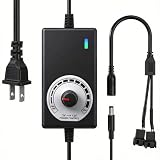
- ✅ Fully Adjustable 3-12V Power Control Easily adjust the output voltage from 3V to 12V with the precision knob, directly controlling fan/pump speed, noise level, airflow, and power consumption. Ideal for silent cooling, moderate airflow, or full-speed operation based on your needs.
- ✅ Universal Compatibility with 12V Devices Comes with a 35cm DC5521 to dual 4-pin splitter cable, supporting 2-pin, 3-pin, 4-pin, and DC5521-connected 12V fans, pumps, and other small electronics. Works seamlessly with PC case fans, water pumps, routers, cabinets, and DIY cooling projects.
- ✅ Reliable & Safe Power Adapter AC 100-240V 50/60Hz input with 2A max output (24W total power). Built-in multi-layer protection including overcharge, overcurrent, overvoltage, short-circuit, and temperature safeguards. Fireproof housing and thick copper wires ensure long-term durability and safety.
- ✅ Reliable & Safe Power Adapter AC 100-240V 50/60Hz input with 2A max output (24W total power). Built-in multi-layer protection including overcharge, overcurrent, overvoltage, short-circuit, and temperature safeguards. Fireproof housing and thick copper wires ensure long-term durability and safety.
- ✅ Versatile Cooling & DIY Applications Perfect for reducing fan noise in home electronics, optimizing airflow in water cooling systems, adjusting pump flow rates, or powering low-voltage DIY projects. Suitable for PC cases, gaming consoles, network cabinets, aquariums, and more.
Information needed for a specific recommendation
A safe controller or minimum setting cannot be named without the fan model, rated voltage and current, connector, power source, and whether control will come from a motherboard or a standalone unit. Those details determine compatibility and the usable startup and running range.
Quick Recap
Best Value
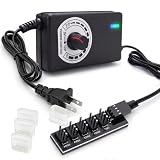
- ✅ 3V~12V Continuously Variable Speed Regulation | Customize Fan & Pump Performance Freely Built-in precision rotary knob for stepless voltage adjustment from OFF/3V to max 12V, realizes 0%-100% speed control. Perfectly balance cooling efficiency, running noise and power consumption to match your real usage scenarios. Max output 3A/36W to drive multiple cooling devices stably.
- ✅ 5-Way Universal Fan Hub Splitter | With Short-Circuit Prevention Caps Comes with a 20cm DC5521 to 5×4PIN fan splitter cable, universally fits all common 12V cooling devices: 2-pin, 3-pin, 4-pin PWM computer case fans and water pumps. Equipped with 4 insulating plastic caps to cover unused empty terminals, effectively avoid accidental short circuit, greatly improve circuit safety.
- ✅ Universal AC 100-240V Input & Full Multi-layer Safety Protection Wide-range AC 100V~240V worldwide input design. Equipped with 5-level built-in safety protection: over-current, over-voltage, short-circuit, overheat and surge protection. Thickened pure-copper internal wiring + fireproof plastic housing ensures long-term stable high-load operation without overheating or burnout. The adjustable LED indicator changes brightness with output voltage to intuitively show working status.
- ✅ Wide Application for All DIY Cooling Scenarios Ideal cooling power solution for PC computer chassis, NAS storage devices, home servers, AV audio cabinets, network router/modem cooling, hydroponics system and all kinds of electronic DIY projects. Widely used for home silent modification, equipment heat dissipation upgrade and customized small cooling system build. Also for DIY a air purifier and solder-fume extractor .
- ✅ Complete Plug-and-Play Kit | Tool-Free Easy Mounting for DIY Builds Full set includes adjustable speed power adapter + DC5521 to 5-port fan hub cable out of box, enought cord length for flexible layout, no extra adapters or soldering required.Double-Sided Adhesive on Hub Base, saves your wiring time and modification cost for DIY cooling builds.
Product prices and availability are accurate as of the date/time indicated and are subject to change. Any price and availability information displayed on Amazon at the time of purchase will apply.

