
Free tools Windows power users keep installed
One-click scans. No signup required.
iTechGuides is reader-supported. When you buy through links on our site, we may earn an affiliate commission. As an Amazon Associate I earn from qualifying purchases. Learn more
The $27 vertical mouse most plausibly connected to this headline is the Seenda MOU-302—but the available reporting does not verify that it won a nine-mouse test. Tom’s Guide reviewed the MOU-302 in July 2025, reporting that price; that review is not evidence of a separate comparison or a cure for wrist pain. A vertical mouse may suit some people, but fit and task performance vary, and changing mice alone is not an established treatment for persistent pain.
What the $27 Seenda MOU-302 does—and does not—establish
Tom’s Guide’s July 2025 review of the Seenda MOU-302 reports a $27 price. That makes it a plausible match for the product described in the headline, but the available review does not establish that the MOU-302 beat eight other mice in a nine-model test.
The review reports three sensitivity settings: 1000, 1600, and 2400 DPI. It also reports that there is no left-handed version. DPI changes how far the pointer moves for a given mouse movement; it does not determine whether the mouse will fit your hand or ease discomfort. The review’s price is dated, not a guarantee of the current price.
Quick wins for a faster PC:
Scan for outdated or missing drivers - takes under a minuteDriver Scan →Repair Windows errors before they cause bigger problemsFix Now →Fix the driver behind crashes, sound loss and screen glitchesFind Drivers →How to choose a vertical mouse for your hand
Check handedness and hand size before comparing specifications. A mouse that is awkward to hold may undermine the posture change you are seeking, and product makers’ fit guidance is not a clinical finding.
#1 Best Overall

- Ergonomic Comfort Design: This vertical ergonomic mouse promotes a natural handshake grip, keeping your wrist and forearm in a neutral, straight line. It's ideal for office workers, designers, and anyone with wrist strain (like carpal tunnel), reducing pressure and discomfort during long hours of computer use at work or home
- Built-in Volume Control Button: Pause, play, and adjust music volume directly from the mouse. Great for streamers, remote workers in video calls, music lovers, and multitaskers who need quick control without switching windows, boosting efficiency
- 3 Multi-Device Connectivity: Connect to 3 devices simultaneously via 2.4G USB/BT1/BT2. Ideal for hybrid workers, students, and power users who switch between a laptop, tablet, and desktop PC at home, office, or on the go with one click
- Silent & Precise Mouse: Noiseless clicks prevent distractions, while adjustable DPI (1000/1600/2400) ensures smooth control. Suits office environments, libraries, late-night gaming, or shared spaces where noise control matters, offering flexibility for work and casual gaming
- Long-Lasting & Easy Recharging: With its built-in 500mAh battery and USB-C charging, this mouse lasts up to 2 months per charge. It's perfect for busy professionals, travelers, and home users who value convenience and hate battery waste, ensuring reliable use anywhere
Seenda MOU-302
The MOU-302 is the candidate associated with the reported $27 price. Tom’s Guide lists 1000/1600/2400 DPI and says a left-handed version is not available. The cited review does not establish hand-size guidance.
Anker 2.4G Wireless Vertical Ergonomic Optical Mouse
Anker’s official product page lists 800, 1200, and 1600 DPI, a 2.4G wireless receiver, and two AAA batteries, which are not included. These specifications describe the product, not a demonstrated effect on pain.
Rank #2
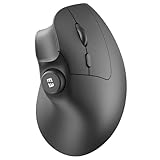
- Ergonomic Comfort Design: This vertical ergonomic mouse promotes a natural handshake grip, keeping your wrist and forearm in a neutral, straight line. It's ideal for office workers, designers, and anyone with wrist strain (like carpal tunnel), reducing pressure and discomfort during long hours of computer use at work or home
- Built-in Volume Control Button: Pause, play, and adjust music volume directly from the mouse. Great for streamers, remote workers in video calls, music lovers, and multitaskers who need quick control without switching windows, boosting efficiency
- 3 Multi-Device Connectivity: Connect to 3 devices simultaneously via 2.4G USB/BT1/BT2. Ideal for hybrid workers, students, and power users who switch between a laptop, tablet, and desktop PC at home, office, or on the go with one click
- Silent & Precise Mouse: Noiseless clicks prevent distractions, while adjustable DPI (1000/1600/2400) ensures smooth control. Suits office environments, libraries, late-night gaming, or shared spaces where noise control matters, offering flexibility for work and casual gaming
- Long-Lasting & Easy Recharging: With its built-in 500mAh battery and USB-C charging, this mouse lasts up to 2 months per charge. It's perfect for busy professionals, travelers, and home users who value convenience and hate battery waste, ensuring reliable use anywhere
Logitech Lift and MX Vertical
Logitech positions the Lift for small-to-medium hands and offers left- and right-handed versions. It describes the Lift as a 57-degree device. The MX Vertical is positioned for medium-to-large hands. These are manufacturer fit descriptions; try to assess grip comfort and reach for yourself where possible.
Do these 3 things before closing this tab:
1Clear out junk files and repair common Windows errors2Fix the driver behind crashes, sound loss and screen glitches3Repair Windows errors before they cause bigger problemsWhat an independent comparison says
RTINGS’ comparison of the Anker mouse and Logitech Lift favors the Lift overall in its testing, citing comfort, Bluetooth support, sensor behavior, latency, and customization. It describes the Anker as lighter and sturdier. RTINGS’ comfort assessment is a product comparison, not evidence that either mouse prevents or relieves wrist pain.
Rank #3

- Ergonomic Comfort Design: This vertical ergonomic mouse promotes a natural handshake grip, keeping your wrist and forearm in a neutral, straight line. It's ideal for office workers, designers, and anyone with wrist strain (like carpal tunnel), reducing pressure and discomfort during long hours of computer use at work or home
- Built-in Volume Control Button: Pause, play, and adjust music volume directly from the mouse. Great for streamers, remote workers in video calls, music lovers, and multitaskers who need quick control without switching windows, boosting efficiency
- 3 Multi-Device Connectivity: Connect to 3 devices simultaneously via 2.4G USB/BT1/BT2. Ideal for hybrid workers, students, and power users who switch between a laptop, tablet, and desktop PC at home, office, or on the go with one click
- Silent & Precise Mouse: Noiseless clicks prevent distractions, while adjustable DPI (1000/1600/2400) ensures smooth control. Suits office environments, libraries, late-night gaming, or shared spaces where noise control matters, offering flexibility for work and casual gaming
- Long-Lasting & Easy Recharging: With its built-in 500mAh battery and USB-C charging, this mouse lasts up to 2 months per charge. It's perfect for busy professionals, travelers, and home users who value convenience and hate battery waste, ensuring reliable use anywhere
Can a vertical mouse reduce wrist pain?
A vertical or angled design can change how the forearm and wrist are positioned, but that does not make every vertical mouse more comfortable or prove it will relieve pain. A 2015 NIOSH-indexed evaluation measured wrist posture, pointing performance, and preferences. Its concept mice reduced forearm pronation compared with a traditional flat mouse, while its fully vertical concept had the poorest pointing performance. The study supports a posture-versus-performance tradeoff; it does not show that a retail mouse cures wrist pain. See the CDC Stacks record of the NIOSH mouse-shape evaluation.
The broader evidence is also uncertain. A 2018 Cochrane review examined 15 studies involving 2,165 workers; the authors judged one study at low risk of bias and the other 14 at high risk. They concluded that evidence for arm supports or alternative mice in preventing work-related musculoskeletal disorders was inconsistent. In two studies, combining an arm support with an alternative mouse was associated with lower neck or shoulder disorder incidence (RR 0.52, 95% CI 0.27 to 0.99), but not a clearly lower right upper-limb disorder incidence (RR 0.73, 95% CI 0.32 to 1.66). Those results concern a combined intervention, not the Seenda mouse or vertical mice generally. Read the Cochrane review.
Rank #4

- Ergonomic Comfort Design: This vertical ergonomic mouse promotes a natural handshake grip, keeping your wrist and forearm in a neutral, straight line. It's ideal for office workers, designers, and anyone with wrist strain (like carpal tunnel), reducing pressure and discomfort during long hours of computer use at work or home
- Built-in Volume Control Button: Pause, play, and adjust music volume directly from the mouse. Great for streamers, remote workers in video calls, music lovers, and multitaskers who need quick control without switching windows, boosting efficiency
- 3 Multi-Device Connectivity: Connect to 3 devices simultaneously via 2.4G USB/BT1/BT2. Ideal for hybrid workers, students, and power users who switch between a laptop, tablet, and desktop PC at home, office, or on the go with one click
- Silent & Precise Mouse: Noiseless clicks prevent distractions, while adjustable DPI (1000/1600/2400) ensures smooth control. Suits office environments, libraries, late-night gaming, or shared spaces where noise control matters, offering flexibility for work and casual gaming
- Long-Lasting & Easy Recharging: With its built-in 500mAh battery and USB-C charging, this mouse lasts up to 2 months per charge. It's perfect for busy professionals, travelers, and home users who value convenience and hate battery waste, ensuring reliable use anywhere
Make the workstation change part of the experiment
OSHA advises performing hand tasks with the wrist straight and neutral, keeping the pointing device within easy reach, and adjusting the workstation to limit awkward posture. Its guidance says, “You should perform all hand tasks with the wrist in a straight, neutral posture to allow the tendons to slide easily without interference.” Consult OSHA’s pointer and mouse guidance for placement details.
- Position the mouse close enough that you do not have to reach or hold your arm away from your body.
- Check that your wrist remains straight rather than bent sideways or sharply up or down while you use it.
- Pay attention to whether the grip, buttons, and pointer movement work for your usual tasks; a different shape can affect pointing performance.
- Break up long, uninterrupted computer work with short breaks. OSHA lists wrist and forearm pain among possible symptoms in its work-process guidance.
If discomfort persists or worsens, treat a mouse change as a workstation experiment, not a diagnosis or treatment, and seek appropriate clinical care.
Quick Recap
Best Value
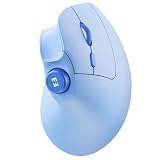
- Ergonomic Comfort Design: This vertical ergonomic mouse promotes a natural handshake grip, keeping your wrist and forearm in a neutral, straight line. It's ideal for office workers, designers, and anyone with wrist strain (like carpal tunnel), reducing pressure and discomfort during long hours of computer use at work or home
- Built-in Volume Control Button: Pause, play, and adjust music volume directly from the mouse. Great for streamers, remote workers in video calls, music lovers, and multitaskers who need quick control without switching windows, boosting efficiency
- 3 Multi-Device Connectivity: Connect to 3 devices simultaneously via 2.4G USB/BT1/BT2. Ideal for hybrid workers, students, and power users who switch between a laptop, tablet, and desktop PC at home, office, or on the go with one click
- Silent & Precise Mouse: Noiseless clicks prevent distractions, while adjustable DPI (1000/1600/2400) ensures smooth control. Suits office environments, libraries, late-night gaming, or shared spaces where noise control matters, offering flexibility for work and casual gaming
- Long-Lasting & Easy Recharging: With its built-in 500mAh battery and USB-C charging, this mouse lasts up to 2 months per charge. It's perfect for busy professionals, travelers, and home users who value convenience and hate battery waste, ensuring reliable use anywhere
Which option makes sense?
- Considering the headline’s $27 candidate: the Seenda MOU-302 is the plausible match to the dated price, but the claimed nine-mouse win is unverified.
- Left-handed or small-to-medium hands: Logitech describes Lift as available for either hand and suited to small-to-medium hands.
- Medium-to-large hands: Logitech positions MX Vertical for that size range.
- Comparing Lift with Anker: RTINGS’ testing favors Lift overall on several comfort and performance attributes, while describing Anker as lighter and sturdier; neither result establishes pain relief.
Product prices and availability are accurate as of the date/time indicated and are subject to change. Any price and availability information displayed on Amazon at the time of purchase will apply.

