
iTechGuides is reader-supported. When you buy through links on our site, we may earn an affiliate commission. As an Amazon Associate I earn from qualifying purchases. Learn more
All three boards in this comparison use AMD’s AM4 socket and X570 chipset, but “X570” alone does not confirm compatibility with a particular Ryzen 3000 processor, board revision, or BIOS. The documented differences are mainly in storage, networking, firmware tools, and the details you should verify for your add-in cards—not a guaranteed leap in application performance. The Gigabyte X570 AORUS MASTER has the clearest documented case for buyers seeking triple M.2, dual wired networking, Wi-Fi 6, and Q-Flash Plus; MSI’s MEG X570 ACE publishes specific memory and storage figures; ASRock’s Taichi requires checking its model-specific support information and exact specifications before comparing layouts.
At a glance: what the documented specifications show
| Board | Documented features | Best fit to investigate |
|---|---|---|
| Gigabyte X570 AORUS MASTER | Gigabyte lists a 14-phase digital VRM, three PCIe 4.0/3.0 M.2 slots with thermal guards, Wi-Fi 6, 2.5GbE plus Gigabit Ethernet, and Q-Flash Plus. These are manufacturer specifications; the 14-phase description does not establish a particular overclocking result. Gigabyte support and specifications | A build that can use three M.2 drives, two wired network connections, Wi-Fi 6, or a BIOS update feature that does not require a CPU installed. |
| ASRock X570 Taichi | ASRock’s support listing identifies the Taichi as an AM4/X570 model and provides a CPU support listing. The available source does not establish the board’s detailed slot-sharing, network, or BIOS feature comparison. ASRock AM4 CPU support | A buyer willing to check the exact CPU support entry, required BIOS, and the specific Taichi manual and specification page for the intended card and drive layout. |
| MSI MEG X570 ACE | MSI lists four DDR4 slots supporting up to 128 GB, three M.2 positions across CPU and chipset links, four SATA ports, and a Flash BIOS Button. PCIe behavior and link speeds depend in part on the installed CPU. MSI specifications | A build where the stated memory capacity and mix of M.2 and SATA storage are a useful starting point, subject to checking slot and lane-sharing details. |
These figures and features come from manufacturers’ pages accessed on October 4, 2026. They are not a complete substitute for each board’s manual: verify the exact revision, M.2 and PCIe sharing, rear and internal USB, audio, dimensions, and network configuration before choosing.
Check CPU support, revision, and BIOS before buying
Compatibility is model- and BIOS-specific. Confirm the exact processor against the board maker’s CPU support list, including any minimum BIOS version. A Ryzen 3000 label or X570 chipset name is not enough to establish that a particular board revision will boot the exact CPU with its installed firmware.
Do these 3 things before closing this tab:
1Fix the driver behind crashes, sound loss and screen glitches2Clear out junk files and repair common Windows errors3Scan for outdated or missing drivers - takes under a minute- Gigabyte: Use the support page for the exact AORUS MASTER revision; Gigabyte maintains separate revision pages. Its listed support information includes BIOS versions, release dates, and notes. The page for revision 1.1/1.2 showed an F40a release dated April 14, 2026, as accessed October 4, 2026. Check the relevant page again before buying or updating. Gigabyte X570 AORUS MASTER support
- ASRock: Search the AM4 CPU support listing for the X570 Taichi and your exact processor, then confirm any required BIOS against the correct board documentation. ASRock AM4 CPU support
- MSI: Check MSI’s MEG X570 ACE specification and support information for the supported Ryzen family and firmware requirements for the exact CPU. MSI MEG X570 ACE specifications
Gigabyte lists Q-Flash Plus for the AORUS MASTER, and MSI lists a Flash BIOS Button for the ACE. These are relevant if you may need to update firmware before normal boot, but follow the exact model-and-revision instructions: the feature name alone does not establish the required file, USB procedure, or indicator behavior.
#1 Best Overall

- AM4 socket: Ready for AMD Ryzen 3000 and 5000 series, plus 5000 and 4000 G-series desktop processors.Bluetooth v5.2
- Best gaming connectivity: PCIe 4.0-ready, dual M.2 slots, USB 3.2 Gen 2 Type-C, plus HDMI 2.1 and DisplayPort 1.2 output
- Smooth networking: On-board WiFi 6E (802.11ax) and Intel 2.5 Gb Ethernet with ASUS LANGuard
- Robust power solution: 12+2 teamed power stages with ProCool power connector, high-quality alloy chokes and durable capacitors
- Renowned software: Bundled 60 days AIDA64 Extreme subscription and intuitive UEFI BIOS dashboard
Compare storage and expansion around your actual build
Gigabyte X570 AORUS MASTER: triple M.2 and two wired network ports
Gigabyte lists three PCIe 4.0/3.0 M.2 slots with thermal guards. The vendor’s page also lists Wi-Fi 6 and 2.5GbE plus Gigabit Ethernet. This combination is most meaningful if you will populate several M.2 positions or use both wired network interfaces; unused ports and slots are not a performance benefit by themselves. Check the support page for the exact revision and its manual for how drives and expansion cards share resources. Gigabyte’s Australia Rev. 1.0 specification page gives ATX dimensions of 30.5 × 24.4 cm; do not assume that a different revision or regional product page establishes every board detail. Gigabyte Rev. 1.0 specifications
MSI MEG X570 ACE: stated M.2, SATA, and memory capacity
MSI lists three M.2 positions and four SATA ports, along with four DDR4 slots and a maximum capacity of 128 GB. The specification distinguishes CPU- and chipset-connected M.2 positions and notes that PCIe behavior depends on the CPU. Before planning a GPU plus capture card, network card, or multiple drives, use the board manual to check the precise slot arrangement and sharing rules; counts alone do not show which combinations can operate together. MSI MEG X570 ACE specifications
Rank #2

- AMD Socket AM4: Ready to support AMD Ryzen 5000 / Ryzen 4000 / Ryzen 3000 Series processors
- Enhanced Power Solution: Digital twin 10 plus3 phases VRM solution with premium chokes and capacitors for steady power delivery.
- Advanced Thermal Armor: Enlarged VRM heatsinks layered with 5 W/mk thermal pads for better heat dissipation. Pre-Installed I/O Armor for quicker PC DIY assembly.
- Boost Your Memory Performance: Compatible with DDR4 memory and supports 4 x DIMMs with AMD EXPO Memory Module Support.
- Comprehensive Connectivity: WIFI 6, PCIe 4.0, 2x M.2 Slots, 1GbE LAN, USB 3.2 Gen 2, USB 3.2 Gen 1 Type-C
ASRock X570 Taichi: verify the board-level details directly
The available ASRock CPU support listing establishes the Taichi’s AM4/X570 context and offers processor support information, but it does not establish the detailed expansion and storage layout needed for a like-for-like feature verdict. Consult the exact Taichi specification page and manual for M.2 and SATA counts, slot sharing, network, USB, audio, and physical fit; do not infer those details from the model name or from another X570 board. ASRock AM4 CPU support
The Tool Desk
Outbyte Driver Updater FREEFix the driver behind crashes, sound loss and screen glitchesFind Drivers →Outbyte PC Repair FREEClear out junk files and repair common Windows errorsFree Scan →What motherboard performance evidence can—and cannot—tell you
Tom’s Hardware’s historical MEG X570 ACE review notes that much software performance is dictated by hardware shared across the tested boards, while also discussing board-level behavior and features. That is a useful caution against choosing on the assumption that a premium motherboard alone will deliver a large application-performance gain. The review’s results belong to its contemporary test setup and should not be treated as a current, universal ranking of these three boards. Tom’s Hardware MEG X570 ACE review
Rank #3

- AMD Socket AM4: Ready to support AMD Ryzen 5000/4000/3000 Series Processors.
- Enhanced Power Solution: Digital Twin 12+2 Power Phase and premium chokes and capacitors for steady power delivery.
- Advanced Thermal Armor: Advanced VRM heatsink and M.2 Thermal Guard for better heat dissipation. Integrated I/O Shield for quicker PC DIY assembly.
- Boost Your Memory: Compatible with DDR4 Memory and supports 4 DIMMs with Extreme Memory Profile support.
- Comprehensive Connectivity: 1x PCIe 4.0 x16 with reinforced PCIe UD Armor, 1x PCIe 4.0 M.2 slot, 1x PCIe 3.0 M.2 slot, 2x USB 3.2 Gen 2 Type-A, 3x USB 3.2 Gen 1 Type-A, and 1x Front USB 3.2 Gen 1 Type-C for hassle free setup.
Gigabyte describes the AORUS MASTER power delivery as 14 phases with components rated at least 50 A each. That is a vendor claim about components, not an independent measurement or a guarantee of a particular temperature, stability, or overclock. AORUS power-delivery feature page
Tom’s Hardware separately reported a substantial difference between reported and measured power on its tested ASRock X570 Taichi configuration. The finding applies to that test system and method; it does not establish behavior for every BIOS, CPU sample, board revision, or later firmware. Tom’s Hardware motherboard power testing
Rank #4

- AMD AM4 Socket and PCIe 4.0: The perfect pairing for 3rd Gen AMD Ryzen CPUs.Bluetooth v5.2
- Robust Power Design: 8+2 DrMOS power stages with high-quality alloy chokes and durable capacitors to provide reliable power for the last AMD high-count-core CPUs
- Optimized Thermal Solution: Fanless VRM and PCH heatsink, multiple hybrid fan headers and fan speed management with Fan Xpert 4 or the UEFI Q-Fan Control utility
- High-performance Gaming Networking: WiFi 6 (802.11ax), 2.5 Gb LAN with ASUS LANGuard
- Best Gaming Connectivity: Supports HDMI 2.1 (4K@60HZ) and DisplayPort 1.2 output, featuring dual M.2 slots (NVMe SSD)—one with PCIe 4.0 x4 connectivity, front panel USB 3.2 Gen 1 connector, USB 3.2 Gen 2 Type-C & Type-A ports and Thunderbolt 3 header, 1 x SPI TPM header
How to make the final choice
- Confirm the exact CPU and board revision. Locate the manufacturer’s CPU support entry and required BIOS, then make sure the listing corresponds to the revision being sold.
- Map your drives and cards. Write down the number and type of M.2 and SATA drives, GPU, and any add-in cards. Compare that list with the exact manual’s slot and lane-sharing tables.
- Prioritize features you will use. The AORUS MASTER’s listed triple M.2, dual wired LAN, Wi-Fi 6, and Q-Flash Plus are useful only if they match your network, storage, and update needs. The ACE’s published memory capacity and storage arrangement may be more relevant to another build. For the Taichi, establish its exact specifications before treating it as equivalent on any axis.
- Check fit and connectivity. Verify case clearance using the dimensions for the exact revision, and confirm rear and internal USB, audio, network, and fan-header needs in the manual.
- Compare the actual offer. Check current local pricing, stock, and whether a board is new, used, or refurbished. Historical review prices do not establish today’s value, especially for older AM4 hardware.
A historical Tom’s Hardware comparison noted a £20 UK price difference between the ACE and AORUS MASTER in its contemporary context; that is not a current price or a reliable present-day value comparison. Tom’s Hardware comparison context
Recommended Free Tools
Quick Recap
Best Value
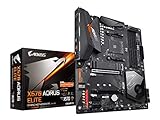
- Supports AMD 3rd Gen Ryzen/ 2nd Gen Ryzen/ Ryzen with Radeon Vega Graphics processors.Operating SysteM Support for Windows 11 64-bit. Support for Windows 10 64-bit
- Dual channel ECC/ non ECC unbuffered DDR4, 4 DIMMs
- True 12 phases digital VRM
- Extended VRM Heatsink
- Dual ultra-fast NVMe PCIe 4.0/3.0 x4 M.2 & thermal guard
Product prices and availability are accurate as of the date/time indicated and are subject to change. Any price and availability information displayed on Amazon at the time of purchase will apply.

