
Free tools Windows power users keep installed
One-click scans. No signup required.
iTechGuides is reader-supported. When you buy through links on our site, we may earn an affiliate commission. As an Amazon Associate I earn from qualifying purchases. Learn more
There is no single external camera that is guaranteed to work with every Samsung Galaxy S7 or smartphone. Choose by task: use a compatible camera and an OTG connection to transfer photos, verify device and app support before buying a USB camera for live video, or consider an OTG-compatible USB endoscope or borescope for close-up inspection.
Choose the right kind of external camera
| What you want to do | Best-fit option | What to verify |
|---|---|---|
| Move pictures from a separate camera | Connect the camera to the phone with a compatible cable or OTG adapter. | Samsung describes photo transfer from a compatible camera; check the camera’s connection and transfer support. |
| Use a USB camera as a live video source | A USB camera supported by the exact phone and the app you intend to use. | Confirm the phone’s external-camera support, the app’s ability to accept USB camera input, and the camera’s power requirements. |
| Inspect a small or hard-to-reach area | A USB endoscope or borescope designed for Android OTG. | Check the phone’s OTG support, connector and adapter, camera app compatibility, probe dimensions, cable length, lighting, and water-resistance claims. |
Transfer photos from a compatible camera
Samsung’s OTG guidance says an OTG cable can connect USB devices and “Transfer photos directly from a compatible camera to the phone.” The word “compatible” matters: this is guidance for importing pictures, not a promise that any USB camera will appear as a live feed in the S7’s Camera app. See Samsung’s OTG connectivity guidance.
For the Galaxy S7 and S7 edge, Samsung’s 2016 overview lists an On-The-Go Adapter (USB Connector) among the in-box items and describes connecting USB devices. A secondhand phone may not include its original accessories, and package contents can vary by market. Check what is in the box before buying an adapter. The older S7 accessory setup is micro-USB-era, so do not assume that a USB-C-only adapter is the right connection. Samsung’s overview is at How to Get More Out of Your Galaxy S7 and S7 edge’s USB Connector.
Crashes, No Sound, or Screen Glitches?
Random freezes, missing sound and display glitches usually trace back to one bad driver. Find and replace yours safely.Free scan · under a minutePC Slower Than It Used to Be?
A free scan shows the junk files, broken settings and background clutter dragging Windows down - then fixes them in one click.Free scan · Windows 10 & 11Use a USB camera for live video only after checking compatibility
A USB connection alone does not mean a phone can show a USB camera’s live video. Android’s documentation describes external USB cameras as a capability provided through the device’s camera implementation. It also notes that this approach is not designed for performance-intensive high-resolution or high-speed streaming, or for manual control of the camera’s ISP, sensor, and lens. Some third-party apps can access USB cameras directly, but both the device and the chosen app must support the workflow. See the Android Open Source Project documentation on external USB cameras.
#1 Best Overall

- ✔ COMPATIBLE WITH ALL SMARTPHONES, TABLETS, and LAPTOPS including ALL iPhone models, Samsung Galaxy and Note, Google Pixel, Huawei and more. CONTENTS INCLUDE: TruView 0.45x Wide Angle Lens, Clarus 15x Macro Lens, TruGrip Lens Clip, GlowClip Mini Rechargeable LED Light + Charging Cable, Quick-Release Lanyard, DuraCase, EasyClip, and Cleaning Cloth.
- ✔ TRUVIEW 0.45x WIDE ANGLE LENS - CAPTURE 45% MORE PICTURE WITH EVERY SNAP: Shoot stunning photos of people, pets, travel scenery, landscapes, architecture, selfies and more. NO DARK CORNERS (vignetting) like cheaper lenses. Crafted from aircraft-grade aluminum and premium optical glass for durability and clarity. Multi-element, coated glass lenses minimize ghosting, reflections, lens flare, and other artifacts. Xenvo cell phone lens attachment is ideal for hobbyists and photography pros alike.
- ✔ CLARUS 15x MACRO LENS - MARVEL YOUR SENSES. MAGNIFY NEARBY SUBJECTS FOR BREATHTAKING, SUPER CLOSE-UP PHOTOS: Capture all the intricacies and details with precision-focus for razor crisp macro photos every time. (For best results, position macro lens approximately 1/2 inch from subject. Not designed for zooming in on distant subjects.) THE TRUGRIP LENS CLIP offers SUPERIOR GRIPPING POWER to fasten your lenses to your cell phone when you're in action mode, framing your next perfect shot.
- ✔ GLOWCLIP RECHARGEABLE LED FILL LIGHT - The GlowClip LED light clips ANYWHERE on your phone to instantly illuminate your subject and surroundings with warm continuous light. The warm and natural LED light is superior to your smartphone's built in flash—which can be blinding and unnatural—especially in darker settings and venues. FEATURES 3 BRIGHTNESS SETTINGS: Low, Medium and High. Say goodbye to frustrating photo "retakes" and hello to brilliant photos the first time.
- ✔ QUICK-RELEASE LANYARD AND TRAVEL CASE - TRANSPORT AND PROTECT YOUR LENS KIT: Perfect for taking your Xenvo lenses with you on the fly. The travel case stores and protects all lens kit components snugly and safely while the quick-release lanyard is the perfect way to carry your lenses on your next outing. Just drape the lanyard and lens around your neck. The quick-release lanyard head makes it a cinch to access your Xenvo lenses in a flash so you never miss another photo moment.
Before buying a webcam or other UVC USB camera for live use, check all of the following for your exact phone and intended app:
- Whether the phone supports the necessary OTG connection and USB camera workflow.
- Whether the app explicitly accepts an external USB camera as a video input. Do not assume the built-in Camera app will do so.
- Whether the camera’s USB Video Class (UVC) requirements match the phone and app.
- Whether the phone can supply enough power, or whether the camera needs a separate power source.
- Whether the resolution, frame rate, and controls meet your needs; Android’s external-camera documentation does not promise high-resolution or high-speed performance.
Samsung’s AT&T Galaxy S7 product page lists USB 2.0 and “MHL: No” for that specific variant. That page does not establish specifications for every S7 model, and a USB connection should not be confused with video output or live external-camera support. Check the product details for your own model: Samsung’s Galaxy S7 SM-G930A support page.
Rank #2

- 【10X Telephoto & Macro 2-in-1 Lens】Experience the power of two professional lenses in one. This dual lens combines a 10X telephoto lens for Phone to bring distant stage moments at concerts clearly closer, and the 10X macro lens focuses at 8 inches – far enough to capture flowers, leaves, and insects in the wild without casting shadows or scaring them away
- 【Superior Optical Clarity & Sharpness】Featuring a complex 12-element optical structure with full-surface multi-layer coating, this Phone telephoto lens is engineered to significantly reduce glare and distortions. This advanced design helps deliver sharper, clearer images with more vibrant colors and improved light transmission for higher-quality photos
- 【Lightweight & On-the-Go Ready】Weighing only 5.12 oz, this clip-on telephoto lens for Phone is incredibly lightweight and portable. Its minimalist design slips effortlessly into your pocket, making it the perfect, hassle-free companion for travel adventures, hiking trips, or spontaneous concerts without adding any bulk to your gear
- 【Universal Clip-On Compatibility】Designed as a universal phone camera lens, it is compatible with a wide range of smartphones, including most Phone and Samsung Galaxy models. Simply clip it onto your phone's camera in seconds—no tools or complicated setup required—to instantly upgrade your mobile photography
- 【Unleash Your Creative Potential】Go beyond your phone's standard camera limits. This Phone macro lens and telephoto combo empowers you to explore new perspectives, from vast landscapes to intricate close-ups. It’s an ideal tool for content creators, photography enthusiasts, and fans who want to capture professional-level shots
For close-up inspection, consider an Android OTG endoscope
If you want to look inside a pipe, behind an appliance, or into another confined space, an Android OTG USB endoscope or borescope is a more specific match than a general-purpose webcam. Compatibility still depends on the particular phone, OTG connection, camera, and app. Compare products by connector and adapter needs, cable length, probe diameter, lighting, claimed water resistance, and explicit Android/OTG and app support. These are specifications to verify for the model you choose, not guarantees about the entire category.
A Galaxy Store listing for a USB endoscope/UVC camera app says that OTG support and an OTG cable are required, and lists Android 6 through Android 13+. Those are the listing’s stated requirements—not confirmation that every S7 configuration or endoscope will work. Check the listing and camera details before purchase: USB Endoscope, Microscope, Borescope, UVC USB camera.
Quick Recap
Best Value

- High Quality: Professional HD Lens with advanced lanthanide optical glass give you clear shots every time,reducing glare and reflection. Top-grade aluminum construction increases the durability of the product and let the lens kit be your partner of photography.
- Easy to Use Clip-on Lens: Detachable and Portable clamps with soft rubber, guarding against bumps and scratches on your phones. Easy to install and remove, clip on to all major smartphones and tablets with a single lens rear camera.
- Universal detachable clamp design, making the mini lenses can work on most types of mobile phones whose camera lenses are not bigger than 13mm diameters, such as iPhone, iPad, Samsung and other smart phones and even Laptops. (For specific model compatibility, please consult customer service)
- The Fisheye lens offers you a wide hemispherical image. The Macro lens for taking extreme close-up pictures of tiny objects in details. The Wide-angle lens projects a substantially large ranges, such group of people, buildings and landscape. Enjoy a fantastic world!
- Package Content: 180 Degree Fish Eye Lens+0.65X Wide Angle+10X Macro Lens. Note: 1. The Macro Lens and the Wide Angle Lens are attached together upon receival! The wide lens should be used together with macro lens. 2. The macro lens can be used seperately, suggest keeping 1-2cm distance from your object to take more clear pictures. Some phone autofocus systems may interfere—manual distance adjustment is recommended. May show vignetting (especially on Android). Please crop in post-processing.
Rank #4

- 【Beginner-Friendly 2-in-1 Phone Lens Kit】An easy and affordable way to explore phone photography. This compact kit includes a 0.45X wide-angle lens and a 12.5X macro lens, giving beginners two creative shooting options for travel, everyday moments and close-up photography
Rank #3
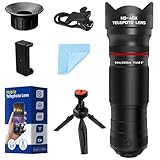
- 40X High-Power Telephoto Lens with Tripod: Experience professional-grade zoom with our 40X red ring telephoto lens kit. Comes with a stable tripod to eliminate shaking and capture sharp, detailed images of distant scenes.
- Signature Red Ring Pro Design: Crafted with a premium red ring finish for a sleek, professional look. Perfect for photography enthusiasts who want both style and performance.
- Manual Focus for Clear Shots: Rotate the focus ring to easily zoom in or out and fine-tune clarity. Capture distant wildlife, landscapes, and the moon with precision.
- HD Optical Glass & Durable Aluminum Build: Made of multi-coated optical glass and aircraft-grade aluminum alloy. Delivers bright, vivid, distortion-free photos without black corners.
- Universal Clip - Wide Compatibility: The adjustable clip and tripod mount work with almost all smartphones — including iPhone 16 15 14 13 12 Pro Max, Samsung Galaxy S24 S23 S22, Google Pixel, OnePlus, LG, and more.
Practical buying checklist
- Identify the task. Decide whether you need photo import, a live USB video feed, or close-up inspection.
- Identify the phone and connector. Confirm the exact S7 model or other smartphone, its port, and whether an OTG adapter is available. For an S7, a micro-USB-era adapter is the relevant starting point, not a USB-C-only adapter.
- Check the camera and app together. For photo import, look for a compatible camera transfer method. For live video or inspection, verify that the app supports that camera type and the phone’s connection.
- Check power and physical fit. Confirm power needs, cable reach, probe size, and any relevant lighting or water-resistance claims for an inspection camera.
- Buy against the specific compatibility claim. Prefer a seller or manufacturer that names the phone, Android version, app, and connection method rather than relying on a broad “works with Android” label.
Product prices and availability are accurate as of the date/time indicated and are subject to change. Any price and availability information displayed on Amazon at the time of purchase will apply.

