
Do these 3 things before closing this tab:
1Repair Windows errors before they cause bigger problems2Fix the driver behind crashes, sound loss and screen glitches3Clear out junk files and repair common Windows errorsiTechGuides is reader-supported. When you buy through links on our site, we may earn an affiliate commission. As an Amazon Associate I earn from qualifying purchases. Learn more
The claim that Best Buy’s new recycling program will let you mail in your old electronics is only partly current: Best Buy offers U.S. mail-in recycling, but the nationwide service launched on April 5, 2023. A small box currently costs $22.99, a medium box costs $29.99, and UPS pickup may cost extra.
The service is designed for people who have small, eligible electronics but cannot conveniently reach a Best Buy store. It is not a free mail-back program, a universal solution for every household product, or a substitute for Best Buy’s separate trade-in and haul-away services.
Key takeaways
- Best Buy announced its nationwide recycle-by-mail boxes on April 5, 2023; the service remains listed on BestBuy.com as of August 18, 2026.
- The small box measures 9 × 5 × 3 inches, holds up to 6 pounds, and is currently listed at $22.99; the medium box measures 18 × 14 × 4 inches, holds up to 15 pounds, and is listed at $29.99.
- Each box includes tape, a prepaid UPS label, and instructions, but a UPS home-pickup charge may apply.
- Mail-in recycling is for accepted small electronics, not large TVs, appliances, loose batteries, liquids, chemicals, or every item accepted through Best Buy’s broader store-recycling program.
- Best Buy says its recycling partner, Electronic Recyclers International, destroys data on received devices, but customers remain responsible for backing up and wiping or removing personal data before shipping.
Does Best Buy’s new recycling program let you mail in old electronics?
Yes, Best Buy currently offers a U.S. recycle-by-mail service, but calling the program “new” is inaccurate in 2026. Best Buy announced the nationwide service on April 5, 2023, and Best Buy’s current mail-in page still lists the service.
The practical arrangement is simple: you buy a Best Buy/ERI recycling box, pack it with eligible electronics, attach the included prepaid UPS label, and send the box through UPS. The service is useful when transportation or distance makes store drop-off difficult, but convenience comes with a fee.
#1 Best Overall
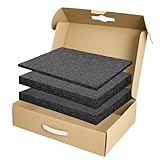
- Package Includes: You will receive a packing box 17 x 12 x 4 inch with 2 sizes of polyethylene foams in black - 2 pcs 16 x 12 x 1.5 inch and 1 pcs 16 x 12 x 0.4 inch. This is a complete packaged set can meet most of your daily storage needs, protecting your precious items from being damaged. And it also includes an anti-static ESD bag and IATA-compliant UN3481 lithium battery label. A ready-to-ship solution that meets courier and air travel safety standards for laptops and electronics
- Eco-Friendly & Sustainable: Made from 100% recyclable materials. The box is made of kraft brown single-layer corrugated cardboard which is sturdy enough for daily use. The foam is made of quality polyethylene material which is lightweight, flexible, tear resistant, with fine texture and offer a reliable solution for cushioning and protecting your valuable items during transport and storage
- DIY: Foam pads are easy to cut for your specific needs. They can be cut with a knife or scissor (not included) into any shape or size you require, making them a versatile solution for a wide range of applications. And also no printings on the box for small businesses to display your brand, label, and gift stickers
- Operating Skill: It is recommended that you outline the item prior to cutting, or cut a suitable seam storage unit to the approximate dimensions of the product. Simply use the thin foam as a cushion to place items on, and then use the thick foam to store the items you need to collect
- Wide Range of Applications: Our box and polyethylene foam combinations provide excellent shock absorption and protection for your equipment and are perfect for protecting fragile items such as electronics, firearms/guns, cameras, tools, arts, crafts, glassware, fishing tackle, collectibles and more. Can be used for shipping, mailing, wrapping, packing and storage
How does Best Buy mail-in recycling work?
Best Buy’s current service follows four basic stages: order the box, fill it with accepted electronics, seal and label it, and give it to UPS.
- Choose and order a box. Best Buy currently lists a small and a medium option. Select the box based on the packed contents, not merely the number of devices.
- Check eligibility before packing. The mail-in program has its own accepted-item instructions. Do not assume that an item accepted at a Best Buy store is automatically accepted in the mail-in box.
- Pack the electronics within the limit. Use the supplied box and included tape. Weigh the completed contents before sealing so the package does not exceed the box’s stated limit.
- Seal and label the package. Apply the prepaid UPS label according to the instructions.
- Send the box through UPS. You can drop it at UPS or arrange a UPS home pickup. Best Buy warns that an additional UPS pickup charge may apply.
- ERI processes the shipment. Best Buy identifies Electronic Recyclers International, Inc. as its recycling partner. Best Buy says recyclers determine whether received items are repaired, repurposed, or recycled; the service should not be treated as a promise that every device will be reused.
The purchased box is non-returnable, and Best Buy says mail-in recycling boxes cannot be returned to or dropped off at a Best Buy store. Best Buy’s mail-in service instructions control if the online description and the instruction sheet differ.
How much does Best Buy mail-in recycling cost?
Best Buy currently lists two mail-in recycling boxes. The listed price includes the box and prepaid UPS shipping label, but not necessarily a UPS home-pickup fee.
The Tool Desk
Outbyte PC Repair FREERepair Windows errors before they cause bigger problemsFix Now →Outbyte Driver Updater FREEFix the driver behind crashes, sound loss and screen glitchesFind Drivers →| Box | Dimensions | Maximum weight | Listed price | Best use |
|---|---|---|---|---|
| Small | 9 × 5 × 3 inches | Up to 6 pounds | $22.99 | A small quantity of compact electronics and accessories |
| Medium | 18 × 14 × 4 inches | Up to 15 pounds | $29.99 | Several small electronics when the contents fit safely |
According to Best Buy’s current mail-in service page, the small box is listed at $22.99 and the medium box at $29.99. Prices and availability can change.
Using the listed price and maximum weight, the small box costs approximately $3.83 per pound when filled to its 6-pound limit. The medium box costs approximately $2.00 per pound when filled to its 15-pound limit. Those are calculations based on Best Buy’s prices and limits, not Best Buy’s own cost-per-pound claims.
The medium box is the better value by weight only if you have enough eligible electronics to fill it safely. Buying a medium box for one lightweight device can cost more than using a free local collection event or an available store drop-off. Because the box is non-returnable, estimate the size and weight before ordering.
Rank #2
- Eco-Friendly & Sustainable: Made from 100% recyclable materials, our laptop shipping box is environmentally friendly ♲
- Convenient Design: Features a dedicated compartment for cords and adapters, ensuring all components stay organized during transit.
- Versatile Compatibility: Accommodates laptops with dimensions up to 15.125" x 10.25" x 1" and minimum dimensions of 11.5'' x 7" x 0.5".
- Optimal Protection: Outer box dimensions of 17" W x 11.5" D x 3.5" H provide ample space for secure packaging. FedEx/UPS/USPS/ISTA Certified.
- Reliable Transit: Our laptop shipping box passes all transit testing requirements, ensuring your device arrives safely at its destination.
What can you put in the Best Buy mail-in recycling box?
The mail-in box is intended for accepted small electronics and accessories. Best Buy’s 2023 announcement gives tablets, cords, keyboards, and other small household gadgets as examples.
Examples mentioned in Best Buy’s broader recycling information include phones, laptops, tablets, computer accessories, cameras, audio equipment, and GPS devices. However, the broader in-store list is not automatically the mail-in list. Packaging requirements, safety rules, and carrier restrictions can differ.
Before packing, check the accepted-electronics instructions supplied with the box and the current Best Buy mail-in requirements. If the instructions do not clearly identify an item as accepted, do not put the item in the shipment without confirming eligibility.
What cannot go in the mail-in box?
Best Buy’s current mail-in page excludes many materials that are hazardous, non-electronic, or unsuitable for this shipping program.
| Do not mail | Why this matters |
|---|---|
| Loose batteries | Battery shipping and handling require specific safety controls. |
| Devices or products containing mercury, including mercury thermometers | Mercury is hazardous and requires specialized handling. |
| Smoke detectors and carbon-monoxide detectors | These products have separate disposal considerations. |
| Light bulbs | Bulbs are not accepted electronics for this box. |
| Aerosol cans and other pressurized canisters | Pressurized containers can create shipping hazards. |
| Paint, chemicals, automotive fluids, medical waste, adhesives, glue, and tapes | These materials are not ordinary electronics and may be hazardous. |
| Butane lighters, soda makers, trash, and other listed household products or tools | Being found in a home or containing electronic parts does not make a product eligible. |
Do not mail loose batteries, liquids, chemicals, hazardous materials, or non-electronic household goods. The current online terms and the instruction sheet that arrives with the box should be treated as the final authority because the allowed-item list and shipping requirements may change.
Can devices with built-in lithium-ion batteries be mailed?
Best Buy’s current page expressly excludes loose batteries, but the supplied official material does not establish a blanket rule for every device containing an integrated rechargeable battery.
Rank #3
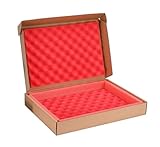
- Note : ①Fits laptop with dimensions up to 15.1" x 10.2" x 0.6";( box external dimension is 16.9" x 11.5" x 2.3"); ② Without available space for charger or cords; please be notice before purchasing
- Strong Construction : The laptop box are made of quality cardboard with protective foams, the high density wave shape sponges which can absorb shock keep the laptop safe
- Reliable : The shipping box for laptop are well made, it have been tested may times and meet transport needs. So this one is a good choice if you want to ship a laptop, electronic parts, or other value item
- Multiuse : The cardboard mailing boxes are widely used in shipping or packing value items like laptops, crafts, electronic parts, artworks, glass items and so on
- Paking : Include laptop box 1 set; 1 UN label and 1 seal label inside
For a device with a built-in lithium-ion battery, follow the current Best Buy instructions and applicable UPS shipping requirements instead of assuming that the device is accepted. Do not remove an internal battery unless the manufacturer specifically permits removal or a qualified technician can do it safely. Never mail a swollen, damaged, leaking, or otherwise unsafe battery-powered device.
How should you protect personal data before recycling?
Customers should wipe or remove personal data before sending a device. Best Buy says customers are solely responsible for data removal, even though Best Buy says ERI destroys data on received devices using processes that may include shredding, erasing, degaussing, impairment, or overwriting.
Best Buy’s statement about downstream data destruction is not a reason to ship an unwiped device containing sensitive information. Treat the mail-in service as an electronics-recycling channel, not as a guaranteed data-recovery or data-wiping service for the customer.
Recommended Free Tools
Data-removal checklist
- Back up irreplaceable files. Copy photos, documents, contacts, authentication data, and other information to a trusted destination before resetting the device.
- Sign out of accounts. Sign out of Apple, Google, Microsoft, Samsung, cloud-storage, password-manager, and other accounts connected to the device.
- Remove SIM and memory cards. Keep removable SIM cards, microSD cards, USB drives, and other storage media unless you intentionally want to recycle them and have securely erased them.
- Factory-reset phones and tablets. Use the device’s built-in reset process after confirming that important data is backed up and account locks are removed.
- Securely erase computers and storage drives. Use an appropriate secure-erase process for the operating system and drive type. A normal file deletion is not the same as securely erasing storage.
- Consider drive removal for highly sensitive data. Best Buy’s recycling FAQ says customers can consult Geek Squad about options involving hard-drive removal for some computers. Removing a drive can make the data decision easier, but only do so when it is safe and practical.
If you cannot verify that sensitive data has been removed, do not send the device through ordinary recycling. Preserve the storage drive or obtain qualified help before shipping.
Is mail-in recycling better than dropping electronics at a Best Buy store?
Store drop-off is generally more economical for people who can safely transport eligible items, while mail-in recycling is more convenient for people who live far from a store or lack transportation.
| Option | Cost signal | Best for | Main limitation |
|---|---|---|---|
| Mail-in recycling | $22.99 small box or $29.99 medium box; UPS pickup may cost extra | Several small, low-value electronics when visiting a store is difficult | Separate mail-in eligibility rules, weight limits, non-returnable box, and no store drop-off for the purchased box |
| Best Buy store recycling | Many qualified categories may be accepted without the mail-in box fee | People who can transport items to a participating store | Item, quantity, state, and location restrictions apply |
| Trade-in | May provide a Best Buy gift card or purchase credit | Working, eligible devices with resale value | Value depends on model, condition, accessories, inspection, and current demand |
| Local government or manufacturer program | May be free, depending on the program | Cost-conscious households and items excluded by Best Buy | Collection rules, dates, and accepted categories vary by location |
Best Buy says its U.S. stores, including stores in Puerto Rico, offer in-store electronics recycling, although Outlet stores generally do not. Best Buy also says store recycling is subject to item, state, and quantity restrictions.
Rank #4

- Category: Lighting -- Bulb and Lamp Recycling
Best Buy’s published pages currently show different store quantity limits. The main recycling page says customers can bring up to three items per household per day, while the FAQ page crawled on August 18, 2026, says employees can accept up to ten qualified items with category-specific limits, including up to five laptops, up to two TVs or monitors, and up to three other qualified items. Connecticut and Pennsylvania stores do not accept TVs or monitors under the FAQ’s stated restrictions.
Because those official pages do not present one consistent universal limit, check the current Best Buy recycling page, the FAQ, and your local store or state rules before making a trip. Do not rely on a single quantity number as a nationwide guarantee.
When is Best Buy trade-in better than recycling?
Trade-in is usually the better first check for a working phone, laptop, tablet, game console, camera, or other device that may still have resale value. Eligible trade-ins can provide a Best Buy gift card, purchase credit, or installment-billing credit, whereas ordinary recycling does not provide compensation.
Best Buy’s trade-in process is separate from mail-in recycling. Eligibility and value depend on the product, condition, accessories, and current resale demand. For online trade-ins, Best Buy generally requires the item to arrive within 14 days of the estimate, subject to the program’s terms. Best Buy’s trade-in FAQ explains the current valuation and shipping rules.
Do not put trade-in items and recycling items in the same shipment. Best Buy warns that the two streams go to different receiving locations. A trade-in sent to the recycling partner may be unrecoverable and will not earn trade-in value.
Free tools Windows power users keep installed
One-click scans. No signup required.
Use this decision test
- Working and reasonably current? Check trade-in value or consider selling it.
- Working but no meaningful resale value? Consider donating it if you can remove personal data and verify that the recipient can use it.
- Broken, obsolete, or unwanted? Compare mail-in recycling, store drop-off, and local collection options.
- Contains sensitive information that cannot be securely erased? Resolve the data issue before choosing any recycling route.
How should you handle a large TV or appliance?
A large TV, refrigerator, washer, dryer, or other major appliance does not belong in a Best Buy mail-in recycling box. Large items need a store, delivery-related haul-away, standalone haul-away, or a local/state collection program.
Best Value

- MUST READ INFORMATION : The laptop boxes are well made carboard shipping boxes with protection foam, has no more space for charger or cords;of couse, the laptop are not included
- UNIVERSAL SIZE : The shipping box for laptop max dimensions ( Inner) are 15.2 x 10.3 x 1.4" (L*W*D) , fits normal laptop screen sizes up to 17.8 Inch; not good for the very professional and thick laptop, so please make sure it fits your laptop size before purchasing
- Superior Pprotection Design : The laptop shipping box made of quality corrugated kraft paper, the inside are high density protection foam and wave sponges which can absorb shocking and impacting effcetively; the laptop are wrapped in the protection foam totally, it have been offered 360° protection when shipping, no worry about the risk of crash or damage
- WIDELY USE : The cardboard mailing boxes are not just for laptop shipping, but also can be used for artworks, crafts, electronic products, value equipments shipping, etc
- WORTH : even the laptop box seems a little expensive, but It's worth to make sure your important laptop or other value items arrived at its destination unscathed
Best Buy says large appliances are not accepted through ordinary store recycling. When Best Buy delivers a replacement eligible major appliance, the company lists a $49.99 haul-away fee for the old appliance. Best Buy also lists standalone haul-away at $199.99 for up to two large products, including TVs, plus unlimited select smaller products. Service areas, exclusions, disconnection requirements, and other conditions apply. Review Best Buy’s recycling and haul-away service details before scheduling.
For a large TV, monitor, battery, appliance, or hazardous product excluded by Best Buy, check municipal, county, state, or manufacturer programs. Best Buy’s recycling information links to state-specific programs and manufacturer-funded alternatives, which may be free or better suited to the item.
What mistakes should you avoid?
- Choosing the small box by default. Dense electronics can exceed 6 pounds quickly. Weigh the contents before ordering or sealing.
- Assuming “electronics” means everything with a plug or battery. The mail-in list is narrower than a general household description of electronics.
- Putting loose batteries or hazardous materials in the shipment. Use a program specifically designed for those materials.
- Assuming the prepaid label makes the entire service free. The box itself costs $22.99 or $29.99, and UPS pickup may add a charge.
- Taking the box to a store. Best Buy says the mail-in box cannot be returned to a Best Buy store.
- Sending a valuable device to recycling. Check trade-in or resale options first.
- Skipping the data wipe. Best Buy says the customer remains responsible for removing personal data.
- Mailing a recalled product. Best Buy’s FAQ says products subject to a CPSC recall are not accepted through its voluntary in-store or online recycling programs.
- Assuming every Best Buy store has identical rules. State restrictions, fees, accepted categories, and quantity limits can differ, and Best Buy’s own pages currently show conflicting general quantity limits.
Who should use Best Buy mail-in recycling?
Best Buy mail-in recycling is a reasonable choice when you have several small, eligible, low-value electronics, the combined contents fit within a 6-pound or 15-pound box, and avoiding a store trip is worth paying $22.99 or $29.99.
What’s actually slowing this PC down?
Pick the symptom - the matching free tool is one click away.
The service is a poor fit for one tiny item, a working device with trade-in value, a large TV or appliance, loose batteries, hazardous materials, or any item that a nearby free local program accepts. Compare the fee, transportation burden, data risk, item eligibility, and likely resale value before ordering the non-returnable box.
Frequently Asked Questions
Is Best Buy mail-in electronics recycling free?
No. Best Buy currently lists the small recycling box at $22.99 and the medium box at $29.99. Each box includes a prepaid UPS label, but an additional UPS home-pickup charge may apply.
Can I return a Best Buy recycling box to a Best Buy store?
No. Best Buy says mail-in recycling boxes cannot be returned to or dropped off at Best Buy stores. The box must be packed, labeled, and sent through UPS.
Does Best Buy erase data from recycled electronics?
Best Buy says its recycling partner, Electronic Recyclers International, destroys data on received devices, but Best Buy also says customers are responsible for wiping or removing personal data before shipment. Back up files, sign out of accounts, remove cards, and securely erase storage before recycling.
Crashes, No Sound, or Screen Glitches?
Random freezes, missing sound and display glitches usually trace back to one bad driver. Find and replace yours safely.Free scan · under a minutePC Slower Than It Used to Be?
A free scan shows the junk files, broken settings and background clutter dragging Windows down - then fixes them in one click.Free scan · Windows 10 & 11Can I mail a large TV or appliance in the Best Buy recycling box?
No. The mail-in box is intended for small accepted electronics, not large TVs, refrigerators, washers, dryers, or other major appliances. Check Best Buy haul-away or local and state recycling programs for large items.
The Bottom Line
Bottom line: Best Buy currently lets U.S. customers recycle certain small electronics by mail, but the service is neither new nor free. It launched nationwide in 2023 and currently costs $22.99 for a small box or $29.99 for a medium box. Use it when convenience outweighs the fee; otherwise, check store drop-off, trade-in, donation, or a local recycling program first.
Quick Recap
Product prices and availability are accurate as of the date/time indicated and are subject to change. Any price and availability information displayed on Amazon at the time of purchase will apply.

