
iTechGuides is reader-supported. When you buy through links on our site, we may earn an affiliate commission. As an Amazon Associate I earn from qualifying purchases. Learn more
The BenQ MA320UG is a strong fit if you want a large Mac desk display with a refresh rate above 60Hz, Thunderbolt connectivity and Mac-oriented controls. Its combination of 32-inch size and 120Hz refresh is unusual, but it is not a larger version of Apple’s Studio Display: the MA320UG is 4K, so text is less dense than on a MacBook Pro or a 27-inch 5K Studio Display. Its glossy screen also makes room lighting an important part of the buying decision.
What the BenQ MA320UG offers
BenQ describes the MA320UG as a 32-inch 4K Nano Gloss monitor for Mac. Its resolution is 3840 × 2160, and its refresh rate reaches 120Hz. That gives you more desktop area than a typical 27-inch display and smoother motion than a conventional 60Hz monitor, while keeping the pixel count at 4K rather than 5K. BenQ’s product page lists the display and connectivity details.
BenQ announced the monitor on June 9, 2026, calling it the first 120Hz model in its MA Series. The company specifies 98% P3 color coverage and 2000:1 contrast. Those are manufacturer-published specifications, not independent lab measurements. Macworld’s 2026 review table instead lists 1300:1 contrast, so the available published figures do not agree. Neither figure alone establishes how the display performs in a particular room or workflow. BenQ’s announcement contains the company’s claims; Macworld’s review gives its separate specification table and user observations.
Free tools Windows power users keep installed
One-click scans. No signup required.
How it fits a Mac desk
Large workspace and smoother motion
The 32-inch panel gives you room for side-by-side windows, timelines and large documents without moving to an ultrawide format. The 120Hz maximum refresh rate can make scrolling and pointer movement look smoother than on a 60Hz screen. It is variable refresh up to 120Hz, according to Macworld’s specifications; actual refresh behavior depends on the connected computer, cable, settings and content.
#1 Best Overall

- MAC COLORS IN FLUID MOTION: Experience 4K at 120Hz for smoother motion and faster on-screen response making everything feel more precise.
- SEAMLESS SETUP: Connect via Thunderbolt 4 daisy chain to extend your Mac workspace, and switch between two computers instantly with Smart KVM for a smoother creative flow.
- VERSATILE CONNECTIVITY: Two Thunderbolt 4 ports deliver a 4K 120Hz signal, fast data, and 96W/15W power delivery, with HDMI and USB-C ports offering added flexibility.
- NANO GLOSS PANEL CLARITY: Delivers crystal-clear detail with deep blacks, bright highlights, and vibrant contrast, showing your Mac exactly as it was meant to be seen.
- ADJUSTABLE STAND: Height, tilt, swivel, and pivot adjustments let the screen follow your posture, delivering comfort and flexibility beyond a fixed stand.
This is not a gaming-first display. MacRumors notes FreeSync support but also cites a 5ms response time and gaming limitations. For everyday Mac work, the appeal is the combination of size and refresh smoothness, rather than a promise of high-end gaming performance. MacRumors’ review discusses those trade-offs.
Mac-focused controls
BenQ’s Display Pilot 2 software supports color syncing and Mac keyboard brightness controls, according to MacRumors. Those features can make an external display feel more integrated into a Mac setup than one controlled only through its physical buttons. The same review reports software friction, particularly when managing a BenQ display alongside a monitor from another brand. Consider that convenience a useful option, not a guarantee of a seamless multi-monitor setup.
Rank #2

- [Show Mac Colors] Calibrated for MacBook with BenQ’s exclusive color tuning, offering a vibrant P3 wide color gamut for MacBook Pro and MacBook Air.
- [Expand MacBook with USB-C] Connect and expand your MacBook display with a single USB-C cable.
- [Integrated MacBook Controls] Adjust brightness and volume directly from your MacBook keyboard.
- [Versatile Connectivity] 2 HDMI and 2 USB-C ports—The dual USB-C ports deliver 90W for your MacBook, and 15W to charge your iPad or iPhone.
- [Adjustable Stand] Adjust height, tilt, swivel, and pivot for maximum comfort.
One-cable potential, with connection trade-offs
The MA320UG has Thunderbolt 4, USB-C, HDMI, USB-A, downstream USB-C and headphone connectivity, as listed by Macworld. BenQ specifies Thunderbolt 4 bandwidth up to 40Gbps, up to 96W of host charging and 15W for connected devices. With a compatible Mac and a Thunderbolt or USB-C connection, one cable can carry display and data while charging the laptop. An HDMI connection can carry the picture, but Macworld notes it does not charge the laptop or connect the USB hub in the same way.
Recommended Free Tools
Check the exact ports on your Mac and the cable path you plan to use before relying on a one-cable desk. BenQ also advertises dual-4K daisy chaining, but says it cannot be used with Apple Silicon M1- and M2-based devices; the company identifies Apple Silicon Pro, Max and Ultra devices as compatible. Its Smart KVM feature requires Display Pilot 2 on both connected macOS or Windows computers. These qualifications are in BenQ’s product information.
Rank #3
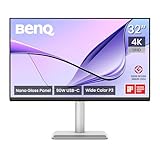
- [Show Mac Colors] Calibrated for MacBook with BenQ’s exclusive color tuning, offering a vibrant P3 wide color gamut for MacBook Pro and MacBook Air.
- [Expand MacBook with USB-C] Connect and expand your MacBook display with a single USB-C cable.
- [Integrated MacBook Controls] Adjust brightness and volume directly from your MacBook keyboard.
- [Versatile Connectivity] 2 HDMI and 2 USB-C ports—The dual USB-C ports deliver 90W for your MacBook, and 15W to charge your iPad or iPhone.
- [Adjustable Stand] Adjust height, tilt, swivel, and pivot for maximum comfort.
Stand adjustments
Macworld lists an adjustable stand, which is useful for positioning a large panel at a comfortable height and angle. The stand’s adjustability helps with everyday ergonomics, but it does not change the central image-quality compromise: a 32-inch 4K screen has lower pixel density than a smaller high-resolution laptop display.
Is 4K sharp enough at 32 inches?
For general work, the MA320UG’s 4K image can be comfortable and useful, but fine text will not look as dense as it does on a MacBook Pro panel. In MacRumors’ comparison, reviewer Juli Clover calculated about 138 pixels per inch for a 32-inch 4K display, versus 254 PPI on the 16-inch MacBook Pro used in the review. Clover reported that text looked somewhat fuzzy next to the laptop at the tested higher resolutions, though it remained readable. That is one reviewer’s experience, not a universal verdict; viewing distance and individual preference matter.
Rank #4

- [Show Mac Colors] Calibrated for MacBook with BenQ’s exclusive color tuning, offering a vibrant P3 wide color gamut for MacBook Pro and MacBook Air.
- [Expand MacBook with USB-C] Connect and expand your MacBook display with a single USB-C cable.
- [Integrated MacBook Controls] Adjust brightness and volume directly from your MacBook keyboard.
- [Versatile Connectivity] 2 HDMI and 2 USB-C ports—The dual USB-C ports deliver 90W for your MacBook, and 15W to charge your iPad or iPhone.
- [Adjustable Stand] Adjust height, tilt, swivel, and pivot for maximum comfort.
Macworld reviewer Roman Loyola described favorable image quality in daily use. The two impressions are compatible: a large 4K screen can work well for everyday tasks while still looking less crisp than a high-density laptop panel when the displays sit side by side. There is no standardized independent colorimeter result in the cited reviews to establish color accuracy or uniformity across units.
The Tool Desk
Outbyte PC Repair FREERepair Windows errors before they cause bigger problemsFix Now →Outbyte Driver Updater FREEScan for outdated or missing drivers - takes under a minuteDriver Scan →Will the glossy screen work in your room?
The Nano Gloss finish is the MA320UG’s most environment-dependent feature. MacRumors cautioned that reflections can make it a poor fit if bright lights or a window are behind the user. Macworld’s reviewer found reflections had little effect in their own setup. Your result will depend on where the monitor faces, the brightness and position of nearby light sources, and how distracting reflections are to you.
Best Value

- DEEP BLACK IPS PANEL w 2000:1 CONTRAST RATIO: Enjoy unrivaled depth and contrast with the 2000:1 IPS Black Technology
- MADE for Mac DESIGNERS: 32" 4K monitor features Pantone Validated and Calman verified color accurate technology. Built with M-Book mode which features Mac compatible color matching. Experience 98% P3 and 100% sRGB color coverage with Delta E ≤ 2
- DISPLAY PILOT 2 & HOTKEY PUCK: Sleek display management and easy brightness control right from your Mac. Easy input switching and auto pivot plus simple desktop partitioning.
- 40Gb/s BANDWIDTH THUNDERBOLT 3: Synchronizes images, videos, data and charge all of your Mac devices with an all-in-one cable! Free up your desk space and say goodbye to clutter thanks to the daisy-chain connectivity capabilities! Seamlessly connect your computer/laptop to create a multi-monitor setup.
- ERGONOMIC & SLEEK DESIGN : An anodized metal base and stand that look great and allow you to fine-tune screen positioning with tilt, swivel, pivot, and height adjustment. Find the perfect combination for your workspace and enjoy superior comfort to support your creativity and productivity
- More promising: a desk where you can control overhead lighting and avoid a bright window behind your seating position.
- More challenging: a bright room with unavoidable light sources reflected in the screen, or a strong preference for matte displays.
MA320UG versus Apple’s Studio Display
Apple does not offer a 32-inch display, Macworld notes, which helps explain the MA320UG’s appeal to people seeking a larger Mac monitor. The closest Apple comparison is the 27-inch 5K Studio Display, but these are different size and resolution classes—not equivalent panels. The MA320UG provides a larger 32-inch workspace and up to 120Hz; the Studio Display is smaller and 5K. That higher pixel count on a smaller panel means greater pixel density than the MA320UG’s 4K at 32 inches.
| Consideration | BenQ MA320UG | Apple Studio Display |
|---|---|---|
| Size and resolution | 32 inches, 4K (3840 × 2160), per BenQ | 27 inches, 5K, as described in Macworld’s comparison |
| Refresh rate | Variable refresh up to 120Hz, per Macworld | Not stated in the cited comparison |
| Finish | Nano Gloss; reviewers reported different experiences with reflections | Finish comparison not stated in the cited review |
| Connectivity and charging | Thunderbolt 4, USB-C, HDMI and hub ports; BenQ specifies up to 96W host charging over Thunderbolt 4 | Not stated in the cited comparison |
| Price snapshot | About $830 in US review coverage in June 2026; not a current quote | Not stated in the cited comparison |
The table reflects only details established in the cited material; it is not a complete feature-by-feature comparison. If pixel density and crisp small text matter most, the 5K Studio Display is the more relevant class to compare. If you value a larger canvas, 120Hz and BenQ’s port-and-control approach, the MA320UG addresses a gap in Apple’s display lineup without matching the Studio Display’s resolution density. Macworld reported a price of $830 on June 10, 2026, while MacRumors reported $829.99 on June 9, 2026. Those are historical US review-time prices, not current or regional quotes.
Who should consider the BenQ MA320UG?
The MA320UG makes the most sense for a Mac user who specifically wants a 32-inch screen, smoother-than-60Hz motion, and the possibility of a Thunderbolt or USB-C hub connection with laptop charging. It is less compelling if your priority is laptop-level text sharpness, a matte surface in a bright room, or demanding gaming performance. Before buying, check that your Mac supports the connection and features you intend to use, and confirm the current price and stock in your region. The cited June 2026 US listings do not establish availability today.
For more product details, see the BenQ MA320UG 32-inch monitor page; treat the manufacturer’s specifications separately from the reviewer observations above.
Quick Recap
Product prices and availability are accurate as of the date/time indicated and are subject to change. Any price and availability information displayed on Amazon at the time of purchase will apply.

