
iTechGuides is reader-supported. When you buy through links on our site, we may earn an affiliate commission. As an Amazon Associate I earn from qualifying purchases. Learn more
As of Epic’s Battle Royale page reviewed on October 7, 2026, Loot Sharks are not listed among the current season’s content. A community-maintained Fortnite reference labels them vaulted in Battle Royale, but Epic has not explicitly confirmed that status on its current season page. So there is no verified current Battle Royale location to give. Check the live game and Epic’s announcements before following old map guides.
Are Loot Sharks still in Fortnite?
The available evidence points to Loot Sharks being vaulted in Battle Royale, but that status is not confirmed by Epic’s current season page. Epic’s page identifies Chapter 7 Season 4: Override and describes the live island and recent updates without mentioning Loot Sharks. A community-maintained reference labels them vaulted in Battle Royale and says they may return; treat that as an indicator, not an official announcement.
This does not establish whether a special mode, Creative island, or later update contains sharks. If you are looking for one in a particular experience, first check that mode’s current rules and content in the Fortnite client. Epic’s current Battle Royale page is at Fortnite Battle Royale.
How to check whether a Loot Shark is available now
- Identify the mode and version. Confirm whether you are playing Battle Royale, a limited-time mode, or a Creative island; availability in one does not establish availability in another.
- Check the current island and active quests in Fortnite. A current quest mentioning a Loot Shark would be more useful than an archived walkthrough, but it would apply only to the mode and season shown in the client.
- Review Epic’s current announcements. Use Epic’s official Battle Royale page and update announcements for current content. If neither the client nor official announcements establish a spawn, do not assume an old location still works.
Epic’s page reviewed on October 7, 2026, listed Chapter 7 Season 4: Override but did not mention Loot Sharks. That omission is not proof they are absent from every Fortnite experience.
#1 Best Overall

- GILDED TROOPER: Board the Battle Bus and drop in with Fortnite Legendary Skull Trooper (Gilded)!
- FORTNITE: 6-inch action figure is inspired by the video game Fortnite
- ARTICULATED: Feature 28 points of articulation to win any Battle Royale
- ACCESSORIES: Comes equipped with Back Bling and Harvesting Tools
- BONUS CODE: Code for virtual item included: Mecha-jolly
Where Loot Sharks spawned on the old map
Published location guides cover Chapter 2 Season 5, not the current island. GamesRadar’s archived Week 9 guide listed coastal areas around Coral Castle, between Steamy Stacks and Dirty Docks, and on the south coast near Lumber Lodge and Camp Cod. Those place names are historical map references; they are not verified current spawn locations. See the GamesRadar Chapter 2 Season 5 Week 9 guide.
What Loot Sharks did in Battle Royale
Historically, Loot Sharks were AI animals and rideable vehicles. Players could mount them, and the sharks could attack by biting. A community-maintained reference says an eliminated shark could drop loot it had consumed. These are descriptions of the historical mechanic, not confirmation that it is active now.
Historical figures also need context: the undated community reference lists 2,000 health and 50 damage, while GameSpot’s 2021 guide for the Season 5 Week 9 challenge describes a shark as having about 2,000 health. These are not verified current balance values. GameSpot also advised bringing extra ammunition because defeating one could take substantial fire; its guide describes the historical challenge and mechanic, not a current quest. See the GameSpot Season 5 Week 9 guide.
Quick wins for a faster PC:
Clear out junk files and repair common Windows errorsFree Scan →Fix the driver behind crashes, sound loss and screen glitchesFind Drivers →Repair Windows errors before they cause bigger problemsFix Now →How the old Loot Shark challenge worked
In Chapter 2 Season 5 Week 9, the task was to deal 500 damage to a Loot Shark. The archived walkthroughs describe attacking one from shore and being ready to evade its leap. That quest, its damage target, and its strategy are historical; they should not be treated as active objectives today.
Rank #2
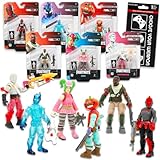
- Fortnite Action Figures Legendary Series Set for Kids - Bundle of 6 Figurines of Red Knight, Zero, and More, Plus Stickers | Fortnite Figures for Boys, Girls, Styles May Vary.
- This Fortnite set includes 6 figurines from the popular video game, Fortnite. Charactes can include Red Knight, Zero, Tomatohead, Love Ranger, and more.
- These Fortnite Legendary Series figures will be great for boys and girls! Perfect for fans and collectors, watch as you assemble your squad with these memorable characters.
- Great for play & display, imaginative storytelling, showcasing, and more. This action figure set is great as party favors, party supplies, goodie bag fillers, loot bag stuffers, and more. Each action figure is 2.5 inches tall.
- Officially licensed Fortnite action figure pack for boys and girls, ages 8 and up. Set also includes a Choose Your Weapon decal sticker.
Do fishing rods or the Harpoon Gun help you find one?
No current Battle Royale guidance supports using fishing equipment to locate a Loot Shark. Epic’s documentation lists fishing rods and the Harpoon Gun as Creative inventory items; it does not establish them as physical equipment for finding sharks in Battle Royale. See Epic’s Fortnite Creative fishing documentation.
How to ride one if it returns
Historical descriptions establish that Loot Sharks could be ridden, but the available current sources do not verify the exact controls or whether riding is enabled in any live mode. If a future season or experience brings them back, use the on-screen interaction prompts in that version rather than relying on old control instructions. First confirm the mode, season, and that the shark is present.
Be cautious of unofficial offers
You do not need an external service or offer to locate an in-game shark. Epic Games Player Support says: “Any real offers will be displayed in the Epic Games Store or on the official Epic Games websites or social media channels.” Treat claims of special access or rewards outside those channels cautiously. See Epic Games Player Support’s guidance on suspicious links.
Do these 3 things before closing this tab:
1Clear out junk files and repair common Windows errors2Fix the driver behind crashes, sound loss and screen glitches3Repair Windows errors before they cause bigger problemsQuick Recap
Product prices and availability are accurate as of the date/time indicated and are subject to change. Any price and availability information displayed on Amazon at the time of purchase will apply.

