
What’s actually slowing this PC down?
Pick the symptom - the matching free tool is one click away.
iTechGuides is reader-supported. When you buy through links on our site, we may earn an affiliate commission. As an Amazon Associate I earn from qualifying purchases. Learn more
The Arduino ESP32 All-in-One Robot is a four-wheel maker project controlled primarily by an Arduino Uno, not by an ESP32 alone. An ESP32-CAM adds Wi-Fi video, while a separate HC-06 module handles Bluetooth control. The author describes obstacle avoidance, line tracking, following, Bluetooth remote control, and live video as project modes; the available project pages do not report independent performance tests.
How the robot is put together
c.iurisci, also credited as Catosci, published the build on Instructables on March 25, 2022; Hackster indexed it on April 6, 2022. The name can be misleading: the parts list and wiring identify the Uno as the main controller and the ESP32-CAM as a camera board. The HC-06 is a separate Bluetooth module. The project connects the camera’s serial RX to Arduino TX and cautions that Bluetooth must be disconnected when that camera serial connection is in use.
The guide’s main components include an Arduino Uno and Sensor Shield V5.0, an L298N dual H-bridge motor driver, four DC motors and 65 × 26 mm wheels, a five-way 5 V tracking module, IR sensors, an HC-SR04 ultrasonic sensor, an SG90 micro servo, a buzzer, the ESP32-CAM, and the HC-06. It also lists a mini breadboard, battery holder, jumper wires, standoffs and screws, and 100 kΩ and 1 MΩ resistors. See the Instructables build guide and the Hackster project page for the published inventory and project details.
Custom chassis and assembly
The build uses custom 3D-printed upper and lower chassis sections, plus an HC-SR04/ESP32 holder, an ESP32 clip, and spacers. In the guide’s assembly, the motors, driver, and tracking sensor go on the lower chassis; the Uno, sensor shield, IR sensors, servo, buzzer, and battery holder go on the upper section. The ultrasonic sensor and ESP32-CAM sit in a printed holder carried by the servo. Wiring is routed through the chassis before the two sections are joined and the wheels installed.
#1 Best Overall

- Complete Project-Based Learning Path – Build 13 progressive projects (LED blink → button control → PIR motion sensor → music playback → motorized doors/windows → SK6812 RGB lighting → fan control → LCD display → gas alarm → temperature/humidity monitor → RFID door unlock → Morse code access → WiFi control → mobile APP remote control). Each project builds on the previous one, ensuring you understand both the electronics and the programming logic behind every smart home feature.
- Master Two Industry-Standard Languages – Learn to code in both Arduino C++ and MicroPython with 13 detailed tutorials for each language. Compare how the same hardware behaves under different programming approaches – a valuable skill for any aspiring engineer. Perfect for classrooms teaching multiple coding languages or self-learners who want flexibility.
- Build a Real WiFi-Controlled Smart Home – Assemble the wooden house structure and integrate sensors to create a functioning smart home system. Control lights, fans, door servos, and RGB lighting directly from your mobile APP (iOS/Android) . Experience how IoT works in real life – from manual control to automated responses based on temperature, humidity, motion, and gas detection.
- Comprehensive Online Wiki with No Guesswork – Our detailed online tutorials (also accessible via the packaging) include wiring diagrams, full code explanations, and step-by-step assembly guides for every project. Whether you're a complete beginner or a teacher preparing lessons, the structured content eliminates confusion and helps you succeed from project 1.
- Everything You Need to Get Started – (TIPS: Batteries are NOT Included)This kit includes the ESP32 development board, expansion board, wooden house parts, all sensors and modules (DHT11, PIR motion, gas sensor, RFID, SK6812 RGB, servo motors, fan, LCD1602, etc.), and connection cables. NOTE: 6x AA batteries are required (NOT Included). The kit is unassembled – you'll build it yourself following our online tutorials, making the learning experience truly hands-on.
The author links a Thingiverse design, and Hackster indexes custom parts. A builder who cannot print these pieces will need a suitable printing service or a mechanically compatible alternative; ordinary off-the-shelf robot chassis are not established as drop-in replacements.
What each mode does
Obstacle avoidance and following
The project describes using ultrasonic and IR sensing in its obstacle-avoidance and following explanations. The pages state these as capabilities but do not establish sensing range, reliability, or behavior under particular conditions.
Rank #2

- Powerful ESP-32 Board: Unlock the world of Internet of Things (IoT) and advanced electronics with the heart of this kit: the ESP-32 board. It features a powerful dual-core processor, integrated Wi-Fi and Bluetooth 4.2, making it perfect for building connected, smart devices that communicate with your phone or the cloud. It's fully compatible with the Arduino IDE for easy programming.
- Super Starter Kit: This kit contains over 35 different modules and electronic components, including sensors, displays, motors, and input devices. From LEDs and buttons to an OLED screen, servo motor, and keypad, you have everything needed to explore a vast range of projects in one box.
- Step by Step Online Tutorial: Jump right in with our detailed, beginner-friendly tutorial. Access 30+ projects with complete code, clear circuit diagrams, and step-by-step instructions. Learn the fundamentals of electronics, coding, and how to utilize the ESP-32's unique capabilities without any prior experience.
- Hands-on Learning for All Skill Levels: Perfect for students, makers, engineers, and hobbyists. Start with basic circuits and coding, then progress to intermediate and advanced IoT applications. Build practical projects like weather stations, smart home controllers, remote-controlled devices, and interactive gadgets. The skills you learn are the foundation for real-world innovation.
- Quality & Great Support: Elegoo is committed to quality. We provide a clear, detailed tutorial guide, refined code, and a well-organized component kit. All modules are carefully selected for reliability and ease of use. Our dedicated technical support team and active online community are ready to help you succeed in your learning journey.
Line tracking
A five-way tracking module is used for line tracking. Its signal connections use several Arduino analog pins according to the project guide.
Recommended Free Tools
Bluetooth remote control
The HC-06 provides Bluetooth input for direction control and mode activation through an Android app. This Bluetooth function is distinct from the ESP32-CAM’s Wi-Fi video connection.
Rank #3

- BUILD, CODE & DRIVE YOUR OWN ROBOT CAR: Turn coding, electronics and engineering into a working programmable robot car you can assemble, program and drive; ideal for weekend family projects, STEM classrooms, coding clubs, robotics lessons and maker challenges
- EXPLORE FPV, LINE TRACKING & OBSTACLE AVOIDANCE: Control the robot with the ELEGOO app or IR remote, view live FPV video through the onboard camera, follow black lines, avoid obstacles with the ultrasonic sensor and explore multiple interactive driving modes
- BEGINNER-FRIENDLY BUILD WITH GUIDED WIRING: Keyed XH2.54 connectors help reduce wiring mistakes, while the illustrated tutorial and example programs guide beginners step by step from chassis assembly and module connection to programming and the first successful run
- GO BEYOND ASSEMBLY WITH CREATIVE CODING: Program with Arduino IDE to explore movement, sensors and control logic, then modify example code to create custom routes, reactions and robotics experiments that develop coding, problem-solving and engineering skills
- COMPLETE RECHARGEABLE STEM ROBOTICS KIT: Includes an ELEGOO UNO R3 controller board, ESP32-WROVER-based camera and Wi-Fi module, line-tracking and ultrasonic sensors, motors, IR remote and a 2000 mAh rechargeable lithium-ion battery; recommended for ages 8+ with adult guidance for first-time builders
Wi-Fi video
The ESP32-CAM sends video over Wi-Fi to an Android app, according to the project description. The pages do not provide measured video latency, image quality, or range.
Published wiring and checks before powering up
The following is the author’s pin map for the listed Uno and Sensor Shield setup, not a substitute for checking the actual board and module labels. The guide groups the four motors by right and left sides and connects each group to one L298N output.
Rank #4

- Unleash Unlimited Innovation: Discover the GAR Monster Kit, an unparalleled, comprehensive Arduino-compatible development set featuring 5 powerful main boards: Uno R3, Mega 2560, Nano V3, ESP32 WiFi+Bluetooth and ESP8266 NodeMCU, enabling a vast spectrum of robotics and IoT projects.
- Master Robotics & IoT Projects: Explore 25+ diverse sensor modules including RFID, Ultrasonic Sensor, Real Time Clock, Accelerometer, LCD, Relay, Servo and Stepper Motor. Build smart home devices, remote-controlled robots and advanced automation with ESP32, ESP8266 Wi-Fi, HC-05 Bluetooth, NRF24L01 transceivers and W5100 Ethernet Shield.
- Learn & Build with Ease: Jumpstart your journey with a QR code for access to the GAR Dropbox Cloud, packed with comprehensive PDF guides, tutorials, youtube video links, and datasheets. Great for beginners and experienced makers, ensuring quick, hassle-free setup with no soldering required.
- Quality & Organization: All 65+ components arrive in pristine condition within a 16" x 12" durable organizer toolbox, ensuring safe transport and tidy, long-term storage for your entire development ecosystem.
- Customer support from USA & Lifetime Replacement: Effective USA-based technical support and a lifetime replacement guarantee on all parts. GAR is committed to your satisfaction, ensuring a seamless and rewarding learning experience for every maker.
| Connection or function | Published wiring |
|---|---|
| Motor driver enable | Arduino pins 3 and 11 |
| Motor direction control | Arduino pins 4–7 |
| Two IR sensors | Arduino pins 2 and 8 |
| Servo | Arduino pin 12 |
| Buzzer | Arduino pin 13 |
| Ultrasonic sensor | Arduino Sensor Shield URF connection |
| Five-way tracking module | Several Arduino analog pins; consult the guide’s diagram for the exact connections |
| Battery-voltage measurement | 100 kΩ and 1 MΩ resistors in a divider, as described by the guide |
- Verify the exact pin labels and pinout of your Uno, shield, sensors, driver, and camera board before connecting them.
- Check power and logic voltage compatibility for each module; do not assume that parts with similar names or appearances share the same requirements.
- Confirm the motor driver is appropriate for the motors and their current demands. The project pages do not provide measured motor current or a substitute-selection comparison.
- Follow the guide’s warning to disconnect Bluetooth when using the camera serial connection to Arduino TX.
The project wiring is specific to its listed hardware. Its published instructions are not an independent electrical-safety review.
Code, app, and what is not established
The Hackster page links downloadable Arduino Uno and ESP32-CAM code archives and identifies an Android app. Their availability and behavior have not been independently verified here, so check the project pages and files before building around them. The project pages do not establish the robot’s speed, sensing range, runtime, video latency, or total cost; those figures should not be inferred from the parts list.
Best Value
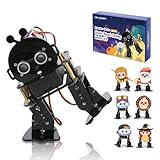
- 【ACEBOTT STEM Smart Robot Kit】: ACEBOTT Bipedal Robot Kit is an acrylic kit based on the ESP32 platform that allows beginners (children) to gain practical experience in programming, electronic assembly, and robotics knowledge. (Note: This kit does not include batteries, you need to prepare the batteries yourself.)
- 【Beginner-friendly】: With the instruction guide of the preset coding files, this tutorial will guide you step by step on how to build and code a robot through ACEBOTT Scratch or Arduino IDE. When you need help, the ACEBOTT technical team is always on call to provide support.
- 【Multi-function Programming Smart Robot】: The ACEBOTT Bipedal Robot Kit comes with 12 preset actions such as kicking, tilting, following, stepping, and obstacle avoidance. It can move in 4 directions. Students can also design and customize actions by themselves after learning.
- 【Cool Custom Mask】: 6 different custom masks can turn the robot into different characters such as Monkey King, Turkey, Santa Claus, etc. You can choose different characters for assembly for different occasions.
- 【Easy Assembly and Detailed Coding Tutorial】: This smart bipedal robot kit contains HD rendered instructions on how to assemble Kit from scratch and all necessary programs and codes. The path is: ACEBOTT Official Website - Resources - WIKI and Assembly Video.
For substitutions, compare supply and logic voltage compatibility, motor-driver current capacity, sensor interface and pinout, mounting dimensions, and whether the replacement preserves separate Bluetooth control and camera video. The project pages do not test or endorse alternative parts.
Quick Recap
Product prices and availability are accurate as of the date/time indicated and are subject to change. Any price and availability information displayed on Amazon at the time of purchase will apply.

