
iTechGuides is reader-supported. When you buy through links on our site, we may earn an affiliate commission. As an Amazon Associate I earn from qualifying purchases. Learn more
The Logitech Z-340 is an early-2000s, three-piece 2.1 computer speaker system: two satellites and a powered subwoofer. It can still serve a desktop or retro-PC setup if the unit is healthy, but it is analog-only and its age makes condition, completeness, and delivered price more important than its old spec sheet.
What is the Logitech Z-340?
The Z-340 consists of a powered subwoofer and two satellite speakers. The right satellite is the system’s control center: it has the power button, main volume knob, headphone jack, and attached audio-input cable. The subwoofer has a separate bass-level control on its rear panel. Logitech’s surviving user guide is dated August 6, 2001; that dates the guide, not necessarily the product’s exact launch.
The subwoofer has an internal mains power supply, so the system uses a power cord rather than a small external power brick. The right satellite and its attached leads are essential parts, not interchangeable extras: the system’s controls and source connection are there.
Quick wins for a faster PC:
Clear out junk files and repair common Windows errorsFree Scan →Fix the driver behind crashes, sound loss and screen glitchesFind Drivers →Repair Windows errors before they cause bigger problemsFix Now →Specifications and connection limits
| Item | What is established |
|---|---|
| Configuration | 2.1 system: two satellites and one powered subwoofer. |
| Input | Analog stereo connection from a computer speaker/headphone output, as shown in Logitech’s setup guide. |
| Headphone jack | On the right satellite; the guide says connecting headphones mutes the speakers. |
| Power rating | 33 W RMS total is listed by Best Buy and repeated in a secondary specification reproduction. The commonly listed breakdown is 20 W RMS for the subwoofer and 6.5 W RMS for each satellite. The available Logitech guide does not provide a specification table in its accessible text. |
| Software and wireless | No product-specific software is required for the analog setup described in the guide; Bluetooth, USB audio, and wireless control are not documented features. |
Those older RMS figures are not a direct loudness comparison with a newer product advertised in peak watts. The Z-340’s practical compatibility is determined by the audio output: a desktop’s 3.5 mm line/headphone jack or a laptop headphone jack can connect directly, while a USB-only laptop needs a USB-to-3.5 mm audio adapter or DAC. A phone or tablet without a headphone jack needs its appropriate analog audio adapter.
#1 Best Overall

- Versatile setup with speakers that connect easily to computers and other devices via Bluetooth wireless or 3.5mm cable
- Logitech Easy-Switch technology lets you seamlessly switch between audio devices Just by pausing the Audio on one device and pressing play on the other
- Each speaker has one active/powered driver that delivers full range Audio and ONE passive radiator that provides bass extension.
- On-speaker headphone jack Plus convenient controls for easy access to Bluetooth wireless pairing, power and Volume adjustments, Bluetooth version: 4.2
- Works with Bluetooth enabled devices and any device with a 3.5mm input including a computer, television, smartphone, tablet and music player
For a TV or monitor, check for a 3.5 mm analog audio output. Optical-only, HDMI ARC, USB-C-only, or Bluetooth sources cannot connect directly; they need a suitable converter or a different speaker system. A Bluetooth receiver can feed the Z-340’s analog input, but Bluetooth is not built into the speakers.
How to connect and set up the Z-340
- Place one satellite on each side of the listening position.
- With the system off, connect the right satellite’s speaker cable to the matching socket on the back of the subwoofer. Align the pins before inserting the connector; do not force it.
- Connect the right satellite’s attached audio cable to the computer’s speaker or headphone output.
- Connect the subwoofer power cord to a wall outlet.
- Press the power button on the right satellite and start audio playback.
- Begin with the source volume around 50% and the speaker volume low. Raise the right-satellite volume gradually, then adjust bass with the control on the rear of the subwoofer.
- For private listening, plug headphones into the right satellite. Logitech’s guide says the speakers mute automatically when headphones are connected.
What it may be like to use today
The Z-340 was built for everyday computer audio—music, video, games, and other desktop sound—with a separate subwoofer for more low-end presence than a small 2.0 pair can provide. That describes its layout, not a guarantee of sound quality: age, storage, wear, and the condition of the individual drivers and electronics all matter. The available documentation does not establish an independent listening-test verdict.
Rank #2

- Convenient Control Pod
- 25 Watts (RMS) Output
- Compact Subwoofer
Its uncomplicated analog input remains convenient when a source has the right output. The trade-off is the lack of built-in Bluetooth, USB audio, digital inputs, remote control, app controls, and current-product warranty coverage. Logitech’s current U.S. product sitemap lists newer speaker models rather than the Z-340, so treat this as a legacy used-market system; that listing does not establish an exact discontinuation date.
What to check before buying used
Confirm the set is complete
- Subwoofer, left satellite, and right satellite.
- The right satellite’s attached audio cable and the cable that connects it to the subwoofer.
- Subwoofer power cord.
- Stands or covers, if their presence matters to you.
Without the right satellite and its connections, the system’s main input and controls may be missing. A subwoofer-only listing is not a usable complete setup unless you can source compatible missing parts.
Rank #3

- Balanced audio sound with depth - 2 Watts Peak/ 1.2 Watts RMS power produces immersive and crystal clear sound.
- Simple and quick USB connection. Just plug the speakers into your computer USB-A port. An orange LED stays lit when your speakers are on. Disconnect the USB-A cable to power off.
- Easy controls. You can easily control the volume or mute on the front of the right speaker to get great audio experience.
- They are slim, lightweight and easy to move around so you can accommodate your setup and get perfect sound wherever you are.
- Your long lasting product set with a solid build quality.
Ask for a working demonstration
- Both satellites play audio and the subwoofer produces bass.
- The power button works consistently; the main volume and rear bass controls change levels without cutting out.
- The headphone jack works and mutes the speakers when headphones are inserted.
- There is no excessive hum, crackling, rattling, distortion, or intermittent loss of sound.
- The seller can show the connectors and power cord intact.
Inspect physical condition and calculate delivered cost
Look for frayed or repaired mains wiring, cracked enclosures, bent or corroded connector pins, unstable cabinets, or signs of overheating such as a burn smell. A scratchy or intermittent volume control can indicate a worn control. Compare the complete tested system’s price plus shipping with a current replacement, rather than judging by the item price alone.
For scale, one 2026 eBay example showed a working used system at $38.69 before $29.63 shipping, while a subwoofer-only example sold for $9.99. These are individual marketplace transactions, not a market average or a dependable valuation: complete system example and subwoofer-only example.
Rank #4
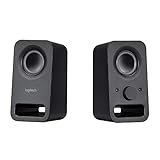
- Rich stereo sound: Two 2-"drivers deliver 6 watts of peak power for clear, loud stereo sound
- Connect two devices at the same time: Simultaneously connect your smartphone plus tablet or laptop via a 3; 5mm audio input plus auxiliary line
- Convenient controls: Front panel volume and power are combined into one easy-access control knob
- Handy headphone jack: Listen to music, movies and games in total privacy
- Durable, compact design: Built to last with high-quality acoustics, tested and tuned at Logitech's state-of-the art audio labs
Troubleshooting common problems
No sound from either speaker
- Confirm the subwoofer power cord is connected and press the right satellite’s power button.
- Check that the source is sending audio to its analog output, then raise source and speaker volume.
- Make sure the audio plug is fully inserted and disconnect any headphones from the right satellite.
- Test the source with ordinary headphones, or try another source, to isolate a computer-output problem from a speaker problem.
One satellite is silent
- Switch the system off and reseat the right-satellite cable at the subwoofer, aligning the pins rather than forcing the connector.
- Inspect for bent, recessed, or corroded pins.
- Try another audio source and check the source’s left/right balance setting.
- If the same channel remains silent, the likely fault is in that satellite, its cable or connector, or the corresponding amplifier channel.
Bass is weak or absent
- Raise the subwoofer control on its rear panel and test another recording or source.
- Check that the source’s audio configuration is not suppressing bass.
- After verifying the system works, try placing the subwoofer nearer a wall or corner; placement may change perceived bass but cannot repair a failed driver or amplifier.
- Rattling, scraping, or distortion points toward a possible driver problem rather than a level setting.
Hum or buzzing
Possible causes include a poor source cable, electrical interference, a ground loop, aging power-supply components, or a failing amplifier. Disconnect the audio input while leaving the system powered: if the hum continues, the source or input cable is less likely to be responsible. You can also try another outlet, test with a battery-powered source, and keep the audio cable away from power bricks and extension cords.
Recommended Free Tools
Headphones do not mute the speakers
Insert the plug fully, try another pair of headphones, and check the jack for debris or damage. If headphones play audio but the speakers do not mute, the jack’s switching contact may be worn.
Best Value

- Just testing
- The 200 Watts RMS/400 Watts Peak power of Logitech Z625 2.1 speaker system delivers crisp sound and thundering bass. Powerful THX audio you can hear and feel.
- Z625 Powerful THX Sound 2.1 speaker system provides a versatile setup by supporting multiple inputs simultaneously including optical, 3.5mm and RCA; connect up to three compatible devices such as your game console, television and computer.
- Easily access all controls, including power, volume, bass, headphone jack and auxiliary jack on the right satellite speaker of the Logitech Z625 2.1 speaker system.
Can you repair one?
Low-risk checks include reseating and externally cleaning connectors, testing another source cable, and using a USB DAC or Bluetooth receiver to provide a modern source connection. Replacing a source-side 3.5 mm cable only helps if that cable is the fault; cosmetic repairs such as replacement feet are worthwhile only if parts are available.
Internal repairs are a different matter. Logitech’s mirrored guide advises against opening or self-servicing the system and directs internal faults to qualified service. The powered subwoofer contains mains-voltage circuitry, so do not open it casually. Driver, amplifier, internal wiring, or proprietary-connector repairs may cost more than the system is worth.
Is the Z-340 worth buying?
| Your priority | How the Z-340 fits |
|---|---|
| Low-cost desktop audio | Worth considering if the complete set is inexpensive and demonstrated working, especially with local pickup. |
| Retro-PC setup | A reasonable period-style option if you value the vintage look and can use an analog output. |
| Modern connectivity | Poor fit if you need built-in Bluetooth, USB, optical, HDMI, or wireless controls. |
| Reliability and support | Riskier than buying a current system because condition depends on age and storage, and the Z-340 is not listed as a current Logitech model. |
| Incomplete or untested listing | Usually a pass unless you specifically want a repair project and have confirmed the cost and availability of missing parts. |
It is most defensible as a complete, tested, low-priced used system—not at a price approaching a current powered-speaker set, or when shipping and repair risk erase the saving.
What’s actually slowing this PC down?
Pick the symptom - the matching free tool is one click away.
Alternatives to consider
Logitech Z407: modern 2.1 with Bluetooth
The Z407 is a current Logitech 2.1 option for buyers who want Bluetooth and a wireless control dial. Logitech’s U.S. shop page lists 80 W peak power, a 20 W subwoofer, and showed a $129.99 direct price when checked; price and availability can change. Its 80 W peak rating should not be compared directly with the Z-340’s commonly cited 33 W RMS. See Logitech Z407.
Logitech Z150: compact wired stereo
The Z150 suits basic, compact stereo listening when a subwoofer is not needed. Logitech’s specifications list analog 3.5 mm input, a headphone output, 3 W RMS, and no required software. It takes less space, but it is not a like-for-like replacement for the Z-340’s subwoofer and bass capability. See Logitech Z150 specifications.
Quick Recap
Product prices and availability are accurate as of the date/time indicated and are subject to change. Any price and availability information displayed on Amazon at the time of purchase will apply.

