
iTechGuides is reader-supported. When you buy through links on our site, we may earn an affiliate commission. As an Amazon Associate I earn from qualifying purchases. Learn more
If your Amazon Smart Air Quality Monitor is offline, showing an unexpected score, or still calibrating, start with its LED and placement before resetting it. Amazon says the first calibration takes seven minutes and the monitor can take up to two days to adjust to its surroundings. Its support guidance describes automatic calibration—not a user-operated manual recalibration.
Check the LED before troubleshooting
The light indicates whether the monitor is reporting air quality, calibrating, or having a setup or connectivity problem. Pressing the button can also show the current indoor air-quality status.
| LED | Meaning | What to do |
|---|---|---|
| Solid green | Good air quality | No setup action is indicated by this light. |
| Solid yellow | Moderate air quality | Check the Alexa app for the score and monitored data. |
| Solid red | Potentially poor air quality | Check the app and consider actions to improve indoor air quality. |
| Blinking blue | Setup mode | Continue setup in the Alexa app. |
| Pulsing blue | Calibration | Allow the calibration to finish. |
| Solid purple | Connectivity issue | Follow the Wi-Fi checks below. |
| Blinking purple | Manual setup needed | Put the monitor into setup mode and add it in the Alexa app. |
Source: Amazon’s LED status guide.
Set up the monitor or return it to setup mode
- Update the Alexa app to its latest version, then open the app and add the Air Quality Monitor by following the on-screen prompts.
- If the monitor is not blinking blue, press and hold its multifunction button for 5–10 seconds, until the light blinks blue and purple alternately.
- Follow the Alexa app prompts to complete setup.
Amazon recommends placing the unit in an open space under 500 square feet for optimal readings. Choose a spot with good airflow and an unobstructed intake, away from direct sunlight and air vents. See Amazon’s setup and placement instructions.
Why does the reading look wrong?
First check the monitor’s location: direct sun, an obstructed intake, poor airflow, or proximity to an air vent can affect the conditions it samples. If it was recently set up or moved, allow time for it to adjust. Amazon says the first score is available after the initial seven-minute calibration, but the monitor can take up to two days to adjust to its surroundings. These are Amazon’s operating instructions, not independent accuracy measurements.
#1 Best Overall

- Know your air – An Alexa air quality monitor that makes it easy to understand what’s in your indoor air.
- Track and measure – Our indoor air quality monitor keeps tabs on 5 key factors: particulate matter (PM 2.5), volatile organic compounds (VOCs), carbon monoxide (CO), humidity, and temperature.
- Stay informed – Get an indication of current indoor air quality from the color-coded LED, and detailed information and an easy-to-understand air quality score in the Alexa app.
- Real-time alerts - Get notifications on your phone or announcements on Echo devices when Alexa detects poor indoor air quality.
- Automate climate control - Enable Routines to turn on or off your compatible Alexa devices, such as air purifiers, dehumidifiers, and fans, when the indoor air quality sensors detect changes.
The Alexa app presents data from the monitor’s temperature, humidity, particulate matter (PM), volatile organic compounds (VOCs), and carbon monoxide sensors as an air-quality score and trends over time; it can also send notifications. Amazon’s reviewed support guidance does not provide an independent accuracy rating or a universal diagnostic threshold. A transient score during the adjustment period alone does not establish that the sensor is defective.
How long does calibration take?
After power is restored, the monitor performs an initial seven-minute calibration; Amazon says the first score is available after this period. It may then take up to two days to adjust to its environment. Unplugging and reconnecting the monitor restarts the seven-minute calibration. See Amazon’s calibration guidance.
Rank #2
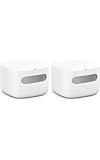
- The information below is per-pack only
- Know your air – An Alexa air quality monitor that makes it easy to understand what’s in your indoor air.
- Track and measure – Our indoor air quality monitor keeps tabs on 5 key factors: particulate matter (PM 2.5), volatile organic compounds (VOCs), carbon monoxide (CO), humidity, and temperature.
- Stay informed – Get an indication of current indoor air quality from the color-coded LED, and detailed information and an easy-to-understand air quality score in the Alexa app.
- Real-time alerts - Get notifications on your phone or announcements on Echo devices when Alexa detects poor indoor air quality.
Can I manually calibrate the monitor?
Amazon’s support instructions describe automatic calibration and adjustment to the surroundings, but do not document a user-operated manual sensor correction or calibration setting. Do not try an undocumented button sequence as a calibration method. If readings remain unexpected after the adjustment period, check placement and app status, then use Amazon’s support channels for device-specific help.
Windows Errors? Fix Them Before They Spread
Repair common Windows errors and clear accumulated junk for a smoother, more stable PC - no reinstall needed.Free scan · no reinstallCrashes, No Sound, or Screen Glitches?
Random freezes, missing sound and display glitches usually trace back to one bad driver. Find and replace yours safely.Free scan · under a minuteWhy is my Amazon air quality monitor offline?
A solid purple light indicates lost connectivity. Try the checks in this order, moving to setup or reset only if the simpler steps do not resolve the issue:
Rank #3

- High Accuracy & Fast Refresh Data: With this smart sensor, the PM2.5 accuracy is ±15 µg/m³ while temperature and humidity accuracies are ±0.54°F and ±3%RH.The two-second correction data feature shows the latest changes in PM2.5, temperature, and humidity.Keep sensor clear for accurate detection.
- Multifunctional Air Quality Detector: The GoveeLife Air Quality Monitor conveniently measures 3 important indexes for indoor air quality, including PM2.5, temperature, and humidity.
- Switchable Display: Press the top button for the clock & PM2.5 display. Long press for 2 seconds to switch to bright screen mode & night mode. The LED indicator displays 4 levels of ambient air quality. 2.4G Wi-Fi is required to display the time.
- Connect with GoveeHome Appliances: Set your target air quality and link with your other GoveeHome smart appliances. GoveeLife air purifiers, humidifiers, and space heaters will turn on and off automatically when the indoor air quality changes.
- H5106 needs to be connected to a power source and supports GoveeLife devices: Smart Air Purifiers - H7126, H7120, H7124, H712C, H7122, H7123; Humidifiers - H7140; Fans - H7100, H7102
- Restart the monitor: Unplug the monitor or its adapter, then reconnect it.
- Check internet access: Confirm the modem has internet by testing another device on the network.
- Check the Alexa app: In Alexa, open Devices and inspect the monitor’s status. Amazon’s general device guidance says device settings show the Wi-Fi network and allow you to change it.
- Confirm the network: If you selected a preferred compatible Alexa device, make sure it is on the same Wi-Fi network as the monitor. If the network setting is correct, check the router and internet connection using another device.
- Redo setup if needed: Hold the multifunction button for 5–10 seconds until blue and purple blink alternately, then follow the Alexa app prompts. If the light is blinking purple, Amazon says manual setup is needed.
For model-specific steps, see Amazon’s Wi-Fi troubleshooting guide and its general Alexa device Wi-Fi guidance.
How to restart or factory-reset the monitor
A restart is simply unplugging and reconnecting the monitor or adapter. Reserve a factory reset for when restarting and redoing setup have not fixed the problem; a reset clears the device’s setup and requires setting it up again.
Rank #4
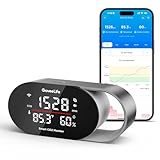
- Fast & Accurate: Equipped with the SCD4x CO₂ sensor (photoacoustic NDIR principle), it ensures accuracy of ±(40ppm + 5%), a 5s refresh rate, and built-in pressure compensation for any altitude. It helps prevent headaches and drowsiness, improving sleep and concentration.Please note: Calibrate in the app's settings outdoors if required.
- 4-in-1 Multi-Function Display: This CO₂ detector clearly shows four essential metrics—real-time CO₂ levels, temperature (°F/°C), humidity (%RH), and a built-in clock(need to connect to the APP).The ideal solution for bedrooms, nurseries, and offices: a combined CO₂ detector and GoveeLife thermometer hygrometer for complete, at-a-glance air quality information.
- Triple Alert System: When CO₂ levels, temperature, or humidity exceeds customizable thresholds, this air monitor triggers three types of warnings: a built-in buzzer, instant app notifications, and detailed email reports. Ensures no alert is missed and provides ultimate peace of mind—especially for families with children or elderly members.
- Customizable LED Display: The CO₂ meter features a programmable screen and tri-color light bar that automatically adjusts brightness based on your custom day/night schedule via the app, ensuring clear visibility by day and eliminating sleep-disrupting light pollution at night. Ideal for light-sensitive sleepers and nurseries.
- Data Tracking & Export: Track up to two years of historical data via interactive charts in the app, and export professional CSV reports for medical consultations or energy efficiency optimization. Enables data-driven improvements to your indoor environment.
- Press and hold the button on the rear of the monitor until the LED blinks purple, approximately 12 seconds.
- Wait for the LED to blink blue, which indicates the factory reset succeeded.
- Set the monitor up again in the Alexa app. Once power is restored, it performs the seven-minute calibration.
See Amazon’s restart and reset instructions.
Independent reader supportYour contribution helps us test, update, and keep practical guides available for everyone.Important: this is not a carbon monoxide alarm
The monitor measures carbon monoxide as one of several factors, but Amazon says it is not certified as a carbon monoxide alarm or detector. Amazon’s explicit warning is: “Your Amazon Smart Air Quality Monitor isn’t a substitute for a carbon monoxide alarm.” Keep a listed carbon monoxide alarm for life-safety protection; do not rely on the monitor’s score or notifications to detect a dangerous CO event. See Amazon’s guide to using the monitor.
Quick Recap
Best Value

- 【Professional 10-in-1 Air Quality Monitor】This professional 10-in-1 air quality monitor accurately measures carbon dioxide (CO2), formaldehyde (HCHO), total volatile organic compounds (TVOC), temperature, humidity, AQI, PM2.5, PM1.0, PM10 in real time, and features a clock (Connect your phone to the monitor via Bluetooth: MT13S, and it will automatically calibrate the time). It helps you keep track of your indoor air quality at a glance, making it ideal for home use.
- 【3-Color Visualization System】This CO2 detector features a high-definition color screen that displays data in real time, ensuring clear readings. It provides a comprehensive assessment of air quality and tracks the average concentration of each gas, enabling data visualization. When air quality exceeds safety thresholds, the screen intelligently changes color, allowing potential air quality risks to be detected immediately—even from a distance.
- 【High Accuracy and Reliability】Built with a high-performance smart chip and advanced sensor array, this tester adopts dedicated intelligent sensing technology for CO2 detection, paired with precision electrochemical sensors for HCHO and TVOC monitoring. Unlike ordinary detectors, it features smart calibration and stable sensitivity, ensuring long-term accurate data output without frequent manual adjustments.
- 【Simple Operation】Air Quality Tester: Press and hold the "Power button" for 3 seconds to turn the air quality monitor on or off, and it automatically initiates full-range detection the moment it’s turned on; and press once to switch temperature settings ℃/℉; press twice to turn the sound on or off; press 3 times to enter the calibration mode; press 4 times to put the screen to sleep(then press once to wake the screen). You can calibrate the time by connecting your phone to the MT13S via Bluetooth.
- 【Wide Range of Applications】This compact and portable indoor air quality monitor can measure air quality in bedrooms, living rooms, kitchens, offices, cars, schools, hotels, basements, restaurants, campsites, and other environments. It is suitable for use in homes, vehicles, grow rooms, maternity and infant care rooms, and public spaces.
Product prices and availability are accurate as of the date/time indicated and are subject to change. Any price and availability information displayed on Amazon at the time of purchase will apply.

