
Free tools Windows power users keep installed
One-click scans. No signup required.
iTechGuides is reader-supported. When you buy through links on our site, we may earn an affiliate commission. As an Amazon Associate I earn from qualifying purchases. Learn more
AI can help with accessibility tasks such as generating image descriptions, spotting likely headings, and supporting live captions. But an AI feature does not make a website or service accessible by itself. Accessibility still depends on whether people with disabilities can use the interface, whether AI-influenced decisions treat them fairly, and whether they have meaningful ways to get help or challenge an outcome.
What does accessibility mean when AI is involved?
There are two related but different questions. First, can people with disabilities use the AI product itself—its controls, inputs, outputs, and error messages? Second, does an AI system treat disabled people fairly when it makes or influences a decision? A product can have an accessible interface yet still produce unfair results; conversely, an AI service may aim to make a task easier while its interface blocks some people from using it.
That distinction matters for everyday technology. A voice assistant, chatbot, captioning feature, or automated decision tool must be judged not just by what it promises to do, but by how people can interact with it, what happens when it gets something wrong, and whether users retain control.
Outdated Drivers Are Slowing You Down
One free scan finds every outdated or missing driver and matches the right update for your exact hardware.Free scan · exact hardware matchPC Slower Than It Used to Be?
A free scan shows the junk files, broken settings and background clutter dragging Windows down - then fixes them in one click.Free scan · Windows 10 & 11Does WCAG apply to AI products?
Yes, when AI is part of a web interface. The W3C Web Accessibility Initiative says the Web Content Accessibility Guidelines (WCAG) apply to dynamic content, multimedia, mobile web content, and AI web interfaces. An AI label does not exempt a web product from accessibility expectations.
#1 Best Overall
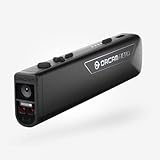
- OrCam Read has been recognized with the top CES 2021 Best of Innovation Award, in the Accessibility category! OrCam Read is a personal artificial intelligence (AI)-driven device unlike any other, for anyone who is consistently exposed to large amounts of text – at work and school, or for leisure – and can even assist people with visual impairment, or reading difficulties including dyslexia and reading fatigue
- The OrCam Read can also help people with learning disability, or anyone who reads large amounts of text on a daily basis, including students, professionals, etc. Now with a new smart reading feature: Simply ask for the text that interests you: “Read the headlines,” “Read amounts,” or “Start from” a specific section (like “desserts” in a menu)
- The OrCam Read can be used in any environment, including low-light, and without requiring any internet connectivity. The device can be easily used to read any kind of printed or digital text, at home, in the office, or on the go. Make your reading easier and more enjoyable, add the OrCam Read to your cart TODAY!
- People who have moderate to severe levels of visual impairment would have difficulties using the device. OrCam Read requires the user to be able to hear, with or without a hearing device. OrCam Read also requires the user to have full control over their hand movements
- This version is for English language, for other languages contact OrCam. Free OrCam online video tutorials and user support
WCAG 2.2 is the latest published version in the W3C’s WCAG 2 series. W3C says it was published on October 5, 2023, and updated on December 12, 2024, and encourages use of the latest version. It organizes 13 guidelines under four principles: perceivable, operable, understandable, and robust. Conformance is assessed against success criteria at Level A, AA, or AAA. The W3C overview is the source for this status and scope.
For native apps, software, and documents, W3C points to WCAG2ICT as guidance for applying WCAG 2 to non-web information and communications technology. WCAG 3.0 is different: it remains a Working Draft, not a final conformance standard, and its December 2024 draft says it does not deprecate WCAG 2. Its exploration of user needs, outcomes, privacy, risk, and algorithmic bias may inform discussion, but draft material should not be treated as adopted requirements.
Rank #2

- Instant Translation in 144 Languages – The Wooask Translator is a powerful language translator device that supports 70 languages and 74accents, ensuring smooth communication worldwide. Ideal for travel, business, and everyday use.
- Ultra-Fast & Real-Time Accuracy Translation – Experience seamless conversations with traductores de voz en tiempo real. The Wooask Translator ultra-fast 0.5s voice translation with 98% accuracy, making it a top choice for professionals and travelers.
- Offline Translation in 120 Pairs – Support English、Spanish、French、German、Korean、Simplified Chinese、Traditional Chinese、Thai、Japanese、Hindi、Arabic、Vietnamese、Portuguese、Russian、italian、indonesian. Switch between all languages at will, without restrictions! Stay connected even without internet access! This electronic foreign language translator supports offline translation for key language pairs, ensuring uninterrupted communication.
- 2.4" HD Touchscreen & Dual Control Interface – Features touchscreen with adjustable text size, touch screen and physical buttons for all-age accessibility. The noise-canceling speaker system ensures crystal-clear audio even in crowded airports or busy streets.
- 500MP Camera for Instant Text Translation – Simply point the high-resolution 500MP camera at menus, road signs, or documents to get instant text translations—ideal for restaurant ordering, navigation, and academic research. Auto-focus and low-light enhancement ensure readable results.
Where could AI help—and what is still uncertain?
A W3C-hosted explainer describes several possible accessibility uses. These are use cases, not proof that a particular tool performs them reliably:
- Image descriptions: a browser or device feature could suggest alternative text for images that have none.
- Heading structure: machine learning could identify text that appears to function as a heading, helping reveal page structure.
- Live captions: on-device processing could reduce latency for captions.
- Testing and remediation: machine-learning tools could help find or address accessibility issues and improve automated checks.
The same W3C explainer cautions that users and developers can have difficulty judging how effective automated accessibility tools are and how reliable they will be. An automated check can surface problems, but it cannot by itself establish that a whole product is accessible. Results still need evaluation with disabled people, including in the contexts where the product will be used.
Rank #3

- 144 Languages AI Translator: Break down language barriers effortlessly with our advanced translator supporting 144 online languages and 16 offline languages. Whether you're traveling abroad, attending international meetings, or studying foreign languages, this device ensures seamless communication anywhere—no WiFi required for offline translation.
- Real-Time Language Translator Device: Powered by next-generation AI, our translator delivers ultra-fast 0.5s voice translation with 98% accuracy. Perfect for fast-paced conversations, whether you're negotiating deals or asking for directions.
- 3" HD Touchscreen & Dual Control Interface: Features 3-inch HD touchscreen with adjustable text size, touch screen and physical buttons for all-age accessibility. The noise-canceling speaker system ensures crystal-clear audio even in crowded airports or busy streets.
- 500MP Camera for Instant Text Translation: Simply point the high-resolution 500MP camera at menus, road signs, or documents to get instant text translations—ideal for restaurant ordering, navigation, and academic research. Auto-focus and low-light enhancement ensure readable results.
- Extended Battery & Portable Design: Engineered for travelers with a long-lasting battery, up to 35 hours continuous use and lightweight only 260g, pocket-sized design. USB-C fast charging only 1.5 hours. Battery performance may vary based on usage.
How can organizations reduce harm and preserve user choice?
Accessibility Standards Canada’s summary of CAN-ASC-6.2:2025 treats accessibility as an ongoing responsibility, not a one-time interface check. It calls for people with disabilities to participate throughout design, coding, testing, procurement, use, and review. It also recommends testing systems and outputs, tracking real-world effects, and reporting performance separately for people with disabilities so problems are not hidden in an overall result.
The summary identifies discrimination, privacy loss, exclusion, and loss of control as potential harms. Practical safeguards include:
Rank #4
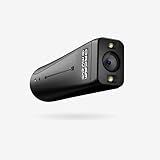
- WE INNOVATE WITH LIFE-CHANGING WEARABLE AI TECHNOLOGY - OrCam MyEye 2 Pro opens new doors, allowing you to relish reading the morning newspaper, immerse yourself in beloved books, and return to your professional life. Identifying the faces of family and friends and navigating shopping solo will effortlessly become part of your routine. Bear in mind: OrCam MyEye facilitates audible access to visual content; it does not enhance visual acuity.
- ORCAM MYEYE IS A COMPACT, INTELLIGENT CAMERA designed to clip onto almost any eyewear frame. It utilizes Artificial Intelligence to instantly and quietly vocalize text from any printed or digital surface, identify faces, products, currency bills, and more, all in real-time
- GLOBAL REACH WITH THOUSANDS OF USERS - OrCam MyEye 2 Pro boasts tens of thousands of users across more than 40 countries and is available in 20 languages. OrCam MyEye 2 Pro stands out as the leading edge, yet effortlessly operable, wearable assistive tool, making a positive impact on individuals of every age group.
- RECOGNIZED as one of TIME Magazine's top 100 inventions in 2019 and highlighted on Dr. Phil and STEVE, this intuitive gadget is controlled through easy hand movements and comes with over 20 voice-activated commands (available solely in the English version). Suitable for any degree of vision impairment, it operates independently of an internet connection.
- FULL ACCESS OrCam's online video guides and customer support at no cost. The language preset on the device at the time of purchase will vary based on the region of purchase. Should you require a different language, please reach out to us.
- Explain clearly what the AI system does and how it uses information; protect personal information and obtain informed consent.
- Provide accessible ways to give feedback, make complaints, and challenge decisions, with accountable people responsible for responding.
- Test the system and its outputs with disabled participants, monitor real-world outcomes, and use feedback to make adjustments.
- Offer meaningful human review or a human alternative where appropriate, rather than forcing people to rely on an automated system.
The standard summary gives sign-language interpretation in hospitals or courts and exam proctoring as examples where a human option should remain available. That is a matter of choice and comparable access; it is not a claim that AI interpretation or proctoring is inherently unsafe.
Quick wins for a faster PC:
Repair Windows errors before they cause bigger problemsFix Now →Fix the driver behind crashes, sound loss and screen glitchesFind Drivers →What should you check before relying on an AI accessibility feature?
For a feature or service you are considering, look beyond its demo and ask how it works for the people and situations it is intended to serve. These questions draw on the evaluation and governance practices described by W3C and Accessibility Standards Canada:
Best Value

- 𝐍𝐨 𝐌𝐨𝐧𝐭𝐡𝐥𝐲 𝐅𝐞𝐞𝐬, 𝐌𝐚𝐬𝐬𝐢𝐯𝐞 𝐄𝐱𝐩𝐚𝐧𝐝𝐚𝐛𝐥𝐞 𝐒𝐭𝐨𝐫𝐚𝐠𝐞: Save with 16 GB of built-in storage. Expand up to 16 TB via a portable hard drive (not included) for continuous recordings from all your cameras—with zero hidden costs or monthly fees.
- 𝐌𝐚𝐬𝐬𝐢𝐯𝐞 𝐄𝐜𝐨𝐬𝐲𝐬𝐭𝐞𝐦 𝐟𝐨𝐫 𝐮𝐩 𝐭𝐨 𝟓𝟎 𝐃𝐞𝐯𝐢𝐜𝐞𝐬: Unite your home security. HomeBase S380 supports 16 eufy cameras / doorbells plus 34 sensors. Seamlessly manage a 50-device ecosystem from one intuitive app to cover every corner of your property.
- 𝐁𝐢𝐨𝐧𝐢𝐜𝐌𝐢𝐧𝐝 𝐀𝐈 𝐚𝐧𝐝 𝐃𝐚𝐢𝐥𝐲 𝐒𝐞𝐜𝐮𝐫𝐢𝐭𝐲 𝐁𝐫𝐢𝐞𝐟𝐢𝐧𝐠𝐬: Cut through notification spam with highly accurate facial recognition. HomeBase S380 helps reduce false alarms by distinguishing family from visitors, and delivers Daily Security Briefings to you at a glance.
- 𝐔𝐧𝐜𝐨𝐦𝐩𝐫𝐨𝐦𝐢𝐬𝐞𝐝 𝐏𝐫𝐢𝐯𝐚𝐜𝐲 𝐏𝐫𝐨𝐭𝐞𝐜𝐭𝐢𝐨𝐧: Your data is protected with industry-standard cryptography, including AES-256-GCM and ECC-256 where applicable. It is accessible only to the user, bolstered by BionicMind for ultimate privacy.
- 𝐏𝐫𝐨𝐚𝐜𝐭𝐢𝐯𝐞 𝐈𝐧𝐭𝐫𝐮𝐝𝐞𝐫 𝐃𝐞𝐭𝐞𝐫𝐫𝐞𝐧𝐜𝐞: Stop crimes before they happen. HomeBase S380 features a piercing 100 dB siren, automatically triggered by AI human detection or motion from connected eufy Security devices to instantly scare off unwanted visitors.
- Supported users and tasks: Which disability-related needs and specific tasks does the feature address?
- Accessible interaction: Can people use its inputs and outputs with relevant assistive technologies?
- Errors and consequences: How well does it perform for different disability groups, and what happens when it makes a mistake?
- Privacy and consent: What personal or disability-related information is collected, how is it protected, and can users make an informed choice?
- Human options and appeals: Is there a practical human alternative or review route, and can users challenge a decision?
- Participation and follow-up: Did disabled people take part in design and testing, and will the organization keep reviewing performance after launch?
A confident product description is not evidence of accuracy across disability groups or of a safe process for handling failures. Ask for concrete information about evaluation and recourse; if the provider cannot explain those, treat the relevant capability as uncertain.
What does U.S. law require of state and local government websites?
In the United States, the Department of Justice’s ADA.gov guidance says the Title II web and mobile application rule requires covered state and local government entities to meet WCAG 2.1 Level AA. Following an April 2026 interim final rule, the guidance reports these compliance dates:
| Covered entity | Reported compliance date |
|---|---|
| Entities with a total population of 50,000 or more | April 26, 2027 |
| Entities with a population below 50,000 and special district governments | April 26, 2028 |
These are U.S. dates for entities covered by the Title II rule—not general deadlines for private companies, every AI product, or organizations in other countries. ADA.gov guidance is the source for the scope and dates. Because legal requirements and timelines can change, covered organizations should check current DOJ guidance and the official Federal Register rule for their situation.
Do these 3 things before closing this tab:
1Clear out junk files and repair common Windows errors2Fix the driver behind crashes, sound loss and screen glitches3Repair Windows errors before they cause bigger problemsWhat comes next for accessible AI?
The practical direction is clear even while specific AI capabilities remain uneven: apply established accessibility expectations to interfaces, involve disabled people throughout development and procurement, evaluate outcomes rather than promises, and maintain privacy protections, human alternatives, and ways to challenge decisions. WCAG 2.2 is the current published WCAG 2 recommendation described by W3C; WCAG 3 remains draft work. The next step is not to assume AI has solved accessibility, but to make systems demonstrably usable, fair, and accountable as they evolve.
Quick Recap
Product prices and availability are accurate as of the date/time indicated and are subject to change. Any price and availability information displayed on Amazon at the time of purchase will apply.

