
The Tool Desk
Outbyte Driver Updater FREEFix the driver behind crashes, sound loss and screen glitchesFind Drivers →Outbyte PC Repair FREEClear out junk files and repair common Windows errorsFree Scan →iTechGuides is reader-supported. When you buy through links on our site, we may earn an affiliate commission. As an Amazon Associate I earn from qualifying purchases. Learn more
On an iPhone or iPad, connect your AirPods Pro and check the battery percentage in Settings or open the case near the device. On a Mac, use the Bluetooth status menu. To help preserve battery life, put the earbuds in their case between uses and use the charging features available for your specific AirPods Pro generation.
Check AirPods Pro battery on iPhone or iPad
- Connect your AirPods Pro to your iPhone or iPad.
- Open the charging case near the device, or put the AirPods in your ears.
- Open Settings and tap your AirPods name near the top of the screen to view the battery percentage. Apple also describes opening the case near the device as a way to check charge.
Apple’s AirPods charging guide covers the nearby-case method, while its AirPods user guide describes checking the percentage in Settings.
Check AirPods Pro battery on a Mac
Open the Bluetooth status menu in the menu bar to see the battery percentage. If Bluetooth is not visible there, go to System Settings > Menu Bar and enable Bluetooth under Menu Bar Controls.
Read the charging case status light
With the earbuds in the case and the lid open, the status light indicates the AirPods’ charge. With the earbuds out, it indicates the case’s charge. Green means fully charged; amber means less than one full charge remains. If the light does not come on, Apple says the AirPods may need charging before use.
#1 Best Overall

- AirPods Pro Charging Case Replacement: Our Replacement AirPods Pro Charging Case works like the original AirPod charging case. If your original AirPod Pro Charging Case is unfortunately lost or damaged, the charging case is compatible with AirPod Pro. It does not include earbuds
- 5 Times Full Charge: Built-in 680mAh batteries provide 5 times full charges for your AirPods Pro 2. Fast charge earbuds, just 15 minutes in the case provides you with 3 hours of listening time
- Bluetooth Button and Wireless and Wire Charging: This Replacement AirPods Pro Charging Case supports Bluetooth pairing. Wireless and Wire Charging enables you to enjoy convenient charging and fast charging. Please note that using wireless charging may cause the case to heat up, which is a normal phenomenon
- Protective AirPods Pro Case: This Replacement AirPod Pro Charging Case features high quality shell protection for earbuds when impacted or falling, similar to the original AirPods Pro 2 charging case
- Troubleshooting Instructions: Do not plug in the charger during the Bluetooth pairing stage. If you encounter issues like one earbud has no sound, the indicator light is flashing randomly, or cannot connect, follow these steps: Put the earbuds back into the case and close the lid for 15 minutes then open it; Check the contact points of the earbuds and charging case and wipe them clean; Confirm that the earbuds are not disconnected and have enough battery power
Make AirPods Pro battery last longer
Keep the earbuds in their case when not in use
Apple recommends returning AirPods to their case between uses. The case holds multiple full charges and acts as a portable charging source. Charge it by cable, or use a Qi-certified charging mat or MagSafe charger only if your particular case supports that method.
Use the charging feature for your AirPods Pro generation
Optimized Battery Charging is designed to reduce battery wear by reducing the time supported AirPods spend fully charged. It learns your charging routine and delays completing the charge until shortly before you are likely to use the AirPods. Apple says it requires an iPhone or iPad and is enabled by default during setup or after updating to iOS or iPadOS 15 or later.
Rank #2

- Replacement Apple AirPods Pro (1st Generation) charging case (A2190). Easy to pair with your existing AirPods set, with pairing instructions included.
- Package includes 1 AirPods Pro 1st Generation replacement charging case (A2190) and pairing instructions in generic envelope or box.
- Only compatible with Apple AirPods Pro (1st Generation)
The controls differ by generation. Apple lists Optimized Battery Charging in the AirPods battery settings for AirPods Pro 1 and AirPods Pro 2. For AirPods Pro 3, Apple describes an Optimized Charge Limit that learns from usage; it can be temporarily disabled to charge fully or turned off in settings. Check the model and current software before following a specific menu path, since the setting name and available controls vary.
Quick wins for a faster PC:
Scan for outdated or missing drivers - takes under a minuteDriver Scan →Clear out junk files and repair common Windows errorsFree Scan →Apple’s documentation does not quantify a guaranteed lifespan increase or establish a universal battery-health percentage or charge-cycle count. Treat optimized charging as a wear-reduction feature, not a promise of a particular battery lifespan.
Rank #3

- 【Replacement for Airpods Pro 2 Charging Case】--Our charging case works like the original AirPod pro 1st 2nd charging case. If your original Airpod Pro Charging Case is unfortunately lost or damaged, making it a perfect replacement, the charging case is compatible with Airpod Pro 2nd charging case
- 【Quick Charging】--It only takes 15 minutes to charge the Air Pod Pro 1 2 generation. The can be fully charged in 2 hours, and it can be fully charged with airpods pro up to 5 times. Easily maintain 24-hour use. Equipped with sleep function, low power consumption, longer battery life
- 【Fast Pairing】--The Compatible for AirPods Pro 2 charging case has a Blue-tooth pairing sync button. After the first connection, the charging replacement case will be automatically connected to your equipment next time, saving you time.
- 【Two Charging Methods】--The Airpods Pro 2 charging case can be charged by lightning cable,When it is full of electricity, it will turn into green light. When it lights up red light, it needs to be charged, which let you know the power condition
- 【After-Sales Service】--If you have any questions about the charging case of Airpod Pro 2 , Our customer care team will provide you with a fast and effective solve your problem. We hope our customers will have a pleasant shopping experience.
Sources and version notes
Apple’s instructions cover multiple AirPods generations and operating-system versions. Battery percentage checks are described for iPhone, iPad, and Mac; some charging notifications and settings depend on supported models and software. For current model-specific details, consult Apple’s Charge your AirPods and AirPods charging user guide.
Quick Recap
Rank #4
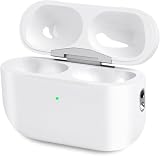
- Perfect replacement:Charging case compatible with for Airpods pro 1st & 2nd Generation. A great replacement charging case for backup if your original case is lost or damaged.
- Charging and Syncing: The wireless Airpod pro charging case is upgraded with a pairing sync button, enable you enjoy sensitive bluetooth pairing.Our charging case equipped with a better chip for stronger performance. Will protect your device from short circuit, over current, over voltage and over charge.
- Wireless & wired charging:The Air pods Pro Charging Case Support both QI wireless charging and lightning cable charging. Compatible with all standard wireless charger.
- Large Capacity Built-in Battery:Built-in 660mA battery for our AirPod Pro charger case, it can fully charge time of Air pod Pro is only 20 minutes and gives you 8 hours listening time and it can be use up to over 3 times when the charging case is full of power. It only needs about 3 hours to be 100% power for the charging case.
- After-sales service:When you received the airpod charging case replacement,If you have any questions, please feel free to contact us. We always try our best to provide customers with high-quality products and excellent services.
Product prices and availability are accurate as of the date/time indicated and are subject to change. Any price and availability information displayed on Amazon at the time of purchase will apply.

