
The Tool Desk
Outbyte PC Repair FREERepair Windows errors before they cause bigger problemsFix Now →Outbyte Driver Updater FREEScan for outdated or missing drivers - takes under a minuteDriver Scan →SuperDisk—usually called LS-120—was a 3.5-inch removable-disk system that stored 120 MB on its own disks and let a compatible drive read and write ordinary 1.44 MB and 720 KB floppy disks. Its backward compatibility made it a practical upgrade, but it did not erase the Zip drive’s head start or the market’s shift toward other removable storage.
What was a SuperDisk?
SuperDisk was Imation’s high-capacity alternative to the standard 3.5-inch floppy. Its first generation, LS-120, used dedicated 120 MB disks. Those disks required an LS-120-compatible drive; a conventional floppy drive could not read them.
LS-120 drives could also read and write standard 1.44 MB and 720 KB floppy disks. That meant users could keep working with their existing diskettes while gaining a much larger format for files that would not fit on one floppy.
The technology is often described as “floptical.” Optical tracking helped guide the magnetic read/write head to the right position. The laser did not read or write the user’s data; the disk remained magnetic storage.
Windows Errors? Fix Them Before They Spread
Repair common Windows errors and clear accumulated junk for a smoother, more stable PC - no reinstall needed.Free scan · no reinstallOutdated Drivers Are Slowing You Down
One free scan finds every outdated or missing driver and matches the right update for your exact hardware.Free scan · exact hardware match#1 Best Overall
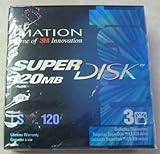
- 3 disks per pack
- 120 MB capacity
- Speed up backups and restores
- IBM formatted
- For use with LS-120 drive only
How did LS-120 compare with LS-240 and a regular floppy?
The figures below are nominal format capacities reported by Pearson / Que in 2003, not measures of usable space or market adoption.
| Format | Nominal capacity | Compatibility and notes |
|---|---|---|
| Standard 3.5-inch floppy | 1.44 MB; 720 KB for the lower-capacity format | Read and written by conventional floppy drives and compatible LS-120 and LS-240 drives. |
| LS-120 (SuperDisk) | 120 MB | Dedicated LS-120 media needs a compatible drive. LS-120 drives also support standard 1.44 MB and 720 KB diskettes. |
| LS-240 | 240 MB | Second-generation media; LS-240 drives also support LS-120 disks and standard floppy formats. |
| Standard 1.44 MB disk in LS-240 special mode | 32 MB | An LS-240 drive could format a standard diskette in this special mode. It is not equivalent to a dedicated LS-240 disk, and the available technical reference does not specify all operating-system, drive, or media conditions. |
What changed with LS-240?
LS-240 doubled the native capacity of LS-120 media and retained support for LS-120 disks and conventional floppy formats. Its ability to format an ordinary 1.44 MB disk to 32 MB was a special mode, not a reason to assume any ordinary floppy drive or computer could use that disk at the higher capacity.
Was SuperDisk better than a Zip drive?
There is no single answer: SuperDisk’s clear advantage was continuity with conventional floppy disks, while Zip had an earlier presence and stronger recognition in the high-capacity floppy market. A useful comparison is what each format offered and how widely it was established—not an unsupported claim that one was universally faster or more reliable.
Rank #2
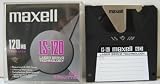
- 120 MB capacity
- Superdisk media
- Maxell brand
- DOS/Windows/IBM format
- Capacity: SuperDisk offered 120 MB per LS-120 disk, later rising to 240 MB per LS-240 disk, compared with 1.44 MB for a standard floppy.
- Compatibility: LS-120 and LS-240 drives could handle common floppy formats as well as their dedicated media. That did not make LS-120 or LS-240 disks readable in ordinary floppy drives.
- Timing and installed base: The Smithsonian National Museum of American History identifies Zip’s popularity as a factor in SuperDisk’s failure to dominate the floppy-storage market.
Why did SuperDisk never catch on?
SuperDisk had an appealing upgrade path, but buyers, computer makers, and software providers needed a removable format with broad adoption. Zip had already built recognition and a user base. The Smithsonian notes that Compaq, Dell, and Gateway were among the manufacturers that supported SuperDisk, but that support did not make it the dominant choice.
The broader superfloppy category also faced familiar hurdles: competing nonstandard formats, compatibility concerns, limited installed bases, cost, and uneven original-equipment-manufacturer support. In time, inexpensive CD-RW drives and other removable storage options narrowed the market opportunity for another floppy-like system.
These factors help explain the outcome, but the available sources do not establish exact SuperDisk sales or market share, or measure the relative weight of each cause. Adoption also varied by region: the Smithsonian describes SuperDisk as less successful in North America than in Asia and Australia, so its reach should not be treated as uniform worldwide.
Rank #3

- 240mb Capacity
- Super Disk 240 Drive Required (NOT 120 Drive) to achieve 240mb capacity
- PC Formatted
- Made in Japan
- Discontinued by all manufactuers** very hard to find**
Can you use a SuperDisk today?
Accessing an old LS-120 disk requires an LS-120-compatible drive; an LS-240 drive also supports LS-120 media. For an old 1.44 MB or 720 KB disk, a compatible LS-120 or LS-240 drive can provide floppy-format access as well. These are legacy hardware and media categories, and current stock, prices, working condition, and computer-interface compatibility are not established here.
If you are sourcing equipment, verify the exact disk format and drive interface, and treat the condition of used media and hardware as an important uncertainty. Do not buy an LS-120 disk expecting a conventional floppy drive to read it.
What’s actually slowing this PC down?
Pick the symptom - the matching free tool is one click away.
Quick Recap
Sources
- Smithsonian National Museum of American History: Imation SuperDisk collection record
- Pearson / Que, 2003, technical references for LS-120 and LS-240 capacity and format details.
Product prices and availability are accurate as of the date/time indicated and are subject to change. Any price and availability information displayed on Amazon at the time of purchase will apply.

