
Recommended Free Tools
For a game made specifically for Windows 3.1 or Windows for Workgroups 3.11, the most dependable route is to install a legally obtained copy of that Windows version inside DOSBox Staging or DOSBox-X, then run the game from the emulated Windows desktop. DOSBox Staging’s manual says it fully supports Windows 3.1 and starts it with the WIN command. A game written for DOS, by contrast, usually runs directly in DOSBox without installing Windows.
First identify what kind of game you have
The words “Windows game” on a box or title screen are not enough to determine how to run it. Check the manual, installer, or files for clues about which operating system the game expects:
- Windows 3.1/3.11 game: It expects the Windows Program Manager, Windows DLLs, or Windows multimedia APIs. Install Windows 3.1 or Windows for Workgroups 3.11 in an emulator, then install the game there.
- DOS game: It runs as a DOS executable and does not require the Windows desktop. You can usually run it directly in DOSBox.
- Win32s or Windows 9x game: It may need a different setup from a standard Windows 3.1 title. Do not assume that a Windows 3.1 installation will be enough; note the game’s stated requirements and troubleshoot against those.
This distinction matters especially for multimedia and full-motion-video games: DOSBox Staging notes that some were released for Windows 3.1 without a DOS version. See its Windows 3.1 documentation and overview of the DOS eras.
Choose an approach
| Approach | Best fit | What to know |
|---|---|---|
| DOSBox Staging | A documented setup for Windows 3.1 games | Its manual says it fully supports Windows 3.1 and requires Windows 3.1 or WfW 3.11 installation files. The cited manual does not support Windows 9x. |
| DOSBox-X | A guided Windows 3.1x installation with additional configuration options | Its guide walks through creating a DOS hard-disk image and installing Windows 3.1x. You still need to supply the Windows files and configure the game. |
| Windows compatibility tools | Some later 16-bit or 32-bit programs | Worth trying for later titles, but not a reliable substitute for a Windows 3.1 environment on current 64-bit Windows. Microsoft describes NTVDM as a legacy 32-bit subsystem for DOS and Windows 3.x programs. |
For Windows 3.1 games, the emulator route recreates the older DOS-based environment. Microsoft’s guidance for older apps recommends the Program Compatibility Troubleshooter when appropriate, while noting that programs can fail after an upgrade because of architecture, security, or system-requirement changes. Microsoft Learn also explains NTVDM and 16-bit app support.
The Tool Desk
Outbyte PC Repair FREERepair Windows errors before they cause bigger problemsFix Now →Outbyte Driver Updater FREEScan for outdated or missing drivers - takes under a minuteDriver Scan →#1 Best Overall

- A game of deduction and suspense by Prospero Hall.
- One player is the Director, silently playing out clues as to what may, or may not have happened to the other players.
- The players are unaware if a murder happened until they start noticing suspicious signs from their neighbors.
- Beautiful illustrations and design transports players to the era of 1950s murder mysteries.
- Ages 13+
Set up Windows 3.1 in an emulator
Use the setup guide for the emulator you choose rather than mixing configuration steps. Both DOSBox Staging and DOSBox-X require Windows installation media or extracted installation files; the emulator does not provide Windows itself. Use files you are legally entitled to use.
- Install DOSBox Staging or DOSBox-X. Download the emulator from its official site and follow its Windows 3.1 installation guide.
- Prepare the Windows installation files. Have the legally obtained Windows 3.1 or WfW 3.11 floppy images or extracted files ready. DOSBox Staging’s guide requires Windows installation media in one of these forms; DOSBox-X’s guide uses a DOS hard-disk image for its installation workflow.
- Create and mount the virtual drive or image. Follow the selected emulator’s instructions to expose the installation files to the emulated DOS environment.
- Install Windows. Run its installer inside the emulator and complete the setup using the instructions for that version and emulator.
- Start Windows. At the DOS prompt, enter
WINto launch the installed Windows environment. - Install the game inside Windows. Mount or insert the game’s floppy, directory, or CD image as appropriate, then run the game’s installer from Windows.
DOSBox-X documents an alternative launch pattern, WIN RUNEXIT, for starting a game through Windows and returning to DOSBox-X when it exits. Follow the DOSBox-X guide for the exact configuration and command context rather than treating that command as universal.
Rank #2

- Package Contents: Each set comprises two curtains, 52 inches wide x 72 inches long. Curtains feature rustproof silver metal curtain rings at the top, with an inner diameter of 1.6 inches. Compatible with standard curtain rods for easy installation and operation
- Red Chess Home Decor: These window curtains feature vibrant printed patterns and unconventional designs that can instantly transform the monotony of your room. Enhance your windows with our patterned curtains
- Functional Curtains: These opaque curtains utilise premium polyester fabric and innovative triple-weave technology, offering a soft touch and excellent drape. They block over 95% of light and UV rays, maximising privacy, thermal insulation, soundproof and room darkening. Ideal for night owls and afternoon nap-takers
- Exquisite Room Decoration: Black Out curtains incorporate your favourite elements to complement your room decor, adding a touch of fun. Suitable for livingroom, bed room, kids room, kitchen, dorm, office, dining room, playroom, apartment, etc
- Easy Care: Blackout curtains are machine washable in cold water, do not bleach, tumble dry on low heat or air dry. Note: Folding during transport may cause temporary creases, which will resolve after hanging for a short period or ironing on a low setting
Fix common sound and display problems
No sound or incorrect music
Configure the game to use the sound card emulated by DOSBox, using the game’s own setup program if it has one. If the game uses MIDI, set up MIDI output as well. DOSBox Staging documents software and external-device MIDI routing for Windows 3.1 games in its manual. The correct choice depends on what the game supports and what output you have configured.
Corrupted graphics or wrong colors
Try the display driver and color-depth settings documented for your emulator and game. Windows version, emulated hardware, and the title’s own requirements can all affect the result, so there is no one setting that guarantees a fix. The DOSBox-X Windows 3.1x guide provides a separate installation and configuration reference.
Rank #3

- Aspect Ratio:16:9
- Designed for mobility: Ultra-thin, light and incredibly durable with a cnc unibody aluminum frame and long battery life.
- 120hz full HD thin bezel display: Super-fast 120hz full HD display that enables smooth visuals in games, with 100% sRGB color space.
- Razer chroma keyboard and precision touchpad: keyboard featuring single-zone rgb lighting with 16.8 million color options, and a precision glass touchpad.
- Complete connectivity — Includes thunderbolt 4, USB-C, USB-A, wireless AX, HD webcam utilizing windows hello, and 4-array mics.
Installer asks for another disk or a CD
Identify which floppy or CD the installer expects and make that disk or image available to the emulator. The game may need the disc mounted not just for installation but also when it runs. The required disk and mounting steps vary by title.
Independent reader supportYour contribution helps us test, update, and keep practical guides available for everyone.If it still will not run
Capture the exact error and check the game’s stated Windows requirements before changing more settings. Record whether you have a Windows 3.1, Win32s, or Windows 9x title; what kind of installer it uses; and whether it asks for a particular floppy or CD. Those details help distinguish an installation-media problem from a Windows-version or emulated-hardware mismatch. A title alone cannot guarantee compatibility.
Rank #4
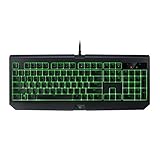
- Designed specifically for gaming, Razer Mechanical Switches actuate at an optimal distance, giving you speed and responsiveness like never before.
- No matter Razer Mechanical Switches have consistently proven themselves to be the best for gaming, delivering both top-notch performance and reliable durability without compromise.
- The all-new Razer Black Widow X Ultimate features individually programmable backlit keys along with dynamic lighting effects all set easily through Razer Synapse.
- Military grade metal top construction
- 10 key roll-over anti-ghosting
For a later 16-bit or 32-bit program rather than a true Windows 3.1 game, try Microsoft’s Program Compatibility Troubleshooter in Windows 10 or 11. It may help with some applications, but it does not recreate a Windows 3.1 environment. Microsoft identifies NTVDM as the 32-bit subsystem for DOS and Windows 3.x programs and says it is in maintenance mode.
Quick Recap
Best Value
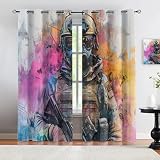
- 1. Resistant & Easy Installation: Includes two panels (42"W x 84"L each; 84"W total) with rustproof silver metal grommets (1.6" diameter). No rods included—compatible with most standard curtain rods.
- 2. Stylish Home Decor Options: High-definition printed patterns with fade-resistant technology. Available in versatile designs to elevate bedrooms, living rooms, kitchens, offices, and more.
- 3. Superior Blackout Performance: Blocks 80%-90% of light and UV rays with triple-weave technology, ensuring privacy and perfect darkness for restful sleep. Darker colors maximize effectiveness.
- 4. Energy-Efficient Insulation: Reduces summer heat and winter chill to balance room temperature, lowering energy bills. Enhances soundproofing and protects floors/furniture from UV damage.
- 5. Low-Maintenance Fabric: Machine washable in cold water, tumble dry on low heat or line dry. Wrinkle-resistant and easy to refresh with light ironing for a crisp finish.
Product prices and availability are accurate as of the date/time indicated and are subject to change. Any price and availability information displayed on Amazon at the time of purchase will apply.
Free tools Windows power users keep installed
One-click scans. No signup required.

