
Tracker is a free, open-source application for measuring motion in video and comparing that motion with physics models. You can mark an object’s position frame by frame, calibrate the scene, and analyze position, velocity, and acceleration. It runs as desktop software on Windows, macOS, and Linux, and as Tracker Online in a browser.
What Tracker does
Tracker is a video analysis and modeling application built on the Open Source Physics (OSP) Java framework. The Tracker project describes it as a tool designed for physics education; its help documentation also notes applications in other fields. Rather than serving as a general-purpose video editor, Tracker is focused on measuring motion and analyzing it with physics-style tools.
You can track an object manually or use automated tracking, then view position, velocity, and acceleration information. The software also supports center-of-mass tracks, vectors and vector sums, RGB line profiles and time-dependent RGB regions. Its Model Builder supports kinematic and dynamic point-mass and two-body models, while external model overlays can be synchronized and scaled against a video for visual comparison.
The project site claims more than 2 million users across 31 languages. The page does not state when that figure was published, so it should be treated as an undated project claim, not a current user count.
Free tools Windows power users keep installed
One-click scans. No signup required.
#1 Best Overall

- ✔ Dual-Method Velocity Determination: Determine projectile speed using conservation of momentum and conservation of energy, then independently verify using horizontal projectile range analysis.
- ✔ Demonstrates Inelastic Collisions in a Real System: Students analyze momentum transfer, calculate recoil velocity, and compute percent kinetic energy loss during collision.
- ✔ Clear Educational Objectives for Advanced Mechanics: Designed to teach conservation laws, projectile motion, uncertainty analysis, center-of-mass calculations, and experimental reproducibility.
- ✔ Precision Angle Measurement & Multi-Trial Testing: Integrated angle indicator enables accurate recoil angle recording for averaging, uncertainty calculation, and percent difference comparison.
- ✔ Ideal for AP Physics & Introductory College Labs: Supports curriculum standards in momentum, mechanical energy, projectile motion, and experimental error analysis.
How to analyze motion in a video
A useful Tracker analysis depends on more than clicking an object in successive frames: first define the time range, scale, and coordinate system so the measurements have meaning.
- Open a video or Tracker file. Start with a supported video, image sequence, or existing project.
- Choose the frames. Set the portion of the clip you want to analyze so the track covers the relevant motion.
- Calibrate the scale. Use a known distance in the scene, such as a measured object or interval, to relate image coordinates to real-world distance. Without scale calibration, position is in image units rather than a meaningful physical distance.
- Set the reference frame. Place the origin and set the coordinate-system angle to define where measurements begin and which direction counts as positive.
- Track the object. Mark its location with the mouse or use an automated tracker. Consistent point selection matters: a changing point on the object can introduce apparent motion that is not the motion you intend to measure.
- Plot and analyze the track. Inspect the position data and velocity or acceleration overlays, and use fitting or custom variables when they suit the question.
- Save and share the work. Save the project; export track data to a spreadsheet when needed, or copy or print images for a report.
Tracker includes calibration sticks and points, coordinate controls, reference frames, protractors, tape measures, circle fitting, curve fitting, and custom variables. These tools help with setup and analysis, but they do not remove the need to make sound measurement choices.
Rank #2

- Includes sine wave generator for adjusting frequency and amplitude
- Mechanical wave driver produces controlled vibrations
- Supports experiments with standing waves and interference patterns
- Comprehensive instruction guide included with assembly directions and guided experiments
- Designed for use with various materials to observe wave motion
Can Tracker measure velocity and acceleration?
Yes. Once you have selected frames, calibrated the scene, set the reference frame, and tracked an object, Tracker can display and analyze position, velocity, and acceleration. Those quantities depend on the underlying measurements: errors in scale, timing or point selection carry through to the derived values.
There is no universal accuracy figure established for Tracker. Results depend on calibration quality, the frames chosen, camera perspective and lighting, and how reliably the object can be tracked. If the camera introduces perspective or radial distortion, Tracker provides corresponding correction filters; correction cannot substitute for a suitable camera view or careful setup.
Rank #3
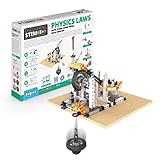
- KIDS EXPLORE the laws of motion and discover how they impact our daily lives.
- BUILD 6 incredible working models, including a rocket launcher, a crash test rig, a sharpening wheel and more. Get ready for a physics adventure with this STEM Project.
- UNLEASH your child's inner scientist with the easy-to-follow instructions, including 12 pages of theory, amazing facts, and fun experiments. And with a 4-page quiz section, kids can test their newfound knowledge and impress you with what they've learned.
- FOR KIDS 9 and up, the STEM building toy also comes with a cutting-edge, interactive 3D app that lets children build in virtual reality. And it's not just us who think this toy is amazing - it's been chosen as one of the 21 best STEM toys and gadgets to get kids interested in tech.
- WITH AWARD-WINNING components designed by Engino, complex scientific concepts are brought into clear focus for budding engineers and scientists. Make education fun with Engino, proudly made in Europe.
Supported video formats and conversion
The official site lists MP4, AVI, WMV, FLV, and MOV video, animated GIFs, and numbered JPG, PNG, or GIF image sequences. Numbered image sequences can also be packaged in ZIP files. If a video will not open, the project recommends converting it to MP4 with HandBrake, an open-source application.
Tracker also includes video filters such as brightness and contrast, strobe, ghost trails, deinterlacing, perspective correction, and radial-distortion correction. An Export Video wizard can transcode a clip or add overlays. These are analysis aids, not a replacement for a full video-editing workflow.
Rank #4

- PRECISE MOTION MEASUREMENT: Photogate timer uses dual light gate sensing to capture timing data for motion analysis, supporting student study of velocity, kinematics, energy, and physics experiments in classroom labs.
- CLASSROOM READY DESIGN: Built as science lab equipment for physics instruction, this self-contained photogate system displays results on an LCD screen and operates without a computer, software, or external data logger for quick setup.
- REPEATABLE DATA MEMORY: Data memory function stores up to 5 sets of measured data, helping students compare repeated trials, review timing measurements, and build stronger lab data analysis during physics, motion, and kinematics experiments.
- HANDS-ON DATA LEARNING: This physics lab equipment supports acceleration calculations from velocity and timing measurements, helping students connect observed motion with Newton’s laws, energy concepts, and physics principles.
- VERSATILE PHYSICS EXPERIMENTS: Compact science equipment displays speed from 0 to 99.99 m/s with multiple unit options and supports carts, pendulums, projectiles, falling objects, collisions, and energy transfer investigations.
Desktop, browser, and operating-system options
Tracker provides desktop installers for Windows, recent and older macOS versions, and Linux. The project also offers Tracker Online, a browser implementation described as identical to desktop Tracker while running in JavaScript rather than Java. Check the official site for the installer or online option appropriate to your system.
For most desktop users, the official installer is the simplest setup: according to the project site, it bundles the Java VM and Xuggle video engine. The source repository identifies Xuggle video-engine support as optional and lists the OSP Core Library as a requirement.
Best Value

- Hands-On Learning Tool: Demonstrates motion, kinematics, and mechanics using real projectile launches
- Adjustable Launch Angles: Allows angle settings from 90° to –45° to study trajectory variation
- Extended Range Capability: Projects steel balls up to 1–2 meters for experiments on distance and height
- Complete Physics Kit: Includes manual launch mechanism, clamp, and two 16 mm steel balls for safe operation
- Photogate Compatible: Works with BeeSpi Photogate and holder to enable precise digital timing measurements
Saving and sharing an analysis
A TRZ Tracker Project is the safer format for sharing a project because it can include a copy of the video, a thumbnail, and HTML documentation. This helps keep the analysis together with the media and context needed to understand it. Tracker also has a Library Browser for sharing projects and documentation, plus annotations, notes, undo and redo, and searchable help.
When a collaborator only needs the measurements, export the track data to a spreadsheet instead. For a report, Tracker can copy or print images. Choose the format based on whether the recipient needs to continue the analysis, use the numerical data elsewhere, or view figures.
Who Tracker is for
Tracker is a fit when the task is to extract motion measurements from video, teach or study physics, or compare observed motion with a model. Its combination of calibration, tracking, plotting, and model overlays is more specialized than a typical video player or editor.
- Good fit: classroom experiments, motion measurement, physics modeling, and analyses where plots or model comparisons matter.
- Less suitable: general-purpose editing or situations that do not require measured motion or physics-style analysis.
- Important trade-off: useful results require deliberate calibration and tracking; the software cannot make poor footage or an unsuitable camera angle reliable on its own.
Cost and licensing
Tracker is free and open source. The source repository labels it GPL-3.0. The official project provides downloads and help, and no paid license is required for ordinary use.
Quick wins for a faster PC:
Clear out junk files and repair common Windows errorsFree Scan →Scan for outdated or missing drivers - takes under a minuteDriver Scan →Quick Recap
Product prices and availability are accurate as of the date/time indicated and are subject to change. Any price and availability information displayed on Amazon at the time of purchase will apply.

