
Yes, you can play some tablet pinball games with a wireless controller, but support depends on the game—not just whether your tablet can pair with Bluetooth. The purpose-built Tilter Pro is marketed for iPad pinball, while general Bluetooth gamepads may work when the specific app supports their input. Confirm support for your exact game and tablet before buying.
Check game support before choosing a controller
Bluetooth pairing only connects a controller to the tablet; it does not ensure a pinball app will recognize it or map its buttons correctly. Tilter Pinball lists compatibility with pinball apps that support controllers, including Pinball Arcade, Pinball Arcade Plus, Stern PBA, Pinball Deluxe, Zaccaria Pinball, and Zen Pinball Party. The maker notes that Zen Pinball Party requires an Apple Arcade subscription. These are manufacturer compatibility claims, not independent tests. Check Tilter Pinball’s compatibility information and confirm the current support details with the game publisher.
For Apple devices, 8BitDo says App Store and Apple Arcade games must support MFi controllers. That is a useful general warning, not proof that a particular pinball game works with a particular gamepad. See 8BitDo’s Apple compatibility guidance.
Purpose-built option: Tilter Pro
Tilter describes its Tilter Pro as a Bluetooth controller designed for iPad pinball. It has side flipper buttons and nudge buttons, which are purpose-specific controls rather than the conventional layout of a general gamepad. The product page lists dimensions of 28 × 20 × 9 cm, USB charging, a charging cable and quick-start guide in the box, and up to 20 hours of continuous play. These are manufacturer specifications, not independently measured results. View the Tilter Pro product details.
#1 Best Overall

- This volume controller WILL work on all Stern SPIKE, SPIKE 2 & SPIKE 3 machines, both exported & USA domestic
The maker’s page displayed a price of €89 when accessed on September 30, 2026. Price, stock, and regional shipping can change, so check the seller’s current listing for your location before ordering.
General Bluetooth gamepads: possible, but not pinball-specific
A standard Bluetooth gamepad may be a practical alternative if your selected app supports controller input. It can offer broader use across tablet games, but the manufacturer’s operating-system compatibility does not establish that a given pinball app will recognize it or provide convenient flipper and nudge controls.
Rank #2

- Precision Control:Hall Effect Joysticks with 0.5ms response eliminate stick drift, ideal for fighting games & sports sims. 1000Hz polling rate ensures lag-free inputs.
- ☑Specially Designed for Retro Games:The wireless nes controller Perfectly adapt to all retro games.Using this wireless mini controller to play a classic game with your friends or family who also love retro games will surely activate your pleasant memories together.
- ☑Easy& Efficient:Wireless connection is more convenient.No need for excessive operation,connect to the receiver and play immediately.only one interface is needed,and dual devices can be used directly. The Wireless Controller is ergonomically designed and has a good hold。The Joystick buttons operate like PC computer keyboard.Setting are not lost:One setting is never lost,and the two handles will not be confused.
- ☑High Compatibility:Fully compatible with mainstream operating systems,for driver free plug and play.This wireless gamepad is seamlessly compatible with Windows,IOS,DOS,MAC OS,linux and more!Type-C adapter suits for new laptops such as Mac M3,Mac M2,Mac M1.
- ☑Wonderful Gift:BFTDjanus Wireless Controller's Package Includes 2 Wireless Controller; 1 USB Wireless Receiver.This is a great gift for hobbyist retro gaming enthusiasts, and of course your kid,father, husband, or boyfriend will be ecstatic to receive it on birthdays, anniversaries,Father's Day, Children's Day, Christmas, and all sorts of other holidays. If you have any questions that need to be resolved after purchase, just contact us via email, we will reply within 24 hours.
| Controller | Manufacturer-listed tablet compatibility | Battery and charging claims | Pinball-specific details |
|---|---|---|---|
| 8BitDo SN30 Pro | Android and iPadOS 16.3 or later; page describes tablet gaming use and includes a mobile gaming clip. | Up to 18 hours of play; 1–2 hours to charge. | Not described as a dedicated pinball controller. App support and button behavior need to be checked. Figures are manufacturer specifications. |
| 8BitDo Pro 2 | Android 9.0 or later and iPadOS 16.3 or later; Bluetooth 4.0. Mobile clip sold separately. | Up to 20 hours of play; four hours to charge. | Not described as a dedicated pinball controller. App support and button behavior need to be checked. Figures are manufacturer specifications. |
How to verify your setup
- Identify your exact game and tablet. Note the app name and whether the device runs iPadOS or Android.
- Check the game’s controller support. Look for explicit support in the game’s current description, settings, or publisher support information. A controller listing for the operating system alone is not enough.
- Confirm the controls you need. For pinball, check whether the app lets you operate left and right flippers and, if desired, nudge controls. Do not assume a generic gamepad maps these as you expect.
- Check the controller’s current requirements. Verify supported OS versions, Bluetooth connection details, charging method, and any required clip or accessory against the current manufacturer page.
- Review purchase terms. Check current regional price, stock, shipping, and return conditions before ordering; these details are not established by compatibility claims.
What about older or ecosystem-specific controllers?
Duo Pinball is historical, not a current recommendation
In an October 4, 2012 announcement, Discovery Bay Games described Duo Pinball as a Bluetooth iPad controller that worked exclusively with Pinball HD and Pinball HD Collection. The announcement listed side flipper buttons, a spring-loaded plunger, bump, and tilt controls. Its app-specific design illustrates why old controller compatibility claims should not be carried forward to current game versions. The announcement does not establish present-day availability or compatibility. Read the 2012 announcement.
AtGames Legends GamePad targets its own ecosystem
AtGames describes the Legends GamePad as a wireless gamepad for Legends Arcade family devices and virtual pinball on the Legends Arcade Platform. The available product information does not establish it as a general-purpose tablet pinball controller, so consider it only if you already use that ecosystem. Its product page also includes customer feedback about Windows Bluetooth/XInput limitations; seamless cross-platform behavior should not be assumed. See AtGames’ product page.
Quick Recap
Rank #3
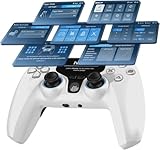
- Interactive Screen for Seamless Customization: With the 2-inch interactive display, easily adjust button mapping, sensitivity, vibration intensity, and Turbo functions on the fly. No app needed, just intuitive control at your fingertips, allowing you to save up to 4 profiles for instant mode switching, optimizing your gameplay experience for different game genres.
- 1000Hz Polling Rate for Ultra-Fast Response: Featuring a 1000Hz polling rate, this controller delivers zero input lag, ensuring immediate response for precision gaming. Ideal for competitive gamers, this ultra-fast response rate guarantees flawless performance in fast-paced action games like FPS or racing, where every millisecond counts.
- Hall Effect Joysticks & Triggers + 2 Programmable Buttons: Equipped with Hall Effect joysticks and dual-stage triggers for smooth, drift-free control, built to last over 5 million cycles. The 2 programmable back buttons enable you to assign macros or game-specific functions for rapid execution, making this controller perfect for advanced gamers seeking customizable, high-performance gaming gear.
- Gyroscope Calibration & Drift Repair Function for Precision: The integrated gyroscope calibration and drift repair function ensure consistent precision over time by fixing joystick drift and gyro inaccuracies. Perfect for FPS and action games, this function allows you to maintain control accuracy throughout your sessions, ensuring smooth motion control with no interruptions during critical moments.
- Motion Control & Immersive Gameplay Experience: 6-axis motion sensing provides precise control in action-packed or racing games, bringing your games to life. Experience accurate motion aiming and enhanced immersion as you control your character or vehicle with dynamic movements, taking your gameplay to the next level.
Product prices and availability are accurate as of the date/time indicated and are subject to change. Any price and availability information displayed on Amazon at the time of purchase will apply.

