
Quick wins for a faster PC:
Repair Windows errors before they cause bigger problemsFix Now →Scan for outdated or missing drivers - takes under a minuteDriver Scan →For GPU-driven AI, the CPU is still important: it prepares and moves data, handles networking and orchestration, and runs the parts of inference that do not execute on the GPU. Arm-based server CPUs are credible alternatives to x86, but the right choice depends on the complete system. NVIDIA Grace stands out when tight CPU–GPU coupling and memory movement are central; cloud Arm CPUs such as Graviton and Axion are options for workloads deployed within their respective cloud platforms. There is no established universal winner.
What the CPU does in a GPU-driven AI system
A GPU performs much of the parallel computation in many AI workloads, but it does not remove the CPU from the execution path. The CPU can prepare input data, coordinate storage and networking, schedule work, manage accelerator resources, and handle preprocessing or other operations that remain on the host. Those jobs can affect end-to-end latency and throughput even when the GPU performs model inference.
CPU capacity matters especially when AI is only one part of a service, or when work is intermittent or unevenly distributed. Arm’s 2024 overview of AI inference on Arm CPUs describes CPU execution as a practical choice in such cases and highlights latency and memory locality as considerations. That does not mean a CPU is generally a substitute for a suitable GPU: it means the CPU side of an accelerator system should be selected for the work it actually performs.
How the main Arm alternatives compare
| Option | Best fit | Potential strengths | What to verify |
|---|---|---|---|
| NVIDIA Grace CPU, including Grace Hopper (GH200) | GPU systems where CPU–GPU data movement, memory sharing, or host-side bandwidth are important | NVLink-C2C, a coherent CPU–GPU memory model, and high-bandwidth LPDDR5X; Grace Hopper pairs Grace with a Hopper GPU | Arm builds and libraries, NUMA behavior, the exact platform configuration, and procurement availability |
| Ampere Altra / Altra Max | Cloud-native CPU inference or general server hosting alongside accelerators | Many Arm cores and vendor-positioned inference software and power characteristics | Framework and kernel support, accelerator compatibility, supply, and the conditions behind vendor comparisons |
| Google Axion | Arm-based workloads deployed on Google Cloud | Neoverse V2-based cloud CPU with documented AI-inference positioning | Region and instance availability, container or image support, pricing, and fit with the selected accelerator |
| AWS Graviton3/4 | AWS inference services and mixed CPU/GPU pipelines | Integration with AWS services; Arm’s guide includes a llama.cpp optimization example for Graviton3 | Recompilation and model-kernel performance, instance memory bandwidth, and GPU attachment for the specific instance |
| Microsoft Cobalt 100 | Azure workloads, including systems paired with Maia or other accelerators | Arm Neoverse CSS design and Azure AI integration | Azure-specific availability and software support for the intended deployment |
| Alibaba Yitian710 | Alibaba Cloud deployments, including cost-sensitive smaller-model inference | Arm’s guide reports prompt-processing, token-generation, and tokens-per-dollar comparisons | Current instance catalog, geography, and whether the guide’s test setup reflects the planned workload |
Why Grace is distinct for GPU systems
Grace is designed around the CPU–GPU connection rather than simply offering an Arm CPU that can sit beside a discrete accelerator. NVIDIA’s Grace Performance Tuning Guide describes Grace Hopper as pairing a Grace CPU with a Hopper GPU, and Grace Blackwell as combining Grace with a Blackwell GPU. The guide specifies 72 Arm Neoverse V2 cores per Grace CPU and 144 in the Grace Superchip.
Recommended Free Tools
#1 Best Overall

- Built for Local AI and Advanced Workflows – The BOSGAME M5 AI Mini PC is powered by AMD Ryzen AI Max+ 395 with 16 cores, 32 threads, up to 5.1GHz, 50 TOPS NPU performance and up to 126 TOPS total AI performance. It is designed for local AI inference, private AI assistants, coding, data analysis, virtualization, content creation and demanding multitasking while keeping sensitive data on the device.
- 128GB Unified Memory for Large Models and Creative Projects – M5 includes 128GB LPDDR5X-8000 unified memory, giving the CPU and Radeon 8060S graphics access to a large shared memory pool. This helps support memory-intensive AI workloads, large project files, multiple virtual machines, 3D work, video editing and complex professional applications without the capacity limits of typical 32GB or 64GB mini computers.
- Radeon 8060S Graphics for Creation, Rendering and Gaming – Integrated Radeon 8060S graphics with 40 RDNA 3.5 compute units delivers high-end visual performance without a separate graphics card. Use the M5 creator workstation for 4K video editing, 3D rendering, CAD, AI image workflows, high-resolution media and modern gaming, while maintaining a compact desktop footprint.
- 2TB PCIe 4.0 SSD and Flexible Expansion – A pre-installed 2TB NVMe PCIe 4.0 SSD provides fast access to models, datasets, media libraries and project files. A second M.2 2280 PCIe 4.0 slot allows additional storage expansion, while the SD 4.0 card reader supports efficient photo and video workflows for creators and production teams.
- Professional Connectivity and Four-Display Support – Dual USB4 ports, HDMI 2.1 and DisplayPort 1.4 support up to four displays and resolutions up to 8K@60Hz. WiFi 7, Bluetooth 5.4 and 2.5GbE deliver fast networking for cloud collaboration, NAS access and business deployment. Windows 11 Pro, performance-mode switching, Wake-on-LAN and auto power-on support flexible workstation use.
For the Grace Superchip, NVIDIA documents up to 960 GB of LPDDR5X memory and up to 900 GB/s of NVLink-C2C bandwidth. NVLink-C2C supports a coherent CPU–GPU memory model, which can be useful when a workload repeatedly moves large tensors between host and GPU, or relies on shared access patterns. NVIDIA also documents up to 1 TB/s of CPU memory bandwidth for GH200 NVL2. These are configuration-specific maximums, not guarantees for every Grace system.
This architecture is most relevant when CPU–GPU data exchange, host memory capacity, or feeding multiple GPUs is a real constraint. If the workload is dominated by computation that stays on the GPU and the host mainly schedules requests, those headline interconnect and memory specifications may not translate into a meaningful application benefit. Measure the full pipeline.
What vendor benchmark claims do—and do not—show
Arm’s 2024 guide reports that Google Axion offers up to 60% greater energy efficiency and up to 50% more performance than comparable x86 instances. It also reports that, after optimization of llama.cpp for Graviton3, prompt processing improved by up to 2.5× and token generation by up to 2×. For Yitian710, the guide reports up to 3.2× prompt-processing and 2.2× token-generation performance versus the Intel systems it cites, plus up to 3× tokens per dollar.
Rank #2
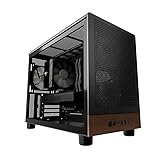
- Engineered for demanding AI workloads, this is your definitive development platform. It packs an AMD Ryzen 5 9600x for parallel processing and an AMD Radeon AI Pro R9700 with 32GB VRAM for large models & complex neural nets. Built for sustained performance, it includes 32GB DDR5 RAM, a 1TB NVMe Gen4 SSD, and a digital display cooler for ultimate thermal stability.
- Industry-Leading Warranty & US Support - Backed by a 2-Year Parts Warranty, Lifetime Labor Warranty & Lifetime Technical Support. Andromeda Insights is a US-based company dedicated to high-performance hardware and long-term service.
- Elite CPU Power with Liquid Cooling – AMD Ryzen 5 9600X | 6 Cores, 12 Threads - Blazing fast speeds with up to 5.4GHz Turbo – ideal for LLM, engineering, gaming, streaming, and content creation. Future-ready architecture ensures consistent high performance. The included digital display cooler keeps it cool without throttling.
- Ultra-Fast 32GB DDR5 6000MHz RAM - Multi-task effortlessly and load programs instantly with 32GB of blazing-fast DDR5 memory for high performance.
- Transform your AI development with the AMD Radeon AI PRO R9700. Its RDNA 4 Architecture and 2nd-gen AI Accelerators deliver up to 2x better AI performance over the previous generation.¹ Equipped with 32GB of dedicated video memory, it lets you tackle larger, more complex projects. Purpose-built to accelerate local AI workloads, the R9700 delivers the speed and capacity your workflow demands to turn ambition into reality.
These are vendor-guide results, not a neutral comparison of all the CPUs under identical models, software versions, power limits, accelerator configurations, and prices. “Up to” figures describe reported results in particular configurations; they should not be treated as predictions for a different model or deployment. The available evidence does not establish a cross-vendor benchmark that normalizes those variables.
Free tools Windows power users keep installed
One-click scans. No signup required.
How to choose for your workload
Prioritize CPU–GPU interconnect when data moves repeatedly
Look closely at link bandwidth and memory coherency if preprocessing, retrieval, paging, or orchestration repeatedly transfers large tensors between the CPU and GPU. Grace’s NVLink-C2C is the clearest documented example in this set. Test whether the application benefits from its memory-sharing behavior rather than assuming a high link specification will accelerate every GPU workload.
Prioritize host memory when the pipeline is memory-heavy
Host memory capacity and bandwidth can matter for retrieval-heavy applications, data staging, large host-side caches, and feeding multiple GPUs. Compare the actual memory configuration of the system you can deploy with the needs of the application; a product family’s maximum capacity or bandwidth may not describe the specific instance or server on offer.
Rank #3

- 【High-Performance APU】The MS-S1 MAX features an AMD Ryzen AI Max+ 395 APU, integrating a Zen 5 architecture CPU (up to 5.1GHz, 16C/32T, 64M L3 Cache), an RDNA 3.5 GPU, and an NPU (50 TOPS). The total system output is 126 TOPS. It provides powerful parallel computing capabilities for demanding AI workflows. It is ideal for running local LLMs, multimodal models, and computationally intensive tasks
- 【128GB UMA Memory】Equipped with up to 128GB of LPDDR5x-8000MT/s unified memory, it enables the CPU and GPU to access a shared, high-bandwidth memory pool with extremely low latency. Ideal for large-scale AI inference, 3D workloads, and complex timelines in video editing. It eliminates traditional VRAM bottlenecks, ensuring smoother data transfer during high-intensity computations. The UMA design maximizes performance stability under high loads
- 【Flexible Expansion】The MS-S1 MAX features USB4 V2 (up to 80Gbps), dual 10GbE LAN, HDMI 2.1 (up to 8K60), a full-length PCIe x16 expansion slot, and dual M.2 slots supporting up to 16TB RAID 0/1. Wi-Fi 7 provides stronger signal coverage and a more stable wireless experience. The slide-out design facilitates upgrades and maintenance. It easily adapts to personal, studio, or rack-mount enterprise environments
- 【High-Efficiency Cooling System】Utilizing an aerospace-grade aluminum alloy chassis, copper base plate, six heat pipes, dual turbine fans, and advanced PCM thermal conductive material, it maintains stable cooling performance even under continuous load. This system supports 130W continuous power and 160W peak power operation, with a built-in 320W power supply. It boasts multiple global certifications including CCC, FCC, UL, CE, and UKCA, ensuring stable and reliable operation in various environments
- 【Cluster Design】Two MS-S1 MAX units can be configured as a dual-unit cluster to run a large 235B Q4 model locally, achieving an output speed of 10.87 tok/s. Supporting 2U rack deployment, multiple MS-S1 MAX units can be cascaded into a distributed cluster to create a high-efficiency AI computing center. A cluster of four MS-S1 MAX units successfully ran a DeepSeek-R1 671B Q4 large model. A reserved cluster power-on interface allows for unified start-up and shutdown
Check Arm software support before committing
NVIDIA states that existing AArch64 binaries, tools, and operating systems are compatible with Grace, and says recompiling applications that are not already Arm-native may improve performance. The Grace guide also cautions that fixed-length HPC compiler output is not binary-compatible between Graviton and Grace. Treat “Arm support” as a starting point: check the exact operating system, framework, libraries, compiler, accelerator runtime, and optimized kernels used by the deployment.
Grace supports SVE2 and NEON. Arm’s 2024 guide discusses int4/int8 llama.cpp optimization and reports the Graviton3 results above after optimization. That is a reason to test optimized builds on the target CPU—not evidence that an unmodified model stack will see the same gains.
Benchmark the complete serving path
Use the intended model, quantization, batch size, accelerator, and software versions. Record end-to-end latency and throughput alongside power and cost; include data preparation and host-side work rather than measuring only GPU kernel execution. For cloud instances, test the exact instance type and region you plan to use, since memory bandwidth, GPU attachment, availability, and price can vary across offerings.
Quick Recap
Practical decision guide
- Choose Grace as a candidate when CPU–GPU memory movement or host bandwidth is central and the system’s NVIDIA GPU and software stack fit your deployment.
- Evaluate Graviton, Axion, Cobalt, or Yitian when the workload belongs in the corresponding cloud and the target instance, region, framework, and accelerator combination are available.
- Consider Ampere Altra for Arm server hosting or CPU inference around accelerators, while independently validating software performance and accelerator fit.
- Keep x86 in the comparison if existing software, deployment availability, or operational compatibility makes migration costly; CPU architecture alone does not determine system performance.
Product prices and availability are accurate as of the date/time indicated and are subject to change. Any price and availability information displayed on Amazon at the time of purchase will apply.

