
AWK is a small Unix language for selecting, extracting, summarizing, and reformatting structured text. Its distinctive approach is to describe which records match and what action to run, instead of building a complete application around every input step. That design remains useful for log inspection, delimited files, command output, and quick data checks.
What AWK is—and why it still matters
“awk” can mean the language, the command-line utility, or any of several implementations. The original was created at AT&T Bell Laboratories in 1977 by Alfred V. Aho, Peter J. Weinberger, and Brian W. Kernighan; their initials form the name.



AWK treats input as records (normally lines) divided into fields. A program pairs patterns with actions:
pattern { action }For each record, AWK tests the patterns and runs the action for matches. Built-in field handling, regular expressions, arithmetic, and associative arrays make a short script capable of useful data work without the ceremony of a larger general-purpose program.
What’s actually slowing this PC down?
Pick the symptom - the matching free tool is one click away.
#1 Best Overall
The core record-and-field model
Select records
A pattern can be a regular expression, a comparison, or a range. This prints records whose first field is greater than 100:
$1 > 100 { print }With a file containing whitespace-separated fields, $1, $2, and so on refer to fields in the current record. $0 is the complete record. The field separator is configurable, so the same model works for CSV-like or colon-delimited text (with appropriate care for quoting rules).
Transform and summarize
Actions can print selected columns, calculate totals, or build associative-array counts. This example counts values in the first field and prints the totals at the end:
Rank #2
{ count[$1]++ }
END { for (value in count) print value, count[value] }
Special patterns such as BEGIN and END run before input starts and after it ends, which is convenient for initialization and final reports.
Do these 3 things before closing this tab:
1Repair Windows errors before they cause bigger problems2Scan for outdated or missing drivers - takes under a minute3Clear out junk files and repair common Windows errorsInspect irregular data
AWK is also useful before a larger analysis. To flag rows that do not have the expected five fields:
NF != 5 { print "unexpected field count:", NR, $0 }Here NF is the number of fields and NR is the input record number. Similar one-liners can find the minimum and maximum of a numeric column or count how many records fall into each category.
A short history of change
| Period | What changed |
|---|---|
| 1977 | The original AWK was written at AT&T Bell Laboratories by Aho, Weinberger, and Kernighan. |
| 1985 | A major revision added user-defined functions, multiple input streams, and computed regular expressions. |
| 1987 | The revised language became widely available with Unix System V Release 3.1. |
| 1989 | System V Release 4 introduced further changes. |
| Later standardization | POSIX work clarified language behavior, with contributions from the original designers and GNU Awk developers. |
Consequently, a script written for the language described in the 1988 first-edition book may encounter additions or portability questions on a modern system. “What changed since the original AWK book?” is therefore a sensible learning question, not evidence that the original model has disappeared.
awk versus GNU Awk (gawk)
GNU Awk is one implementation of AWK, not a synonym for every system’s awk. GNU Awk follows the POSIX specification while also documenting GNU-specific features. It can be used in a POSIX-compatible mode through the options or environment settings described in the GNU manual.
| Choice | Best fit | Portability consideration |
|---|---|---|
System awk in POSIX style |
Scripts that should run on varied Unix-like systems | Stay within standardized language behavior and avoid implementation-specific conveniences. |
gawk with GNU features |
Workstations or scripts controlled by you, where its extended facilities are useful | Declare the dependency or provide a POSIX-compatible alternative; another system’s awk may not recognize GNU extensions. |
When portability matters, test with the target implementation rather than assuming that a successful run under gawk proves compatibility. If an example relies on a GNU extension, label it as such in the script and documentation.
Where AWK fits today
Quick inspection at the shell
AWK starts quickly and composes naturally with Unix pipelines. It can extract a column from command output, filter records by a threshold, or produce a small report while you are investigating a problem.
Delimited and semi-structured text
Logs, tabular exports, and simple configuration-like files map naturally to records and fields. AWK is especially effective when the format is regular enough that a field separator and a few patterns describe it clearly.
Exploratory checks
The AWK authors’ examples include counting categories, finding the range of a numeric field, and identifying rows with too many or too few fields. These are reconnaissance tasks: they help you understand a file before deciding whether it belongs in a database, spreadsheet, or larger data-processing program.
Windows Errors? Fix Them Before They Spread
Repair common Windows errors and clear accumulated junk for a smoother, more stable PC - no reinstall needed.Free scan · no reinstallOutdated Drivers Are Slowing You Down
One free scan finds every outdated or missing driver and matches the right update for your exact hardware.Free scan · exact hardware matchBest Value
When a different tool is the better choice
- Complex application logic: choose a general-purpose language when you need extensive libraries, durable data structures, tests, packaging, or a user-facing application.
- Messy quoted data: a full CSV or JSON parser is safer than treating separators as sufficient when fields can contain embedded delimiters, quotes, or newlines.
- Large-scale processing: AWK can process streams, but a specialized distributed or columnar tool may better match data volume, parallelism, and governance requirements.
- Portability requirements: write to the POSIX-oriented subset or explicitly require GNU Awk; do not silently mix implementations.
The practical boundary is task shape: AWK excels at compact record-and-field transformations, while broader tools pay off when the surrounding program is more important than the text filter itself.
How to learn AWK efficiently
- Learn the data model: practice
$0, numbered fields,NF,NR, separators, andBEGIN/END. - Write pattern-action one-liners: filter a field, print selected columns, and add a numeric total.
- Add associative arrays: count categories and generate a small summary.
- Turn repeated work into a script: use a named file, comments, and explicit input assumptions.
- Check the implementation: run portability-sensitive code with the target system’s
awk, and consult GNU documentation before using a gawk-only feature.
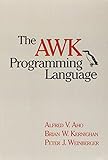
The free GNU Awk User’s Guide is a detailed online reference for GNU Awk 5.4.0 and later. The AWK authors’ The AWK Programming Language, Second Edition is available in paperback and ebook formats and offers a structured route through the language. Neither is required for a useful first script; the choice depends on whether you want a searchable reference or a book-length progression.
Quick Recap
Common mistakes to avoid
- Assuming every command named
awksupports GNU extensions. - Ignoring the input format’s real quoting and escaping rules.
- Using an opaque one-liner for a recurring job without recording field assumptions and separators.
- Confusing a quick exploratory result with a validated data-quality or production pipeline.
Product prices and availability are accurate as of the date/time indicated and are subject to change. Any price and availability information displayed on Amazon at the time of purchase will apply.

