
Quick wins for a faster PC:
Repair Windows errors before they cause bigger problemsFix Now →Fix the driver behind crashes, sound loss and screen glitchesFind Drivers →The easiest reliable way to remove a surface-mount component is to use a temperature-controlled hot-air rework station, electronics flux, a correctly sized nozzle, and ESD-safe tweezers. Warm the board gradually, keep the nozzle moving, wait until every solder joint is liquid, then lift the part straight up without prying.
This guide covers SMD resistors, capacitors, diodes, ICs, connectors and similar parts. A household paint-stripping heat gun is not an equivalent tool: its broad, poorly controlled heat stream can blow components away, melt plastic and damage the PCB. Use one only for destructive salvage of a board and parts you are willing to lose.
What hot-air desoldering does
Hot air does not pull solder out mechanically. It raises the solder around the component above its melting point so several joints become liquid at approximately the same time. The component can then be lifted without forcing individual pins. This is especially useful for SMD (surface-mount device) parts, which are soldered directly to pads on the PCB.
Through-hole parts are often easier with a soldering iron and solder sucker or a powered desoldering gun. The best method depends on the package, board construction and whether the component must survive for reuse.
Do these 3 things before closing this tab:
1Scan for outdated or missing drivers - takes under a minute2Repair Windows errors before they cause bigger problems3Fix the driver behind crashes, sound loss and screen glitches#1 Best Overall

- 【Fast 700W Heating Performance】-- Powerful 700W heating system delivers rapid heat-up with stable temperature recovery, helping you complete soldering and desoldering jobs efficiently while reducing waiting time
- 【Precise Digital Temperature Control】-- Digital LED display provides accurate temperature monitoring. Adjustable temperature and airflow settings make it easy to handle delicate SMD components and larger electronic assemblies
- 【Brushless Fan for Long Service Life】-- Built-in brushless fan offers stable airflow, lower noise, and longer operating life compared with traditional brushed motors, ensuring reliable daily performance
- 【Safe & Convenient Operation】-- Lead-free compatible heating element supports continuous operation. Ergonomic hot air handle and compact station design improve comfort for long repair sessions
- 【Ideal for Electronics Repair】-- Suitable for PCB repair, IC removal, BGA rework, SMD soldering, USB-C port replacement, mobile phone repair, laptop maintenance, DIY electronics, and professional repair shops
For background terminology, see Wikipedia’s desoldering overview.
Use a rework station, not an ordinary heat gun
A dedicated station normally offers adjustable temperature and airflow, interchangeable nozzles, a handpiece holder and a controlled cool-down cycle. Some models also provide vacuum pickup or programmable profiles. A general-purpose heat gun commonly lacks the precision needed to confine heat to one component and may move tiny parts before their solder melts.
If the board or component matters, do not begin with a household heat gun. The Prizm Institute explains the safety difference between electronics hot-air stations and ordinary heat guns at its hot-air safety guide.
Tools and materials
- Temperature-controlled hot-air rework station and a nozzle suited to the package.
- Fine, ESD-safe tweezers; a board holder, vice or third hand; and a heat-resistant, nonflammable work surface.
- Electronics flux, solder wick, a soldering iron for pad cleanup, and lint-free swabs.
- Isopropyl alcohol or the solvent specified for your flux type.
- Eye protection, ventilation or fume extraction, and ESD mat and wrist strap when handling sensitive semiconductors.
- Kapton or other heat-resistant tape for shielding nearby parts.
A microscope or magnifier, thermocouple, preheater, low-melt alloy and solder paste are useful upgrades. SparkFun recommends mechanical support and a heat-resistant surface in its hot-air station tutorial.
Free tools Windows power users keep installed
One-click scans. No signup required.
Prepare the PCB before heating
- Disconnect every external power source and remove batteries, especially lithium cells. Discharge large capacitors using an appropriate procedure.
- Photograph the part and mark polarity, pin 1 and orientation. Record nearby jumpers or components that could be displaced.
- Secure the board level in a holder. Do not hold it in your hand while operating the station.
- Identify vulnerable plastic connectors, buttons, microphones, cameras, sockets, labels, adhesives and conformal coating. Shield what the nozzle cannot avoid.
- Remove dirt and adhesive from the work area. Do not scrape solder mask or traces.
Choose the nozzle, temperature and airflow
Use a small round nozzle for a tiny passive part. For an IC, choose a nozzle that heats the package and its solder perimeter evenly without bathing a large surrounding area. Large connectors and shields may require a larger nozzle and more board preheating. A nozzle that is too small creates a concentrated hot spot; one that is too large exposes nearby parts.
Rank #2
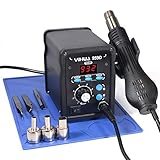
- Quick Heating & Well-Built – The hot air gun heats up rapidly when picked up from the holder thanks to the improved heating element and heating system design. Plus, the control panel is made with solid & brushed aluminum to prevent leaving burnt marks by accident.
- 3 Preset Channels – Save your regularly used settings into three preset channels and jump between channels with just one press. You no longer have to adjust the temperature over and over just for components and solders with different temperature parameters.
- High Performance – Want a bit more 'oomph'? We got just what you're looking for. Our rework station is capable of putting out 120L of hot air at a maximum stabilized temperature of 932°F. With this station, you can conduct rework operations on a broad range of components.
- Advanced Functions & Safety Features– An in-holder standby function to help cool the hot air gun when it is not in use, preserving your hot air gun in mint condition for longer. Equipped with YIHUA’s exclusive Hot Air Gun Fail-safe function to make your work safer, and effectively prevent the risk of any fire hazards.
- Choose YIHUA with Confidence – Enjoy our 12-month US- exclusive manufacturer technical coverage and 24/7 professional assistance on Amazon. Note: This model is designed to operate on 110-127V with a US-standard power plug.
There is no universal temperature or airflow setting. The station display is a setpoint, not the exact temperature at each solder joint. Solder alloy, nozzle, station calibration, copper area, multilayer construction and connection to a ground or power plane all change the result. Start in the low-to-middle part of the usable range with low-to-moderate airflow, then adjust gradually. SparkFun recommends testing settings on an expendable board or component rather than starting at maximum.
| Job | Practical starting approach |
|---|---|
| Tiny resistor, capacitor or diode | Small nozzle, low airflow and moderate heat; heat only the immediate area. |
| Larger passive or small IC | Moderate airflow and heat with a package-matched nozzle; sweep evenly around the joints. |
| USB connector or shield | Preheat the board, use enough total heat for mechanical tabs and copper, and shield surrounding plastic. |
| Ground-plane component | Allow more time and, if possible, preheat from below instead of immediately raising the top temperature. |
| BGA or large multilayer-board IC | Not a beginner operation; use controlled profiling, board support and usually bottom preheating. |
Hakko’s FR-810B specification, for example, lists 50–600°C and 5–115 L/min, demonstrating how widely station capabilities vary; those figures are not a prescription for your board. See Hakko’s specifications.
Step-by-step: remove the component
- Apply flux. Put a small amount around the visible solder joints. Flux improves wetting and heat transfer but cannot compensate for inadequate heat.
- Fit the nozzle. Seat it firmly and keep the handpiece pointed away from people and flammable materials while the station warms.
- Preheat the area. Move the nozzle in slow circles over the surrounding board for several seconds. This reduces the temperature difference between the surface and the board, particularly on thick, copper-heavy PCBs.
- Heat evenly. Hold the nozzle above, not against, the component. Continue small circular or sweeping movements. A working distance of roughly 2–4 cm is a starting point reported by Gordak, but nozzle size and station output require adjustment; see its removal guide.
- Check for reflow. With tweezers, apply only a very gentle upward pressure or sideways nudge. Solder that changes from dull or granular to shiny and liquid, and a part that moves freely, indicate reflow. Do not use force as the test.
- Lift vertically. Raise the component straight up. If it resists, stop pulling and continue heating; prying can lift pads and tear traces.
- Move the heat away. Withdraw the nozzle gradually rather than immediately blasting the exposed pads at maximum airflow.
- Clean the pads. Add flux and use a soldering iron with solder wick to flatten or remove residue. Clean with the solvent appropriate for the flux; Gordak describes solder-wick cleanup followed by gentle isopropyl-alcohol cleaning.
- Inspect under magnification. Look for missing or lifted pads, torn traces, bridges, burned solder mask, melted plastic, displaced neighbors and debris. Check orientation markings before installing a replacement.
How to recognize incomplete reflow
- The solder remains dull, grainy or visibly solid.
- Only one side of a passive or some pins of an IC move.
- The component requires pressure, twisting or prying.
- A connector is loose at its signal pins but still fixed by a tab or underside pad.
Stop pulling whenever resistance remains. QFN and DFN packages, exposed-pad parts and some connectors can have hidden solder underneath even when edge joints look liquid.
Troubleshooting common problems
Solder will not melt
Insufficient total heat, excessive airflow, a tiny nozzle, a large ground plane, a heatsink, lead-free solder, contamination or inaccurate station calibration can all be responsible. Preheat the board, use a better-fitting nozzle, reduce cooling airflow, add flux and increase temperature modestly. A preheater is often safer than simply applying extreme top-side heat. SparkFun discusses the thermal effect of large copper areas in its station tutorial.
The component blows away
Lower airflow, move the nozzle slightly farther away, use a better-fitting nozzle and shield the board from drafts. Do not increase airflow to make up for poor heating.
Rank #3

- 2-IN-1: This 2-IN-1 rework station combines a soldering station with a hot air rework station in a super compact body. Comes with individual LED displays, power switches, temperature control buttons, and air volume adjustment.
- Precision Temperature Control: This rework station comes with built-in PID program, providing temperature control for both the soldering iron and hot air gun. The soldering station temperature is 392-896°F adjustable, and hot air rework station temperature is 212-896°F adjustable with variable air volume.
- Useful Functions: This unit comes with sleep mode for soldering iron, standby mode for hot air gun, °C-°F Conversion, automatic shutdown, and calibration function. You can use these functions to reduce wear, extend soldering tips and heating element's lifespan, and achieve greater temperature precision.
- Complete Soldering Kit: This soldering kit for electronics rework includes 2 spools of solder wire, 5 soldering tips (I/B/K/3.2D/3C), brass wool tip cleaner, desoldering pump, 1 pairs of tweezers, 3 hot air nozzles. You can get started with soldering with everything in this kit.
- This soldering iron kit is covered by our exclusive 1-year USA technical support, with 24-hour assistance from our dedicated team. Note: This product is rated for 110-127V USA specifications. Do not connect this iron to a 220V power socket.
The PCB browns or solder mask bubbles
Stop heating. The nozzle was probably stationary or the board was receiving excessive heat. Let it cool, lower the temperature, keep the nozzle moving and improve preheating. Holding hot air on one spot can permanently damage the PCB.
Nearby plastic melts or discolors
USB and HDMI connectors, pushbuttons, board-to-board sockets, microphones and cable housings are vulnerable. Use heat shielding, a tighter nozzle, lower airflow, board preheating and shorter dwell time. SparkFun specifically warns about melting plastic headers and discoloring switches.
A pad lifts
Likely causes are pulling before complete reflow, sideways force, overheating or a previously weakened PCB. Stop, allow the board to cool and assess the trace. Do not keep prying. A lifted pad may require a jumper wire or professional board repair.
Only some pins melt
Ground-connected pins and large ICs often need more uniform heating. Add flux, use a package-matched nozzle, circulate gently, lower airflow and allow more time. Bottom preheating is preferable to a sudden extreme temperature increase.
Nearby components move
Reduce airflow and shield the area. Every solder joint within the heated region may reflow, not just the target.
Rank #4

- Compact Design: The WEP 8858-V hot air rework kit features a palm-sized main unit with an integrated hot air gun holder and nozzle holder, making it easy to handle and store in your precious workspaces.
- Efficient Heating: The solder gun has a powerful heating element that heats up quickly, allowing you to get started on your work right away. WEP 8858-V soldering gun kit also features a PID program that continuously monitors the temperature and adjusts the power output to maintain a consistent temperature, reducing the risk of damage to delicate components.
- Intuitive Control: The WEP 8858-V hot air soldering station features an intuitive control panel that enables users to adjust the temperature and air volume settings with ease. The controls are designed to be simple and clear, making it easy for users to fine-tune the settings to meet their specific requirements. No need to enter the secondary menu, adjust the air volume with just a simple knob on the panel.
- Comprehensive Soldering Kit: The WEP 8858-V hot air rework station combines adaptability, precision, and safety in a versatile soldering kit. Included are a pair of bent and straight tweezers and three additional nozzles in various sizes, supporting a wide range of tasks. It boasts intelligent features such as a PID program for consistent temperature control, ℉/℃ conversion, digital temperature calibration for precise control, and safety features like a hot air fail-safe.
- This Hot Air Rework Station Kit is covered by our exclusive 1-year USA technical support, with 24-hour assistance from our dedicated team. Note: This product is rated for 110-127V USA specifications. Do not connect this iron to a 220V power socket.
Advice by component type
Small resistors, capacitors and diodes
These are usually the easiest targets: use a small nozzle, low airflow, flux and tweezers. Keep the heated area narrow.
What’s actually slowing this PC down?
Pick the symptom - the matching free tool is one click away.
SOT, SOIC and small QFP packages
Heat the package and perimeter evenly. Never lift one corner while opposite pins remain solid.
USB and other connectors
Mechanical tabs and large copper areas absorb heat, while surrounding plastic is easy to damage. Preheat when possible and confirm that both signal pins and anchors are molten before lifting.
QFN and DFN packages
A hidden center thermal pad can hold the part after the visible edges reflow. Use uniform heat and extra time; never pry.
BGA packages
BGA removal is not a simple beginner task. It generally requires controlled thermal profiling, board support, accurate alignment and often bottom heating. Consider professional rework instead of experimenting on a valuable board. An example of tightly controlled semiconductor removal and ESD practice appears in EPC’s application note.
Crashes, No Sound, or Screen Glitches?
Random freezes, missing sound and display glitches usually trace back to one bad driver. Find and replace yours safely.Free scan · under a minuteWindows Errors? Fix Them Before They Spread
Repair common Windows errors and clear accumulated junk for a smoother, more stable PC - no reinstall needed.Free scan · no reinstallBest Value

- 【PRECISE DIGITAL HEAT CONTROL】Adjust temperature from 100°C to 500°C (212°F-932°F) with microprocessor-controlled accuracy for professional SMD rework and PCB repair
- 【INTELLIGENT SLEEP FUNCTION】The handle automatically enters cooling mode when placed in the holder, protecting internal components and extending service life
- 【F1-F10 ADJUSTABLE AIRFLOW】Fine-tune airflow output for different applications including chip removal, soldering rework, heat shrink tubing and preheating
- 【COMPACT PORTABLE DESIGN】Micro-sized controller saves workspace while delivering powerful performance for repair benches, workshops and mobile technicians
- 【COMPLETE PROFESSIONAL KIT】Includes 6 precision nozzles (3/4/5/6/8/10mm), ESD tweezers, IC extractor, stand and power cable
When another method is easier
| Situation | Often easier method |
|---|---|
| One or two through-hole joints | Soldering iron with solder sucker. |
| Flat SMD pads | Fine-tip iron and solder wick. |
| Many pins on a through-hole connector | Powered desoldering gun. |
| Component is being discarded | Cut the body or leads, then remove each remaining lead with an iron. |
| Large connector on a heavy multilayer board | Bottom preheater plus hot air, or professional rework. |
| Heat-sensitive part | A qualified thermal profile or professional service. |
| Very small passive | A fine-tip iron may be simpler than hot air. |
Low-melt alloy can reduce the temperature needed for difficult removal, but it still requires flux, controlled heating and thorough cleanup.
Safety, ESD and cool-down
- Hot air can cause severe burns and ignite nearby materials. Keep the handpiece in its holder when not heating and never point it at skin, clothing or cables.
- Ventilate or extract fumes from solder and flux, and wash hands after handling lead-containing solder.
- Use ESD controls for microcontrollers, memory, sensors and communication ICs. An earth-connected ESD mat and bench are specified in the EPC procedure linked above.
- Keep batteries and charged capacitors out of the heated area. Do not heat a powered board.
- Follow your station’s shutdown instructions. Some stations continue blowing air while the handpiece cools; SparkFun documents cooling until air temperature falls below 100°C. Do not unplug a hot unit unless its manual explicitly permits it. See the hardware overview.
Choosing equipment for the job
For occasional hobby repair, prioritize stable temperature control, adjustable low airflow, common replaceable nozzles and ESD-conscious accessories over a very high maximum temperature. Large boards and connectors benefit from greater thermal capacity and preheater compatibility. Integrated vacuum pickup is convenient but not essential.
As a high-end reference, Hakko lists the FR-810B with 50–600°C operation, five programmable presets and integrated vacuum pickup. American Hakko’s US list price was $916.77, observed August 16, 2026; the station was shown in stock with 1–2 business-day shipping, and nozzles were not included. Its official page is here. A 2.5 mm nozzle was listed at $20.67, while shaped QFP nozzles ranged approximately from $73.47 to $188.17 on the same date; see the accessory listing. Prices and availability are US-specific and can change.
That professional station is excessive for removing a few inexpensive parts. Frequent repair work justifies better control and serviceability; BGA or production work may justify a complete system with bottom heating and fixtures. A household heat gun remains suitable only for salvage where survival of the board and components is unimportant.
The Bottom Line
Use the lowest heat and airflow that melts every joint evenly, keep the nozzle moving, and never force a component that is still attached. Controlled preheating and patience protect pads, traces and nearby plastic far better than a maximum-temperature blast.
Quick Recap
Product prices and availability are accurate as of the date/time indicated and are subject to change. Any price and availability information displayed on Amazon at the time of purchase will apply.

