
What’s actually slowing this PC down?
Pick the symptom - the matching free tool is one click away.
You can add a donor leaderboard in WordPress with a fundraising plugin that supports one. Charitable Pro provides a Gutenberg block, shortcode, and campaign-builder field; GiveWP documents a donor wall block and shortcode; and Donation Platform for WooCommerce provides a configurable leaderboard shortcode. Choose based on the donation system you already use, the ranking and campaign filters you need, and which donor details you intend to display.
Choose a leaderboard method that fits your donation setup
A WordPress donor leaderboard is usually a feature of the plugin that processes or manages donations, rather than a built-in WordPress feature. The options below differ in placement, filtering, and what their documentation establishes about ranking.
| Option | Documented placement | Controls and considerations |
|---|---|---|
| Charitable Pro | Gutenberg block, shortcode, or Campaign Builder field | Campaign or all campaigns, list or card view, donor count, display and style settings, date range, and minimum donation. Requires Charitable Pro. |
| GiveWP | Donor Wall block and shortcode | Can show or hide company, form, avatar, full name, and comments. The documented wall displays donors who have not opted in to Anonymous Donations; verify whether its display meets your ranking needs. |
| Donation Platform for WooCommerce | [wcdp_leaderboard] shortcode |
Can filter by donation product, set a limit, sort by date or total, paginate, set a fallback message, and change public or anonymous wording. Best suited to a WooCommerce donation flow. |
If you want the most explicit documented combination of ranked display controls and WordPress insertion methods, Charitable Pro is the clearest fit in these options. Charitable states that the feature is included in Pro and becomes available when the plugin is activated. Its documentation requires Charitable Pro 1.8.9.3 or later, WordPress 5.0 or later for Gutenberg block support, and PHP 7.4 or later: Charitable Donor Leaderboard documentation.
Add a Charitable leaderboard
Use the insertion method that matches where the leaderboard belongs. If it should appear inside a particular campaign, the Campaign Builder field is the most direct route because it uses that campaign’s context by default.
The Tool Desk
Outbyte Driver Updater FREEFix the driver behind crashes, sound loss and screen glitchesFind Drivers →Outbyte PC Repair FREEClear out junk files and repair common Windows errorsFree Scan →#1 Best Overall

- 【Package Include】You will receive 1 pack acrylic donation boxes with 1 pack Detachable Sign Holder, suggestion box measure 6.2x4.6x3.9inch, The removable sign holder on the top of the ballot box has dimensions of 6.2x4inch,enough to meet your daily needs.Tips: To prevent the key from scratching the surface of the plastic lottery box, we put the key inside the box. When you receive the product, open the box first to get the key.
- 【High-Quality Material】This acrylic raffle box is made of high-quality acrylic material for excellent quality and performance. It has excellent impact resistance and durability, able to withstand frequent use and movement without damage. Acrylic material is lightweight, making the draw box easy to carry and place.
- 【Secure Locking Mechanism】Equipped with a secure locking mechanism, and is equipped with two keys,the donation box ensures its security, preventing unauthorized access and tampering.
- 【Customized Message Sign Holder】The suggestion box has a folded 4"W x 6.2"H display area that can be used as a sign stand, and we provide a large Enter to Win card that is easy to remove, making it easy for you to stay on top of the themed event.
- 【Multiple Functions】This donation box is perfect as a ballot box, fundraising box, whether voting for class president, raffle tickets, collecting opinions from employees or customers, this acrylic donation box and ballot box can be used for many purposes at home, office or school.
Option 1: Insert the Gutenberg block
- Confirm that Charitable Pro 1.8.9.3 or later is active and that the site meets the documented WordPress and PHP requirements.
- In WordPress, open the page or post where the leaderboard should appear and select + to add a block.
- Search for Donor Leaderboard or Leaderboard, then insert the Donor Leaderboard block.
- Set the display options, preview the page, and publish or update it when the scope and donor details look right.
Option 2: Add a shortcode
Place [charitable_donor_leaderboard] in the page or post content where the leaderboard should appear. For example, Charitable documents this configured shortcode:
[charitable_donor_leaderboard view="card" number="12" campaign="123"]
Rank #2
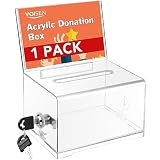
- 【Package Include】You will receive 1 pack acrylic donation boxes with 1 pack Detachable Sign Holder, suggestion box measure 6.2x4.6x3.9inch, The removable sign holder on the top of the ballot box has dimensions of 6.2x3.2inch,enough to meet your daily needs.Tips: To prevent the key from scratching the surface of the plastic lottery box, we put the key inside the box. When you receive the product, open the box first to get the key.
- 【High-Quality Material】This acrylic raffle box is made of high-quality clear acrylic material for excellent quality and performance. It has excellent impact resistance and durability, able to withstand frequent use and movement without damage. Acrylic material is lightweight, making the draw box easy to carry and place.
- 【Secure Locking Mechanism】Equipped with a secure locking mechanism, and is equipped with two keys,the donation box ensures its security, preventing unauthorized access and tampering.
- 【Customized Message Sign Holder】The suggestion box has a folded 4"W x 6.2"H display area that can be used as a sign stand, and we provide a large Enter to Win card that is easy to remove, making it easy for you to stay on top of the themed event.
- 【Multiple Functions】This donation box is perfect as a ballot box, fundraising box, whether voting for class president, raffle tickets, collecting opinions from employees or customers, this acrylic donation box and ballot box can be used for many purposes at home, office or school.
In that example, view selects card view, number sets the number of donors, and campaign specifies a campaign ID. Charitable also documents shortcode use in widgets and many page builders; a theme template can call do_shortcode.
Option 3: Add it in the Campaign Builder
- Open the relevant campaign for editing.
- Open Campaign Builder and choose Add Fields.
- Find Leaderboard under Pro Fields and add it to the campaign.
- Set the options and preview the result before publishing.
This field uses the current campaign context unless you override it. That helps keep a campaign page’s leaderboard scoped to that campaign rather than unintentionally showing donors across the site.
Rank #3
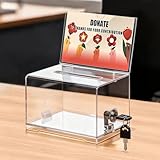
- 【Raffle Ticket Box with 4 x 0.4-Inch Slot】 The top slot is precision-sized for raffle tickets, voting slips, and paper notes, so entries drop in cleanly without jamming at school raffles and contests. Fold or trim oversized slips first and the line keeps moving. Check your insert sizes before the event
- 【Shatter-Resistant Acrylic, See-Through Body】 Crystal-clear acrylic walls keep every bill and ticket in plain view, so donors watch their gift drop in and land, and you can check the collection level at a glance without opening the lid. The shatter-resistant body survives busy events, stays light enough to move between tables, and wipes clean for reuse
- 【4 x 6-Inch Sign Holder for Any Event】 The built-in holder fits standard 4 x 6-inch paper or cards. Swap the insert to relabel the box as a tip jar, tip box, suggestion box, ballot box, raffle box, or a go-to among donation boxes for fundraising events and giveaways. No tools needed; display cards are not included
- 【Donation Box with Lock and 2 Keys】 The keyed lock keeps collected cash and tickets secure while you step away from the table or between pickups. Two keys are included, one for the organizer and one spare. Seat the lid fully before locking
- 【Compact 6.2 x 4.6 x 4.0-Inch Countertop Size】 Measuring 6.2 x 4.6 x 4.0 inches, it fits bake sales, office front desks, concession stands, reception counters, and service stations without crowding your display space, yet holds plenty for steady collections
Set the scope, ranking, and public details
Before publishing, configure the display for the page’s purpose. Available Charitable options include list or card view, a campaign or all campaigns, donor count, avatar and amount visibility, counts, styling, date range, minimum donation, pagination, title, and layout. Preview the result and confirm both the intended campaign scope and the donor information are visible as expected.
- Scope: Decide whether donors should be drawn from one campaign, all campaigns, or a WooCommerce donation product. Confirm the selected filter rather than assuming a leaderboard inherits the right context.
- Ordering: Check what determines the ranking. Donation Platform for WooCommerce documents sorting by donation date or total; do not assume another plugin’s donor wall is ranked by amount unless its settings and output confirm that.
- Details: Choose whether to show names, donation amounts, avatars, companies, forms, or comments. Showing more detail may make recognition more prominent, but it also makes the public display less private.
- Anonymous donations: GiveWP says donors appear on its Donor Wall only if they do not opt in to Anonymous Donations. Its settings can control the display of company name, form, avatar, full name, and comments. Check the plugin’s current settings and donor-facing wording before publishing.
Use GiveWP or WooCommerce if that is your existing system
GiveWP: add a donor wall
GiveWP documents a Donor Wall block and shortcode. Its donor wall is a way to display eligible donors, but the documentation cited here does not establish that every configuration ranks donors as a leaderboard would. Check the actual ordering and display in your setup before presenting it to visitors as a ranked list. GiveWP’s plugin listing is available at WordPress.org, and the Donor Wall guidance is in Nexcess’s GiveWP Donor Wall Shortcode documentation.
Rank #4

- 【Package Include】You will receive 2 pack acrylic donation boxes with 2 pack Detachable Sign Holder, suggestion box measure 6.2x4.6x3.9inch, The removable sign holder on the top of the ballot box has dimensions of 6.2x4inch,enough to meet your daily needs.Tips: To prevent the key from scratching the surface of the plastic lottery box, we put the key inside the box. When you receive the product, open the box first to get the key.
- 【High-Quality Material】This acrylic raffle box is made of high-quality clear acrylic material for excellent quality and performance. It has excellent impact resistance and durability, able to withstand frequent use and movement without damage. Acrylic material is lightweight, making the draw box easy to carry and place.
- 【Secure Locking Mechanism】Equipped with a secure locking mechanism, and is equipped with two keys,the donation box ensures its security, preventing unauthorized access and tampering.
- 【Customized Message Sign Holder】The suggestion box has a folded 4"W x 6.2"H display area that can be used as a sign stand, and we provide a large Enter to Win card that is easy to remove, making it easy for you to stay on top of the themed event.
- 【Multiple Functions】This donation box is perfect as a ballot box, fundraising box, whether voting for class president, raffle tickets, collecting opinions from employees or customers, this acrylic donation box and ballot box can be used for many purposes at home, office,farm stands ,Egg Stalls, Produce Stalls or school.
Donation Platform for WooCommerce: configure the shortcode
Add [wcdp_leaderboard] to the page where the leaderboard should appear. The plugin documentation says the default display is the last ten donations using standard settings. It documents filtering by donation product, limiting the number of entries, sorting by date or total, pagination with a show-more control, and a fallback message. It also describes an anonymous/public checkbox that can change the displayed name text. Check the current plugin settings and the wording donors see at checkout, then verify the published page’s sorting, filter, and name display. See Donation Leaderboard (Donor Wall).
What to verify before publishing
- The required plugin and tier are active, and the site meets the feature’s documented version requirements.
- The leaderboard appears in the intended page or campaign, with the intended campaign or product filter.
- The ordering and number of displayed donors match what the page calls a leaderboard.
- The names, amounts, avatars, and other details shown align with the site’s privacy choices and donor-facing anonymity options.
- The published page—not just the editor preview—shows the expected output.
For GiveWP Peer-to-Peer fundraising, a March 3, 2023 announcement described Team Leaderboard and Fundraiser Leaderboard blocks and shortcode counterparts for P2P campaigns. Because that announcement is dated, confirm the current add-on version still provides the feature you need before choosing that route: GiveWP Peer-to-Peer Version 1.6.0 announcement.
Quick wins for a faster PC:
Clear out junk files and repair common Windows errorsFree Scan →Fix the driver behind crashes, sound loss and screen glitchesFind Drivers →Quick Recap
Best Value

- Dark mahogany finish adds warmth to any business environment
- Side pocket conveniently holds entry forms
- Included pen has a security chain to attach it directly to the box or the table.
- Ballots NOT included.
- This Box CANNOT be attached to a wall.
Product prices and availability are accurate as of the date/time indicated and are subject to change. Any price and availability information displayed on Amazon at the time of purchase will apply.

