
To capture a rectangular panel that is already visible on your screen, use your computer’s area-selection screenshot tool and drag around the panel. On Windows, press Windows + Shift + S; on a Mac, use the Screenshot controls or the area-capture shortcut. If “drawn panel” means a graphic rendered in a webpage you control, export its HTML canvas instead. For repeatable captures of a webpage element, use Playwright.
Choose the method based on where the panel exists: on your desktop, in a canvas, or in a web page you can automate. These approaches capture different things: a screen selection records pixels currently displayed, while a canvas export saves the canvas bitmap.
Choose the method that matches your panel
| Where the panel is | Best starting method | What you capture |
|---|---|---|
| A visible app or desktop window | Windows Snipping Tool or macOS Screenshot | The rendered screen region or window, including its current appearance |
| A panel drawn into an HTML canvas you control | Canvas toDataURL() |
The canvas bitmap, without surrounding browser controls |
| A web page element you need to capture repeatedly | Playwright locator screenshot | The selected element rendered by the browser |
If you only need one image of a panel currently visible on screen, use the operating system method. It does not require a selector or developer access. If you need a clean, repeatable image from a page, automation or canvas export gives you a more precise boundary.
Capture a visible panel on Windows
- Open the panel and arrange it as you want it to appear. Move unrelated windows or overlays out of the capture area.
- Press Windows logo key + Shift + S to open the Snipping Tool capture overlay, as described by Microsoft Support.
- Choose the rectangular snip mode, then drag from one corner of the panel to the opposite corner. Keep the selection just outside the panel’s border if you want its outline or shadow included.
- Select the capture notification to open the image in Snipping Tool. Use the save control to choose a filename and location.
Snipping Tool also offers window, full-screen, and freeform modes. Choose window mode when the panel is a distinct app window and you want its window boundary; use full-screen only when you need everything shown on the display. Freeform is useful for an irregular outline, but it is not the best choice for a clean rectangular panel.
Quick wins for a faster PC:
Scan for outdated or missing drivers - takes under a minuteDriver Scan →Repair Windows errors before they cause bigger problemsFix Now →#1 Best Overall

- Kaisi 20 pcs opening pry tools kit for smart phone,laptop,computer tablet,electronics, apple watch, iPad, iPod, Macbook, computer, LCD screen, battery and more disassembly and repair
- Professional grade stainless steel construction spudger tool kit ensures repeated use
- Includes 7 plastic nylon pry tools and 2 steel pry tools, two ESD tweezers
- Includes 1 protective film tools and three screwdriver, 1 magic cloth,cleaning cloths are great for cleaning the screen of mobile phone and laptop after replacement.
- Easy to replacement the screen cover, fit for any plastic cover case such as smartphone / tablets etc
Capture a visible panel on Mac
- Bring the panel to the front and make sure its contents are visible.
- Open the built-in Screenshot controls or use the area-capture shortcut, then drag the crosshair around the panel. Apple documents the area and window capture options in Take a screenshot on Mac.
- To capture a whole app window rather than a hand-selected region, choose the window capture option and click the target window.
- Save or locate the resulting screenshot using the controls shown for the capture method you selected.
Some apps may not allow screenshots of their windows. If a capture is blocked, that can be an app restriction rather than a problem with your selection. Do not try to bypass an app’s restriction; use an authorized export or capture method provided by the app or its owner.
Save a panel drawn on an HTML canvas
If the panel is graphics rendered into a canvas on a webpage you control, exporting the canvas avoids capturing the browser frame and other surrounding interface. The browser’s HTMLCanvasElement.toDataURL() method returns an image data URL; PNG is the default format. See MDN’s canvas export documentation.
const canvas = document.querySelector('#panel-canvas');
if (!canvas) throw new Error('Canvas not found');

const imageDataUrl = canvas.toDataURL('image/png');
const link = document.createElement('a');
link.href = imageDataUrl;
link.download = 'panel.png';
link.click();
Replace #panel-canvas with the selector for your canvas. This saves the canvas bitmap, not the panel’s surrounding HTML or CSS. If your panel is made from ordinary HTML elements rather than drawn into a canvas, use browser automation to screenshot the element instead.
Rank #2
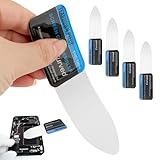
- 【Product Material】Disassembly Screen Opener Tools Constructed from durable stainless steel that resists bending and maintains shape during repeated use.
- 【Product Design】0.1mm ultra-thin pry tool, perfect for prying open and opening phones and computers; lightweight and portable; simple to use and highly practical.
- 【Product Uses】This ultra-thin pry tool is suitable for replacing batteries, touchscreens, LCD screens, back covers, spare parts, etc. Especially suitable for curved screen replacement.
- 【Product Dimensions】The ultra-thin pry tool is 0.1mm thick, with overall dimensions of 123 x 35mm / 4.84 x 1.38 inches.
- 【Product Features】The compact design makes it easy to store and carry, while maintaining professional-grade functionality. The smooth, polished edges will not scratch or damage your phone.
When canvas export fails
Canvas export can be blocked when cross-origin image or other content makes the canvas not origin-clean. In that case, the browser does not permit serialization through toDataURL(). Use content you are authorized to access and configure your page and assets so they meet the browser’s origin-security requirements. Do not try to defeat the restriction.
Capture a webpage panel with Playwright
For a repeatable screenshot of a webpage, Playwright can capture either the current viewport or a particular element. The element method is usually the closest match for a panel because it targets a locator rather than asking you to drag a rectangle. Playwright documents these methods at Screenshots.
Install Playwright in a Node.js project and install its browser as described in the Playwright setup documentation. Then use a locator that uniquely identifies the panel:
Rank #3

- 0.1mm ultra thin opening card, excellent for prying and opening task.
- Non-slip silicone handle for comfortable grip and better control.
- Polished and smooth edge, will not damage or scratch your phone.
- A nice tool to open LCD screen, back cover housing and battery.
- Material: Stainless steel + Silicone; Size: 123 x 35 mm( L*W)
const { chromium } = require('playwright');

(async () => {
  const browser = await chromium.launch();
  const page = await browser.newPage();
  await page.goto('https://example.com');

  const panel = page.locator('.panel');
  await panel.waitFor({ state: 'visible' });
  await panel.screenshot({ path: 'panel.png' });

  await browser.close();
})();
Change the URL and .panel selector to match your page. The selector must identify the intended panel; if it matches multiple elements or the wrong container, the output will not be the image you expect. A viewport screenshot instead uses await page.screenshot({ path: 'page.png' });. Use that when the panel’s surrounding page context matters.
Get a webpage screenshot without running browser automation
If the panel is on a public webpage and a screen selection or local browser setup is inconvenient, ScreenshotNeo is a website screenshot API and MCP server. It is not a tool for capturing an arbitrary desktop app window: it takes screenshots of webpages addressed by URL.
One GET request can return an image or PDF. For a webpage capture, start with this cURL request and replace the target URL with the page you need:
Rank #4
- Durable Material: Stainless steel material, hard and durable, can be used repeatedly; Ultra-thin design, easier to pry the screen; Light weight, easy to carry; Easy to use and practical. Very thin opening picks.
- 0.1mm Ultra-thin Design: Thin prying tool for opening electronic devices. The screen disassembler pry tool is essential to open any parts for tablet, or smartphone sealed with adhesive. Quick and convenient opens the phone.
- Comfortable Grip: Anti slip silicone handle, comfortable grip, better control. The sharp one can disassemble a small crack easily to guard the screen;Flat skid pallets facilitate shelling and maintain shell opening. A good tool for opening the LCD screen, back cover shell, and battery.
- Multi Functional & Professional: The 0.1mm ultra-thin opening card is very suitable for prying open tasks. The screen opener pry tool can open most mobile phone screens without damage to your phones. Can be used for prying, sliding, separating.
- Essential Tool: This tool was specially designed to give maximum leverage to prize apart most devices including mobile phones, which can pry open the screen without damaging the screen. It also can be used to open all types of screens/ tablets/ PC.
curl -G "https://api.screenshotneo.com/v1/shot" -d access_key=YOUR_API_KEY --data-urlencode url=https://stripe.com -o shot.webpSee the ScreenshotNeo documentation for API parameters and setup. ScreenshotNeo also accepts the parameter names used by other screenshot APIs, which can simplify a switch. For programmatic alternatives in Python or Node.js, the same endpoint can be called as follows:
Python
import requests

r = requests.get(
    "https://api.screenshotneo.com/v1/shot",
    params={"access_key": "YOUR_API_KEY", "url": "https://stripe.com"},
    timeout=90,
)
r.raise_for_status()
open("shot.webp", "wb").write(r.content)
Node.js
const q = new URLSearchParams({ access_key: 'YOUR_API_KEY', url: 'https://stripe.com' });
const res = await fetch(`https://api.screenshotneo.com/v1/shot?${q}`);
if (!res.ok) throw new Error(`Screenshot request failed: ${res.status}`);
await import('node:fs/promises').then(fs => fs.writeFile('shot.webp', Buffer.from(await res.arrayBuffer())));
ScreenshotNeo accepts cookie or consent banners before capture and removes more than 60 known consent platforms, newsletter popups, and chat widgets; each of those actions can be turned off. It reports page verdict and billing status in response headers, and bot checks or CAPTCHAs, blank pages, timeouts, failed loads, and cache hits are not billed. Its MCP server provides take_screenshot, get_page_info, and capture_pdf for AI agents, including Claude, Cursor, and other MCP clients.
Plans include 1,000 screenshots per month free with no card, then Starter at $5 for 3,000, Growth at $15 for 15,000, Pro at $39 for 60,000, Scale at $99 for 250,000, and Business at $249 for 1,000,000. Yearly billing gives two months free, and every feature is available on every plan. Sign up for 1,000 free screenshots a month with no card.
Recommended Free Tools
Troubleshoot a screenshot that looks wrong
- The selection misses a border or shadow: Repeat the area capture and drag slightly beyond the panel’s visible edge. A screen-region capture records what is displayed, so the selection boundary determines what is included.
- The panel is covered by a menu, tooltip, or notification: Dismiss the overlay and capture again. If the overlay belongs in the image, leave it visible and include it deliberately.
- The app window cannot be captured on Mac: The app may restrict screenshots. Use an authorized export or ask the app’s administrator or support channel for an allowed way to obtain the content.
querySelectorreturns no canvas: Check the canvas ID or selector in the page’s DOM and ensure the canvas exists before running the export code.toDataURL()raises a security error: The canvas may not be origin-clean because of cross-origin content. Use appropriately configured assets or an authorized source rather than trying to bypass browser protections.- Playwright reports that the locator is not visible or times out: Confirm the page finished showing the panel, the selector identifies the right element, and any required interaction has happened before taking the screenshot.
- The Playwright image includes too much page: Use
locator.screenshot()for the panel instead ofpage.screenshot(), which captures the viewport. - An API result is not the expected image: Check the response headers for the page verdict and billing status, and confirm the requested URL is the page you intended to capture.
Choose the right capture for the job
For a one-off image of an on-screen panel, use the Windows or Mac selection tool. For a canvas you own, export its bitmap directly. For repeatable screenshots of a web element, target it with Playwright. A webpage screenshot API is another option when the subject is a URL rather than a local desktop window.
Best Value

- PentalobeScrewdriver Set: p5 Pentalobe screwdriver,PH000 Phillips Screwdriver, Pentalobe T5 Pentalobe T6 Screwdrivers Repair Tool Kit for Apple MacBook Mac Retina Pro Air,T5 for Macbook air & pro repair, it can remove fan screws, including SSD or hard disk replacement. The improved T5 has curved corner tip, which are different from the previous straight corner tip, It will not damage the screws and is more durable
- SAFETY: for your personal equipments : fix by yourself with this professional-grade repair kits to protect privacy from strangers; you needn't to ask help from friends or wait for repairing technician or look for a repair center. This electronics repair tools kits can not only save your money and time but protects your personal privacy
- High-quality Handy MATERIAL: Magnetic durable stainless steel tip which is is stable and not easy to stripping and deforming; Plastic handle with rubberized grip; Anti-static ESD tweezers with strong corrosion resistance are used, the tip is not easy to strip and deform. You will found that it's so high performance after compared with ifixit tool kit
- MULTIFUNCTION: disassembly, pry opening, take apart macbook, phone, tablet, computer, pc to replace screen, battery or camera lens, clean the dirt inside with electronics tool set; Portable and fit in pocket/backpack – great for home, office, school, business trip, travel
- MULTIPURPOSE: repair kit set for different digital products, such as Mobile Phones (iPhone6/6s/7/7plus/iphone 8,xs, max, Samsung, LG, HUAWEI, Google, HTC), Computer, PC, laptop, desktop (HP, ASUS, Lenovo, Apple Macbook), Table, iPad, SLR cameras, Game Console (PS4, Xbox, Nintendo), game handle/joystick and other electronic devices. A Great GIFT for IT technician, technical engineer, hacker, electronics enthusiast, fixer, hobbyist, DIYer, student, housewife, ect
Frequently Asked Questions
Does taking a screenshot capture the panel’s original editable layers?
No. A screen capture, canvas export, or browser screenshot produces an image of rendered pixels. It does not preserve the panel as editable source artwork or interface components.
Can I capture a panel from a page I do not control?
A visible panel can be captured with your operating system’s screenshot controls. Direct canvas export requires access to the page’s canvas, and browser security rules may prevent exporting content that is not origin-clean.
Quick Recap
Product prices and availability are accurate as of the date/time indicated and are subject to change. Any price and availability information displayed on Amazon at the time of purchase will apply.

